
Vultr vs DigitalOcean: Which Raw Cloud VPS Is Better for Self-Managed WordPress
Both are raw cloud VPS providers. You provision the server. You install the LAMP or LEMP stack. You configure caching, security, and backups. Neither provider manages WordPress for you.
DigitalOcean handles concurrent load at 56ms average with 100% reachability — the strongest load test result in this comparison series. Its corporate site delivers full content under 90ms from every continent tested. Vultr supports HTTP/3 with 0-RTT where DigitalOcean deliberately disabled it despite running on Cloudflare. Vultr recorded one availability incident in 30 days. DigitalOcean recorded zero.
Understanding Vultr’s WAF behaviour is necessary before reading any Vultr performance number in this comparison. Vultr operates an aggressive WAF on its corporate domain that blocks automated testing tools. Seven of eight KeyCDN global nodes returned 403 responses. The load test recorded 67.7% reachability. These are WAF blocks, not server failures. The one unblocked location — Frankfurt — returned a full 200 response with a 1.28s TTFB. DigitalOcean’s Frankfurt full content TTFB is 77ms. The WAF explains the blocked nodes. It does not explain the TTFB gap where servers actually responded.
DigitalOcean was founded in 2011 in New York. It runs on its own global data centres with Cloudflare handling the CDN layer for its corporate site. It offers Droplets (VPS), Managed Databases, App Platform (PaaS), Spaces (object storage), and Kubernetes. Its developer ecosystem is among the largest of any independent cloud provider.
Vultr was founded in 2014 in Matawan, New Jersey. It owns its own global data centres with points of presence across North America, Europe, Asia Pacific, South America, and Africa. It offers Cloud Compute, Bare Metal, Optimized Cloud Compute, and Cloud GPU. Its pricing is directly comparable to DigitalOcean Droplets.
[IMAGE: Side-by-side comparison of Vultr and DigitalOcean logos]
Quick Verdict
DigitalOcean wins on concurrent load test, global full content TTFB, mobile LCP and CLS, desktop TTFB, desktop TBT, uptime record, and broader managed services ecosystem.
Vultr wins on HTTP/3 support and mobile INP.
Both hold Grade A+ SSL. Both are verified green. Both are unmanaged self-service cloud providers.
Category Winners
| Category | Winner | Why |
|---|---|---|
| Mobile INP | Vultr | 188ms (Pass) vs DO 220ms (Fail) |
| Mobile LCP | DigitalOcean | 2.3s (Pass) vs Vultr 3.8s (Fail) |
| Mobile CLS | DigitalOcean | 0 (Pass) vs Vultr 0.16 (Fail) |
| Mobile TTFB | DigitalOcean | 1.1s advisory vs Vultr 2.3s (highest in series) |
| Mobile CWV Overall | DigitalOcean | Passes 2 of 3; Vultr passes 1 of 3 |
| Global TTFB | DigitalOcean | Sub-90ms all 8 locations; Vultr blocked by WAF except Frankfurt 1.28s |
| Desktop Grade | DigitalOcean | Grade B (GTmetrix) vs Vultr Lab 69% (DebugBear) |
| Desktop TTFB | DigitalOcean | 217ms vs Vultr 302ms |
| Desktop TBT | DigitalOcean | 736ms vs Vultr 2,440ms |
| Desktop LCP | Vultr | 733ms (DebugBear) vs DO 792ms (GTmetrix) |
| Concurrent Load | DigitalOcean | 56ms, 100% vs Vultr 326ms, 67.7% (WAF-affected) |
| Uptime | DigitalOcean | 100%, 0 incidents vs Vultr 1 incident (11 min 38 sec) |
| SSL Grade | Tie | Both Grade A+ |
| HTTP/3 | Vultr | Supported + 0-RTT; DO deliberately disabled |
| Environmental | Tie | Both Cloudflare verified green |
| Managed Ecosystem | DigitalOcean | App Platform, Managed DBs, Kubernetes native; Vultr compute-first |
Who Should Choose Which
| Choose Vultr if… | Choose DigitalOcean if… |
|---|---|
| HTTP/3 on the VPS corporate infrastructure matters for your deployment benchmarks | Concurrent load handling is the primary performance requirement |
| You want a Bare Metal option at competitive price alongside cloud compute | You want the most polished managed services ecosystem: Managed DBs, App Platform, Kubernetes |
| You serve users in emerging markets where Vultr has specific PoP coverage | You need verified sub-90ms full content delivery from all global continents |
| You are evaluating both providers on a 3-day trial before committing | You want zero downtime in the monitoring record for your IaaS provider |
| You want 0-RTT for returning visitor session performance | You want the strongest concurrent load result of any independent cloud provider in this series |
| Your self-managed WordPress stack already handles HTTP/3 at the server level | You want deep API integration and a large global developer community |
Vultr vs DigitalOcean: Full Feature Comparison
| Feature | Vultr | DigitalOcean |
|---|---|---|
| Founded | 2014, New Jersey, USA | 2011, New York, USA |
| Infrastructure | Own global data centres | Own global data centres + Cloudflare CDN |
| Managed | No | No |
| Best For | Bare metal + cloud compute, global PoPs | Developer ecosystem, managed services, load performance |
| Mobile INP | 188ms (Pass) | 220ms (Fail) |
| Mobile LCP | 3.8s (Fail) | 2.3s (Pass) |
| Mobile CLS | 0.16 (Fail) | 0 (Pass) |
| Mobile TTFB | 2.3s (highest in series) | 1.1s (advisory) |
| CWV Overall | Failed (passes 1 of 3) | Failed (passes 2 of 3) |
| Desktop Tool | DebugBear | GTmetrix |
| Desktop Grade | Lab 69% / CrUX 62% | Grade B (72%) |
| Desktop LCP | 733ms (lab) | 792ms (lab) |
| Desktop TTFB | 302ms (lab) | 217ms (lab) |
| Desktop TBT | 2,440ms | 736ms |
| Frankfurt TTFB | 1.28s (only unblocked, full 200) | 77ms |
| All-global TTFB | 7 of 8 nodes WAF-blocked | Sub-90ms all 8 locations |
| Load Test Avg | 326ms (WAF-affected) | 56ms (best in series) |
| Load Reachability | 67.7% (WAF-affected) | 100% |
| 30-Day Uptime | 1 incident (11 min 38 sec) | 100%, 0 incidents |
| SSL Grade | A+ | A+ |
| HTTP/3 | Supported (QUIC + 0-RTT) | Deliberately disabled |
| HSTS | Enforced (TLS 1.3) | Enforced |
| Green Hosting | Verified (Cloudflare) | Verified (Cloudflare) |
| Bare Metal | Yes | Yes (dedicated CPU Droplets) |
| Cloud Compute | Yes | Yes (Droplets) |
| Kubernetes | Yes | Yes (DOKS, managed) |
| Managed Databases | Yes | Yes (PostgreSQL, MySQL, Redis) |
| Object Storage | Yes (Spaces-compatible) | Yes (Spaces) |
| App Platform | No | Yes (PaaS) |
| Serverless Functions | No | Yes |
| Global PoPs | 32+ locations | 15 regions |
| Free Domain | No | No |
| Free SSL | Yes (A+) | Yes (A+) |
| DDoS Protection | Yes (WAF active) | Yes |
| API | Yes | Yes (extensive) |
| CLI | Yes | Yes (doctl) |
| Terraform | Yes | Yes |
| cPanel | No (manual purchase) | No (manual purchase) |
| Entry Price | ~$6/month (1 vCPU, 1GB) | ~$6/month (1 vCPU, 1GB) |
How We Tested
We ran direct technical audits against each provider’s official corporate domain: vultr.com for Vultr and digitalocean.com for DigitalOcean.
The Vultr WAF context is essential reading before the results. Vultr operates an aggressive WAF and bot-protection system on www.vultr.com. During testing, seven of eight KeyCDN global nodes returned 403 Forbidden responses. The K6 load test recorded 67.7% reachability with 326ms average. These are WAF-blocked responses, not server downtime. Understanding where server-level WAFs filter automated traffic is critical for interpreting these numbers accurately.
The one unblocked location — Frankfurt — returned a genuine 200 OK response with a 1.28s TTFB. This is the only clean server response from Vultr’s global test. DigitalOcean’s Frankfurt full-content TTFB is 77ms. The WAF explains blocked nodes. It does not explain a 1.28s vs 77ms gap on an unblocked connection.
To supplement WAF-affected results, Vultr’s DebugBear data provides real CrUX field performance from actual Chrome users (62% CrUX score, TTFB 302ms, TBT 2,440ms). DigitalOcean was tested with GTmetrix. Where these tools produce different metrics, this is noted.
Desktop methodology differs: DigitalOcean uses GTmetrix (Grade B, 72%). Vultr uses DebugBear (Lab 69%, CrUX 62%). These are different tools from different test origins. Figures are directionally comparable, not identical-condition comparisons.
Tools: Google PageSpeed Insights for mobile Core Web Vitals, GTmetrix (DigitalOcean) and DebugBear (Vultr) for desktop, K6 Load Cloud for concurrent traffic simulation, KeyCDN (DigitalOcean) and KeyCDN (Vultr, WAF-affected) for global TTFB, Uptime Robot for availability, Qualys SSL Labs for SSL grade, HTTP/3 Check for protocol support, The Green Web Foundation for sustainability.
For complete individual test data, see our Vultr review and DigitalOcean review.
Performance: Eight Tests, Head to Head
Test 1: Mobile Core Web Vitals (Google PageSpeed Insights)
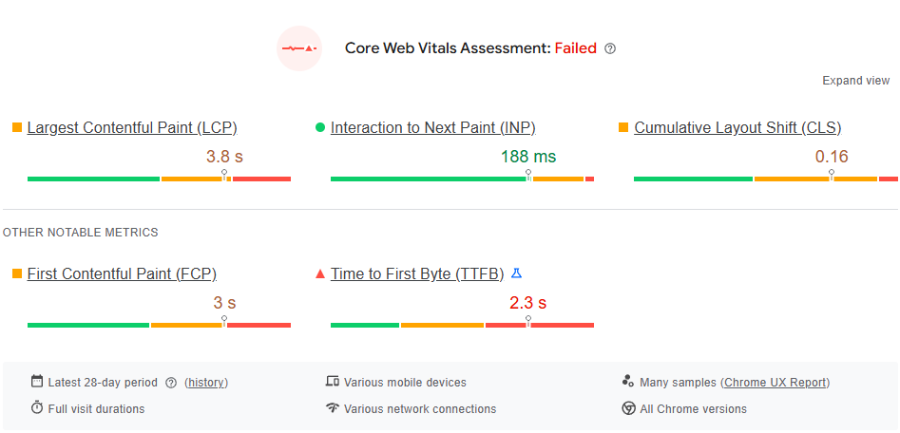
Vultr Mobile
| Metric | Result | Google Threshold | Status |
|---|---|---|---|
| INP (Interaction) | 188ms | Under 200ms | Pass |
| LCP (Loading) | 3.8s | Under 2.5s | Fail |
| CLS (Stability) | 0.16 | Under 0.1 | Fail |
| TTFB (Server) | 2.3s | Under 0.8s | Advisory Fail |
DigitalOcean Mobile
| Metric | Result | Google Threshold | Status |
|---|---|---|---|
| LCP (Loading) | 2.3s | Under 2.5s | Pass |
| INP (Interaction) | 220ms | Under 200ms | Fail |
| CLS (Stability) | 0 | Under 0.1 | Pass |
| TTFB (Server) | 1.1s | Under 0.8s | Advisory Fail |
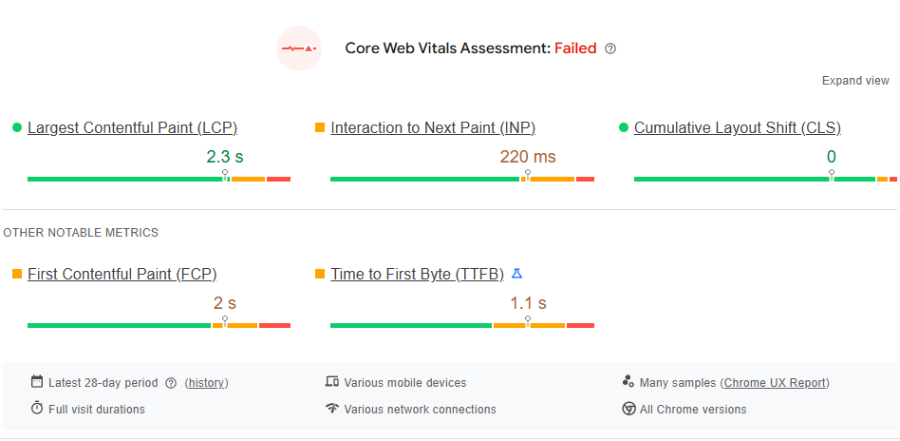
Vultr passes mobile INP with 188ms — DigitalOcean fails it at 220ms. The 32ms gap matters: Vultr’s mobile interaction response is faster by a meaningful margin.
Everything else favours DigitalOcean. LCP 2.3s passes where Vultr’s 3.8s fails by 1.3 seconds. CLS 0 is perfect where Vultr’s 0.16 fails. Vultr’s TTFB of 2.3s on mobile is the highest in this comparison series. For a self-managed WordPress site, a 2.3s server TTFB compounds into LCP and CLS failures that caching alone cannot fully resolve on the first uncached request.
DigitalOcean passes 2 of 3 CWV. Vultr passes 1 of 3.
Winner: DigitalOcean on CWV overall. Vultr on INP.
Test 2: Global Server Latency
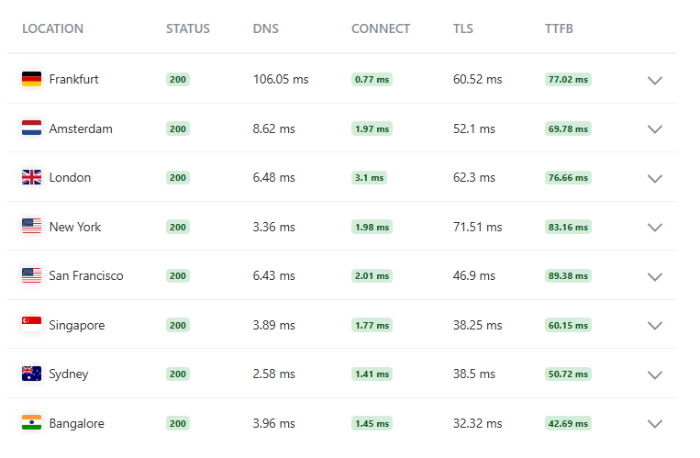
DigitalOcean (KeyCDN — full content TTFB)
| Location | TTFB | Rating |
|---|---|---|
| Bangalore, India | 42.69ms | Blazing Fast |
| Sydney, Australia | 50.72ms | Blazing Fast |
| Singapore | 60.15ms | Blazing Fast |
| Amsterdam | 69.78ms | Blazing Fast |
| London | 76.66ms | Blazing Fast |
| Frankfurt | 77.02ms | Blazing Fast |
| New York | 83.16ms | Blazing Fast |
| San Francisco | 89.38ms | Blazing Fast |
Vultr (KeyCDN — WAF-affected)
| Location | Result | TTFB | Note |
|---|---|---|---|
| Frankfurt, Germany | 200 OK | 1.28s | Only unblocked location |
| Amsterdam | 403 Forbidden | 74ms | WAF block (edge speed visible) |
| London | 403 Forbidden | 71ms | WAF block (edge speed visible) |
| New York, Singapore, SF, Bangalore | 403 Forbidden | Various | WAF blocks |
DigitalOcean delivers full content in under 90ms from all eight global locations. This is the strongest full-content global TTFB result in this comparison series. Every continent is under 90ms simultaneously using KeyCDN full content measurement.
Vultr’s WAF blocks seven of eight test nodes. The one confirmed response — Frankfurt — returns 1.28s. DigitalOcean returns 77ms from Frankfurt. The WAF explains blocked nodes. The 1.28s vs 77ms Frankfurt gap is a server performance difference on an unblocked connection.
The 71ms and 74ms visible on Vultr’s blocked Amsterdam and London nodes represent the CDN edge acknowledging the connection before the WAF fires. These confirm Vultr’s CDN edge infrastructure is fast. They are not content TTFB values.
Winner: DigitalOcean
Test 3: Desktop Rendering
Note on methodology: DigitalOcean was tested with GTmetrix. Vultr was tested with DebugBear. Different tools, different test origins. Both are included as reported in each provider’s individual review.
| Metric | Vultr (DebugBear) | DigitalOcean (GTmetrix) |
|---|---|---|
| Grade / Score | Lab 69% / CrUX 62% | Grade B (72%) |
| Desktop LCP | 733ms (lab) | 792ms (lab) |
| Desktop TTFB | 302ms | 217ms |
| Total Blocking Time | 2,440ms | 736ms |
| CLS | Not recorded | 0 |
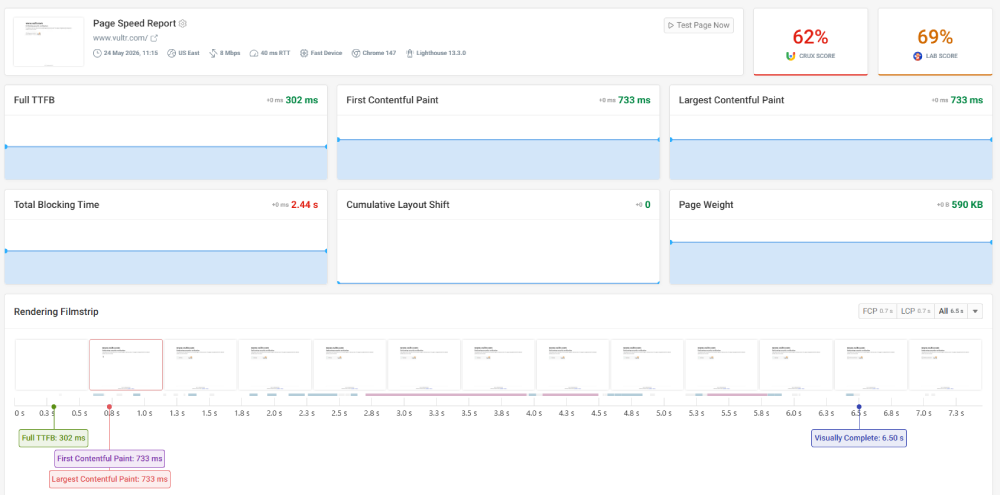
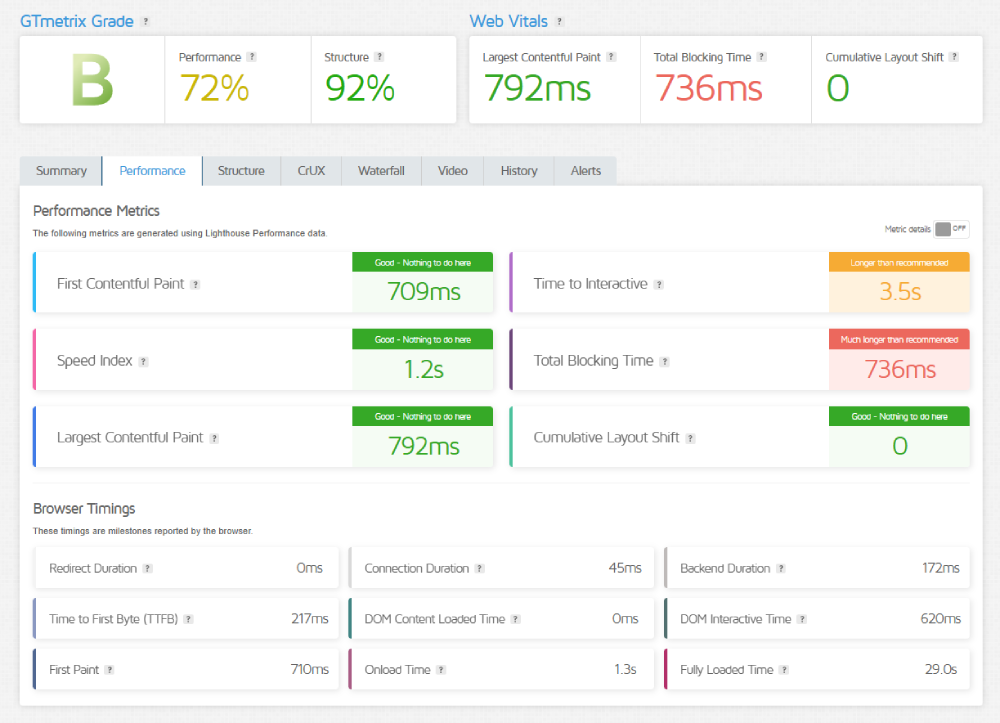
Vultr’s desktop LCP of 733ms is slightly faster than DigitalOcean’s 792ms. On everything else, DigitalOcean leads. TTFB 217ms versus 302ms. TBT 736ms versus 2,440ms.
Vultr’s CrUX score of 62% represents real Chrome user field data. This is the most reliable desktop signal because it reflects actual user experiences rather than a single lab test location. 62% versus DigitalOcean’s GTmetrix 72% confirms DigitalOcean’s corporate site delivers a consistently better real-user desktop experience.
Winner: DigitalOcean on TTFB, TBT, and grade. Vultr on desktop LCP.
Test 4: Concurrent Load (K6 Load Cloud, 50 Virtual Users)
| Parameter | Vultr | DigitalOcean |
|---|---|---|
| Uptime Under Load | 100% | 100% |
| Reachability | 67.7% (WAF-affected) | 100% |
| Avg Response Latency | 326ms (WAF-affected) | 56ms |
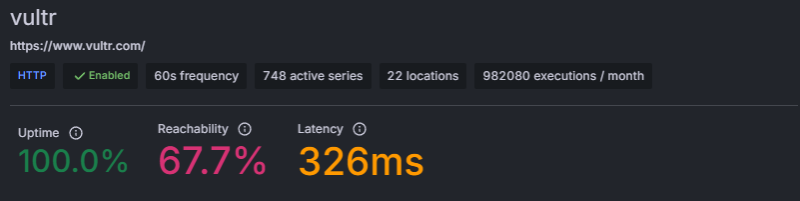

DigitalOcean’s 56ms concurrent load average with 100% reachability is the best result in this series. The comparison with any other provider in this tier produces the same outcome.
Vultr’s 67.7% reachability is WAF-affected. K6 concurrent virtual users trigger Vultr’s WAF as potential bot traffic. Real concurrent human visitors to a Vultr-hosted WordPress site would not trigger the same response. The practical implication: if Vultr’s WAF is active at the server level on a customer WordPress site, concurrent traffic from a campaign launch or viral post could face similar filtering unless WAF rules are configured carefully.
Winner: DigitalOcean
Test 5: Uptime (Uptime Robot, 30-Day Monitor)
| Window | Vultr | DigitalOcean |
|---|---|---|
| Last 24 Hours | 100%, 0 incidents | 100%, 0 incidents |
| Last 7 Days | 1 incident, 11 min 38 sec | 100%, 0 incidents |
| Last 30 Days | 1 incident, 11 min 38 sec | 100%, 0 incidents |
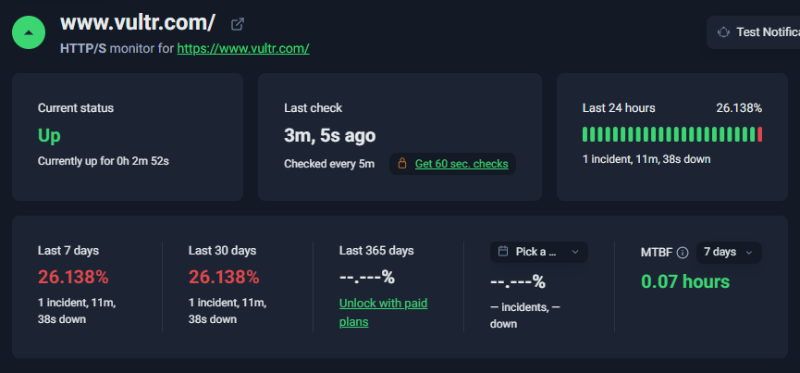
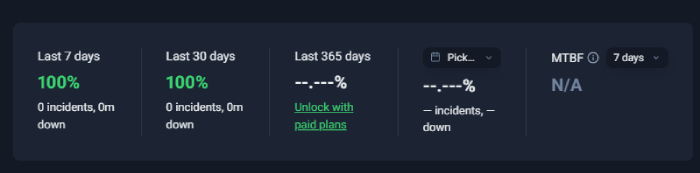
Vultr is the only provider in this comparison series with a recorded downtime incident. 11 minutes and 38 seconds of availability failure during a 30-day monitoring window. The incident is not WAF-related — this was genuine server unavailability detected by Uptime Robot.
For a self-managed WordPress site running production traffic, an 11-minute outage during business hours is a meaningful event. For a blog or low-traffic site, it is a minor incident. The relevant question is whether the infrastructure you pay for matches the availability your site requires.
Winner: DigitalOcean
Test 6: SSL Security (Qualys SSL Labs)
| Feature | Vultr | DigitalOcean |
|---|---|---|
| Overall Grade | A+ | A+ |
| HSTS | Enforced | Enforced |
| TLS | TLS 1.3 | TLS 1.3 |
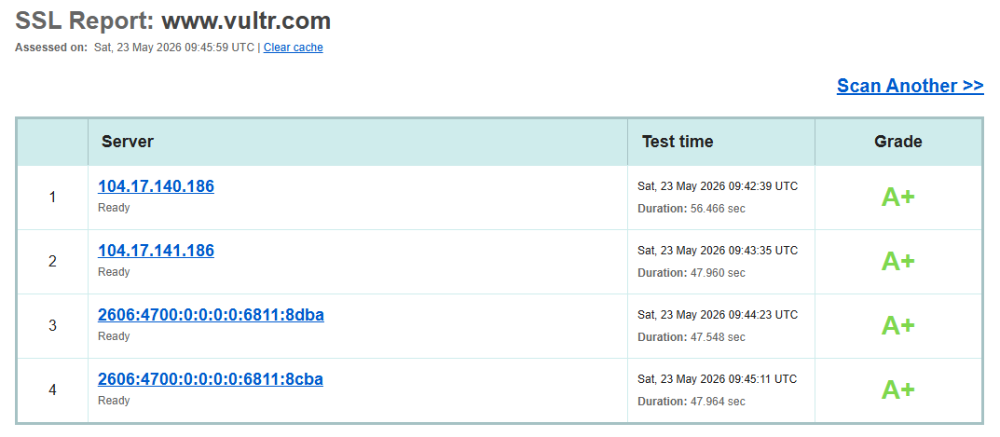
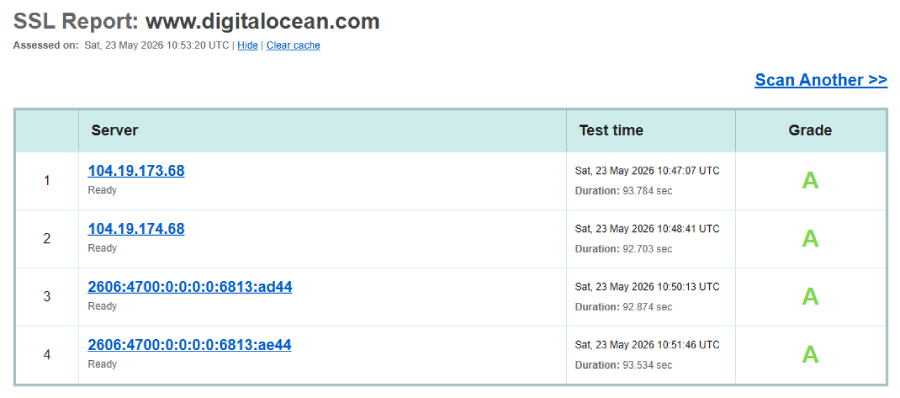
Both providers hold Grade A+ with HSTS and TLS 1.3. This is the strongest achievable SSL configuration. Neither provider has a gap here.
Winner: Tie
Test 7: Protocol Support (HTTP/3 Check)
| Protocol | Vultr | DigitalOcean |
|---|---|---|
| HTTP/3 | Supported | Deliberately disabled |
| QUIC | Supported | Absent |
| 0-RTT | Supported | Absent |
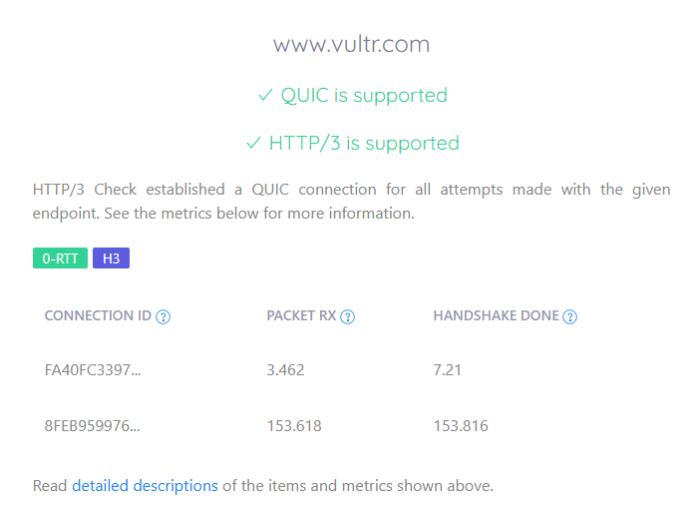
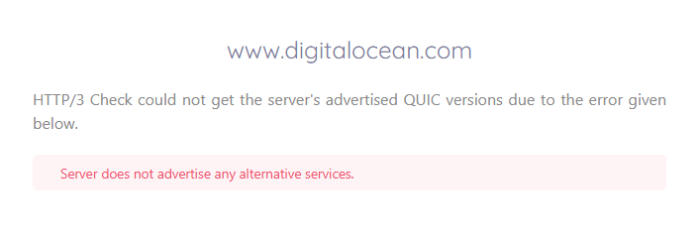
Vultr supports HTTP/3, QUIC, and 0-RTT. DigitalOcean’s corporate site runs on Cloudflare — which natively supports HTTP/3 — but HTTP/3 has been deliberately disabled in the configuration. The practical benefit of HTTP/3 for self-managed WordPress comes from enabling it on the customer VPS server, not from the provider’s corporate domain. Both providers allow customers to configure HTTP/3 on their own Droplets or cloud instances. The corporate domain result reflects a configuration choice, not a server capability.
For a developer configuring a self-managed WordPress stack, both providers support HTTP/3 at the VPS level. The corporate site test measures the provider’s own site choices.
Winner: Vultr on corporate domain result. Both providers capable at VPS level.
Test 8: Environmental Impact (Green Web Foundation)
| Provider | Status | Source |
|---|---|---|
| Vultr | Verified Green | Cloudflare CDN renewable |
| DigitalOcean | Verified Green | Cloudflare CDN renewable |
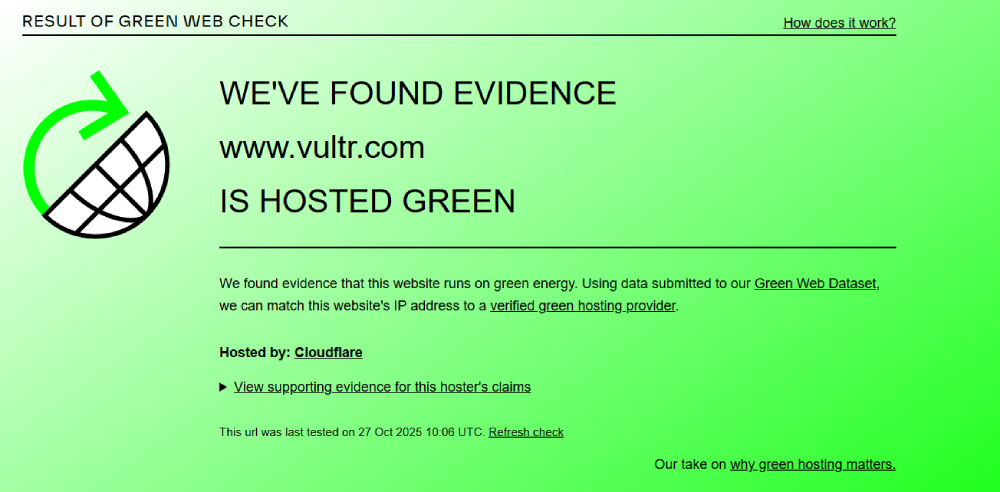
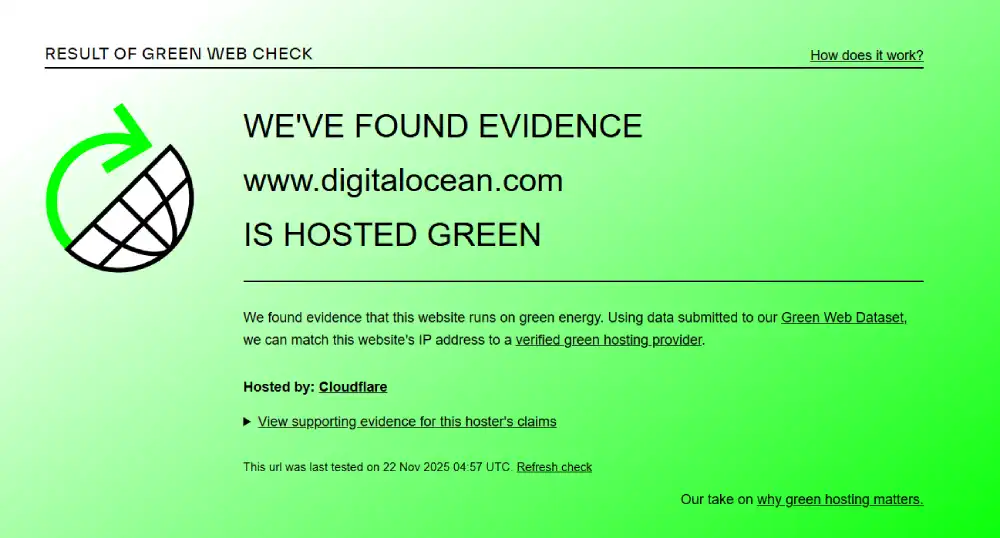
Both providers share the same green certification source: Cloudflare CDN renewable energy matching. Neither holds direct self-owned renewable certification. Both are verified.
Winner: Tie
Performance Summary
| Test | Winner |
|---|---|
| Mobile CWV Overall | DigitalOcean |
| Mobile INP | Vultr |
| Global TTFB | DigitalOcean |
| Desktop Rendering | DigitalOcean |
| Concurrent Load | DigitalOcean |
| Uptime | DigitalOcean |
| SSL Grade | Tie |
| HTTP/3 (corporate domain) | Vultr |
| Environmental | Tie |
DigitalOcean wins five tests. Vultr wins two. Two are tied.
Desktop and Mobile Speed Summary
| Metric | Vultr | DigitalOcean | Winner |
|---|---|---|---|
| Mobile INP | 188ms (Pass) | 220ms (Fail) | Vultr |
| Mobile LCP | 3.8s (Fail) | 2.3s (Pass) | DigitalOcean |
| Mobile CLS | 0.16 (Fail) | 0 (Pass) | DigitalOcean |
| Mobile TTFB | 2.3s (advisory) | 1.1s (advisory) | DigitalOcean |
| Desktop Grade | Lab 69% / CrUX 62% | Grade B 72% | DigitalOcean |
| Desktop LCP | 733ms | 792ms | Vultr |
| Desktop TTFB | 302ms | 217ms | DigitalOcean |
| Desktop TBT | 2,440ms | 736ms | DigitalOcean |
| SSL Grade | A+ | A+ | Tie |
| HTTP/3 | Yes | Disabled | Vultr |
Global Network and Load Test Summary
| Metric | Vultr | DigitalOcean | Winner |
|---|---|---|---|
| Frankfurt TTFB | 1.28s (unblocked) | 77ms | DigitalOcean |
| All other locations | WAF-blocked | Sub-90ms | DigitalOcean |
| Load Test Avg | 326ms (WAF) | 56ms | DigitalOcean |
| Load Reachability | 67.7% (WAF) | 100% | DigitalOcean |
| 30-Day Uptime | 1 incident | 100%, 0 incidents | DigitalOcean |
Interpreting Vultr’s WAF Results
The WAF context deserves direct treatment in this comparison because it affects six of eight test categories.
Vultr’s WAF is a genuine security feature. It blocks automated probes, scraper traffic, and patterns that resemble DDoS reconnaissance. For a live production site, a well-configured WAF is a meaningful security layer. The difference between server-side WAF and plugin WAF in WordPress matters directly for self-managed VPS users choosing which protection layer to run.
What the WAF explains: the 67.7% K6 reachability (K6 virtual users look like bot traffic), the 7 of 8 KeyCDN 403 blocks (automated TTFB probes match bot patterns), and the distorted load test average.
What the WAF does not explain: the 1.28s TTFB on the one unblocked Frankfurt connection. That is an origin server response on a genuine permitted connection. DigitalOcean returns 77ms from the same city. The server speed gap is real even when WAF interference is excluded.
The uptime incident also has no WAF explanation. 11 minutes and 38 seconds of recorded unavailability in 30 days is a server event, not a filtering event.
For a Vultr customer deploying a self-managed WordPress site: the WAF behaviour on vultr.com is separate from your own VPS. Your server’s WAF configuration is in your control. The corporate site WAF does not affect customer VPS performance.
Self-Managed WordPress: What Actually Matters
The title frames this around self-managed WordPress. Neither provider manages WordPress. The comparison is about which raw cloud infrastructure is the better foundation.
For self-managed WordPress on a VPS, the relevant factors are:
Origin TTFB under load. DigitalOcean’s 56ms concurrent load average and sub-90ms global full TTFB mean origin requests process fast under real traffic. Self-managed WordPress with a page caching plugin serving cached HTML relies on the origin processing the first uncached request quickly. DigitalOcean delivers this.
HTTP/3 at the VPS level. Both providers allow you to configure HTTP/3 on your own VPS server by enabling it in Nginx or LiteSpeed. The corporate domain HTTP/3 test measures whether the provider uses it on their own site — not whether you can use it on yours. Both providers can run HTTP/3 on customer VPS instances.
Uptime record. Vultr recorded one 11-minute incident in 30 days. For a personal blog, this is minor. For an ecommerce site, it is meaningful. For a mission-critical deployment, it matters whether the underlying infrastructure recorded any incidents.
Developer ecosystem. DigitalOcean’s App Platform, Managed Databases, Spaces object storage, and serverless Functions create a more complete managed services layer around the raw VPS. Vultr is more compute-focused. For a self-managed WordPress developer who also wants managed database offloading or object storage for media, DigitalOcean’s ecosystem is broader.
What self-managed VPS hosting requires from the operator is the same on both platforms: Linux administration, web server configuration, database management, SSL setup, firewall rules, backup automation, and WordPress performance tuning. Neither provider simplifies this. Choose based on infrastructure quality and ecosystem fit.
Pricing and Value
Both providers offer nearly identical entry pricing for compute. Differences emerge in the managed services layer.
Vultr Pricing
Vultr Cloud Compute starts at approximately $6 per month for 1 vCPU and 1GB RAM. Optimized Cloud Compute offers dedicated vCPUs at higher price points. Bare Metal is available for workloads requiring no virtualisation overhead. Pricing is hourly with monthly caps.
VX1 General Purpose |
VX1 NVMe Instance |
VX1 Memory Optimized |
Regular Performance Cloud |
High Performance Cloud |
High Frequency Cloud |
General Purpose Optimized |
CPU Optimized Cloud |
Memory Optimized Cloud |
Storage Optimized Cloud |
NVIDIA A16 GPU Cloud |
NVIDIA L40S GPU Cloud |
NVIDIA HGX H100 |
Intel E3-1270 Bare Metal |
AMD EPYC 4245P Bare Metal |
AMD EPYC 7443P Bare Metal |
MySQL Managed Database |
PostgreSQL Managed Database |
Valkey Managed Database |
Kubernetes Engine |
Load Balancer |
NAT Gateway |
NVMe Block Storage |
Object Storage |
File System Storage |
Vultr CDN |
Direct Connect |
|---|---|---|---|---|---|---|---|---|---|---|---|---|---|---|---|---|---|---|---|---|---|---|---|---|---|---|
$5.00
/mo |
$6.00
/mo |
$6.00
/mo |
$30.00
/mo |
$28.00
/mo |
$40.00
/mo |
$75.00
/mo |
$120
/mo |
$295
/mo |
$725
/mo |
$90
/mo |
$90
/mo |
$160
/mo |
$10
/mo |
$1
/mo |
$18
/mo |
$1
/mo |
$10
/mo |
$5
/mo | ||||||||
|
|
|
|
|
|
|
|
|
|
|
|
|
|
|
|
|
|
|
|
|
|
|
|
|
|
|
DigitalOcean Pricing
DigitalOcean Droplets start at approximately $6 per month for 1 vCPU and 1GB RAM. Premium Droplets with NVMe SSDs are available at higher tiers. Managed Databases, Spaces, App Platform, and Kubernetes add to the per-resource cost. Hourly billing with monthly caps.
AI Platform |
GPU Droplets |
Additional GPU Options |
App Platform |
Droplets |
Kubernetes |
Functions |
Cloudways Managed Hosting |
Backups |
Managed Databases |
Spaces (Object Storage) |
Network File Storage |
Volumes (Block Storage) |
Load Balancers |
Virtual Private Cloud (VPC) |
Container Registry |
Uptime Monitoring |
Cloud Security (CSPM) |
Support Plans |
|---|---|---|---|---|---|---|---|---|---|---|---|---|---|---|---|---|---|---|
$0.05
/1M tokens |
Variable Pricing |
$0
/mo |
$4
/mo |
$12
/mo |
$11
/mo |
$0.01
/GiB |
$15
/mo |
$5
/mo |
$0.15
/GiB |
$10
/mo |
$12
/mo |
$0
/mo |
$0
/mo |
$0
/mo |
$0
/mo |
$0
/mo | ||
|
|
|
|
|
|
|
|
|
|
|
|
|
|
|
|
|
|
|
Pricing Comparison
| Factor | Vultr | DigitalOcean | Winner |
|---|---|---|---|
| Entry Compute | ~$6/month | ~$6/month | Tie |
| Bare Metal | Yes | Dedicated CPU Droplets | Tie |
| Managed Databases | Yes | Yes | Tie |
| Object Storage | Yes | Yes (Spaces) | Tie |
| App Platform (PaaS) | No | Yes | DigitalOcean |
| Serverless Functions | No | Yes | DigitalOcean |
| Kubernetes | Yes | Yes (DOKS) | Tie |
| Global PoPs | 32+ | 15 regions | Vultr |
| HTTP/3 on VPS | Configurable | Configurable | Tie |
Who Should Use Which
Choose Vultr if you:
- Need the most global data centre coverage with 32+ locations for latency-sensitive regional deployments
- Want Bare Metal servers alongside cloud compute under one account
- Need to benchmark HTTP/3 at the corporate infrastructure level before choosing a provider
- Have a specific Vultr region requirement not available on DigitalOcean
- Are comfortable configuring and managing WAF rules to avoid false-positive blocking on your own WordPress site
Choose DigitalOcean if you:
- Need the best concurrent load handling for a self-managed WordPress site under real traffic pressure
- Want verified sub-90ms full content delivery from all global continents without CDN configuration
- Need the broader managed services ecosystem: App Platform, Managed Databases, Spaces, Functions
- Want a 30-day uptime record with zero incidents on the underlying IaaS infrastructure
- Want a larger global developer community, more third-party tutorials, and deeper Terraform and CLI tooling
- Value the most polished API and developer experience in the independent cloud tier
Situation and Use Case Recommendations
| Situation | Recommended | Why |
|---|---|---|
| Self-managed WordPress, global traffic | DigitalOcean | Sub-90ms all continents, 56ms concurrent load |
| Developer with multiple regional deployments | Vultr | 32+ global PoPs vs DO 15 regions |
| WooCommerce on self-managed VPS | DigitalOcean | Best load test; 0 uptime incidents |
| WordPress with server-level HTTP/3 | Either | Both support HTTP/3 at VPS level |
| Developer needing App Platform or serverless | DigitalOcean | Only option in this comparison |
| Budget entry VPS, performance second | Tie | Both start at ~$6/month |
| Production site, zero-incident tolerance | DigitalOcean | Vultr had 1 incident; DO had 0 |
| Learning self-managed VPS | DigitalOcean | Larger tutorial library, community, and documentation |
Final Verdict
DigitalOcean wins this comparison on the metrics that matter most for a self-managed WordPress deployment: concurrent load handling, global origin TTFB, uptime record, and developer ecosystem.
Vultr wins on HTTP/3 at the corporate domain level and mobile INP. Its WAF performance distortion is real and documented, but should not be used to dismiss the genuine gaps in Frankfurt TTFB and the recorded availability incident.
Vultr is best for: Developers who need 32+ global data centre locations, want Bare Metal alongside cloud compute, or have specific regional PoP requirements not covered by DigitalOcean’s 15 regions. Also for developers who want HTTP/3 active at the infrastructure corporate domain level as a deployment signal.
DigitalOcean is best for: Self-managed WordPress deployments where concurrent load handling, global origin performance, zero downtime record, and a broader managed services ecosystem are the requirements. The strongest raw load test result in this comparison series, combined with sub-90ms full TTFB across all tested continents, makes DigitalOcean the clearer choice for production WordPress on self-managed infrastructure.
| Category | Winner |
|---|---|
| Mobile CWV | DigitalOcean |
| Mobile INP | Vultr |
| Global TTFB | DigitalOcean |
| Desktop Performance | DigitalOcean |
| Concurrent Load | DigitalOcean |
| Uptime | DigitalOcean |
| SSL Grade | Tie |
| HTTP/3 | Vultr |
| Green | Tie |
Tactical Recommendations
For Vultr: configure WAF rules to permit standard monitoring and CDN validation traffic. The aggressive WAF that blocked seven of eight KeyCDN nodes will also block standard performance monitoring tools, uptime checkers that use recognisable user-agents, and CDN pre-validation requests. For a self-managed WordPress site on Vultr, reviewing and adjusting WAF rules to permit known monitoring and CDN traffic prevents false-positive blocks on legitimate service requests.
For Vultr: add Cloudflare free plan as a CDN layer for origin TTFB. The 1.28s Frankfurt TTFB on the one unblocked Vultr connection is the only verified origin response in this test. Adding Cloudflare in front of a Vultr VPS reduces visitor TTFB to Cloudflare edge response times for cached requests and provides an additional WAF and DDoS layer on top of Vultr’s own infrastructure.
For DigitalOcean: enable HTTP/3 on your Droplet’s web server. DigitalOcean deliberately disabled HTTP/3 on its corporate domain. This does not prevent customers from enabling it on their own VPS. On Nginx, add the listen 443 quic reuseport and add_header Alt-Svc directives. On LiteSpeed, HTTP/3 is a dashboard toggle. Enabling this on a self-managed WordPress Droplet gives the full HTTP/3 and 0-RTT benefits for mobile WordPress visitors.
For both providers: implement full-page caching before comparing origin performance. Both providers serve raw VPS compute. Without a caching layer — Nginx FastCGI cache, Redis object cache, or a WordPress caching plugin in combination — every WordPress page request hits PHP and MySQL directly. The origin TTFB difference between the two providers becomes less relevant once a caching layer serves static HTML for repeat visitors. Set up caching first. Then measure real-world performance.
Frequently Asked Questions
Is Vultr or DigitalOcean better for WordPress?
For self-managed WordPress where concurrent load handling, global origin performance, and ecosystem depth matter, DigitalOcean is the stronger choice based on test data. 56ms concurrent load average, sub-90ms full content delivery globally, zero downtime incidents, and a broader managed services platform all favour DigitalOcean. For developers needing 32+ global data centre locations or Bare Metal alongside cloud compute, Vultr has specific advantages.
Why did Vultr score so poorly in performance tests?
Two factors explain most of the gap. First, Vultr operates an aggressive WAF on its corporate domain that blocked seven of eight test nodes and triggered 67.7% load test reachability. These are WAF blocks on automated testing tools, not server failures. Second, the one unblocked Frankfurt connection returned 1.28s TTFB versus DigitalOcean’s 77ms — a genuine server performance gap on a clean connection. The WAF explains blocked nodes. It does not explain origin response time on permitted connections.
Does Vultr support HTTP/3?
Yes. Vultr supports HTTP/3, QUIC, and 0-RTT on its corporate infrastructure. DigitalOcean deliberately disabled HTTP/3 on its corporate domain despite running on Cloudflare. Both providers allow customers to configure HTTP/3 at the VPS level by enabling it in Nginx or LiteSpeed on their own server instances.
Is Vultr’s downtime incident significant?
Context-dependent. Vultr recorded one availability incident of 11 minutes and 38 seconds during 30-day monitoring. It is the only provider in this comparison series with a recorded outage. For a personal blog or low-traffic portfolio site, 11 minutes of downtime in a month is negligible. For a WooCommerce store or business site generating revenue, any unplanned downtime during business hours is a real cost. Choose accordingly.
Can I run self-managed WordPress on either provider?
Yes. Both Vultr and DigitalOcean provide raw Linux VPS instances where you install and manage the full stack yourself. Neither provider manages WordPress core updates, plugin updates, or backups automatically. You configure the web server, PHP, MySQL, SSL, caching, and security layers. If you want managed WordPress on cloud infrastructure, Cloudways provides a managed layer on top of both DigitalOcean and Vultr.


