
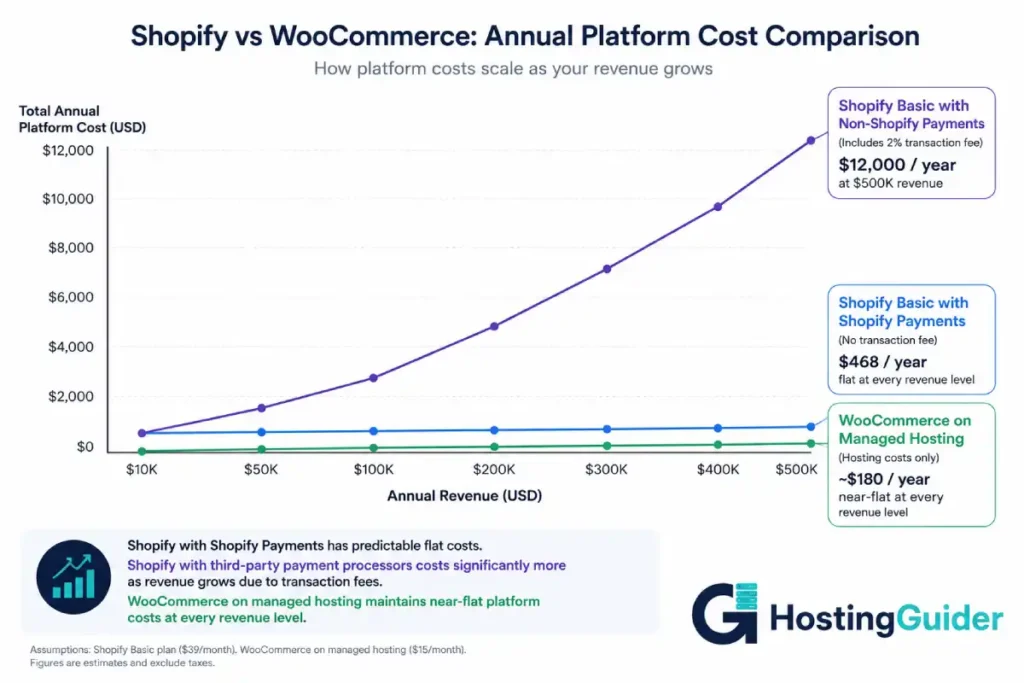
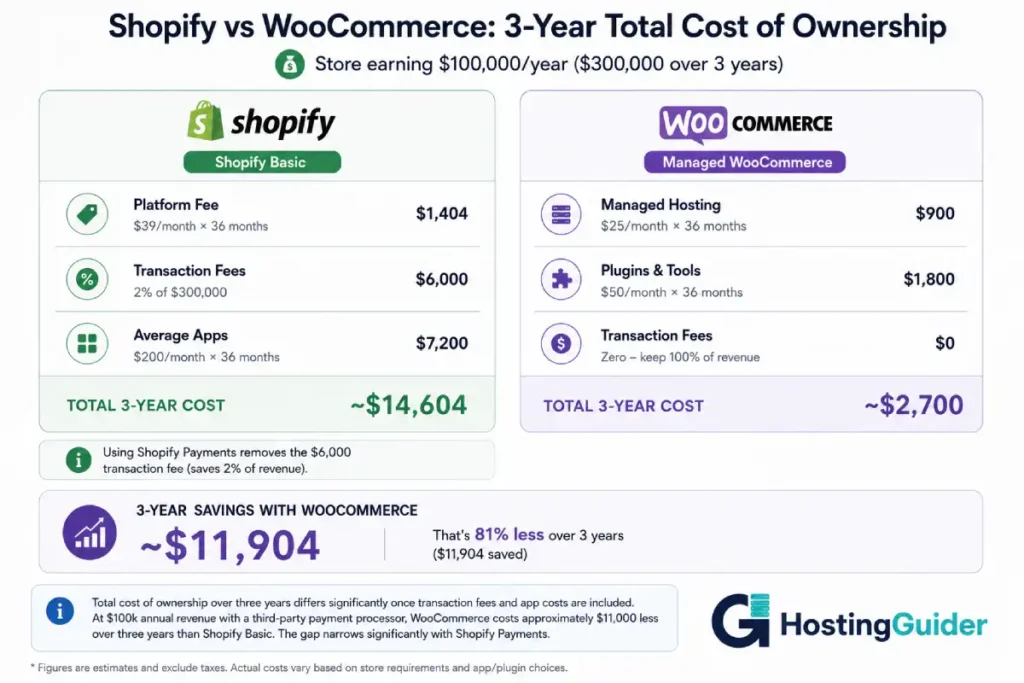
Shopify’s Basic plan costs $39 per month. On $100,000 per year in sales using a third-party payment processor, Shopify also charges a 2% transaction fee. That is $2,000 per year added to the $468 annual subscription fee. Total platform cost: $2,468 per year.
WooCommerce charges zero transaction fees. On the same $100,000 per year in sales, the platform cost is your hosting fee. Nothing else.
That is one number. There are several more like it in this comparison that most Shopify vs WooCommerce posts mention briefly and move past. This one does not move past them. The real cost of each platform across different revenue levels is the most important comparison a store owner can make, and it is almost never calculated clearly before the decision.
By the time most store owners discover the full cost structure, they have already built their store.
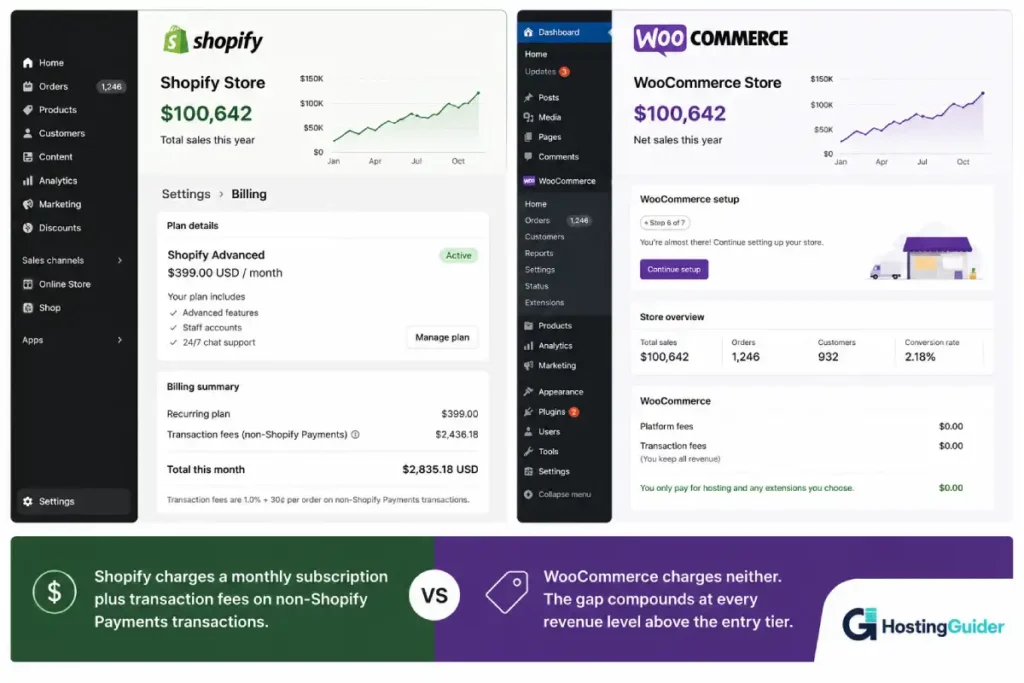
The Real Cost Nobody Calculates Before They Choose
Before comparing features, run the numbers. This table shows the full platform cost at different annual revenue levels for both platforms. It is the most important data in this comparison.
Shopify Transaction Fee Reality
Shopify charges transaction fees unless you use Shopify Payments, their proprietary payment processor. If you use Stripe, PayPal, or any other processor, these fees apply:
| Shopify Plan | Monthly (annual) | Transaction Fee |
|---|---|---|
| Basic | $39/month | 2% per transaction |
| Shopify | $105/month | 1% per transaction |
| Advanced | $399/month | 0.5% per transaction |
| Plus | $2,000+/month | 0.15% per transaction |
Annual Platform Cost Comparison at Different Revenue Levels
| Annual Revenue | Shopify Basic (2% fee) | Shopify Mid (1% fee) | WooCommerce (managed hosting) |
|---|---|---|---|
| $10,000/year | $468 + $200 = $668 | $1,260 + $100 = $1,360 | $300 to $600 |
| $50,000/year | $468 + $1,000 = $1,468 | $1,260 + $500 = $1,760 | $300 to $600 |
| $100,000/year | $468 + $2,000 = $2,468 | $1,260 + $1,000 = $2,260 | $300 to $600 |
| $500,000/year | $468 + $10,000 = $10,468 | $1,260 + $5,000 = $6,260 | $600 to $1,800 |
| $1,000,000/year | Requires Advanced: $4,788 + $5,000 = $9,788 | N/A | $600 to $2,400 |
The note on Shopify Payments: These transaction fees are waived if you use Shopify Payments. Shopify Payments is available in a limited number of countries. It is not available in every market. If you are outside a supported country or if your product category is in Shopify’s restricted list for Shopify Payments, these transaction fees are unavoidable.
WooCommerce has zero platform transaction fees on every plan, at every revenue level, in every country, regardless of which payment processor you use.
This table changes the Shopify vs WooCommerce conversation for every store owner who understood Shopify as a flat monthly fee.
Shopify vs WooCommerce: Quick Comparison
| Feature | Shopify | WooCommerce |
|---|---|---|
| Monthly platform fee | $39 to $399 | $0 (software is free) |
| Hosting included | Yes | No (separate) |
| Transaction fees | 0.5% to 2% (waived on Shopify Payments) | Zero |
| App/plugin ecosystem | 8,000+ apps (many paid) | 60,000+ WordPress plugins |
| Themes | 100+ (many paid $150+) | Thousands (many free) |
| Custom checkout | Shopify Plus only ($2,000/mo+) | All plans |
| SEO capability | Good | Excellent |
| Subscription selling | App required ($79-99/mo) | Free plugin available |
| Abandoned cart | Built-in (Shopify plan+) | Free plugin |
| Multi-currency | Built-in | Plugin or WooCommerce Payments |
| Point of sale | Built-in hardware | Plugin required |
| Hosting managed | Yes | Depends on host |
| Developer access | Limited (Liquid templating) | Full PHP/CSS/JS |
| Data ownership | Shopify controls | Full |
| Platform lock-in | High | Low |
| Support | 24/7 Shopify | Hosting provider + community |
What Shopify Actually Is and What It Controls
Shopify is a fully managed ecommerce platform. Your store lives on Shopify’s servers. Shopify handles hosting, security, updates, SSL, and the payment infrastructure. You pick a theme, upload products, and start selling.
The simplicity is genuine. Shopify is the fastest path from zero to a working store for a non-technical seller. The checkout is tested across hundreds of millions of transactions. The admin is clean. The onboarding is well-designed.
What Shopify controls that you do not:
The checkout. Shopify’s checkout is Shopify’s code. You cannot edit the checkout HTML, CSS, or flow on any plan below Shopify Plus. You cannot add custom fields, change the layout, or modify the order flow. You use Shopify’s checkout as it is. If you want a one-page checkout, a custom upsell sequence, or a branded checkout experience, you need Shopify Plus at $2,000 per month or an app that approximates the feature within Shopify’s restrictions.
The theme architecture. Shopify uses a templating language called Liquid. Customising beyond the theme editor requires a developer with Liquid experience. Moving from Shopify to another platform means your theme and all its customisations cannot be moved. You rebuild.
Your store’s availability. If Shopify terminates your account, your store goes offline immediately. Shopify can and does terminate accounts for terms violations, payment issues, or category restrictions. The remediation process involves Shopify’s review timeline, not yours.
The app ecosystem. Most advanced functionality on Shopify requires an app from the Shopify App Store. Shopify controls which apps are available. Apps can be removed from the store. Apps can change their pricing. An app that costs $19/month today can increase to $79/month next year. The features your store depends on are in third-party hands.
What WooCommerce Actually Is and What It Requires
WooCommerce is a free, open-source plugin for WordPress. It turns any WordPress installation into a full ecommerce store. The plugin is maintained by Automattic (the company behind WordPress.com) but runs on self-hosted WordPress.org.
WooCommerce requires three things: a hosting account, a WordPress installation, and the WooCommerce plugin. Most managed WordPress hosts install WordPress and WooCommerce simultaneously with a one-click setup. The store is live in under an hour for a non-technical user on managed hosting.
What WooCommerce gives you that Shopify does not:
Full checkout control. WooCommerce checkout is PHP code. You or a developer can modify every element of the checkout flow on any hosting plan at any cost. Custom fields, one-page checkout, multi-step checkout, conditional logic, and custom order confirmation pages: all available without a $2,000/month plan.
Full code access. The store runs on your server. You have FTP and SSH access. Every file, every database record, every configuration is accessible and modifiable. No platform restrictions on what you can build.
Portable data. Your products, orders, and customers live in a database on your server. Moving hosts takes minutes with a migration plugin. Moving platforms requires exporting that database. Nothing is locked inside Shopify’s infrastructure.
The requirement that makes non-technical users nervous: You choose and manage your own hosting. The good news: managed WooCommerce hosting handles the server management, security, and backups automatically. The choice of hosting provider determines performance and reliability. This is a one-time decision, not ongoing technical management for most store owners on managed hosting.
Transaction Fees: The Shopify vs WooCommerce Number That Changes Everything
This deserves more space than the table above gave it.
Shopify’s transaction fee structure means the platform gets more expensive the more successful your store becomes. At $39/month Basic with Shopify Payments, the fee is waived. With any other payment processor, 2% leaves your revenue on every transaction.
Why store owners use non-Shopify Payments processors:
- Shopify Payments is unavailable in many countries
- Shopify Payments has a restricted product categories list that includes certain supplements, firearms accessories, and other legal products
- Some stores prefer PayPal, Stripe, or regional processors that Shopify Payments does not replace in local markets
- B2B stores often use payment methods (net terms, bank transfer, purchase orders) that Shopify Payments does not handle
The avoidable version: A store in the US selling allowed product categories can use Shopify Payments and avoid the transaction fee. This is genuinely viable for many store owners and changes the cost comparison significantly.
The unavoidable version: Any store outside Shopify Payments’ supported regions, any store selling in a restricted category, or any store that needs payment flexibility beyond Shopify Payments will pay the transaction fee. At $500,000 per year in revenue on the Basic plan, that is $10,000 per year going to Shopify as a transaction fee.
WooCommerce uses Stripe, PayPal, or any payment gateway directly. No WooCommerce transaction fee. The only fees are the payment processor’s standard rates, which are the same regardless of platform.
The App Tax: The Hidden Shopify vs WooCommerce Cost Difference
Shopify’s core platform is deliberately lean. Features that are standard in WooCommerce require paid apps in Shopify. This is not a criticism of Shopify’s architecture. It is a description of how the platform works and how the real total cost of ownership differs from the headline monthly price.
Common Functionality and What It Costs
| Feature | Shopify App Cost | WooCommerce Equivalent |
|---|---|---|
| Email marketing | Klaviyo $20 to $150/month | MailPoet free to $99/year |
| Product reviews | Judge.me free to $15/month | Free plugin |
| Subscription billing | ReCharge $99/month | WooCommerce Subscriptions $199/year |
| Loyalty programme | Smile.io $49 to $199/month | Free plugin options |
| Advanced search | Searchpie $19 to $99/month | Free plugin |
| Wishlists | $7 to $19/month | Free plugin |
| Product bundles | $14 to $49/month | Free plugin |
| Volume discounts | $19 to $49/month | Free plugin |
| Order tracking | $10 to $29/month | Free or low-cost plugin |
| Custom checkout fields | Shopify Plus required ($2,000/mo) | Free |
A mid-sized Shopify store with email marketing, reviews, subscriptions, and a loyalty programme pays approximately $150 to $500 per month in app fees on top of the platform fee. The same functionality on WooCommerce typically costs $0 to $50 per month in plugin fees, often less.
The app dependency risk: Shopify apps are third-party businesses. Apps change their pricing, change their features, or shut down. Every time a critical Shopify app increases its price or closes, the store owner has no recourse except finding a replacement. WooCommerce plugins are open-source code that runs on your server. Even if the developer stops supporting a plugin, the code continues running. You maintain control.
Ease of Use: Shopify vs WooCommerce for Getting a Store Live
Shopify Ease of Use
Shopify wins on setup speed. Create an account, choose a theme, add products, connect a payment processor, and launch. No hosting decision. No server configuration. No plugin installation.
The admin is clean, well-documented, and constantly improved. Product management, order processing, discount codes, and basic analytics are all intuitive. A non-technical store owner can manage a Shopify store for daily operations without developer help.
The limit: anything beyond standard store operations requires either an app or a developer who knows Liquid templating. Customising the checkout, changing the checkout flow, or building custom functionality requires skills Shopify does not make widely accessible.
WooCommerce Ease of Use
WooCommerce on managed hosting has become significantly easier than its historical reputation suggests. A managed WooCommerce host like SiteGround or WP Engine installs WordPress and WooCommerce in a single click. The WooCommerce setup wizard walks through payment configuration, shipping zones, and tax settings in a guided flow.
Daily operations on WooCommerce (processing orders, updating products, running promotions) are straightforward for any user comfortable with a web-based admin.
The complexity appears in plugin management. Running 10 to 15 plugins involves periodic updates. Plugin compatibility issues occasionally break features. Managed hosts reduce this with automatic updates, but it does not eliminate the maintenance consideration fully.
Ease of Use Comparison
| Task | Shopify | WooCommerce |
|---|---|---|
| Initial store setup | Fastest (2 to 3 hours) | Moderate (half a day) |
| Adding products | Easy | Easy |
| Processing orders | Easy | Easy |
| Adding new features | App install (often paid) | Plugin install (often free) |
| Customising checkout | Shopify Plus only | Any plan |
| Changing payment processors | Easy | Easy |
| Developer customisation | Liquid (specialist) | PHP/CSS/JS (standard) |
Design and Storefront Customisation: Shopify vs WooCommerce
Shopify Themes
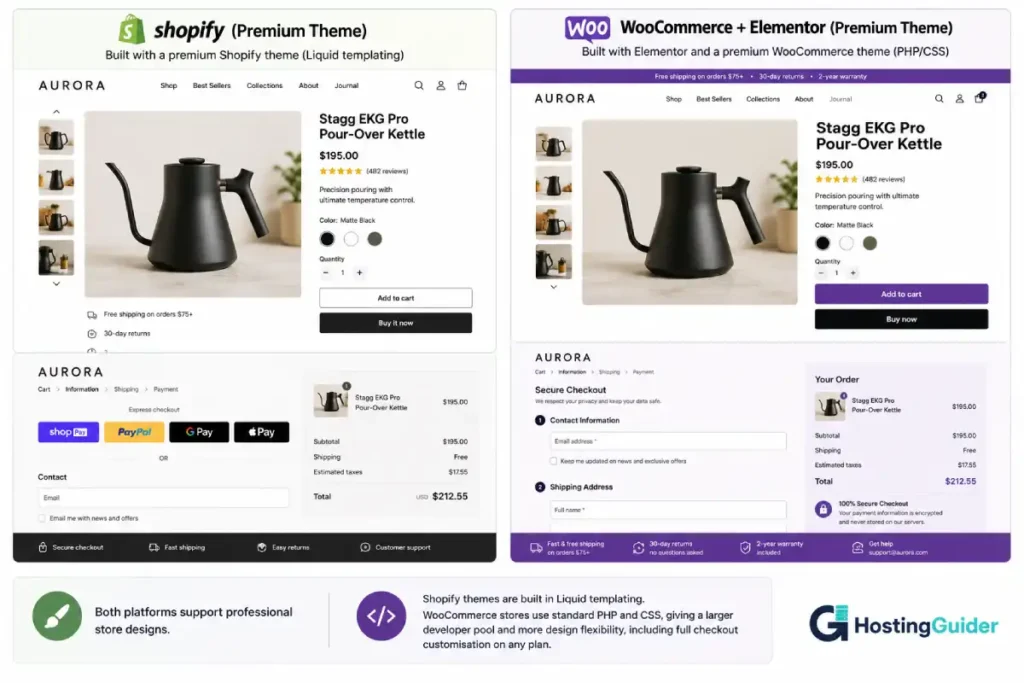
Shopify’s theme store includes free and premium themes. Premium themes cost $150 to $400 as one-time purchases. The quality is generally high. Themes are mobile-responsive by default. The visual theme editor handles layout, colours, typography, and section order without code.
Custom design beyond the theme editor requires Liquid templating. Moving from one Shopify theme to another requires rebuilding customisations because customisations live in the theme files, not in a portable component system.
WooCommerce Themes and Design
WooCommerce works with any WordPress theme. The ecosystem includes thousands of dedicated WooCommerce themes from free options in the WordPress repository to premium themes with full page builder integration. Elementor provides visual product page, cart, and checkout design using standard CSS rather than Liquid templating.
The WooCommerce design ceiling is higher than Shopify because WordPress themes are built in standard web technologies. Any developer can customise a WooCommerce store. A developer who knows PHP, CSS, and JavaScript can build anything. The same is not true of Shopify, where Liquid is a specialist skill with a smaller talent pool.
SEO: The Shopify vs WooCommerce Search Performance Gap
Shopify SEO
Shopify has improved its SEO capability significantly. Clean URLs, editable meta titles and descriptions, automatic sitemaps, alt tag editing, and canonical tags are all available. For most small stores targeting product and category keywords, Shopify’s built-in SEO is adequate.
The specific Shopify SEO limitations that affect real stores:
- Shopify automatically adds
/collections/and/products/prefixes to URLs. You cannot change this structure. - Duplicate content issues from collection and tag pages require ongoing management through canonical tags
- No equivalent to Yoast SEO or RankMath for real-time content analysis
- Blog content on Shopify lacks the deep content optimisation tools available to WordPress-based stores
- Schema markup for rich results requires apps or manual code injection
For a store where content marketing and blog SEO drive meaningful traffic, Shopify is a real constraint.
WooCommerce SEO
RankMath installed on a WooCommerce store gives every product page, category page, and blog post real-time SEO analysis, schema markup, and technical SEO controls that Shopify does not provide natively.
WooCommerce URL structures are fully customisable. Product page schema (price, availability, reviews) appears in rich search results. Category page optimisation with proper breadcrumb markup is standard. Blog content for content-led SEO strategies runs on WordPress, the most SEO-capable publishing platform available.
For stores where organic traffic from Google is a meaningful acquisition channel, WooCommerce’s SEO capability is genuinely better than Shopify’s at the same cost tier.
Checkout and Conversion Optimisation: Shopify vs WooCommerce
This is where Shopify has a genuine, documented advantage that most comparisons understate.
Shopify’s Checkout Advantage
Shopify’s checkout is used by hundreds of millions of buyers. It is tested and optimised at a scale no individual WooCommerce store can match. Shop Pay (Shopify’s accelerated checkout) has conversion rates that Shopify publishes as meaningfully higher than standard checkout. Returning Shop Pay users complete purchases with a single tap.
The checkout UX is also consistent across stores, which reduces friction for repeat buyers who have used Shopify before.
The limitation: You cannot customise the Shopify checkout on Basic, Shopify, or Advanced plans. You use it as-is. Custom checkout flows, additional fields, branded checkout pages, and checkout A/B testing require Shopify Plus at $2,000+ per month.
WooCommerce Checkout Customisation
WooCommerce checkout is fully customisable on any hosting plan from any provider. Custom fields, custom layout, one-page checkout, multi-step checkout, conditional fields based on product type, and any checkout logic a developer can imagine are all achievable without a premium platform tier.
For a store that needs specific checkout behaviour: a B2B store requiring purchase order fields, a subscription box requiring size preferences, a made-to-order product requiring measurements, WooCommerce is the only option between the two platforms at a reasonable cost.
Scalability: Shopify vs WooCommerce as Your Store Grows
Shopify at Scale
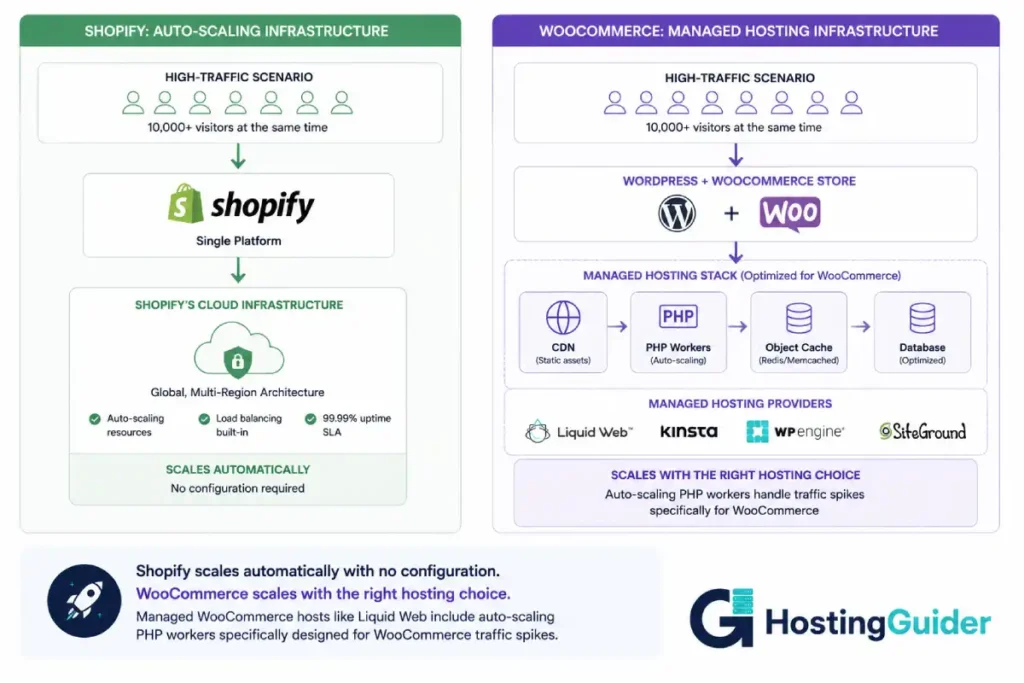
Shopify handles traffic spikes and high order volumes without server management involvement. The infrastructure scales automatically. This is a genuine operational advantage for stores that experience viral moments or seasonal traffic peaks.
The cost of Shopify scaling is the platform fee and transaction fee structure. As revenue grows, Shopify costs more. Moving from Basic to Advanced to Plus follows a predictable but steep price staircase. At $2,000/month for Shopify Plus, you get checkout customisation, dedicated support, and higher API rate limits.
WooCommerce at Scale
WooCommerce on shared or under-resourced hosting does not scale well. Under high concurrent traffic, poorly configured WooCommerce stores produce slow page loads and timeouts. This is a configuration and hosting problem, not a platform problem, but it is real for stores that do not invest in proper infrastructure.
WooCommerce on managed hosting with a caching layer, a CDN, and proper server resources handles high traffic reliably. Our comparison of Cloudways vs Liquid Web covers two platforms built for WooCommerce at scale. Liquid Web includes auto-scaling PHP workers specifically designed for WooCommerce traffic spikes. Cloudways offers cloud infrastructure on five providers with manual scaling options.
For stores with predictable high traffic, WooCommerce on managed hosting with auto-scaling is comparable to Shopify in availability. The difference is that WooCommerce requires the right hosting choice. Shopify handles scaling automatically.
Platform Ownership and Lock-In: Shopify vs WooCommerce Portability
Shopify Lock-In
Moving away from Shopify requires:
- Exporting product data (available as CSV)
- Exporting customer data (available)
- Exporting order history (available)
- Rebuilding your storefront on the new platform (Shopify themes do not transfer)
- Rebuilding your checkout customisations (if any)
- Setting up 301 redirects from all your Shopify URLs to the new platform URLs (important for SEO)
- Reconnecting all payment processors and apps
The data exports are complete enough that migration is possible. The storefront must be rebuilt. Any developer customisations in Liquid must be rewritten in the new platform’s language. The process takes days to weeks for an established store.
WooCommerce Portability
Moving from one WooCommerce host to another: copy the files and database, import to the new host, and update DNS. Twenty to forty minutes with a migration plugin.
Moving from WooCommerce to another platform requires exporting the WooCommerce database, which most platforms can import or which services like Cart2Cart automate. Your theme and customisations are in standard PHP and CSS, which a developer can port more easily than Shopify’s Liquid templates.
The critical difference: moving WooCommerce to a better hosting provider is trivial and costs nothing. Moving from Shopify to another platform is a full store rebuild.
For a growing store that may need to change infrastructure providers as requirements evolve, WooCommerce’s portability is a significant operational advantage.
Who Shopify Is Actually For
Shopify is the right choice for specific, well-defined situations:
- A first-time store owner who wants the fastest path from no store to live store with no technical decisions
- A physical product retailer that needs a clean, reliable checkout with built-in Shopify POS for both online and in-person sales
- A store in a Shopify Payments-supported region selling non-restricted products where the transaction fee is waived
- A seller on multiple channels who uses Shopify’s native Amazon, eBay, and social commerce integrations
- A high-volume store that can justify Shopify Plus at $2,000/month for checkout customisation and dedicated support
- Any seller for whom the simplicity and managed infrastructure are worth the premium over WooCommerce’s flexibility
Who WooCommerce Is Actually For
WooCommerce is the right choice for:
- Any store outside Shopify Payments regions where transaction fees are unavoidable and compounded with revenue
- Any store in a product category restricted from Shopify Payments (supplements, certain accessories, adult products, etc.)
- Any store with a content and SEO strategy where WordPress’s blogging and Yoast SEO capabilities are part of the growth model
- Any store needing custom checkout functionality that would require Shopify Plus at $2,000/month
- Any store selling subscriptions where WooCommerce Subscriptions at $199/year is dramatically cheaper than ReCharge at $99/month
- Any store where the long-term platform cost matters, and the WooCommerce total cost is significantly lower at scale
- Any developer or agency building stores for clients who want full code control and portable infrastructure
For WooCommerce store owners choosing hosting, our Kinsta vs WP Engine comparison covers the two premium managed WordPress and WooCommerce platforms. Our SiteGround vs Cloudways comparison covers the best entry-level managed WooCommerce options with automatic setup, security, and backups included.
Final Verdict
The Shopify vs WooCommerce comparison comes down to one honest question: what does each platform actually cost at your revenue level, and is that difference worth the simplicity trade-off?
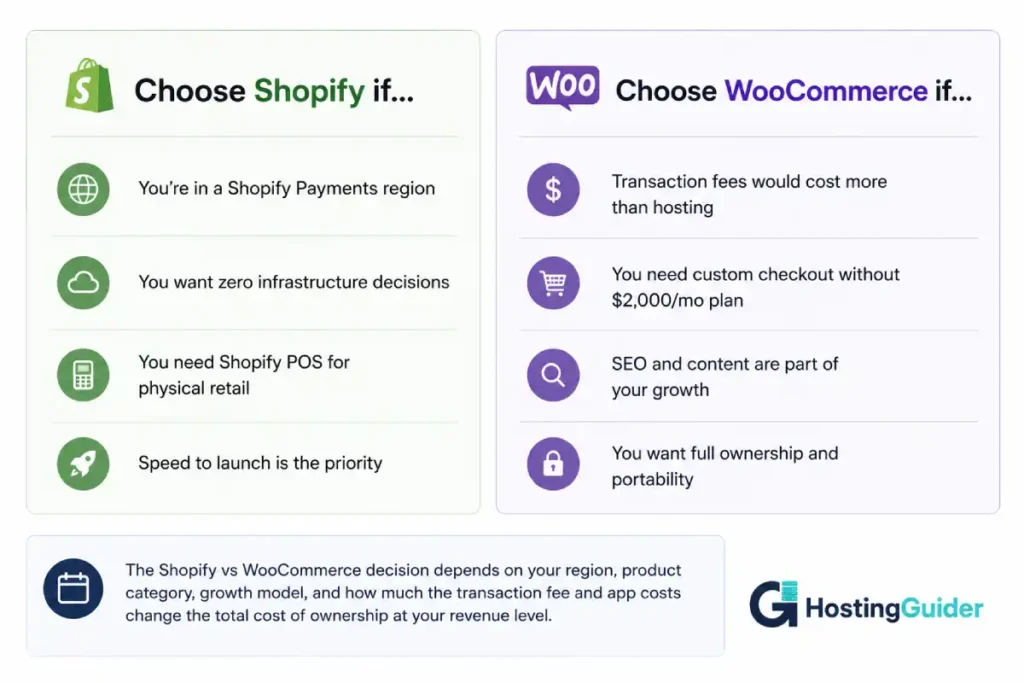
Shopify wins the Shopify vs WooCommerce comparison when: you are in a Shopify Payments-supported region selling non-restricted products, you want no hosting decisions, you value Shopify’s tested checkout and automatic scaling, and the monthly fee plus zero transaction fees is genuinely competitive with WooCommerce at your revenue level.
WooCommerce wins the Shopify vs WooCommerce comparison when: transaction fees would compound meaningfully with your revenue, you need checkout customisation that Shopify reserves for $2,000/month plans, you are building a content and SEO strategy alongside your store, or you want full ownership of your store’s infrastructure and data.
The honest analysis: most ecommerce comparisons declare Shopify the winner for beginners and WooCommerce the winner for technical users. This one draws a different line. The dividing factor is not technical skill. It is the total cost of ownership calculation at your revenue level, your region, and your product category.
Run the numbers for your specific situation before you build. Rebuilding a store after the wrong choice is measured in weeks of work, not hours.
Final Summary Table
| Category | Shopify | WooCommerce |
|---|---|---|
| Platform fee | $39 to $399/month | $0 (hosting only) |
| Transaction fees | 0% to 2% (waived on Shopify Payments) | Zero |
| App ecosystem | 8,000+ apps (many paid) | 60,000+ plugins (mostly free) |
| Checkout customisation | Shopify Plus only ($2,000/mo) | All plans |
| SEO capability | Good | Excellent |
| Ease of setup | Fastest | Moderate (managed hosting) |
| Scalability | Automatic | Requires hosting choice |
| Design flexibility | Good (Liquid) | Excellent (standard PHP/CSS) |
| Data ownership | Shopify-controlled | Full |
| Platform lock-in | High | Low |
| Best for beginners | Yes | Yes (with managed hosting) |
| Best for scale | Depends on transaction fees | Yes (zero transaction fees) |
Frequently Asked Questions
Shopify vs WooCommerce Pricing: Is WooCommerce Really Free?
WooCommerce the plugin is free. Running a WooCommerce store requires a WordPress hosting account (typically $15 to $50/month for managed hosting suitable for ecommerce) and a domain name (~$15/year). There are no transaction fees and no platform revenue cut. Additional functionality comes from free or paid plugins. The total cost is typically $300 to $600 per year for a functional ecommerce store, compared to $468+ per year for Shopify Basic before transaction fees and app costs.
Does Shopify charge transaction fees if you use Stripe?
Yes. Shopify charges transaction fees of 2% (Basic), 1% (Shopify), or 0.5% (Advanced) when you use Stripe, PayPal, or any payment processor other than Shopify Payments. These fees are in addition to Stripe’s own processing fees (typically 2.9% + $0.30 per transaction). The only way to avoid Shopify transaction fees is to use Shopify Payments, which is only available in certain countries and has a restricted product category list.
Can WooCommerce handle a high-traffic store?
Yes, with the right hosting. WooCommerce performance depends on hosting infrastructure. A well-configured WooCommerce store on managed hosting with a full-page cache, object cache, and CDN handles thousands of concurrent visitors reliably. The same WooCommerce setup on shared hosting performs poorly under traffic spikes. Shopify handles scaling automatically. WooCommerce requires the correct hosting configuration but is capable of handling enterprise-level traffic on appropriate infrastructure.
Is Shopify better for beginners than WooCommerce?
Shopify is faster to set up and requires fewer initial decisions. For a non-technical seller who wants a store live today with no hosting, plugin, or configuration decisions, Shopify is genuinely easier. Managed WooCommerce hosting has closed the gap significantly for technical ease, but Shopify remains the simpler starting point. The right question is not which is easier to start, but which is cheaper and more flexible at the revenue level you expect to reach.
Shopify vs WooCommerce Migration: Can I Switch from Shopify to WooCommerce?
Yes. Shopify allows full export of product data, customer data, and order history as CSV files. WooCommerce can import these with migration plugins or services like Cart2Cart. The challenge is your storefront: Shopify themes built in Liquid do not transfer to WordPress. You rebuild the visual design on WooCommerce using a WordPress theme and page builder. For stores with significant custom Shopify theme development, the rebuild is the largest part of the migration cost.
Does WooCommerce need a developer to set up?
Not for a standard store setup. Managed WooCommerce hosting providers like SiteGround, WP Engine, and Cloudways install WordPress and WooCommerce automatically. The WooCommerce setup wizard handles payment processors, shipping zones, and tax configuration through a guided interface. A non-technical store owner can launch a standard WooCommerce store on managed hosting without developer help. A developer becomes necessary for custom checkout functionality, complex integrations, or advanced design work beyond standard theme customisation.
Which platform is better for subscription products?
WooCommerce with WooCommerce Subscriptions costs $199 per year for the extension. Shopify requires an app like ReCharge, which costs $99 to $499 per month depending on revenue. For a store with subscription products, WooCommerce is significantly cheaper for this feature category alone. At $99/month for ReCharge versus $199/year for WooCommerce Subscriptions, the annual savings on this single feature covers a full year of managed WooCommerce hosting.


