
A content delivery network (CDN) is a distributed network of servers that delivers website content from locations closer to visitors.
Instead of sending every request directly to your origin server, a CDN can serve cached files from an edge location near the visitor.
That reduces the distance content has to travel, lowers the number of requests reaching your origin, and can improve loading performance for visitors who are geographically far from your server.
A CDN can cache images, CSS, JavaScript, fonts, videos, downloads, and, in the right configuration, even public HTML pages.
It can also provide services such as TLS termination, DDoS protection, bot filtering, and web application firewall (WAF) rules.
This guide explains how CDNs actually work, what they cache, how edge routing works, how to configure one, how to read cache headers with curl, and how to troubleshoot a CDN that isn’t caching as expected.
Key Takeaways
- A CDN stores cached copies of content at distributed edge locations and serves those copies when requests match the cache.
- A cache hit lets the CDN respond without contacting your origin server, reducing origin load and usually reducing latency.
- A CDN does not automatically make every request faster. Uncached or dynamic requests still have to reach the origin, although some providers can optimize the network connection between the edge and origin.
- CDN routing is based on network conditions and provider-specific routing systems, not simply the geographically closest server.
- HTTP headers such as
Cache-Control,Age,ETag, and provider-specific cache-status headers can help you determine what happened to a request. CF-Cache-Statusis specific to Cloudflare. Other CDN providers use different headers and meanings.- A CDN does not replace web hosting. Your origin still runs your application, database, and other server-side components.
- Incorrect caching rules can create stale content or, in the worst case, expose personalized content to another visitor.
- The safest way to troubleshoot caching is to inspect the response headers rather than relying only on how fast a page feels.
Quick Answer
A CDN is a distributed network of servers that caches and delivers website content from locations closer to visitors.
When a requested resource is already cached at an appropriate edge location, the CDN can serve it without contacting the origin server. This can reduce latency, lower origin-server load, and improve delivery performance.
CDNs can also provide security and networking features, including TLS termination, DDoS mitigation, WAF rules, traffic filtering, and optimized connections between visitors and the origin.
What a CDN Actually Does
Imagine a visitor in Tokyo loading a website whose origin server is in Virginia.
Without a CDN, the visitor’s browser has to establish a connection to the website’s infrastructure and retrieve the requested resources through the network path between Tokyo and Virginia.
With a CDN, the site’s static resources may already exist at an edge location much closer to the visitor. The CDN can then return those resources from the edge instead of fetching them from Virginia for every request.
The server that contains the original application and content is called the origin server.
The distributed servers that handle requests and may store cached copies are generally called edge servers. CDN providers group these servers into locations commonly referred to as points of presence (PoPs).
A CDN is, at its core, a geographically distributed network that brings content closer to users through edge servers and caching.
The important distinction is simple:
Origin: where your application and original content live.
Edge: where the CDN handles visitor requests and may store cached copies.
Why a CDN Can Help Even When a Request Is Not Cached
Caching is the biggest reason CDNs improve performance, but it is not the only possible benefit.
Some requests cannot or should not be cached. Examples include:
- Logged-in account pages
- Personalized API responses
- Shopping carts
- Checkout requests
- Requests containing private user information
- Frequently changing application data
Those requests still need to reach the origin.
However, a CDN may still improve the network path between the visitor and origin. Depending on the provider and configuration, the CDN can maintain optimized connections to the origin, use persistent connections, or provide other network-level optimizations.
Many CDNs maintain persistent connections to the origin as part of their delivery architecture, which helps here too.
But this distinction matters:
A CDN does not magically make a slow application fast.
If your database takes two seconds to produce a response, putting a CDN in front of it does not turn that database query into a fast query.
Caching can avoid that database work entirely when a response is cacheable. An uncached request still depends on the origin’s application, database, and network performance.
How a CDN Actually Works
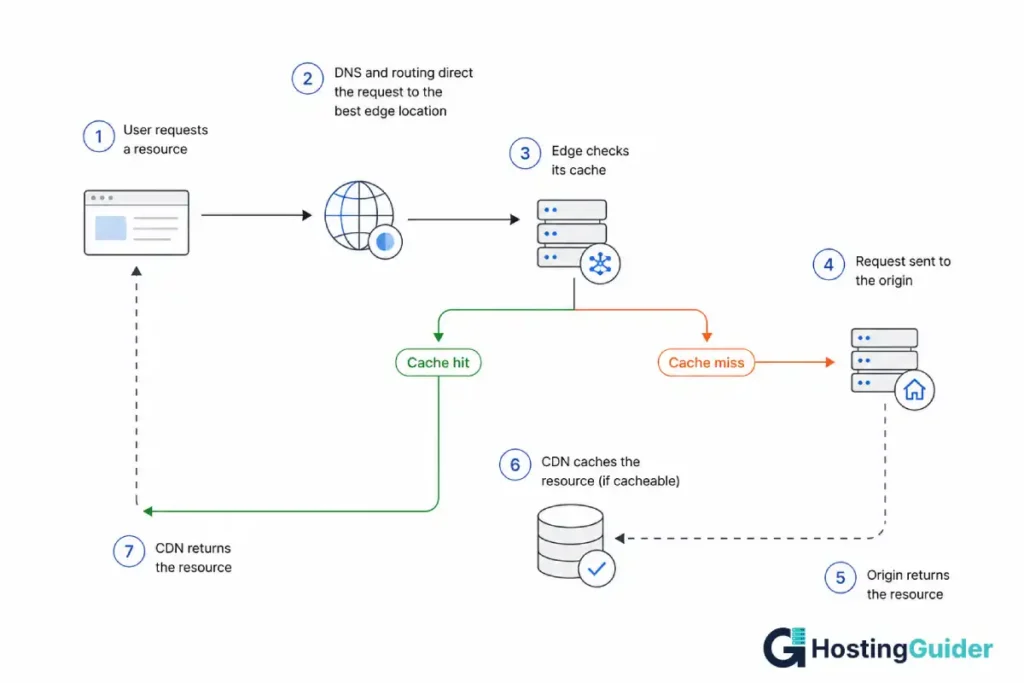
The basic request flow looks like this:
- A visitor requests a resource from your website.
- DNS and the CDN’s routing system direct the request toward an appropriate CDN edge location.
- The edge checks whether it has a valid cached copy.
- If it does, the CDN returns the cached object. This is a cache hit.
- If it does not, the CDN sends a request toward the origin or another cache tier. This is a cache miss.
- The origin returns the resource.
- If the resource is cacheable, the CDN stores it according to its caching rules.
- Future matching requests can be served from the cache until the object expires, is revalidated, evicted, or purged.
This is the same flow CDNs like CloudFront use in practice: DNS routes the request to an appropriate edge location, the edge checks its cache, and a cache miss causes the CDN to retrieve the object from the origin and store it for subsequent requests.
Cache Hit vs. Cache Miss
A cache hit means the CDN already has a valid response matching the request’s cache key.
A cache miss means the CDN does not have a usable cached response for that request.
For example:
Visitor
   ↓
CDN edge
   ↓
Cache lookup
   ├── HIT  → return cached file
   │
   └── MISS → request origin
                ↓
             response
                ↓
             store cache
                ↓
             return file
The more requests your CDN can serve from its cache, the fewer requests your origin has to process. This proportion of requests served from cache is called the cache hit ratio.
CDN vs. Web Hosting
A CDN and web host solve different problems.
| Technology | Main job | Where content is generated or stored |
|---|---|---|
| CDN | Delivers content from edge locations | CDN edge/cache |
| Web hosting | Runs your website and application | Origin server |
| Database | Stores application data | Database server/service |
| Browser cache | Stores resources on the visitor’s device | Visitor’s browser |
| Server/page cache | Stores generated responses near the application | Origin infrastructure |
A CDN does not normally replace your web host.
Your hosting server still runs PHP, Node.js, Python, databases, WordPress, or whatever application powers your website.
The CDN sits in front of that infrastructure and handles requests according to its routing, caching, and security rules.
CDN, Reverse Proxy, and Cache Plugin: What’s the Difference?
These technologies overlap, but they are not interchangeable.
| Technology | What it does |
|---|---|
| CDN | Distributed edge network that can cache and deliver content from multiple locations |
| Reverse proxy | Sits in front of an origin and forwards requests to it |
| Server/page cache | Stores generated responses so the application does less work |
| Browser cache | Stores resources on the visitor’s device |
A CDN is commonly implemented using reverse-proxy architecture, but a reverse proxy does not have to be a global CDN.
A WordPress caching plugin is different again. It normally operates on the website’s hosting environment and can store generated pages or other resources.
You can use several of these layers together.
For example:
Visitor
   ↓
CDN
   ↓
Server/page cache
   ↓
WordPress/application
   ↓
Database
The important part is making sure the layers have compatible rules.
DNS Basics You Need Before Setting Up a CDN
Many CDN setups involve changing DNS, so you need to understand the difference between DNS records and CDN proxying.
A nameserver identifies which DNS service is authoritative for a domain.
A DNS record tells that DNS service where a hostname should resolve.
A CDN proxy can place the CDN in the path between the visitor and the origin.
These are separate concepts.
Common DNS Records
| Record | Purpose |
|---|---|
| A | Maps a hostname to an IPv4 address |
| AAAA | Maps a hostname to an IPv6 address |
| CNAME | Maps one hostname to another hostname |
| MX | Specifies mail servers for a domain |
| TXT | Stores text such as verification and policy records |
| NS | Identifies authoritative nameservers |
The MX record deserves special attention.
If you change nameservers and fail to preserve your existing mail-related DNS records, your website may continue working while email stops working.
Before changing DNS, record the existing DNS configuration.
How a CDN Chooses an Edge Location
A CDN does not simply look at a map and select the geographically closest server.
Providers use different routing technologies and measurements to direct traffic.
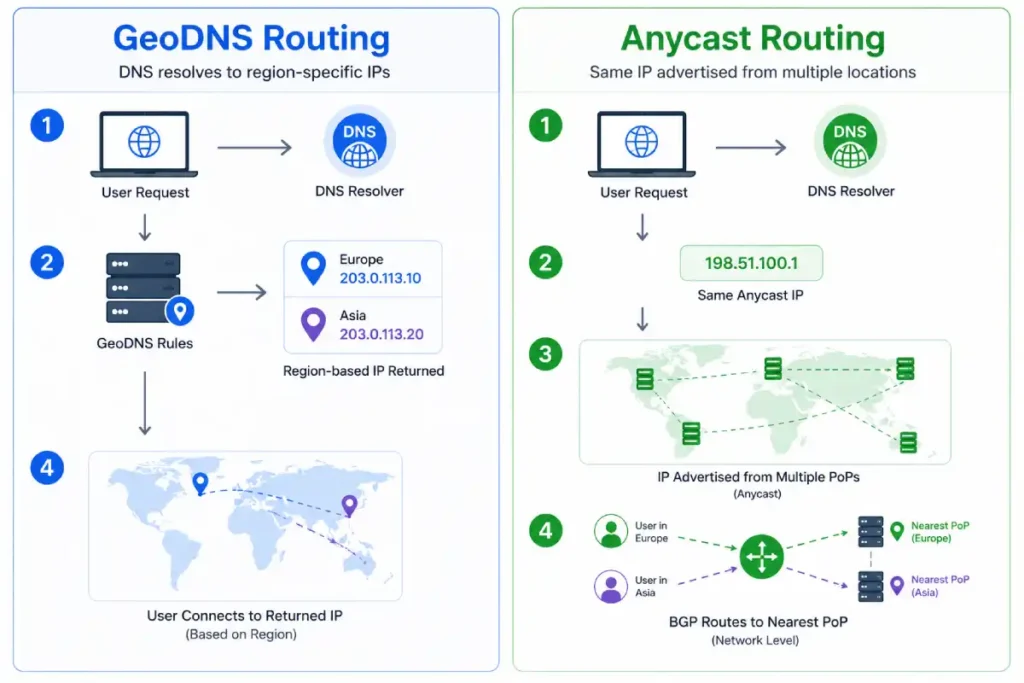
GeoDNS
With GeoDNS, DNS responses can vary based on the geographic location associated with the DNS request.
That can help direct visitors toward an appropriate region.
However, DNS-based location decisions are not necessarily based on the visitor’s exact physical location. Recursive DNS resolvers, VPNs, proxies, and other network configurations can affect the result.
Anycast
Anycast allows the same IP address to be advertised from multiple network locations.
Internet routing then determines where the traffic is delivered based on routing information and network topology.
This means the selected location is not necessarily the geographically closest server.
The practical takeaway is:
CDNs try to select an edge location that provides a good network path, not simply the shortest geographic distance.
Different CDN providers combine routing technologies in different ways, so you should not assume that all CDNs make routing decisions identically.
What Does a CDN Cache?
A CDN can cache many types of resources, but whether a particular response is cacheable depends on the CDN configuration, HTTP headers, request characteristics, and provider rules.
Static Content
Static resources are usually the easiest to cache:
- Images
- CSS
- JavaScript
- Fonts
- Public videos
- Software downloads
- Public PDFs
Because these resources are generally identical for many visitors, they can often be cached for relatively long periods.
Dynamic Content
Dynamic content can be much more complicated.
Examples include:
- Shopping carts
- Account pages
- Personalized dashboards
- Logged-in pages
- Personalized API responses
- Content that changes based on cookies
A CDN can sometimes cache dynamic-looking content, but only when the caching configuration safely accounts for the factors that make responses different.
The key question is not:
Is this URL dynamic?
It is:
Can the exact response safely be reused for another request?
If the answer is no, it should not be shared through a normal CDN cache.
Pull CDN vs. Push CDN
Most modern CDN workflows are effectively pull-based.
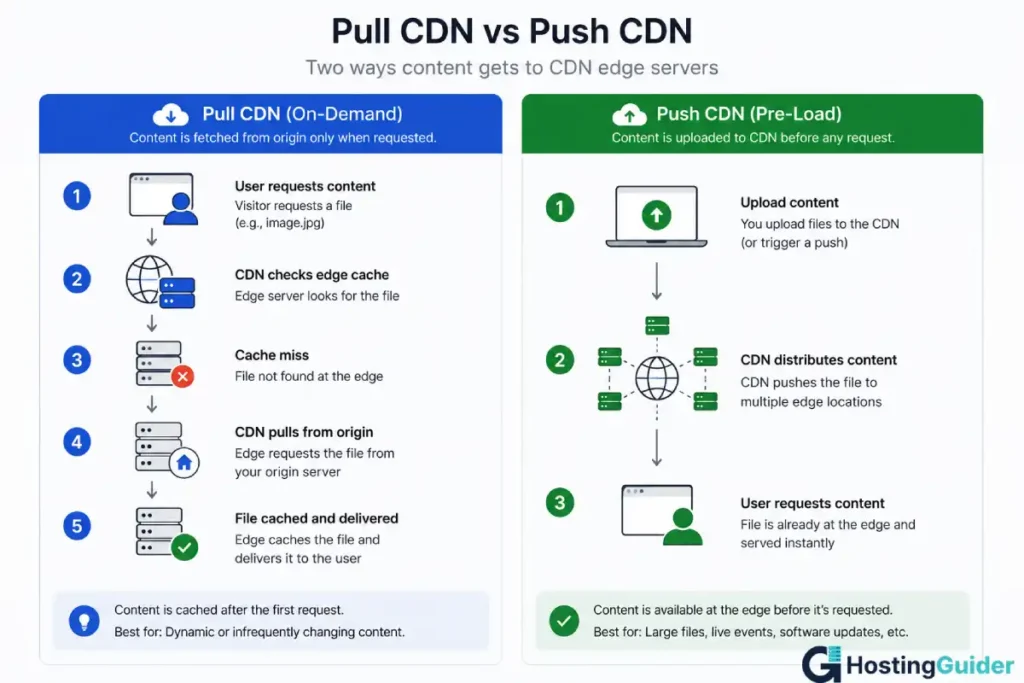
With a pull CDN:
- A visitor requests a resource.
- The edge does not have it.
- The CDN retrieves it from the origin.
- The CDN stores it if the response is cacheable.
- Future requests can use that cached copy.
This requires little manual work.
A push CDN uses a different model: content is uploaded or distributed to the CDN before visitors request it.
Push-style distribution can be useful for large files or controlled delivery workflows, although pull-based caching is the common model for ordinary websites.
What Is a Cache Key?
The cache key determines whether two requests are considered requests for the same cached object.
This is one of the most important concepts in CDN caching.
Suppose your site receives:
https://example.com/image.jpg
and:
https://example.com/image.jpg?campaign=email
Depending on the CDN configuration, the query string may or may not form part of the cache key.
If it does, those requests can become separate cache objects.
The cache key can potentially include things such as:
- Hostname
- URL path
- Query strings
- Selected cookies
- Selected request headers
The exact behavior depends on the provider.
Most major CDNs, including CloudFront, let administrators control which query strings, cookies, and headers contribute to the cache key.
Why Cache Keys Matter
A cache key that includes unnecessary values can fragment your cache.
For example, if these all represent the same page:
/blog
/blog?utm_source=email
/blog?utm_source=facebook
/blog?utm_source=newsletter
but the CDN treats every query string as unique, the cache can end up storing several versions of essentially the same content.
Where appropriate, configure the CDN to ignore tracking parameters that do not change the response.
Do not blindly remove query strings from the cache key if they actually change the content.
Cache Hit Ratio
The cache hit ratio is the proportion of requests that are served from the cache rather than requiring a trip to the origin.
A simple formula is:
Cache Hit Ratio =
Cache Hits ÷ Total Cacheable Requests × 100
There is no single cache-hit percentage that every website should target.
A site dominated by static images and assets may naturally have a high hit ratio.
A personalized application with many dynamic requests may have a much lower ratio.
The useful question is:
Is your cache hit ratio appropriate for the content you expect to be cacheable?
Cache hit ratio depends on the site’s content and cache configuration, and it can be improved by reducing unnecessary values in the cache key.
Query Strings and Cache Efficiency
Tracking parameters are a common source of unnecessary cache fragmentation.
For example:
/article?utm_source=email
/article?utm_source=facebook
/article?utm_source=twitter
If the content is identical and the CDN includes the entire query string in the cache key, each URL can become a separate cache entry.
Where your CDN supports it, you can configure caching so that parameters that do not affect the response are excluded from the cache key.
Be careful with parameters that actually change content.
For example:
/image?size=small
/image?size=large
should not be treated as the same resource if they return different files.
Understanding the Vary Header
The Vary response header tells caches that a response can change based on specified request headers.
For example:
Vary: Accept-Encoding
This tells caches that the response can differ according to the compression formats supported by the client.
Vary exists for an important reason: it helps prevent a cache from serving the wrong representation to another request.
The goal should therefore not be to remove Vary simply to increase cache hits.
Instead, avoid adding unnecessary values that cause the CDN to maintain multiple versions when those variations are not actually needed.
Reading CDN Cache Headers With curl
One of the fastest ways to determine whether your CDN is working is to inspect the HTTP response headers.
Run:
curl -sI https://yoursite.com/some-image.jpg
You may see output similar to:
HTTP/2 200
cache-control: public, max-age=3600
age: 1245
etag: "abc123"
content-type: image/jpeg
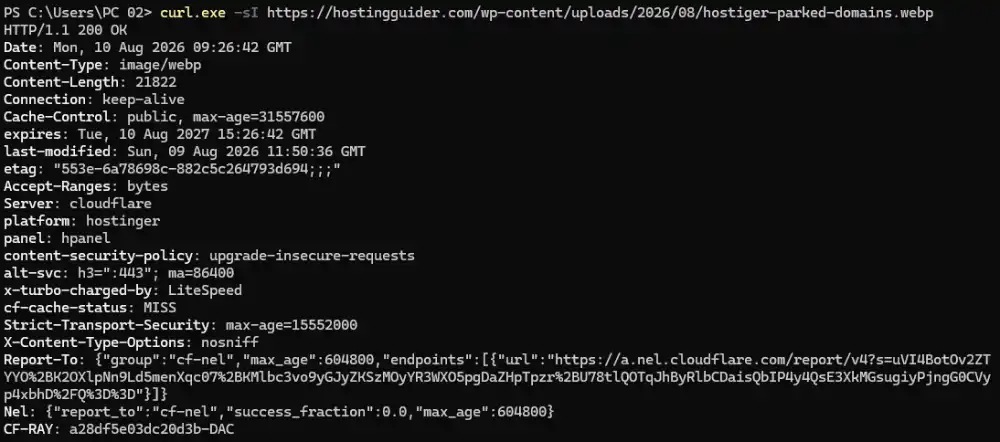
The exact headers vary by CDN.
Useful headers include:
| Header | What it tells you |
|---|---|
Cache-Control | Caching instructions |
Age | Approximate time a cached response has been stored |
ETag | Identifier for a particular representation |
Last-Modified | Last modification timestamp |
Vary | Request headers that can affect the response |
| Provider-specific cache header | Whether the provider considers the response a hit, miss, bypass, etc. |
Cloudflare
Cloudflare uses:
CF-Cache-Status
Other Providers
Other CDN systems may expose headers such as:
X-Cache
X-Cache-Hits
X-LiteSpeed-Cache
The meaning is provider-specific.
Do not assume that X-Cache: HIT or X-Cache: MISS has exactly the same behavior across every CDN.
Cache-Control Explained
Cache-Control is one of the most important HTTP headers for understanding caching.
Consider:
Cache-Control: public, max-age=3600, s-maxage=86400
Here:
publicindicates that the response may be stored in a shared cache.max-age=3600allows a client cache to consider the response fresh for 3,600 seconds.s-maxage=86400specifies a separate freshness lifetime for shared caches such as CDNs.
private
Cache-Control: private
This is appropriate when the response contains information intended for a specific user and should not be stored in a shared cache.
no-store
Cache-Control: no-store
This instructs caches not to store the response.
no-cache
This is one of the most misunderstood directives.
Cache-Control: no-cache
does not mean “never store this response.”
It means a stored response must be revalidated before being reused.
MDN explicitly distinguishes no-cache from no-store: no-cache allows storage but requires revalidation, while no-store prevents storage.
That distinction matters when troubleshooting a CDN.
ETag and Conditional Requests
An ETag identifies a particular representation of a resource.
For example:
ETag: "abc123"
When a cached response needs validation, a client or intermediary can send:
If-None-Match: "abc123"
If the resource has not changed, the server can respond:
304 Not Modified
This avoids retransmitting the complete resource.
Last-Modified and If-Modified-Since provide another mechanism using modification timestamps.
To inspect common caching headers:
curl -sI https://yoursite.com/some-image.jpg | grep -iE "cache|age|etag|vary"
On Windows PowerShell, you can simply inspect the full output:
curl.exe -I https://yoursite.com/some-image.jpg
Cloudflare’s CF-Cache-Status Values
If you use Cloudflare, the CF-Cache-Status response header provides useful information about how Cloudflare handled a request.
Common values include:
| Status | General meaning |
|---|---|
HIT | The response was served from Cloudflare’s cache |
MISS | The response was not already cached and had to be fetched |
DYNAMIC | Cloudflare determined the response was not eligible for caching |
BYPASS | The request was eligible, but caching was bypassed because of response/configuration conditions |
EXPIRED | A previously cached object had expired |
REVALIDATED | The cached resource was checked with the origin and confirmed unchanged |
STALE | A stale cached response was served |
UPDATING | A stale response may be served while Cloudflare updates the cached object |
NONE/UNKNOWN | The response did not receive a normal cache-status classification |
Cloudflare’s current documentation distinguishes DYNAMIC from BYPASS: DYNAMIC means the asset was not eligible for caching at request time, while BYPASS can occur when a response is otherwise eligible but origin headers or another condition prevents caching.
Cloudflare also documents UPDATING behavior for asynchronous stale-while-revalidate workflows.
These meanings are Cloudflare-specific.
Do not apply them to another CDN without checking that provider’s documentation.
What Does the Age Header Mean?
The Age header indicates approximately how long a response has been stored in a shared cache.
For example:
Age: 1245
means the cached response has been in that cache for roughly 1,245 seconds.
Age is associated with responses served from cache, and it can reset after revalidation, purge, eviction, and subsequent caching.
Age is useful evidence, but do not use it alone to determine exactly which CDN layer served the response.
Modern CDNs can have multiple cache tiers.
Why Isn’t My CDN Caching This File?
If a resource that should be cacheable keeps showing a miss or non-cacheable status, work through the following checklist.
1. Confirm the Request Is Going Through the CDN
Check the response headers.
Look for the CDN’s identifying headers or other evidence that the request passed through the CDN.
2. Check the HTTP Method
Most CDN caching systems primarily cache GET and HEAD requests.
Other methods, such as POST, generally require different handling.
3. Check Cache-Control
Look for directives such as:
Cache-Control: private
or:
Cache-Control: no-store
These can prevent shared caching.
4. Check for Cookies
Responses that set cookies may be treated differently by a CDN.
For example:
Set-Cookie: session=abc123
can indicate that the response is associated with a user session.
5. Check CDN Cache Rules
A cache rule may explicitly exclude:
/wp-admin/
login pages
checkout pages
API endpoints
specific file types
specific URL paths
6. Check the Cache Key
A query string, cookie, or header may be causing each request to represent a different cache object.
7. Check Expiration and Revalidation
The object may have expired or been revalidated recently.
8. Check the Edge Location
Different edge locations can have different cache states.
A resource may be a HIT in one location and a MISS in another.
Do not treat one request from one location as a complete representation of global CDN behavior.
Purging, Eviction, and Cache Busting
These three concepts are different.
Purging
A purge is an explicit instruction to remove cached content.
For example, after updating:
/article/example
you can purge that URL.
Eviction
An eviction happens when the CDN removes an object automatically, often because cache storage needs to be reused or the object is no longer valuable enough to retain.
You do not necessarily trigger an eviction yourself.
Cache Busting
Cache busting changes the resource URL so the CDN treats it as a new object.
For example:
style.css
becomes:
style-v2.css
Modern build systems commonly use content hashes:
style.a84f91.css
This is often preferable to repeatedly purging long-lived static assets.
Why Cache Busting Works
Suppose the CDN already contains:
/app.css
You replace the contents of that file.
The CDN may still have the old version until the object expires or is purged.
If you instead deploy:
/app.7f3a21.css
the CDN has never seen that exact URL.
It therefore fetches the new file and caches it as a new object.
This allows CSS and JavaScript to use long cache lifetimes without forcing a global purge after every deployment.
What to Record Before Enabling a CDN
Before changing your DNS or CDN configuration, create a baseline.
Record:
- Current DNS records
- Origin server IP address
- Current nameservers
- Email-related DNS records
- Important subdomains
- Current page performance
- Current TTFB
- Current response headers
- Important API endpoints
- Logged-in areas
- Checkout and cart URLs
- Any existing caching rules
If something breaks after activation, this baseline gives you something to compare against.
How to Set Up a CDN
The exact process varies by provider, but the general workflow is:
- Create a CDN account.
- Add your domain or hostname.
- Configure the origin server.
- Review imported DNS records.
- Preserve required DNS records, especially mail-related records.
- Update nameservers or configure the provider’s supported DNS/CNAME method.
- Wait for the domain to become active.
- Enable proxying or CDN delivery for the desired web traffic.
- Configure HTTPS.
- Configure cache rules.
- Exclude private or personalized content.
- Verify the response headers.
- Test the website from multiple locations.
- Monitor performance and cache behavior.
Using Cloudflare as an Example
Cloudflare is a useful example because it combines DNS, CDN delivery, TLS, caching, and security features.
The exact dashboard interface can change, so focus on the underlying configuration rather than memorizing button locations.
Step 1: Add Your Domain
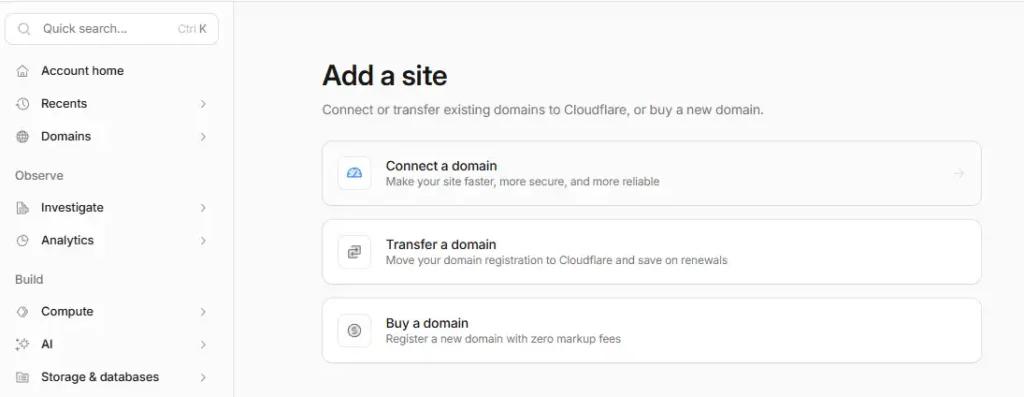
Add your domain to the CDN provider.
The provider will typically ask you to configure your existing DNS setup.
Step 2: Review DNS Records
Compare the provider’s DNS records against your baseline.
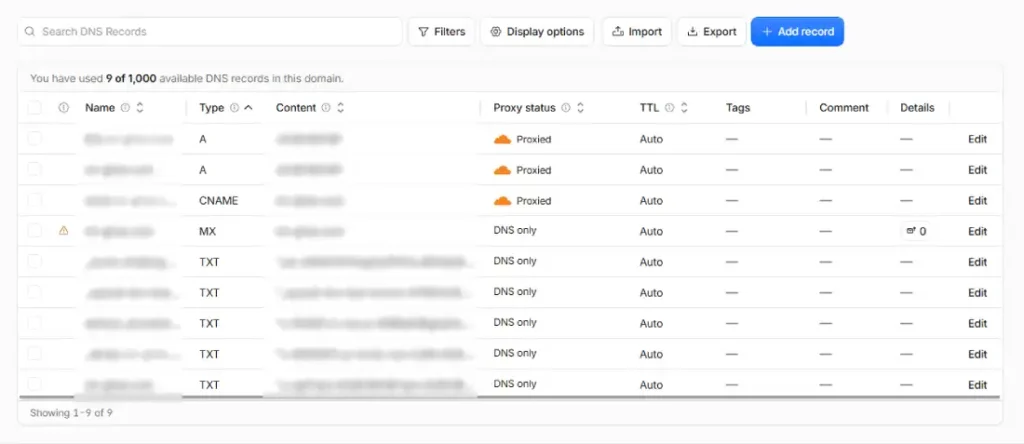
Pay particular attention to:
AAAAACNAMEMXTXT- Important subdomains
Do not assume the automatic DNS import is perfect.
Step 3: Change Nameservers or Configure DNS
If the provider requires nameserver delegation, change the domain’s authoritative nameservers at your registrar.
If the provider supports another integration method, follow its current instructions.
Step 4: Enable Proxying
For supported web records, enable CDN proxying.
A proxied request travels through the CDN.
A DNS-only record resolves through DNS but does not necessarily place the web request behind the CDN.
This distinction is important.
Step 5: Configure HTTPS
Your visitor-to-CDN connection should use HTTPS.
You also need to decide how the CDN connects to your origin.
The safest general configuration is to use HTTPS from the CDN to the origin with a valid origin certificate.
CDN SSL/TLS: Two Separate Connections
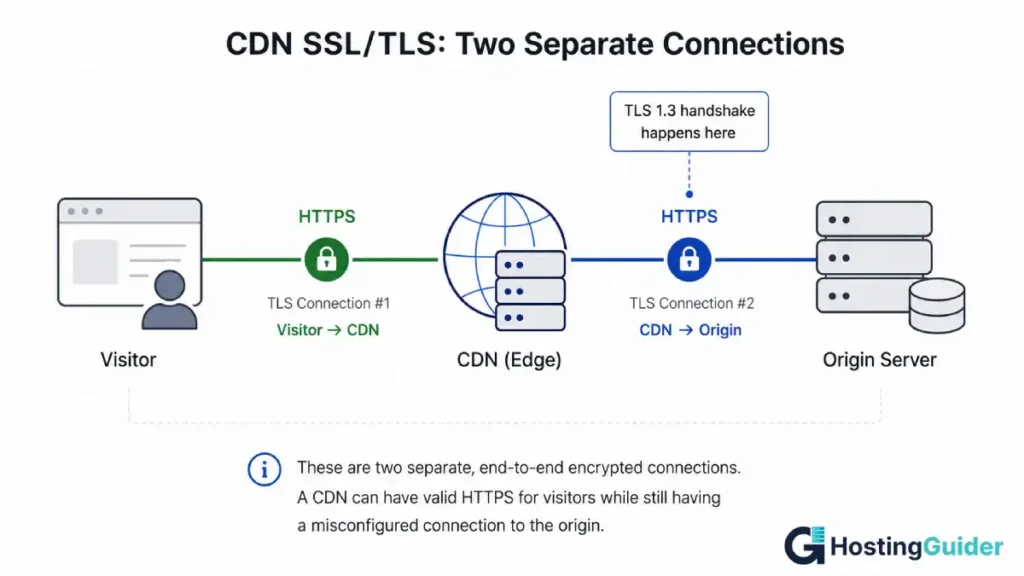
There are two encryption paths to think about:
Visitor
   │
 HTTPS
   ↓
CDN
   │
 HTTPS
   ↓
Origin
The first connection is:
Visitor → CDN
The second is:
CDN → Origin
These are separate.
A CDN can have valid HTTPS for visitors while still having a misconfigured connection to the origin.
Redirect Loops
One common configuration problem occurs when the CDN connects to the origin using HTTP while the origin forces HTTP requests to redirect to HTTPS.
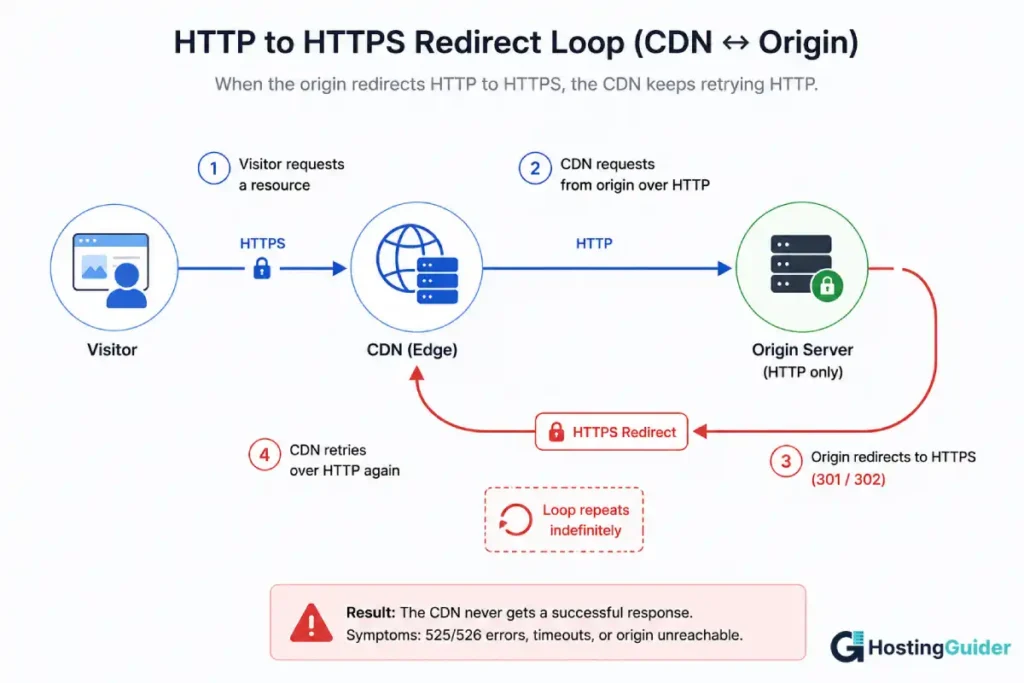
The result can become a loop:
CDN → HTTP origin
       ↓
origin redirects → HTTPS
       ↓
CDN repeats HTTP request
       ↓
redirect again
The exact behavior depends on the CDN’s configuration and your origin rules.
The solution is to configure the CDN-to-origin encryption mode and origin redirects consistently.
CDN Security
A CDN can provide an additional security layer because it sits between visitors and your origin.
Common CDN security features include:
- DDoS mitigation
- Web application firewall rules
- Bot filtering
- Rate limiting
- TLS termination
- IP filtering
- Traffic inspection
A CDN does not replace server security.
If an attacker can discover and directly reach your origin IP, they may be able to bypass CDN protections.
For sites that require the CDN to be the only public path to the origin, configure the origin firewall to restrict web traffic to the CDN provider’s published IP ranges where appropriate.
Do Not Cache Private Content
This is one of the most important CDN rules.
Never blindly cache pages that contain user-specific information.
Examples include:
- Account dashboards
- Shopping carts
- Checkout pages
- Private API responses
- Password-protected content
- Personalized user pages
A cache does not understand your business logic simply because a URL looks harmless.
If the same cache object can be served to multiple users, you must ensure that the response is safe to share.
CDN Compression
CDNs can compress text-based resources before delivering them.
Common compression technologies include:
- Gzip
- Brotli
Brotli is widely used for web text resources such as HTML, CSS, and JavaScript.
Compression reduces the number of bytes transferred between the CDN and visitor.
It does not, however, fix:
- Excessive JavaScript execution
- Slow database queries
- Poor server-side code
- Large images
- Third-party script delays
Compression is one optimization layer, not a complete performance solution.
HTTP/2 and HTTP/3
Modern CDNs commonly support newer HTTP protocols.
HTTP/2
HTTP/2 supports multiplexing, allowing multiple requests and responses to share a connection.
HTTP/3
HTTP/3 uses QUIC instead of TCP.
One advantage is that packet loss affecting one stream does not create the same connection-level blocking behavior associated with TCP.
These protocols can improve connection efficiency, particularly on networks with latency or packet loss.
You generally do not implement the underlying transport protocol yourself when using a CDN. The CDN provider handles much of the protocol negotiation.
CDN Speed and SEO
A CDN can improve website performance, but it is important not to oversimplify the SEO relationship.
Using a CDN is not, by itself, a guaranteed ranking boost.
What a CDN can do is improve aspects of user experience and technical performance.
For example, a CDN may:
- Reduce latency for distant visitors
- Lower TTFB for cacheable content
- Reduce origin workload
- Improve asset delivery
- Handle traffic spikes more efficiently
Google says Core Web Vitals are used by its ranking systems, while also emphasizing that good Core Web Vitals alone do not guarantee high search rankings.
Google’s current Core Web Vitals targets are:
| Metric | Good target |
|---|---|
| LCP | ≤ 2.5 seconds |
| INP | ≤ 200 ms |
| CLS | ≤ 0.1 |
A CDN can contribute to better performance, but it is only one part of the overall page-speed picture.
A slow database, oversized images, excessive JavaScript, poor rendering architecture, or third-party scripts can still produce poor Core Web Vitals even with an excellent CDN.
TTFB and CDN Performance
Time to First Byte (TTFB) measures how quickly the browser receives the first byte of the response.
A CDN can improve TTFB when it serves a resource directly from an edge cache.
For a cache hit:
Visitor → nearby CDN edge → response
For a cache miss:
Visitor → CDN edge → origin → CDN edge → visitor
The second path still depends heavily on the origin.
That is why measuring only TTFB without checking cache status can produce misleading conclusions.
How to Test Whether a CDN Is Actually Helping
Do not judge a CDN based on one page load.
A better test controls as many variables as possible.
Test the Same URL
Use the exact same URL before and after the CDN change.
Test the Same Location
If possible, test from the same geographic location and network.
Test Multiple Times
The first request may be a cache miss.
Later requests may be cache hits.
Compare Multiple Signals
Record:
- CDN cache status
Age- TTFB
- Total response time
- Page load time
- Origin response time where available
- Cache hit ratio
- Core Web Vitals
A useful test looks something like:
| Test | Before CDN | After CDN |
|---|---|---|
| TTFB | 650 ms | 180 ms |
| Cache status | N/A | HIT |
| Asset response | 300 ms | 45 ms |
| Origin requests | High | Lower |
The exact numbers will vary by site.
Do not compare an uncached request from one country with a cached request from another and call the difference a CDN improvement.
That is not a controlled comparison.
What a CDN Does Not Fix
A CDN is not a replacement for performance engineering.
It does not automatically fix:
- Slow database queries
- Inefficient application code
- Excessive JavaScript
- Large images
- Slow plugins
- Slow third-party scripts
- Poor server configuration
- Large HTML documents
- Layout instability
- Poor rendering architecture
If your origin takes three seconds to generate a page and that page is not cached, the CDN cannot eliminate those three seconds.
The correct approach is to identify whether the bottleneck is:
Network
↓
CDN
↓
Origin
↓
Application
↓
Database
↓
Browser rendering
Then optimize the layer responsible for the delay.
Should You Cache HTML?
Caching HTML can produce significant performance improvements, but it requires more care than caching images.
A public blog post may be safe to cache.
A personalized account page is not.
Before caching HTML, ask:
- Does the response contain user-specific information?
- Does it depend on cookies?
- Does it depend on login state?
- Does it vary by location?
- Does it vary by device or request headers?
- How quickly must content updates reach visitors?
Good Candidates for HTML Caching
- Public blog posts
- Public documentation
- Public landing pages
- Public category pages
- Public product pages without user-specific content
Poor Candidates
- Cart
- Checkout
- Account pages
- Private dashboards
- Personalized pages
- Session-specific content
A Practical CDN Cache Strategy
Use this as a starting point rather than a universal rule.
| Content | Typical approach |
|---|---|
| Images | Cache for a long duration |
| Fonts | Cache for a long duration |
| Versioned CSS | Cache for a long duration |
| Versioned JavaScript | Cache for a long duration |
| Public PDFs | Usually cache |
| Public downloads | Usually cache |
| Public blog posts | Cache with an appropriate TTL |
| Public HTML | Cache carefully |
| Personalized pages | Do not share-cache by default |
| Cart | Exclude |
| Checkout | Exclude |
| Account pages | Exclude |
| Personalized APIs | Exclude by default |
CDN Caching vs. Website Caching
Caching can happen at several levels.
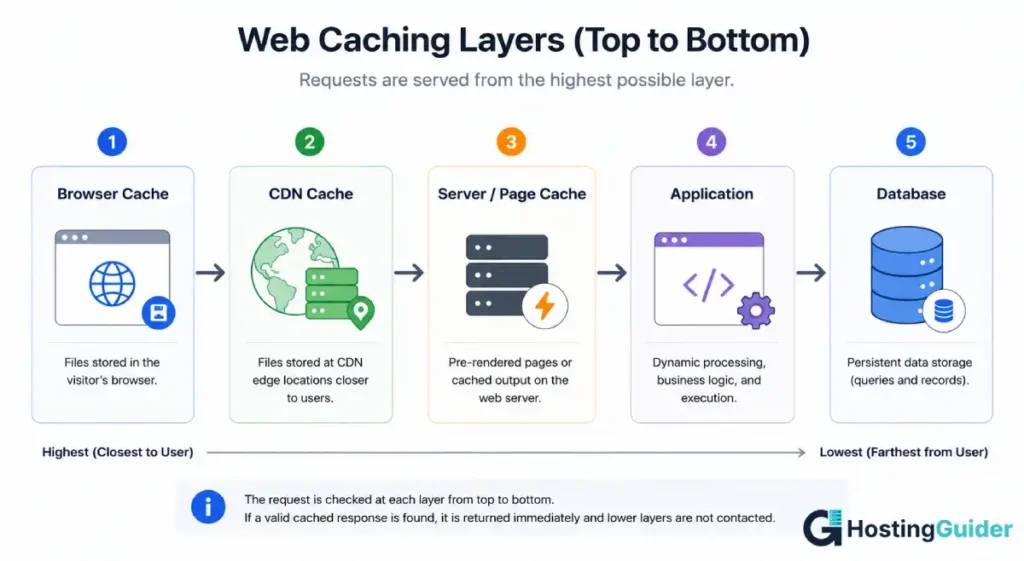
A simplified architecture is:
Browser cache
      ↓
CDN cache
      ↓
Server/page cache
      ↓
Application
      ↓
Database
Each layer solves a different problem.
Browser caching avoids downloading resources again.
CDN caching avoids reaching the origin for cacheable responses.
Server/page caching reduces the amount of work required to generate a response.
Database caching can reduce repeated database operations.
Using multiple layers together can be powerful, but they need compatible expiration and invalidation rules.
Using a CDN With WordPress
WordPress continues running on your origin server.
The CDN sits in front of WordPress and can cache static resources and, where configured safely, public pages.
Typical WordPress exclusions include:
/wp-admin/
/wp-login.php
/cart/
/checkout/
/my-account/
The exact paths depend on your site and plugins.
WooCommerce stores are particularly sensitive because cart, checkout, account, and session-related requests can be personalized.
WordPress Cache Plugin + CDN
If you already use a WordPress caching plugin, you now have two caching layers.
For example:
Visitor
↓
CDN cache
↓
WordPress page cache
↓
WordPress
This can work very well.
But you need to understand which layer controls:
- Page expiration
- Cache purging
- HTML caching
- Asset caching
- Exclusions
A WordPress content update does not necessarily purge a separately managed CDN cache.
If visitors need to see an update immediately, you may need to purge the relevant CDN object or use cache-busting/versioned assets.
When a CDN Helps Most
A CDN is particularly useful when:
- Visitors are distributed across multiple countries
- Your origin is far from many visitors
- Your site serves many static assets
- You serve large downloads
- Your site experiences traffic spikes
- You need edge-level security features
- Your origin needs protection from large volumes of repetitive requests
When a CDN May Make Less Difference
A CDN may provide a smaller performance improvement when:
- Almost all visitors are close to the origin
- The site has very little static content
- Most requests are personalized
- The application is already extremely fast
- The primary bottleneck is a database or backend process
Even then, a CDN may still provide useful security, TLS, traffic-management, or reliability features.
Comparing Major CDN Providers
CDN capabilities and pricing change over time, so use the provider’s current documentation and pricing pages when making a purchasing decision.
| Provider | Common strengths |
|---|---|
| Cloudflare | CDN, DNS, WAF, DDoS mitigation, edge services |
| Akamai | Large global network and enterprise delivery |
| Fastly | Developer-oriented controls and fast cache management |
| Amazon CloudFront | Strong integration with AWS infrastructure |
| Bunny CDN | Simple CDN configuration and usage-based pricing |
There is no universally best CDN.
The right choice depends on:
- Traffic volume
- Visitor geography
- Origin location
- Required security features
- Cache-control requirements
- Developer tooling
- Pricing model
- Integration with your existing infrastructure
How CDN Pricing Works
CDN pricing is usually based on some combination of:
- Data transferred
- Requests
- Geographic region
- Security features
- Compute or edge functions
- Image optimization
- Origin traffic
- Additional services
Data transfer is often one of the largest components.
Your cache hit ratio matters because cache misses can require additional communication with the origin.
However, do not assume that every provider bills origin traffic or cache misses in exactly the same way.
Always check the provider’s current pricing model before estimating costs.
When Would You Use More Than One CDN?
Using multiple CDN providers is called multi-CDN.
Most small websites do not need it.
Multi-CDN setups are more common when:
- Availability requirements are extremely high
- Traffic is globally distributed
- Regional performance varies significantly between providers
- An organization wants protection against provider-level outages
The downside is complexity.
You have more:
- DNS/routing logic
- Certificates
- Cache rules
- Purge mechanisms
- Monitoring
- Provider-specific behavior
For most small and medium websites, one properly configured CDN is simpler and more useful.
A Practical CDN Troubleshooting Example
Suppose your site has been behind a CDN for several months, but visitors in other countries still report slow image loading.
You check:
curl -sI https://example.com/image.jpg
and see:
CF-Cache-Status: DYNAMIC
The first question should not be:
Is the CDN broken?
Instead ask:
Why did the CDN decide this response was not cacheable?
Check:
- The CDN cache rules.
Cache-Control.Set-Cookie.- The request method.
- The URL and query string.
- Any cache exclusions.
- Whether the resource is actually being proxied through the CDN.
If a broad rule has disabled caching for the entire domain, narrow the rule to the specific path that actually needs special handling.
The important lesson is simple:
The CDN often does exactly what its configuration tells it to do.
Quick Decision Guide for CDN Problems
HIT, but the page is still slow
The CDN successfully served that particular response from cache.
Look elsewhere:
- Large images
- JavaScript execution
- Third-party scripts
- HTML size
- Client-side rendering
- Other uncached requests
MISS repeatedly
Check:
- Cache-Control
- Cookies
- Cache rules
- Cache key
- Query strings
- Object expiration
- Whether you’re repeatedly testing from different edge locations
DYNAMIC or BYPASS
First determine why the response is considered non-cacheable.
For Cloudflare, these statuses have distinct meanings, so check the provider-specific documentation rather than treating them as generic CDN terminology.
Visitors see old content
Investigate:
- Cache expiration
- Revalidation
- Purge status
- Cache-busting strategy
- Multiple caching layers
The problem may not be that caching is “broken.” It may simply be that the old object is still considered valid.
Common CDN Mistakes to Avoid
1. Caching Personalized Pages
Never share-cache private user content without a deliberate configuration that safely separates users.
2. Forgetting DNS Records
A website can continue working while email breaks if important MX, TXT, or other records were missed during a nameserver migration.
3. Assuming a CDN Replaces Hosting
It does not.
Your application still needs an origin.
4. Ignoring the Origin
A CDN can reduce origin traffic, but cache misses still depend on origin performance.
5. Using an Overly Broad Cache Rule
A rule intended for one URL can accidentally affect an entire site.
6. Treating Every CDN Header the Same
CF-Cache-Status is Cloudflare-specific.
Other providers use different headers and definitions.
7. Purging Everything for Every Change
Global purges can cause a large number of requests to return to the origin at once.
Prefer targeted purges or cache-busting where practical.
8. Removing Vary Just to Increase Cache Hits
Vary exists to prevent incorrect reuse of representations.
Optimize unnecessary variation rather than removing legitimate variation.
9. Testing Only One Request
A first request can be a cache miss.
Test repeated requests and, when relevant, multiple geographic locations.
Frequently Asked Questions
What is a CDN in simple terms?
A CDN is a network of servers that stores and delivers copies of website content from locations closer to visitors. When the requested content is already cached, the CDN can serve it without contacting the origin server.
Is a CDN the same as web hosting?
No. Web hosting runs and stores your website and application. A CDN sits in front of the origin and distributes cacheable content from edge locations.
Does a CDN make a website faster?
It can. The biggest improvement usually comes when visitors can receive cached content from a nearby edge instead of retrieving it from a distant origin.
The actual improvement depends on visitor geography, cacheability, origin performance, content size, and network conditions.
Does a CDN improve SEO?
Not directly just because you use one.
A CDN can improve performance and user experience, which may help your site achieve better Core Web Vitals. Core Web Vitals factor into ranking, but good scores alone don’t guarantee higher rankings.
Does a CDN cache everything?
No.
Static resources are usually easier to cache. Personalized, private, or frequently changing content often requires different rules or should not be shared through a CDN cache.
What is a cache hit?
A cache hit occurs when the CDN already has a valid cached response matching the request.
The CDN can return that response without retrieving it from the origin.
What is a cache miss?
A cache miss occurs when the CDN does not have a usable cached response matching the request.
The CDN then needs to retrieve the resource from the origin or another cache tier.
Why does my CDN show MISS?
A miss can happen because the resource has not been cached at that edge yet, the cache entry expired, the request has a different cache key, the object was purged or evicted, or a configuration prevents the response from being reused.
What does CF-Cache-Status: HIT mean?
For Cloudflare, HIT means Cloudflare served the response from its cache. The CF-Cache-Status header is Cloudflare-specific.
What is the difference between no-cache and no-store?
no-cache does not mean that the response cannot be stored. It means a stored response must be revalidated before reuse.
no-store tells caches not to store the response.
MDN documents this distinction explicitly.
Should I cache WordPress pages?
Public WordPress pages can often be cached safely.
Do not blindly cache pages containing login state, account information, carts, checkout information, or other personalized content.
Can a CDN break a website?
Yes.
Common configuration problems include:
- Incorrect DNS records
- SSL/TLS configuration problems
- Redirect loops
- Incorrect cache rules
- Missing DNS records
- Origin connectivity problems
These are usually configuration issues rather than evidence that the CDN itself is defective.
Do I need a CDN for a small website?
Not necessarily.
A CDN can still be useful for visitors who are far from your origin and for security or traffic-management features, but a small site with a local audience may see a smaller performance improvement.
Conclusion
A CDN is fundamentally about putting frequently requested content closer to the people requesting it.
The simplest request looks like this:
Visitor → CDN edge → cached response
Instead of:
Visitor → origin server → application → database → response
when the resource is already cached.
That difference can reduce latency, lower origin load, and make websites more resilient during traffic spikes.
But a CDN is not a magic performance switch. It does not fix slow databases, inefficient application code, oversized images, excessive JavaScript, or poorly configured caching rules.
If you already use a CDN, the best place to start is not your browser’s loading animation.
Run:
curl -sI https://yoursite.com/some-file.jpg
Then inspect the cache-status header, Cache-Control, Age, ETag, and related response headers.
Once you understand whether a request is a HIT, MISS, BYPASS, DYNAMIC, or another provider-specific state, CDN troubleshooting becomes much less of a guessing game.


