
BigCommerce is trying to convince you to pay $39 per month for something WooCommerce gives you free.
Here is when that trade makes sense. Here is when it does not.
This is not a feature-list comparison. Every comparison post has those. This one focuses on the decision most store owners actually face: you are building a serious online business, you want to make the right platform choice before you are 200 products and three years of SEO deep, and you need a clear answer rather than “it depends.”
BigCommerce is a hosted ecommerce platform. You can view their current plans at bigcommerce.com. Your store lives on BigCommerce’s servers. They handle the infrastructure, security, updates, and uptime. You pay a monthly fee. You focus on selling.
WordPress with WooCommerce is the alternative.
WooCommerce is a free plugin that turns any WordPress site into a full online store. According to our latest WordPress and ecommerce market data, WooCommerce powers nearly 40% of all online stores globally. The software costs nothing. The hosting costs money. The trade-off is control versus convenience.
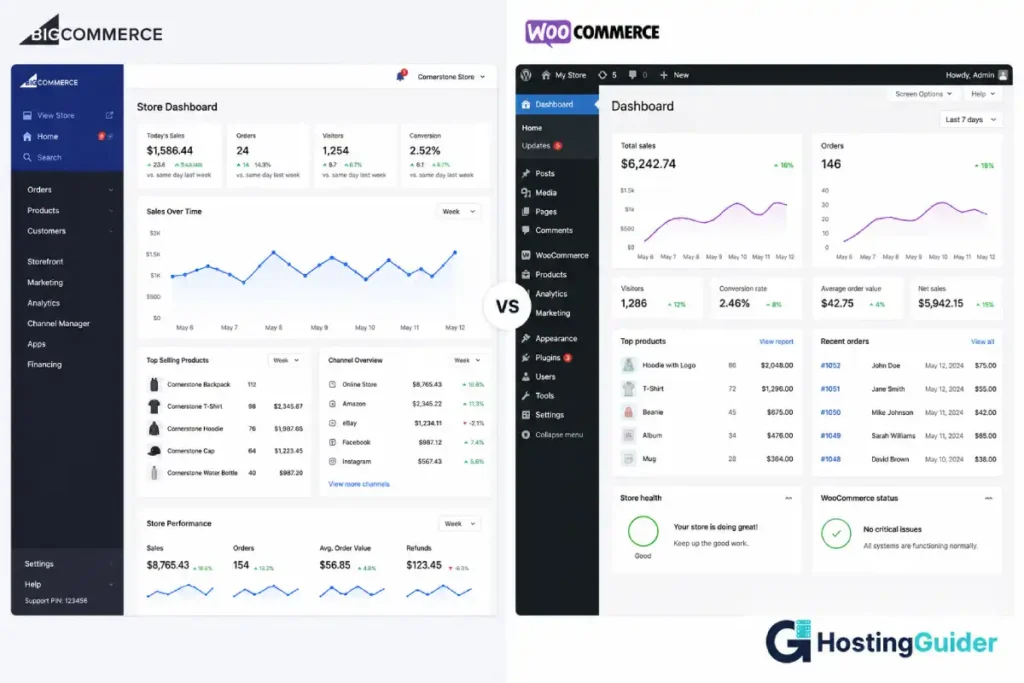
Table of Contents
BigCommerce vs WordPress: Quick Comparison
| Feature | BigCommerce | WordPress + WooCommerce |
|---|---|---|
| Hosting included | Yes | No (separate purchase) |
| Software cost | $39 to $399/month | Free |
| Transaction fees | None | None |
| Themes | 100+ (some free) | Thousands (many free) |
| Plugins/extensions | 1,000+ | 60,000+ WordPress plugins |
| SEO control | Good | Excellent |
| B2B features | Built-in | Extension required |
| Multi-channel selling | Built-in (Amazon, eBay, Instagram) | Plugin required |
| Performance | Consistent (managed) | Varies by hosting |
| Security | Managed by BigCommerce | Managed by host and user |
| Data ownership | Limited | Full |
| Scalability | Enterprise-ready | Enterprise-ready |
| Setup time | 1 to 3 hours | 2 to 5 hours |
| Developer access | Limited | Complete |
Who Each Platform Was Actually Built For
Before comparing features, understand the audience each platform targets. Choosing the wrong one for your use case is more expensive than any plugin fee.
BigCommerce was built for: Merchants who want a fully managed ecommerce environment with enterprise-grade multi-channel selling built in. It targets growing mid-market stores, B2B businesses, and brands already selling on multiple channels. Its customer list includes Skullcandy, Clarks, and Ben and Jerry’s. BigCommerce earns its fee by removing infrastructure decisions from your list.
WooCommerce was built for: Businesses that want full ownership of their store, maximum SEO control, unlimited customisation, and the freedom to choose their hosting infrastructure. It targets everyone from first-time store owners to enterprise retailers running hundreds of thousands of SKUs. It is the dominant platform globally because the barrier to entry is zero and the ceiling is unlimited.
The honest framing: if you are comparing BigCommerce to WooCommerce, you are comparing paying someone to manage your store infrastructure versus managing it yourself or hiring a managed host to manage it for you. The platform features are secondary to this fundamental question.
Setup and Ease of Use
BigCommerce
Sign up. Choose a theme. Add your products. Connect a payment gateway. Go live.
BigCommerce’s setup wizard walks you through every step. Payment processors including Stripe, PayPal, and 65 other gateways are pre-integrated. Tax calculation, shipping zones, and abandoned cart recovery are built into the platform. You do not install extensions to get core store functionality working.
For a business owner with no technical background who wants a working store in an afternoon, BigCommerce delivers. The learning curve is in the back-office: managing customer groups, setting up B2B pricing, and configuring complex shipping rules. Not in getting the store live.
WordPress + WooCommerce
Install WordPress on the hosting. Install WooCommerce. Choose a theme. Configure shipping, tax, and payment settings. Add products.
More steps than BigCommerce. But managed WordPress hosts have reduced this significantly.
Most managed hosts offer one-click WordPress and WooCommerce installation. SiteGround, WP Engine, and similar platforms pre-configure WooCommerce with sensible defaults.
The real complexity in WooCommerce comes from extension management. Running a full-featured store often means managing 10 to 20 plugins. Each requires updates. Plugin conflicts are a real issue. This maintenance overhead is invisible in BigCommerce and highly visible in WooCommerce.
Ease of Use Comparison
| Task | BigCommerce | WooCommerce |
|---|---|---|
| Initial store setup | Easier | More steps |
| Adding products | Easy | Easy |
| Managing orders | Clean interface | Clean (requires training) |
| Payment gateway setup | 65+ pre-integrated | Extension or direct API |
| Tax configuration | Built-in rules | Plugin required |
| Multi-currency | Built-in | Plugin required |
| Plugin/extension updates | Automatic | Manual or managed by host |
BigCommerce vs WordPress setup winner: BigCommerce for initial setup. WooCommerce for long-term flexibility once set up.
Design and Themes: BigCommerce vs WordPress
BigCommerce Themes
BigCommerce offers around 100+ themes across free and premium tiers. Premium themes start at $150 as a one-time purchase. The theme quality is generally high. Themes are mobile-responsive by default. The visual page editor (Page Builder) handles customisation of homepages and landing pages without code.
The design ceiling on BigCommerce is lower than that of WordPress. Deep visual customisation requires access to the Stencil theme framework and front-end development knowledge. You cannot install a third-party page builder. Design customisation beyond the theme editor requires a developer.
WordPress + WooCommerce Themes
WordPress has thousands of themes built for WooCommerce. Free options from the WordPress repository cover most basic store designs.
Premium WooCommerce themes from providers like Astra, Flatsome, and Divi offer visual page builders, pre-built store layouts, and deep product page control.
The design ceiling on WordPress is unlimited. With a developer, every pixel is customisable. Without a developer, a premium theme and Elementor or Kadence Blocks produce professional store designs that match BigCommerce quality.
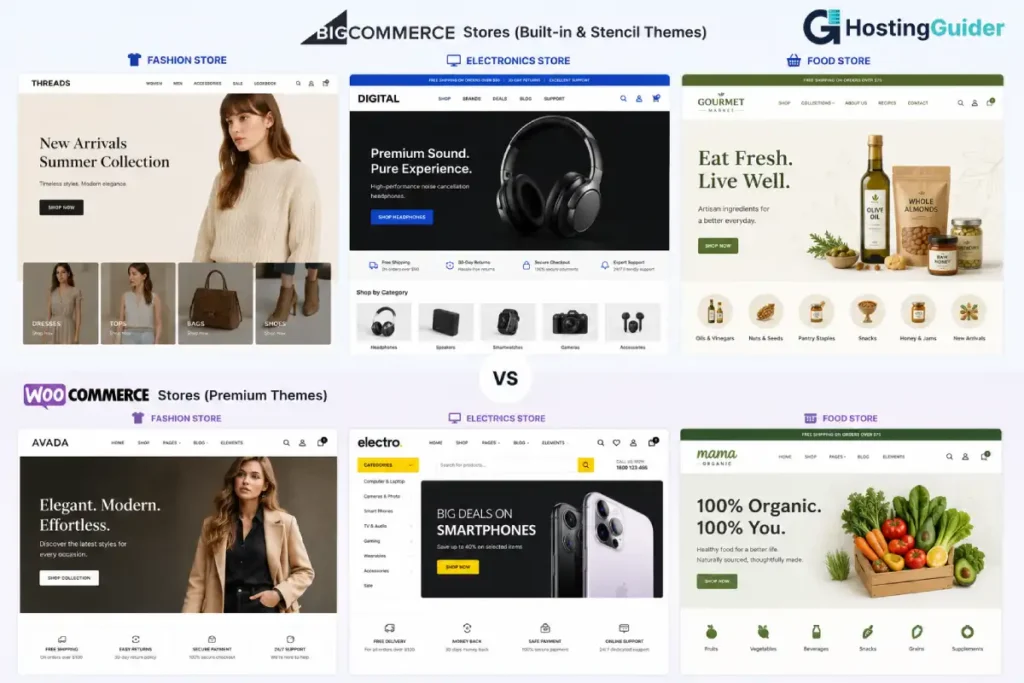
Winner: WooCommerce for design variety and development ceiling. BigCommerce for out-of-box theme quality without a developer.
SEO
This is the category where the BigCommerce vs WordPress decision matters most for long-term growth. It is not close.
BigCommerce SEO
BigCommerce includes solid SEO basics:
- Customisable meta titles and descriptions per product, category, and page
- Automatic XML sitemap
- Clean URL structure (customisable)
- 301 redirect management
- Canonical tags to prevent duplicate content
- Schema markup for products (pricing, availability, reviews)
- Open Graph tags for social sharing
For a store targeting straightforward product keywords, BigCommerce’s built-in SEO tools are workable. The clean, fast code base helps with Core Web Vitals. The hosted infrastructure delivers consistent page speed without manual optimisation.
The limits appear at scale. Technical SEO beyond the basics requires workarounds or developer intervention: custom crawl controls, advanced schema types, granular sitemap management, and breadcrumb structured data for complex catalogue hierarchies.
WordPress + WooCommerce SEO
Yoast SEO and RankMath are the two dominant WordPress SEO plugins. Both integrate directly with WooCommerce product pages. Both give you control that BigCommerce cannot match:
- Real-time content analysis for every product description
- Product schema markup with price, availability, brand, and review data
- Breadcrumb structured data across category trees
- Full XML sitemap control including product, category, tag, and image sitemaps
- Redirect manager integrated with the site editor
- Internal linking suggestions across your full product catalogue
- Integration with Google Search Console
Beyond the plugins, WordPress gives you direct control over server-side SEO factors. Your hosting choice determines page speed and Time to First Byte. Your caching configuration determines how fast product pages load for repeat visitors. Server-level caching directly affects your store’s Core Web Vitals scores, which Google uses as a ranking signal for ecommerce pages.
WooCommerce stores consistently outrank BigCommerce stores in competitive product categories not because the platforms are unequal on the basics, but because WordPress developers have built SEO tooling for it that BigCommerce simply does not have an equivalent for.
Winner: WordPress + WooCommerce. For any store where organic search is a growth channel, the SEO tooling gap is significant.
Pricing
This is the section most BigCommerce vs WordPress comparisons get wrong. They compare BigCommerce’s headline price to WooCommerce’s “free” label and call it a win for WooCommerce. The real comparison is more nuanced.
BigCommerce Pricing
| Plan | Monthly (annual billing) | Revenue Limit | Best For |
|---|---|---|---|
| Standard | $39/month | $50k/year sales | New and small stores |
| Plus | $105/month | $180k/year sales | Growing stores, abandoned cart |
| Pro | $399/month | $400k/year sales | High-volume stores |
| Enterprise | Custom | No limit | Large businesses |
Key points:
- No transaction fees on any plan. BigCommerce takes nothing per sale. Your payment processor fee is your only transaction cost.
- Revenue caps apply. If your store exceeds the Standard plan’s $50,000/year revenue, you are automatically moved to the Plus plan at $105/month.
- Most advanced features (abandoned cart, customer groups, stored credit cards) require Plus or higher.
- Themes are a one-time purchase ($150 to $400 for premium).
WordPress + WooCommerce Pricing
WooCommerce software is free. Here is what you actually pay:
| Item | Typical Annual Cost |
|---|---|
| WooCommerce plugin | Free |
| WordPress hosting (managed) | $180 to $600/year |
| Domain name | $12 to $15/year |
| Premium WooCommerce theme | $50 to $100 (one-time) |
| Payment gateway extensions | $0 (Stripe and PayPal built-in) |
| Subscription billing extension | $199/year |
| Multi-currency plugin | $0 to $79/year |
| Advanced shipping plugin | $0 to $99/year |
| Abandoned cart plugin | $0 to $149/year |
The honest cost comparison:
For a store at launch with basic features, WooCommerce on good managed hosting runs $25 to $50 per month. BigCommerce Standard runs $39 per month. They are comparable.
For a store needing subscriptions, multi-currency, abandoned cart, and customer groups, WooCommerce with extensions may run $50 to $80 per month total. BigCommerce Plus runs $105 per month. WooCommerce costs less.
For a store generating $40,000/year in revenue, BigCommerce Standard covers you. At $50,001 per year, you move to $105/month. WooCommerce has no revenue cap. A $1 million/year WooCommerce store pays the same hosting costs as a $50,000 store.
The revenue cap is the most important BigCommerce pricing fact most comparisons omit.
Pricing Verdict
WooCommerce is cheaper for growing stores. This is the most important pricing conclusion in any BigCommerce vs WordPress evaluation. No revenue caps. No forced plan upgrades as your sales increase. Extensions cost once or annually rather than being bundled into a rising monthly fee.
BigCommerce is predictable and transparent. One monthly bill. No surprise extension costs. No server upgrade decisions. For a business owner who values predictable overhead, this has real value.
Performance
Performance in a BigCommerce vs WordPress comparison comes down to who controls the server.
BigCommerce Performance
BigCommerce hosts every store on its managed cloud infrastructure with a built-in CDN. SSL, compression, image optimisation, and server management are handled at the platform level. A newly launched BigCommerce store loads fast from day one without any configuration.
What BigCommerce manages automatically:
- Global CDN delivery
- Automatic SSL certificate management
- Server response time optimisation
- Image compression (within the platform)
- Automatic uptime monitoring
The limit: BigCommerce controls the infrastructure ceiling. If their CDN underperforms in a specific region, your options are limited to contacting support. You cannot change hosting providers, add a different CDN, or configure server-level caching independently.
WordPress + WooCommerce Performance
WooCommerce performance depends almost fully on the hosting provider and store configuration. This is both the strength and the risk.
A WooCommerce store on a poorly configured shared host is slow. Product pages with 15 active plugins, no full-page caching, and a heavy theme will fail Core Web Vitals tests. The platform gets the blame but the real issue is the infrastructure choices.
A WooCommerce store on quality managed hosting with full-page caching configured, image compression active, and a lightweight theme can outperform BigCommerce on every measurable metric. Our tests across managed WordPress hosts show significant results: Liquid Web delivers 78ms TTFB and passes all three mobile Core Web Vitals. WP Engine passes all Google mobile thresholds. Rocket.net handles 50 concurrent users at 46ms average with zero dropped connections.
For a WooCommerce store, the hosting provider is the performance provider.
Performance Comparison
| Factor | BigCommerce | WooCommerce (managed hosting) |
|---|---|---|
| Default speed | Fast | Depends on host |
| CDN included | Yes | Varies by host |
| Core Web Vitals (default) | Generally good | Varies |
| Core Web Vitals (managed WP host) | N/A | Pass on top hosts |
| Performance ceiling | Platform-limited | Unlimited |
| TTFB control | None | Full |
| Caching configuration | Platform-managed | Configurable |
Winner: BigCommerce for out-of-box consistency. WooCommerce with managed hosting for performance ceiling and control.
Ecommerce Features
This is the BigCommerce vs WordPress comparison that matters most for a store owner. You are building a store. The feature set determines whether the platform supports your business model.
Core Features Both Platforms Include
- Unlimited products
- Product variations (size, colour, etc.)
- Inventory management
- Order management and fulfilment
- Customer accounts
- Coupon and discount codes
- Abandoned cart recovery (BigCommerce Plus+; WooCommerce free plugin)
- Digital and physical product sales
- Tax calculation
Where BigCommerce Leads
Multi-channel selling is built in. BigCommerce connects natively to Amazon, eBay, Facebook Shop, Instagram Shopping, Pinterest, and Google Shopping from the dashboard. No third-party plugin required. Inventory syncs across all channels. For a store selling across multiple platforms, this is a genuine operational advantage.
B2B is where the BigCommerce vs WordPress gap is largest for wholesale businesses. B2B features are native. BigCommerce Enterprise includes customer group pricing, quote management, purchase order support, and net payment terms as standard features. Building equivalent B2B functionality on WooCommerce requires multiple extensions and custom development.
Headless commerce is a first-class feature. BigCommerce supports decoupled front-end architectures natively, allowing brands to use their own front-end framework while BigCommerce handles the commerce back-end. This is an enterprise use case but BigCommerce executes it better than WooCommerce out of the box.
Where WooCommerce Leads
Extension depth is unmatched. The WooCommerce extension library covers every commerce use case: subscriptions, memberships, auctions, bookings, rentals, restaurant ordering, event tickets, affiliate programmes, and custom pricing rules. If you can describe it, there is almost certainly a WooCommerce extension for it.
Subscription commerce is stronger. WooCommerce Subscriptions is the industry standard for subscription billing on a self-hosted store. BigCommerce’s subscription support requires a third-party integration and is less flexible.
Wholesale and tiered pricing is more flexible. WooCommerce gives developers direct access to the pricing engine. Tiered pricing, role-based pricing, quantity-based discounts, and dynamic pricing rules are all available as free or low-cost extensions.
You own your customer data fully. On WooCommerce, your customer data lives in your database on your server. You export it, back it up, and control it. On BigCommerce, your data lives in their system. Export options exist but are limited compared to direct database access.
Ecommerce Feature Comparison
| Feature | BigCommerce | WooCommerce |
|---|---|---|
| Multi-channel (Amazon, eBay) | Built-in | Plugin required |
| B2B pricing and quotes | Built-in (Enterprise) | Extension required |
| Subscription billing | Third-party integration | WooCommerce Subscriptions |
| Headless commerce | Native support | Possible with development |
| Custom pricing rules | Limited | Flexible |
| Data ownership | Platform-controlled | Full |
| Extension ecosystem | 1,000+ apps | 60,000+ WordPress plugins |
| Abandoned cart | Plus plan+ | Free plugin available |
| Multi-currency | Built-in | Plugin required |
Security
BigCommerce Security
From a security standpoint, the BigCommerce vs WordPress gap is largest for unmanaged WordPress installs. BigCommerce is PCI DSS Level 1 compliant out of the box. Every store benefits from the same security infrastructure without any configuration. SSL is automatic. The platform receives security updates without store owner involvement. There is no plugin vulnerability surface. Extensions run through BigCommerce’s API rather than being installed on the server.
For a store owner who wants to focus fully on selling and not on security maintenance, this is a real advantage.
WooCommerce Security
WooCommerce security depends on three factors: your hosting provider, your plugin maintenance habits, and your WordPress configuration. Poorly maintained WooCommerce stores are a known attack target. Outdated plugins, weak admin passwords, and unmonitored server configurations create vulnerabilities that BigCommerce users cannot have.
On managed WordPress hosting with a security-focused provider, the risk profile narrows significantly. Security at the hosting layer goes beyond SSL. A quality managed WordPress host includes server-level firewalls, malware scanning, automatic plugin updates, and free hack remediation. This brings WooCommerce security close to BigCommerce levels without manual effort.
Winner for security in the BigCommerce vs WordPress comparison: BigCommerce for default security with zero configuration. WooCommerce on managed hosting is comparable. WooCommerce on unmanaged shared hosting is a risk case.
If You Choose WooCommerce: The Hosting Decision
If WooCommerce is the right platform for your store, the hosting provider determines most of your day-to-day performance and security. This choice deserves as much attention as the platform choice itself.
For WooCommerce stores that need enterprise-grade reliability and support, our comparison of Cloudways vs Liquid Web covers the clearest mid-market versus enterprise decision. Liquid Web includes auto-scaling PHP workers that handle traffic spikes without manual intervention, a 22-second phone response guarantee, and a 100% uptime SLA with a 10x credit clause. Cloudways offers managed cloud from $11 per month with five cloud provider options.
For agencies and high-traffic WooCommerce stores, our Kinsta vs WP Engine comparison covers the two dominant premium managed WordPress platforms. WP Engine passes all three Google mobile Core Web Vitals. Both include staging environments and managed security.
For growing stores not yet at the premium tier, our SiteGround vs Cloudways comparison covers the most common choice. SiteGround handles everything automatically and earns GTmetrix Grade A out of the box. Cloudways offers more server control with pay-as-you-go billing.



BigCommerce vs WordPress: Who Should Choose Which
Who Should Choose BigCommerce
Choose BigCommerce if:
- You sell across multiple channels (Amazon, eBay, Facebook, Instagram) and want them managed from one dashboard
- Your store has B2B wholesale requirements, and you need customer group pricing, quote management, and net payment terms without custom development
- You want one monthly bill with no hosting, security, plugin updates, or server decisions
- Your technical team is small or non-existent, and you need the platform to manage infrastructure
- You are building a headless commerce architecture and want the commerce layer managed separately
- Your store operates in a tightly regulated industry where PCI DSS Level 1 compliance needs to be documented without configuration work
Who Should Choose WordPress + WooCommerce
Choose WordPress + WooCommerce if:
- Organic search is a meaningful part of your customer acquisition strategy
- Your store needs a feature that exists as a WooCommerce extension: subscriptions, memberships, auctions, rentals, custom pricing rules
- You want full ownership and portability of your customer data
- Your revenue is growing and you do not want to be pushed into a more expensive plan tier by a revenue cap
- You need the flexibility to change hosting providers, CDN providers, or infrastructure without rebuilding your store
- You have a developer or plan to work with one and want unlimited customisation
One Question That Decides It
Here is the simplest version of the BigCommerce vs WordPress decision:
Will your store depend on organic search traffic to grow?
If yes, choose WooCommerce. The SEO gap is large enough to change revenue outcomes over a two to three year horizon. WordPress powers more ecommerce SEO success stories than any other platform for a reason.
If your store will grow primarily through paid advertising, social commerce, and multi-channel retail, BigCommerce’s built-in channel integrations and managed infrastructure are worth the monthly fee.
Most stores use both channels. Most stores that depend on both channels end up on WooCommerce because the SEO ceiling matters. Try the free SEO tool before starting.
Final Verdict
The BigCommerce vs WordPress decision comes down to infrastructure versus control. Neither platform is wrong for the right business. But one platform wins more of the specific decisions.
To summarise the BigCommerce vs WordPress comparison:
BigCommerce wins on: managed infrastructure, native multi-channel selling, B2B features out of the box, PCI compliance without configuration, and consistent performance without hosting decisions.
WooCommerce wins on: SEO, pricing at scale (no revenue caps), extension depth, data ownership, design flexibility with development, and the total cost of ownership for a store that grows significantly.
If you are launching a serious ecommerce business with a content and SEO strategy, build on WooCommerce with quality managed hosting. The combination of WooCommerce’s ecommerce engine, WordPress’s content management, and a managed host handling infrastructure gives you the strongest platform for organic growth.
If you are launching a store that will live primarily in paid and social channels and you want zero infrastructure decisions, BigCommerce is a clean and capable choice. You will pay more per month as you scale. You will save time on technical management throughout.
Summary Table
| Category | Winner | Margin |
|---|---|---|
| Setup ease | BigCommerce | Moderate |
| Design flexibility | WooCommerce | Moderate |
| SEO capability | WooCommerce | Large |
| Pricing (launch) | Comparable | Small |
| Pricing (at scale) | WooCommerce | Large (no revenue caps) |
| Performance default | BigCommerce | Moderate |
| Performance ceiling | WooCommerce | Large |
| Multi-channel selling | BigCommerce | Large |
| B2B features | BigCommerce | Large |
| Extension depth | WooCommerce | Very Large |
| Data ownership | WooCommerce | Large |
| Security default | BigCommerce | Moderate |
| Security managed hosting | Comparable | Small |
| Scalability | Comparable | Small |
Frequently Asked Questions About BigCommerce vs WordPress
Does BigCommerce charge transaction fees?
No. In the BigCommerce vs WordPress comparison on fees, neither platform charges transaction fees. BigCommerce charges no transaction fees on any plan. You pay your payment processor fee (typically 2.9% plus $0.30 per transaction through Stripe) and nothing to BigCommerce per sale. WooCommerce also charges no platform transaction fees. Both platforms are better than Shopify on this specific point.
What happens when my BigCommerce store exceeds $50,000 in annual revenue?
BigCommerce automatically upgrades your account to the Plus plan at $105 per month. This is the revenue cap most small store owners do not notice until it happens. The Standard plan at $39/month caps at $50,000 annual revenue. Plus caps at $180,000. Pro covers up to $400,000. WooCommerce has no revenue caps at any level.
Is WooCommerce faster than BigCommerce?
On quality managed hosting, WooCommerce can be faster than BigCommerce on specific metrics. Our testing shows managed WordPress hosts like Liquid Web delivering 78ms TTFB and passing all mobile Core Web Vitals. BigCommerce delivers consistent performance by default. WooCommerce on cheap shared hosting is slower than BigCommerce. The comparison depends fully on which WooCommerce host you choose.
Can I migrate from BigCommerce to WooCommerce?
Yes. Moving from BigCommerce vs WordPress direction means rebuilding some elements. Several migration tools automate the process of moving products, customers, and order history from BigCommerce to WooCommerce. Cart2Cart and LitExtension are the two most commonly used services. The WordPress.org documentation also covers standard migration processes. The migration preserves product data, customer accounts, and order history. SEO URL redirects require careful mapping during the migration process.
Is WooCommerce good for large stores?
Yes. WooCommerce scales to enterprise catalogue sizes with the right hosting. Stores running hundreds of thousands of SKUs operate on WooCommerce. Performance at scale requires investment in managed hosting, database optimisation, and caching configuration. WooCommerce does not impose product or order limits. BigCommerce also scales to the enterprise level with managed infrastructure.
Does BigCommerce include hosting?
Yes. BigCommerce is a fully hosted platform. Your store lives on BigCommerce’s servers. You do not purchase or manage separate hosting. SSL, CDN, uptime monitoring, and server maintenance are all included in your monthly plan. WooCommerce requires separate hosting, which you purchase and manage independently or through a managed WordPress host.
BigCommerce vs WordPress for Dropshipping: Which Platform Wins?
Both platforms support dropshipping. WooCommerce integrates with AliExpress through the AliDropship plugin and with Spocket, Printful, Printify, and DSers for product sourcing. BigCommerce integrates with Modalyst, Spocket, and Printful natively. For dropshipping with heavy reliance on AliExpress suppliers, the WooCommerce ecosystem has more direct integration options. For dropshipping with multi-channel retail across Amazon and eBay, BigCommerce’s native channel management is stronger.
