
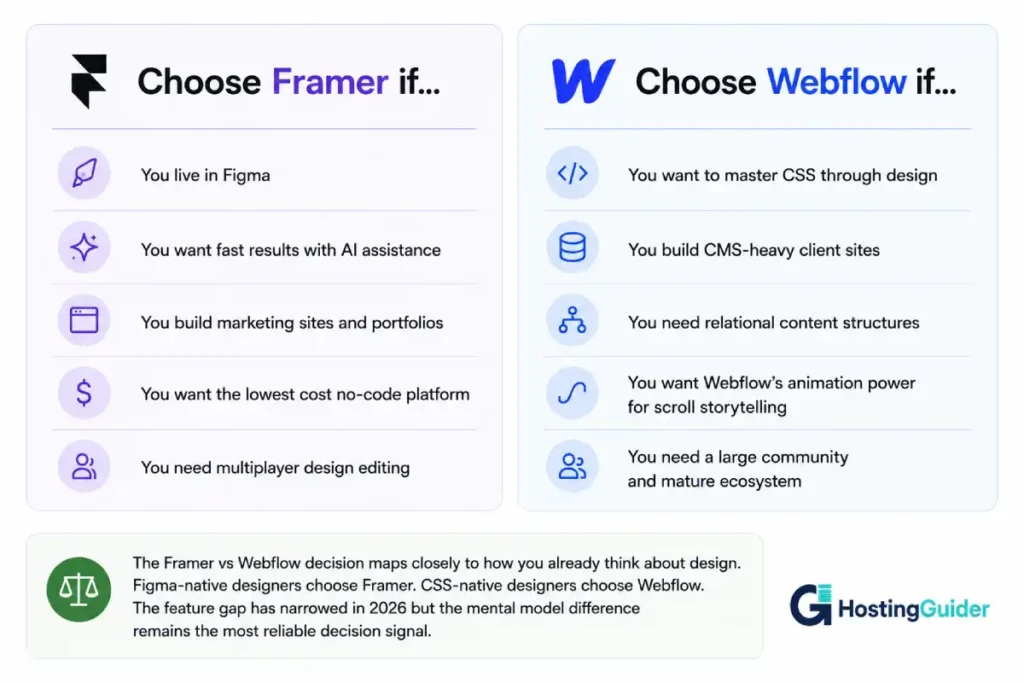
Framer is the tool for designers who think in Figma.
Webflow is the tool for designers who think in CSS.
Most Framer vs Webflow comparisons list features. This one explains why the mental model you already work in should decide the platform before you read another word. The features matter. The mental model matters more because it determines whether a platform feels natural or constantly frustrating to use regardless of what it can do.
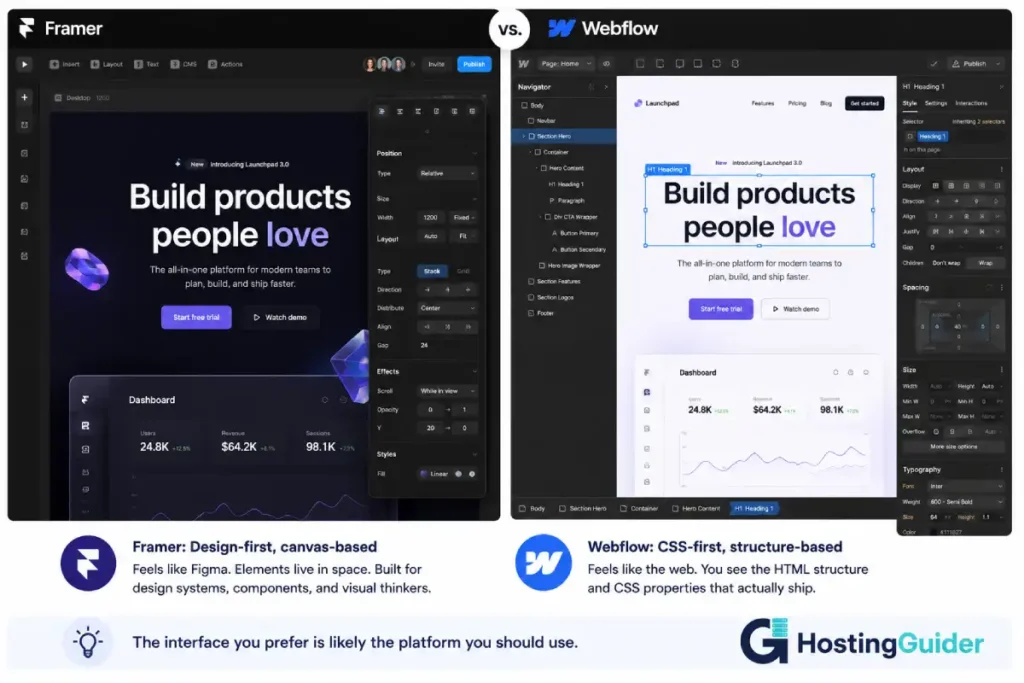
Framer was a prototyping tool that became a publishing platform. It inherited the Figma-style canvas interface, the component system that thinks in design tokens, and the collaborative multiplayer model. Designers who live in Figma pick up Framer in hours because the spatial thinking is the same.
Webflow was built by engineers who wanted to expose CSS and HTML as a visual interface. Its panel system maps to CSS properties. Its box model is CSS’s box model. Its layout options are Flexbox and CSS Grid rendered visually. Designers who understand how the web is built pick up Webflow faster because the conceptual model aligns with reality.
Neither is wrong. They are built for different designers with different backgrounds. This comparison covers every dimension where they differ, the feature landscape where Framer has closed gaps that used to make the comparison easy, and the specific use cases where each platform is clearly the right choice.
The Mental Model That Decides Every Framer vs Webflow Choice
Before comparing any feature, understand what each platform assumes about how you think.
Framer assumes you think like a product designer.
You work with frames and components, not pages and divs. Elements stack and group in layers. Components have variants, just like in a design system. When you change a component, all instances update. The relationship between design tokens, component styles, and page layout feels like working in Figma because Framer’s interface was deliberately built on the same spatial metaphor.
If you have spent years in Figma or Sketch, opening Framer feels like recognition rather than learning.
Webflow assumes you think like a web developer who uses visual tools.
Elements have margins and padding. Layout is Flexbox or CSS Grid. Classes apply styles the way CSS classes apply styles. The Navigator panel is the DOM hierarchy. When Webflow says “position absolute” it means CSS position absolute. When it shows you an overflow toggle, it is showing you CSS overflow.
The interface translates web development concepts into visual controls. Designers who understand the box model and CSS layout already know what every Webflow panel is doing even before they read the label.
Why this matters more than features:
A tool whose mental model matches your background removes friction from every single task. A tool whose mental model does not match your background adds friction to every single task. The Framer vs Webflow decision is not primarily about which platform has more features. It is about which one stops fighting you at 11pm when you are trying to fix a layout issue on a client deadline.
Framer vs Webflow: Quick Comparison
| Feature | Framer | Webflow |
|---|---|---|
| Interface mental model | Design-first (Figma-like canvas) | CSS-first (visual web dev) |
| Founded | 2013 (Amsterdam) | 2013 (San Francisco) |
| Learning curve | Low for Figma users | Steep (steepest in no-code) |
| CMS capability | Basic | Advanced |
| E-commerce | No native ecommerce | Yes (Webflow Commerce) |
| Blog / publishing | Limited | Full CMS and blog |
| SEO controls | Good | Very good |
| Animations | Excellent | Excellent |
| AI features | Built-in (layout, copy, components) | Limited (as of 2025) |
| Performance | Excellent (React-based) | Excellent (CDN-hosted) |
| Component system | Design-system native | Class-based |
| Custom code | React components, JSX | HTML embeds, custom code |
| Multiplayer editing | Yes (Figma-style) | Limited |
| Free plan | Yes | Yes (limited) |
| Starter pricing | $5/month | $14/month (CMS) |
| Pro pricing | $30/month | $39/month (Business) |
| Hosting | Included | Included |
| Custom domain | Yes (paid plans) | Yes (paid plans) |
| Global CDN | Yes | Yes |
| Responsive design | Breakpoints (Figma-style) | Breakpoints (CSS-style) |
| Export code | Yes (React/HTML) | Yes (HTML/CSS/JS) |
| Templates | Growing library | Large library |
| Community size | Growing | Very large |
| Best for | Marketing sites, portfolios, SaaS pages | Marketing sites, portfolios, CMS-heavy sites |
| Not suitable for | Complex CMS, ecommerce | Quick design-to-publish workflows |
The Interface: How Framer vs Webflow Each Think About Design
Framer’s Canvas Interface
Open Framer and you are on a canvas. Not a page. Not a template. A canvas.
You place frames. You design inside them. Elements position relative to their parent frame using constraints, just like in Figma. The auto-layout system works like Figma’s auto-layout: direction, spacing, padding, sizing. If you have built a component in Figma with nested auto-layout frames, you understand exactly how to build a Framer component.
The properties panel floats contextually. Select a text element and see text properties. Select a frame and see frame properties. The interface surfaces what is relevant rather than showing every possible control at once. This is a product design philosophy applied to a web publishing tool.
Component variants in Framer work like design system variants. Create a button component with default, hover, and active states. Connect transitions between them. Publish the site. The interactions are live without writing any animation code. For product designers who spend their days thinking about component states in design tools, this workflow is faster than any other no-code platform.
The trade-off: Framer’s freeform canvas means layouts that are not properly constrained can break at unexpected screen sizes. A designer who places elements precisely on the canvas without thinking about responsive constraints produces a beautiful desktop design and a broken mobile layout. The tool requires discipline about constraints that Webflow enforces more explicitly through its box model.
Webflow’s CSS-First Interface
Open Webflow’s Designer and you see a canvas surrounded by panels. The Navigator panel on the left is the HTML hierarchy. The Style panel on the right is CSS. Everything you do in Webflow’s visual interface corresponds to a real CSS or HTML operation.
Add an element and it creates an HTML tag. Apply a style and it creates a CSS class. Set padding and it sets CSS padding. Use Flexbox layout and Webflow exposes Flexbox properties visually: direction, justify-content, align-items, wrap, gap. The CSS vocabulary is present in the interface.
This transparency is Webflow’s most significant advantage for designers who want to understand what they are building. Every layout decision in Webflow has a CSS equivalent that a developer can read, maintain, and extend. The gap between design and development is smaller on Webflow than on any other no-code tool because the output HTML and CSS is the same quality a developer would write.
The trade-off: this transparency creates the steepest learning curve in the no-code space. Designers who do not have a model for CSS layout, the box model, or semantic HTML find Webflow genuinely difficult. The platform assumes a level of web literacy that Framer, Squarespace, and Wix do not require.
Learning Curve: The Framer vs Webflow Gap That Matters Most
This is the category where the Framer vs Webflow gap is largest and most consequential for individual designers.
Framer Learning Curve
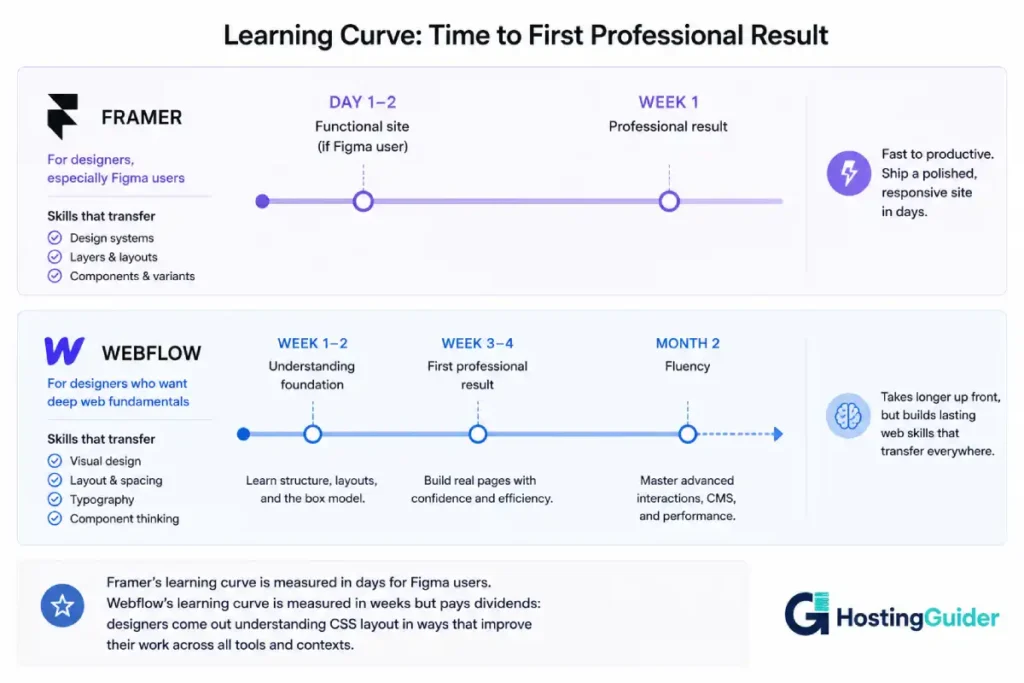
A designer who uses Figma daily can publish a professional Framer site in one to two days of learning time. The interface vocabulary transfers. Auto-layout skills transfer. Component thinking transfers. The new knowledge required is how Framer handles pages, CMS, and publish settings rather than how to design.
Framer’s AI features reduce the starting friction further. The AI layout generator can produce a structured starter from a text prompt. A designer can describe what they want, receive a structured layout with placeholder content, and begin refining from there rather than from a blank canvas. For designers who know what they want to build but want to reduce setup time, this is a meaningful acceleration.
The areas where Framer requires new learning: CMS configuration, interaction triggers for complex animations, code component integration for developers extending the platform, and the responsive constraint system which has Framer-specific behaviors that differ from Figma’s constraint model.
Webflow Learning Curve
Webflow has a reputation for being the hardest no-code tool to learn. The reputation is accurate. The justification matters.
Webflow is hard to learn because it teaches you the web. Box model. Flexbox. CSS Grid. Positioning. Specificity. Class inheritance. These are not Webflow concepts. They are web concepts that Webflow exposes rather than abstracting away.
A designer who invests two to four weeks in learning Webflow properly comes out understanding how websites are built at a level that makes them a significantly better designer. The investment has a return beyond the platform. Every layout decision makes sense. Every browser behavior is predictable. The knowledge persists even if you stop using Webflow.
Webflow University, the platform’s free educational resource, is genuinely one of the best no-code learning libraries available. The structured courses and project-based learning reduce the investment required to reach proficiency. But it is still a real investment compared to Framer.
For a designer who needs to deliver a project in two weeks with no prior platform experience, Framer is the practical choice. For a designer who wants to invest in a platform skill that pays dividends across every future project, Webflow’s learning curve is worth it.
Animations and Interactions: Where Framer vs Webflow Both Excel
This is the feature category where Framer vs Webflow is most equal and where both platforms genuinely outperform alternatives.
Framer Animations
Framer’s animation system comes directly from its prototyping heritage. The platform has ten years of interaction design built into its DNA.
Smart Components handle state-based interactions without writing code. A navigation menu with open and closed states, a button with hover and active animations, a card that flips on click: all built through component variant connections and spring-based transitions. The animation parameters use design language: spring tension, damping, duration, delay. Designers who have worked with animation prototyping tools recognise the vocabulary immediately.
Framer also supports scroll-based animations natively. Parallax effects, fade-in-on-scroll, pinned sections that animate as you scroll through them: configured visually through the scroll interaction panel. The output is performant because Framer compiles interactions to optimised JavaScript rather than relying on heavy libraries.
The code component system extends animations to developer-built React components. A React developer can build a custom animated component in code and expose its properties to designers as visual controls in Framer’s interface. This bridge between code and design is deeper than any other no-code platform handles it.
Webflow Animations
Webflow’s Interactions system (IX2) is one of the most powerful visual animation tools in web design. Scroll-triggered animations, timeline-based sequences, multi-step interactions, and parallax effects are all built through a dedicated Interactions panel.
The Interactions panel exposes triggers: page load, scroll into view, scroll position, mouse move, element click. For each trigger, a timeline of property changes plays out: opacity, transform, filter, color, and any CSS-animatable property. Multi-step sequences build complex choreographed page experiences without code.
The output is clean GSAP-powered JavaScript. Webflow’s interactions produce the type of animation quality you see on award-winning agency sites because the platform gives designers the control that previously required a frontend developer.
Verdict on animations: Both platforms produce production-quality interactions. Framer’s system is faster for designers building from component states. Webflow’s system is more powerful for complex page-level choreography and scroll storytelling. The choice comes down to the type of interaction you are primarily building.
CMS and Content Management: The Clearest Framer vs Webflow Gap
This section has the clearest winner in the Framer vs Webflow comparison.
Framer CMS
Framer has a CMS. It is basic.
You create collections, define fields, add content, and connect fields to design elements. For a blog with title, date, author, body, and featured image, it works. For a portfolio with project pages that pull structured content from a collection, it works. For a team page pulling from a people collection, it works.
The limits appear quickly: no nested collection references (a blog post cannot have a relationship to a separate author collection), limited field types compared to Webflow, no CMS-powered navigation, and limited filtering and sorting of collection data in the design. The CMS is functional for simple use cases and insufficient for anything that requires the structured data relationships that a real content-driven site needs.
Framer has improved its CMS in recent updates. The gap is narrower than it was in 2023. It remains significant for any site where content management is a core requirement.
Webflow CMS
Webflow’s CMS is genuinely powerful for a no-code platform.
Collection items have relational fields: a blog post can reference an author collection item, a product can reference a category collection, a case study can reference a client. These relationships allow the type of structured content modelling that a developer would build in a relational database.
CMS-powered navigation, CMS-powered filtering, conditional visibility based on CMS field values, and multi-reference fields for many-to-many relationships are all available without code. The Editor mode (Webflow’s CMS editing interface) allows non-designer content editors to add and modify content without accessing the Designer.
For agencies building content-heavy sites for clients, Webflow’s CMS is the reason they choose Webflow over Framer, Squarespace, or any other no-code platform. The combination of design control and structured content management is unique in the no-code space.
Winner: Webflow by a significant margin for any site where content management matters.
SEO Capability: Framer vs Webflow Search Performance
Both platforms have improved their SEO tooling. Neither reaches the depth of WordPress with a dedicated SEO plugin. Webflow has more control.
Framer SEO
Framer generates clean, fast HTML. Meta titles and descriptions are editable per page. Open Graph tags for social sharing are configurable. The sitemap is automatically generated. Canonical tags work correctly.
The performance advantage Framer has from its React architecture gives it a potential Core Web Vitals edge. Static-exported Framer pages load very fast. For simple marketing pages, Framer’s default SEO performance is excellent.
The limitations: no real-time content SEO guidance, limited schema markup control, and URL structures that are less flexible than what Webflow provides. The blog and CMS limitations discussed in the previous section also limit content-led SEO strategies on Framer. If your SEO strategy depends on publishing regular structured content, Framer’s CMS is not the right foundation.
Webflow SEO
Webflow provides stronger SEO controls than Framer. Custom URL slugs with no forced prefixes, full control over heading hierarchy, redirects managed from the dashboard, canonical tag configuration, and the ability to noindex individual pages or collections are all built into the platform.
Webflow also supports custom code injection at the page and site level, which allows adding structured data JSON-LD directly for rich search results. For a product page, service page, or FAQ section that needs schema markup, Webflow’s code injection handles it without third-party apps.
Webflow’s CMS advantage compounds the SEO advantage. A structured blog built on Webflow CMS produces properly structured content with correct semantic HTML, CMS-driven meta tags, and the ability to create pillar pages with collection-linked supporting content. For a brand where content-led SEO is a growth strategy, Webflow’s combination of CMS and SEO controls is significantly better than Framer.
Winner: Webflow for technical and content SEO depth. Framer for performance on simple marketing pages.
Framer AI: The Feature That Changes the Framer vs Webflow Comparison in
This section would not have existed in this form two years ago. Framer has shipped AI features that meaningfully change the Framer vs Webflow comparison.
What Framer AI Does
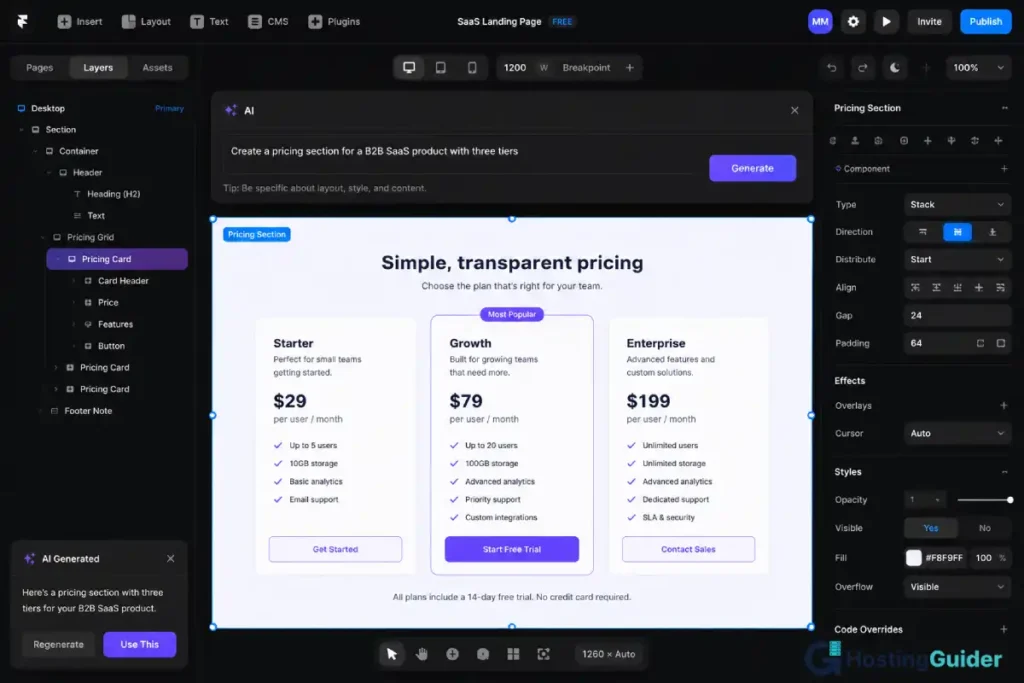
AI Layout Generation: Describe a section in natural language and Framer generates a structured layout with appropriate components, placeholder content, and rough design. “A hero section for a SaaS product with a headline, subheadline, email capture form, and product screenshot” produces a usable starting point in seconds. The output requires design refinement but eliminates the blank canvas problem.
AI Copy: Generate placeholder copy for any section based on context. Name your brand and product category and the AI writes headlines, body copy, and CTAs that match the section’s purpose. Replace placeholder text during the revision process rather than before the design is structured.
AI Components: Framer can suggest and generate custom components based on descriptions. Interactive elements, cards, feature grids, and pricing tables are generated as editable Framer components rather than static images.
AI Translate: Multi-language sites in Framer can use AI translation to generate localised content versions without leaving the platform.
These features are built into the Framer editor, not behind a separate AI tool subscription. They are part of the core product.
Webflow’s AI Position in
Webflow has introduced AI features including the Webflow AI Assistant for copy editing and an AI layout generator in beta. The tooling is less mature than Framer’s and feels like a reaction to Framer’s AI-first positioning rather than a foundational design decision.
Webflow’s competitive advantage on CMS depth, SEO controls, and the established ecosystem is not threatened by Framer’s AI features. But for designers choosing a new platform to learn where AI-accelerated workflows matter, Framer’s lead on AI integration is a real consideration.
Winner: Framer on AI features. Webflow is catching up but Framer’s AI is currently more mature and more integrated.
Performance: Framer vs Webflow Infrastructure in
Both Framer and Webflow serve sites from global CDNs and both produce fast-loading sites by default. The underlying architectures differ.
Framer Performance
Framer is React under the hood. Sites publish as React applications with static generation for most pages. This architecture produces excellent Core Web Vitals performance: fast initial page load from static generation, fast subsequent navigation from React’s client-side rendering, and low Time to First Byte because content is pre-rendered.
Framer’s code export option produces React and HTML files that developers can host anywhere. The framework choice means Framer sites can be self-hosted with complete control over the delivery infrastructure, unlike Webflow where the export produces static HTML that lacks the CMS and interaction layers.
The performance risk: React-based sites load a JavaScript runtime. On slow connections, the JavaScript bundle size can affect Time to Interactive even if the initial render is fast. Framer optimises its bundle size but the architectural overhead is different from Webflow’s static HTML output.
Webflow Performance
Webflow publishes sites as optimised HTML, CSS, and JavaScript served from Fastly CDN. Pages are pre-rendered at publish time. The output is static content that loads without a JavaScript framework overhead on the initial render.
Webflow’s interaction system (IX2) adds JavaScript but the animations are compiled to optimised code. A simple Webflow site with minimal interactions loads faster on slow connections than an equivalent Framer site because the JavaScript payload is smaller.
The performance risk on Webflow is designer-introduced: heavy CSS, large unoptimised images, and complex interactions on every page can degrade performance. Webflow’s Designer does not enforce performance best practices. Sites with 50 animation triggers and full-page video backgrounds frequently fail Core Web Vitals despite excellent infrastructure.
Performance verdict: Both platforms are fast. Framer’s React architecture is faster for dynamic and component-heavy experiences. Webflow’s static HTML output is faster on slow connections for content-heavy pages. For most marketing sites and portfolios, the difference is negligible. For complex interactive applications, Framer’s React foundation is the better base.
Pricing: The Most Lopsided Part of the Framer vs Webflow Comparison
The Framer vs Webflow pricing comparison is not close. Framer is significantly cheaper at every tier.
Framer Pricing
| Plan | Monthly (annual billing) | Page Limit | CMS Items | Custom Domain |
|---|---|---|---|---|
| Free | $0 | 1 page | None | No (framer.app subdomain) |
| Mini | $5/month | 3 pages | None | Yes |
| Basic | $15/month | Unlimited | 100 CMS items | Yes |
| Pro | $30/month | Unlimited | 1,000 CMS items | Yes |
| Business | $85/month | Unlimited | 10,000 CMS items | Yes |
No transaction fees. No ecommerce (Framer has no native ecommerce).
Webflow Pricing
| Plan | Monthly (annual billing) | CMS Items | Custom Domain |
|---|---|---|---|
| Starter | $0 | 0 | No |
| Basic | $14/month | 0 (no CMS) | Yes |
| CMS | $23/month | 2,000 CMS items | Yes |
| Business | $39/month | 10,000 CMS items | Yes |
| Enterprise | Custom | Unlimited | Yes |
Webflow also has separate Workspace plans for teams building multiple client sites, which add significant cost for agencies.
Three-Year Cost Comparison for a Standard Designer Portfolio or Marketing Site
| Configuration | Annual Cost | Three-Year Cost |
|---|---|---|
| Framer Pro | $360/year | $1,080 |
| Webflow Business | $468/year | $1,404 |
| Framer Basic | $180/year | $540 |
| Webflow CMS | $276/year | $828 |
At comparable feature tiers (CMS access, unlimited pages, custom domain), Framer costs approximately 35% less than Webflow annually.
For freelance designers and small agencies managing multiple client sites, Framer’s lower per-site cost compounds significantly. A freelancer managing ten client sites on Framer Pro (one site per workspace) pays $30/month. The equivalent Webflow setup for an agency managing client sites involves workspace-level pricing that quickly exceeds $100/month.
Winner: Framer by a wide margin on pricing at every tier.
Templates, Community, and Ecosystem: Framer vs Webflow
Framer Templates and Community
Framer has a growing template library and a strong community particularly among product designers and startup founders. The Framer Community on Discord is active. A dedicated marketplace of templates, plugins, and components has developed rapidly since Framer’s 2022 platform reinvention.
The template quality is high: many Framer templates are designed to the standard of agency-built sites rather than typical SaaS template aesthetics. The selection covers SaaS marketing pages, portfolio sites, and startup landing pages extremely well.
The ecosystem is smaller than Webflow’s in absolute terms. There are fewer third-party developers building Framer plugins and extensions. There are fewer community-built resources for specific use cases. This is a function of Framer’s shorter history as a publishing platform rather than its trajectory.
Webflow Templates and Community
Webflow has the largest no-code web design community. Made in Webflow, Webflow University, Webflow Experts, and the Webflow Marketplace collectively represent years of community investment. There are thousands of Webflow templates, cloneables (shared project templates), and educational resources.
The Webflow ecosystem includes a certified experts programme for agencies and freelancers, a large marketplace of templates covering every industry, and a community that has solved almost every design problem at least once in a forum post or YouTube tutorial. For any problem you encounter in Webflow, someone has written a solution.
Winner: Webflow on community, templates, and ecosystem depth. Framer catching up fast.
Code Integration and Developer Handoff: Framer vs Webflow
Framer Code Components
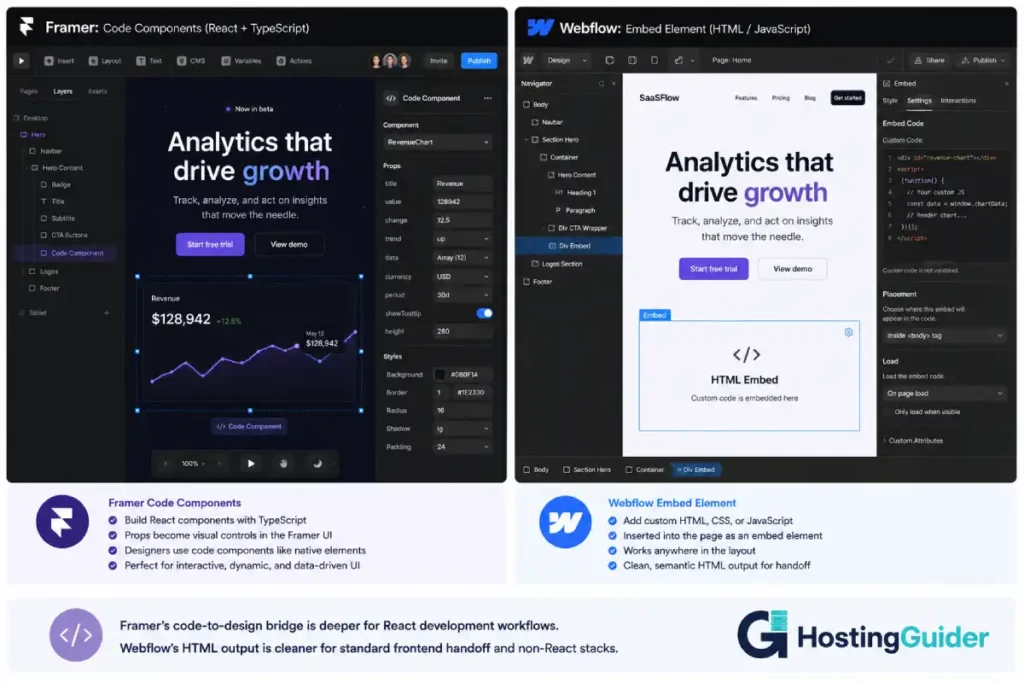
Framer’s code component system is its most developer-friendly feature. A React developer can build a custom component in code, import it into Framer, and expose its properties as visual controls in the design interface. A designer can then use the component as if it were any other Framer element: resizing it, changing its exposed properties, placing it on the canvas.
This bridge between design and code is more powerful in Framer than in any other no-code tool. The component is real React code. The visual controls are generated automatically from TypeScript props. A custom animation library, a complex data visualisation, a third-party API integration: all buildable as Framer code components and usable by designers without touching the code.
Code export in Framer produces a React project that developers can host, maintain, and extend. The exported code is not optimised for hand-editing but it is real React, not Webflow’s HTML/CSS output.
Webflow Code Integration
Webflow allows custom HTML, CSS, and JavaScript through embed elements and code injection at the page and site level. This covers most integration needs: custom analytics, third-party chat widgets, custom form handlers, and one-off interactive elements.
Webflow does not have a native code component system equivalent to Framer’s. Custom functionality in Webflow requires either a custom embed element or a third-party JavaScript library. The integration is less deep than Framer’s React component system for custom-built interactive elements.
Webflow’s code export produces clean, readable HTML and CSS. A developer receiving Webflow export HTML can read and modify it without knowing the Webflow platform. For handoff from designer to developer, Webflow’s HTML output is often cleaner and more maintainable than Framer’s React output for developers who do not work in React.
Winner for React developers: Framer. Winner for standard frontend developers: Webflow.
Who Framer Is Actually Built For
Framer is the right platform for:
- Product designers and UX designers who work in Figma daily and want to publish live sites without learning a new mental model
- SaaS founders and startup teams building marketing sites, pricing pages, and landing pages where design quality and fast iteration matter more than CMS depth
- Freelancers building portfolio sites where the design sophistication of the site is itself a demonstration of skill
- Designers building for clients who need fast project delivery and are comfortable with Framer’s CMS limitations for simple marketing sites
- Teams that need multiplayer editing where multiple designers work on the same project simultaneously
- Designers exploring AI-accelerated workflows who want to use AI layout and copy generation as part of their standard process
- Developers with a React background who want to extend the platform with custom components and work within a React-native architecture
Who Webflow Is Actually Built For
Webflow is the right platform for:
- Designers who want to master web fundamentals and come out understanding CSS layout, the box model, and semantic HTML at a level that makes them better at every web project
- Agencies building CMS-heavy client sites where content editors need to add and update content without touching the design layer
- Brands with serious content strategies where a structured CMS with relational fields powers blog, portfolio, and case study content at scale
- SEO-focused businesses where technical SEO controls, schema markup, redirect management, and structured content matter for search rankings
- Sites with complex interactions and scroll animations where Webflow’s IX2 system produces agency-quality animation work
- Developers and designers on the same team where Webflow’s HTML/CSS output creates a cleaner handoff than Framer’s React output for non-React developers
The Use Case Breakdown: Framer vs Webflow for Specific Projects
For specific project types, the Framer vs Webflow choice becomes more direct:
| Project Type | Recommended | Why |
|---|---|---|
| Personal portfolio (designer) | Framer | Figma-like, fast, excellent design quality |
| SaaS marketing website | Framer | AI features, fast iteration, React performance |
| Agency client site (simple) | Framer | Lower cost, faster delivery, adequate CMS |
| Agency client site (CMS-heavy) | Webflow | CMS relational fields, Editor mode for clients |
| Brand blog or news site | Webflow | Full CMS, SEO controls, content structure |
| Scroll animation showcase | Webflow | IX2 system is more powerful for page choreography |
| Landing page (paid ads) | Framer | Fast to build, AI-generated starting points |
| Product launch microsite | Framer | Interaction quality, component states, fast delivery |
| E-commerce site | Neither | Shopify or WooCommerce (see our Shopify vs WooCommerce comparison) |
| CMS site with Figma team | Framer | Shared component language with Figma design system |
| Enterprise marketing site | Webflow | Established ecosystem, team controls, CMS depth |
| Developer-designer collaboration | Framer (React team) or Webflow (standard dev) | Depends on tech stack |
The Alternative for Content-Heavy Sites
Both Framer and Webflow reach their limits with content-heavy publishing. A blog that publishes daily, a knowledge base with hundreds of articles, a documentation site, or a media publication needs more CMS capability than either platform provides.
For content-first sites where publishing workflow, SEO depth, and content management are priorities, WordPress combined with a visual page builder like Elementor remains the stronger foundation. WooCommerce adds ecommerce capability that neither Framer nor Webflow matches natively.
Our Webflow vs WordPress comparison covers that specific choice. For the design-first builder who also needs ecommerce, our Webflow vs Shopify post covers the commerce trade-off.
Final Verdict
The Framer vs Webflow decision is closer now than it was in 2023. Framer has shipped AI features, improved its CMS, added code components, and reduced its pricing to the point where the comparison is genuinely competitive.
Framer wins on: pricing, learning curve for Figma users, AI features, multiplayer editing, React architecture, and speed to first professional result.
Webflow wins on: CMS depth, SEO controls, animations for complex page choreography, community size, ecosystem maturity, and HTML output quality for developer handoff.
The tiebreaker is the mental model question at the top of this post.
If you think in Figma, use Framer. The spatial canvas, the component variant system, the auto-layout approach, and the design-system-native thinking will feel like home from day one. The CMS limitations will only matter if you build content-heavy sites.
If you think in CSS, use Webflow. The box model interface, the class system, the Flexbox controls, and the structured HTML hierarchy will make sense immediately. The learning curve is real and worth it for the web literacy it provides.
For designers who are new to both: start with Framer. The lower learning curve, the lower cost, and the AI features make it the faster path to a live professional site. Add Webflow to your toolkit when a project specifically requires deep CMS capability or complex scroll animations that Framer’s system does not handle as cleanly.
Final Summary Table
| Category | Framer | Webflow | Winner |
|---|---|---|---|
| Mental model | Design-first (Figma) | CSS-first (web) | Match your background |
| Learning curve | Low (for Figma users) | High | Framer |
| CMS capability | Basic | Advanced | Webflow |
| SEO depth | Good | Very good | Webflow |
| AI features | Advanced (built-in) | Basic | Framer |
| Animations | Excellent | Excellent | Tie |
| Performance | Excellent (React) | Excellent (static) | Tie |
| Pricing | $5 to $30/month | $14 to $39/month | Framer |
| Community | Growing | Very large | Webflow |
| Code integration | React-native | HTML/CSS embed | Framer (React), Webflow (standard) |
| Multiplayer editing | Yes | Limited | Framer |
| E-commerce | None | Basic (Webflow Commerce) | Webflow (by default) |
| Overall winner | Framer (for speed and value) | Webflow (for depth and scale) | Depends on use case |
Frequently Asked Questions
Framer vs Webflow in: Is Framer Actually Better?
For specific use cases, yes. Framer is better than Webflow for designers who come from a Figma background, for SaaS marketing pages and portfolios where fast iteration and AI-assisted design matter, for lower-budget projects where Framer’s pricing advantage is significant, and for teams that need multiplayer editing. Webflow remains better for CMS-heavy sites, complex content structures, deep SEO requirements, and scroll animation choreography. The answer depends on what you are building and what mental model you already work in.
Framer vs Webflow Ease of Use: Which Is Easier to Learn?
Yes, for most designers. Framer’s canvas-based interface is intuitive for anyone who uses Figma, Sketch, or similar design tools. Webflow’s CSS-first interface has the steepest learning curve in the no-code space. A designer with no prior web development knowledge will reach a professional result faster in Framer than in Webflow. A designer who invests time in learning Webflow gains web literacy that Framer does not provide.
Framer vs Webflow CMS: Does Framer Have Content Management?
Yes, but it is limited. Framer’s CMS handles basic content collections: blog posts, portfolio items, team members. It lacks the relational field types, reference fields, and CMS-powered navigation that Webflow provides. For a simple blog or portfolio, Framer’s CMS is functional. For a site with multiple interrelated content types, multi-author publishing workflows, or structured content at scale, Webflow’s CMS is significantly more capable.
Can Framer compete with Webflow for agency work?
For agency marketing sites and landing pages, yes. Framer’s lower cost and faster delivery make it competitive for agencies building simple client sites. For agencies building content-managed sites where clients edit their own content through a non-designer interface, Webflow’s Editor mode is more appropriate than Framer’s CMS editing workflow. Most agencies that use Framer do so for marketing and campaign sites. Most agencies that use Webflow do so for marketing sites and client CMS projects.
Does Framer support ecommerce?
No. Framer has no native ecommerce feature. If you need to sell products alongside a Framer-built marketing site, the common solution is embedding Shopify’s Buy Button into Framer pages for simple stores, or directing visitors to a separate Shopify or WooCommerce store for the purchase flow. Webflow has native Webflow Commerce for basic stores, though serious ecommerce operations benefit from a dedicated platform like Shopify or WooCommerce.
Which is better for a SaaS marketing website, Framer or Webflow?
Framer. SaaS marketing sites are Framer’s strongest use case. The design quality from Framer’s canvas matches the visual bar that SaaS brands expect. The component system handles design system consistency across pages. The AI features generate layout starting points that speed up campaign page creation. The React architecture performs well for JavaScript-heavy marketing pages with interactive elements. Webflow is also used for SaaS marketing sites but Framer’s design speed and AI workflow give it an edge for teams that iterate on marketing pages frequently.
Is Framer cheaper than Webflow?
Yes, significantly. Framer’s Pro plan at $30/month includes unlimited pages, 1,000 CMS items, and a custom domain. Webflow’s Business plan at $39/month offers comparable features. At the entry tier with CMS, Framer Basic at $15/month compares to Webflow CMS at $23/month. Over three years, a designer using the comparable tier pays approximately $540 on Framer versus $828 on Webflow. The pricing gap is consistent across all tiers.


