
Security headlines make zero-day exploits sound like an unstoppable threat targeting every WordPress site equally. Zero-day vulnerabilities are part of a wider security crisis facing websites in 2026. Our website hacking and breach statistics cover attack frequency, breach costs, and the most common exploit categories.
They are not. Your real risk depends on what you host, where you host it, how quickly you patch, and which components of your stack you control versus which ones your provider controls.
This article gives you a practical risk assessment. Not the theoretical maximum exposure, but the realistic profile of a typical shared-hosted WordPress site and the specific factors that raise or lower it.
Key Takeaways
- A zero-day exploit targets a vulnerability that has no patch yet. Once a patch is released, most attackers shift to unpatched sites, not truly unpatched software
- Shared hosting creates two distinct attack surfaces: the one you control (WordPress, plugins, themes) and the one you do not (PHP, web server, OS)
- Most WordPress compromises happen through known vulnerabilities in outdated plugins, not true zero-days
- The patching window between vulnerability disclosure and patch application is the period of highest real-world risk
- Virtual patching through a WAF can block exploitation attempts before you have applied the official fix
- Upgrading to VPS gives you control over server-level patching. Shared hosting leaves that to the provider
What a Zero-Day Exploit Actually Is
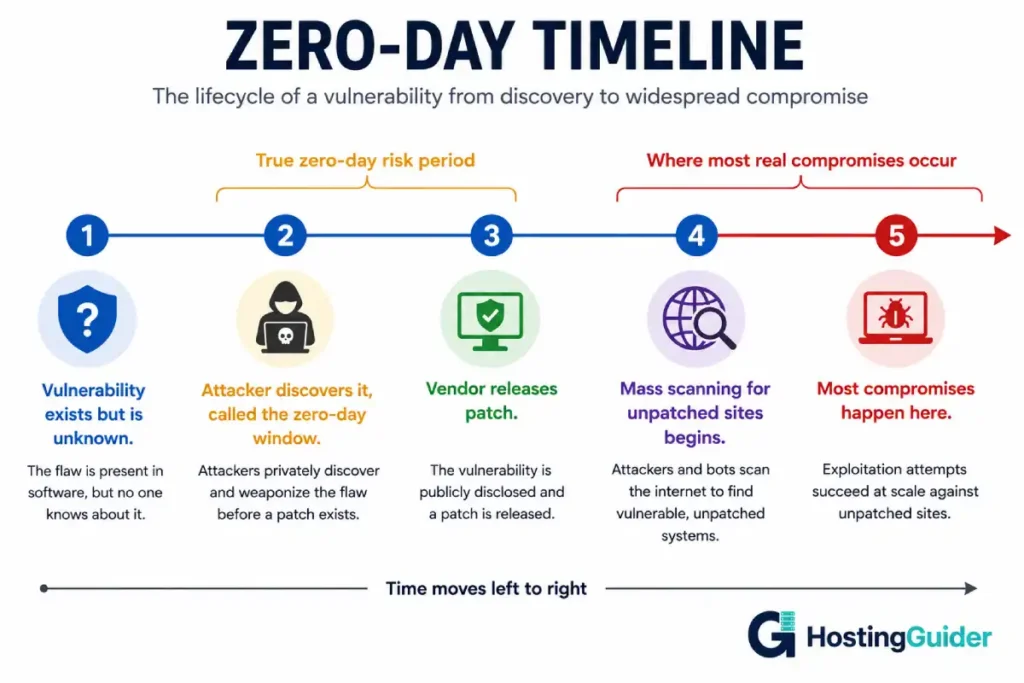
A zero-day exploit takes advantage of a vulnerability that the software vendor does not yet know about, or has not yet fixed. The name comes from the development team having zero days to address the problem before attackers start using it.
Once the vendor releases a patch, the vulnerability is no longer technically a zero-day. At that point, it becomes a known, patchable vulnerability. The risk does not disappear, but the nature of the threat shifts.
Most sites that get compromised through a WordPress vulnerability are not hit by a true zero-day. They are hit by a patched vulnerability that the site owner did not apply. Attackers scan the entire internet for sites running a specific vulnerable plugin version. They find millions of unpatched sites. The zero-day window closed months earlier.
This distinction matters enormously for your risk assessment. The headline risk (a sophisticated attacker using a never-before-seen exploit) is different from the actual statistical risk (an automated scanner finding your site runs Plugin X version 3.2.1 with a known CVE).
Your Attack Surface on Shared Hosting
Shared hosting splits your attack surface into two categories with very different risk profiles.
The Part You Control
WordPress core, themes, and plugins are entirely within your control. You decide when to update them, which ones to install, and which ones to remove.
This part of the attack surface is where the majority of WordPress compromises originate. A study of WordPress compromises consistently shows plugin vulnerabilities as the leading cause, followed by weak credentials, and then theme vulnerabilities. WordPress core accounts for a small percentage because it is well-audited and benefits from automatic minor updates.
The risk from this component is almost entirely within your control. Keeping plugins updated, removing unused plugins, and running only plugins that are actively maintained reduces exposure dramatically.
The Part Your Provider Controls
The web server software (Nginx or Apache), the PHP version, the operating system, and the underlying server configuration are all managed by the hosting provider. You cannot patch these yourself on shared hosting.
If a critical zero-day is discovered in PHP, you depend on your provider applying the patch. If a vulnerability is found in the version of OpenSSL your provider runs, only they can fix it. If their control panel software has a security flaw, you are exposed until they resolve it.
This is the fundamentally different risk characteristic of shared hosting compared to a VPS. On a VPS, a zero-day in PHP means you run apt upgrade php8.1 , and the patch is applied within hours of release. On shared hosting, you wait.
Providers vary considerably in how quickly they apply security patches. Well-resourced providers with dedicated security teams can patch a critical PHP vulnerability within hours of its release. Smaller providers can take days or weeks. This is a meaningful difference in real-world risk exposure.
The Noisy Neighbour Security Problem
Shared hosting puts hundreds or thousands of WordPress sites on the same physical server. If any one of those sites is compromised, the attacker gains access to that site’s processes. Depending on how tightly the server is configured, this can create paths to other sites on the same server.
Modern shared hosting providers use several isolation techniques to limit this risk:
PHP running as a per-user process under php-fpm with separate pools. Each site’s PHP process runs under a different system user. One site’s PHP cannot directly read another site’s files.
Filesystem permissions enforced at the operating system level. Directories and files owned by each hosting account are not readable by other accounts.
ModSecurity and server-level WAF rules that catch common attack patterns before they reach any PHP process.
The quality of this isolation varies significantly between providers. Budget shared hosts sometimes run outdated versions of these isolation mechanisms or misconfigure them. Premium providers typically maintain tighter isolation.
When evaluating shared hosting security, the security requirements for business hosting include checking what isolation mechanism the provider uses, not just whether they claim to offer security features.
The Patching Window
The period between when a vulnerability is publicly disclosed and when you apply the patch is your highest-risk window.
For WordPress plugins, this window can be measured in days if you have automatic updates enabled, or months if you update manually and infrequently.
For server-level components, this window depends on your hosting provider for shared hosting or on your own update discipline for a VPS.
Check how quickly your hosting provider applies PHP security updates. This information is sometimes in their documentation, sometimes requires asking support directly. A provider that patches PHP within 24 hours of a critical release is meaningfully different from one that patches within two weeks.
Enable WordPress automatic background updates to minimise the patching window for your application layer. In wp-config.php:
define('WP_AUTO_UPDATE_CORE', true);
For plugins, the automatic update option is available per-plugin in the WordPress admin under Plugins. Enable it for all plugins from reputable authors. For plugins with a history of problematic updates, schedule manual review of plugin changelogs before updating.
Virtual Patching: Protection Before a Fix Exists
Virtual patching is one of the most underutilised techniques for zero-day risk reduction.
When a vulnerability is disclosed, security researchers often publish an analysis of how it works and what the attack payloads look like. WAF vendors and security teams use this information to write firewall rules that block exploitation attempts even before a software patch exists.
Cloudflare’s managed WAF ruleset is updated with virtual patches for newly disclosed WordPress vulnerabilities, often within hours of public disclosure. A site behind Cloudflare with the managed ruleset enabled receives protection from newly disclosed plugin vulnerabilities without any action from the site owner.
ModSecurity with the OWASP Core Rule Set provides similar virtual patching at the server level. When a new CVE is published for a WordPress plugin, security teams publish ModSecurity rules that block the specific request patterns used to exploit it.
The web application firewall layers involved in this protection span from the CDN edge down to the web server. Each layer can independently apply virtual patches, and the combination provides meaningful protection during the window between disclosure and patching.
Enable virtual patching:
- Add your site to Cloudflare and enable the Cloudflare Managed Ruleset
- If managing your own server, install ModSecurity with OWASP CRS
- Subscribe to security notifications for every plugin you run (WPScan sends alerts to registered users)
- Monitor the WPScan vulnerability database for newly disclosed vulnerabilities in your installed plugins
Assessing Your Real Risk Level
Your actual risk profile depends on several factors that most generic advice ignores.
What you host matters. A small personal blog with no login forms, no ecommerce, and no sensitive data has a different risk profile from a WooCommerce store processing credit card transactions. Attackers prioritise targets with extractable value. High-traffic sites with known monetisation are higher-value targets than dormant personal sites.
The plugin count matters. Each active plugin is a potential attack surface. A site with 35 active plugins, several of which are rarely updated or abandoned, has materially higher vulnerability exposure than a site with 8 actively maintained plugins. Audit your active plugins against the WPScan database to see how many have unpatched CVEs.
The traffic level matters. Automated scanners find targets through search engine results, web crawlers, and historical data. A high-traffic site indexed well in Google is more visible to opportunistic scanners than a low-traffic site.
Your provider’s patch speed matters. Request your provider’s security patch SLA or look for documented evidence of how quickly they responded to past critical PHP or server vulnerabilities. This is one of the most important but least discussed factors in shared hosting security.
Your update discipline matters most. Run this check on your WordPress site:
Install the WordPress security checker or use the WPScan CLI tool:
# Install WPScan
gem install wpscan

# Scan your site (requires WPScan API key for vulnerability data)
wpscan --url https://yourdomain.com --api-token YOUR_TOKEN
The output shows your WordPress version, plugin versions, and any known vulnerabilities associated with each. The count of known unfixed vulnerabilities across your installed components is your most practical risk indicator.
The Risk Reduction Checklist
These actions address the real attack paths, not theoretical ones.
Enable automatic WordPress core updates by adding define('WP_AUTO_UPDATE_CORE', true) to wp-config.php. Minor updates apply automatically. Major updates still require manual action.
Enable automatic plugin updates for plugins from reputable, actively maintained authors. In the WordPress admin, go to Plugins and toggle auto-updates on per-plugin.
Remove unused plugins and themes immediately. A deactivated plugin with a known vulnerability is still exploitable if the files exist on disk. Deletion is the only effective removal.
Add the site to Cloudflare and enable the managed WAF ruleset. This provides virtual patching for newly disclosed vulnerabilities.
Set up external uptime monitoring. A compromise often causes the site to start serving malicious redirects or error pages. UptimeRobot detects HTTP response changes that can indicate a compromise before you notice it directly.
Schedule a monthly security audit: log into WordPress admin, review active plugins for available updates, check the last update date of each plugin, and deactivate any that have not been updated in over a year.
Subscribe to the WordPress security announcements to receive notifications about core security releases.
When to Upgrade from Shared Hosting for Security Reasons
Shared hosting is appropriate for most WordPress sites from a security standpoint when the provider maintains current software versions and the site owner keeps the application layer updated.
Consider upgrading to a VPS or managed cloud hosting when any of these apply:
Your hosting provider is slow to patch critical PHP or server vulnerabilities. If a critical PHP release takes two weeks to reach shared hosting customers, the risk during that window may be unacceptable.
You handle sensitive data or payment information. Compliance requirements for PCI DSS and similar frameworks often impose server configuration standards that shared hosting cannot guarantee.
Your site is consistently targeted. If server logs show sustained attack campaigns, a shared hosting environment provides less defensive depth than a VPS where you control all layers.
You need specific WAF configuration. Shared hosting restricts server-level WAF configuration. A VPS lets you install ModSecurity with custom rulesets tuned for your specific application.
The signs your hosting plan needs upgrading cover security-related signals alongside the more commonly discussed performance triggers.
If moving to managed WordPress hosting, verify that the provider maintains proactive security patching and includes server-level WAF. The presence of marketing phrases like enterprise security does not confirm specific patching timelines. Ask directly. A managed host worth the premium will not have obvious red flags like vague patch policies or no security incident response contacts.
Frequently Asked Questions
How likely is a zero-day attack on a small WordPress site?
True zero-day attacks against small, typical WordPress sites are rare. The economics of targeted zero-day exploitation favour high-value targets: large ecommerce stores, news sites, government sites, and infrastructure. Most attacks against small sites use known vulnerabilities in outdated plugins, credential stuffing, or phishing. Your practical risk from true zero-days is low. Your practical risk from known-but-unpatched vulnerabilities is significant and largely within your control.
Can I do anything about a PHP zero-day on shared hosting?
Directly, no. PHP runs at the server level and only the hosting provider can patch it. What you can do: ensure Cloudflare’s WAF is active and up to date, because Cloudflare publishes virtual patch rules for PHP vulnerabilities rapidly. Contact your provider to ask about their patch timeline. If the vulnerability is critical and your provider is slow, consider temporarily routing traffic through Cloudflare and using their WAF to block known exploit patterns while waiting for the server patch.
Does Cloudflare’s free tier help with zero-day protection?
Partially. The free tier allows custom firewall rules (up to five) that you can use to block specific exploit patterns when a new vulnerability is disclosed. The managed WAF ruleset that receives automatic virtual patches requires the Pro plan at $20 per month. For a site that handles real business value, the Pro plan cost is justified by the automated rule updates alone. The free tier combined with careful manual rules and fast plugin updates provides reasonable protection for lower-risk sites.
Is managed WordPress hosting safer than shared hosting for zero-day risk?
Generally, yes, for server-level components. Managed providers like Kinsta run on cloud infrastructure with security teams that apply patches to PHP and server software faster than most shared hosts. They also typically include WAF protection as part of the platform. The trade-off is cost. Whether the security improvement justifies the price difference depends on what you host and how sensitive the data is. For sites where a compromise would have serious business consequences, managed hosting’s faster patching and integrated WAF is worth the premium.
How do I know if my site has already been compromised?
Run a malware scan using Wordfence, Sucuri SiteCheck, or WPScan. Check your server access logs for unusual request patterns: excessive 404 errors, requests to non-existent PHP files, traffic spikes from unusual geographic locations. Check your WordPress files for recent modifications outside of normal update windows. Google Search Console will flag your site if Google detects malware. Set up Google Search Console alerts if you have not already. A compromised site often shows redirect behaviour or unusual content before the owner notices anything in the admin interface.


