Most websites should send five security headers: Strict-Transport-Security, Content-Security-Policy, X-Content-Type-Options, X-Frame-Options (or CSP frame-ancestors) and Referrer-Policy. Permissions-Policy is a useful sixth.
Three older headers, X-XSS-Protection, Expect-CT and Public-Key-Pins, should not be added at all.
The table below gives a safe starting value for each header and what breaks if you get it wrong.
An HTTP response header is a short line of instructions your server sends with every page. Security headers tell the browser which risky behaviors to block.
Headers are one layer in a wider hosting security setup. The overview of security layers beyond HTTPS summarizes them, while the checklist below goes header by header.
The security headers checklist
This table lists every header worth checking, the value we suggest starting with, and the risk of a bad setting.
| Header | What it does | Starting value | Risk if set wrong | Needed on |
|---|---|---|---|---|
| Strict-Transport-Security | Tells browsers to use HTTPS only | max-age=31536000 | Subdomains without HTTPS become unreachable | Every HTTPS site |
| Content-Security-Policy | Limits where scripts, styles and frames can load from | frame-ancestors 'self' first, full policy later | Broken scripts, forms or embeds | Every site, built up slowly |
| X-Content-Type-Options | Stops browsers guessing file types | nosniff | Files served with the wrong type stop loading | Every site |
| X-Frame-Options | Blocks other sites from framing your pages | SAMEORIGIN | DENY can break your own previews and embeds | Every site, especially logins and checkouts |
| Referrer-Policy | Controls what URL data leaves your site on clicks | strict-origin-when-cross-origin | unsafe-url leaks full URLs | Every site |
| Permissions-Policy | Turns off browser features you don’t use | camera=(), microphone=(), geolocation=() | Blocks a feature your site needs | Sites with third-party scripts |
| Cross-Origin-Opener-Policy | Isolates your window from pages it opens | same-origin-allow-popups (optional) | same-origin can break login or payment popups | Apps and logged-in sites |
| X-XSS-Protection | Old browser XSS filter | Don’t send it, or send 0 | Can create new XSS holes | None |
| Expect-CT | Old certificate transparency check | Don’t send it | None now, it’s ignored | None |
| Public-Key-Pins | Old certificate pinning | Remove it | Can lock visitors out | None |
These starting values follow the OWASP HTTP Headers Cheat Sheet, with two changes we explain below: SAMEORIGIN instead of DENY, and no HSTS preload at first.
Strict Transport Security (HSTS)
HSTS tells a browser to load your site only over HTTPS for a set number of seconds, even if someone types or clicks an http:// link.
The MDN Strict-Transport-Security reference explains the three parts:
max-age: how many seconds the browser remembers the rule (required)includeSubDomains: the rule also covers every subdomainpreload: asks to be added to the list built into browsers
Browsers ignore the header if it arrives over plain HTTP. RFC 6797, the HSTS standard, says a browser “MUST ignore” it on an insecure connection.
HSTS also removes the “proceed anyway” button on certificate errors. RFC 6797 calls this failing with “no user recourse”. So an expired certificate takes your site offline for returning visitors.
For your site, this means: turn on HSTS only after the SSL certificate setup renews automatically.
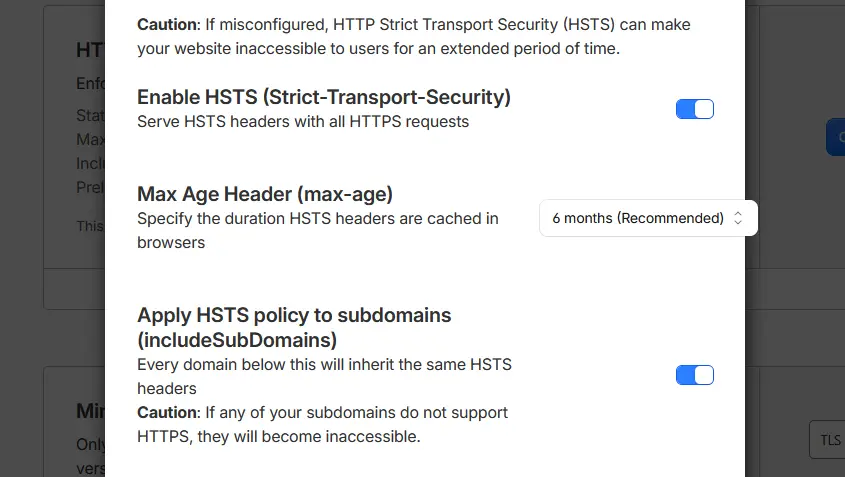
We suggest starting with a short max-age, such as 300 seconds, then raising it to one year once nothing breaks.
Why we don’t suggest preload at first
Preloading is hard to undo, so treat it as a long-term commitment, not a quick win.
The official HSTS preload list site requires a valid certificate, an HTTP to HTTPS redirect, HTTPS on all subdomains, and a header with at least one year, includeSubDomains and preload.
It warns that “Inclusion in the preload list cannot easily be undone” and that removal “takes months” to reach users.
MDN adds that preload is not part of the HSTS standard.
For your site, this means: skip includeSubDomains and preload if any subdomain (a mail panel, an old staging site) still runs without HTTPS.
Content-Security-Policy (CSP)
Content-Security-Policy tells the browser which sources may load scripts, styles, images, and frames on your pages, which limits the damage from injected code.
CSP is the strongest header here, and the easiest to break a site with. WordPress themes and plugins load scripts from many places.
A safe first step is the single directive frame-ancestors 'self', which controls framing only.
The full rollout, with report-only testing, is covered in setting up CSP on WordPress.
X-Content-Type-Options
X-Content-Type-Options with the value nosniff stops browsers from guessing what kind of file they received, so a file can’t be run as something it isn’t.
The MDN X-Content-Type-Options reference says it blocks scripts not served with a JavaScript type and stylesheets not served as text/css.
For your site, this means: add it everywhere. If a file stops loading afterward, fix the content type the server sends for it.
X-Frame-Options vs CSP frame-ancestors
Both headers stop other websites from loading your pages inside an invisible frame, a trick called clickjacking that fools visitors into clicking your buttons.
The MDN X-Frame-Options reference lists two working values:
DENY: no site can frame the page, including yoursSAMEORIGIN: only pages on your own site can frame it
MDN says the old ALLOW-FROM value is ignored by modern browsers. It also says CSP frame-ancestors supersedes X-Frame-Options and should be preferred for new setups.
We suggest sending both, because they don’t conflict. WordPress’s own sendframeoptions_header() function sends exactly this pair: SAMEORIGIN plus frame-ancestors 'self'.
For your site, this means: use SAMEORIGIN rather than OWASP’s DENY if your editor, page builder, or theme previews load your pages in frames.
Referrer-Policy
Referrer-Policy controls how much of the current page’s address is shared with the next site when a visitor clicks a link or loads a resource.
The MDN Referrer-Policy reference says strict-origin-when-cross-origin is the browser default. Other sites see only your domain, never the full path or query string.
MDN warns that unsafe-url “will leak potentially-private information”. That matters when URLs contain order numbers, search terms, or reset tokens.
For your site, this means: setting the default value explicitly costs nothing and makes your choice visible to header scanners. Avoid unsafe-url.
Permissions-Policy
Permissions-Policy switches off browser features, such as the camera, microphone and location, for your pages and any frames inside them.
An empty list () disables a feature everywhere, according to the MDN Permissions-Policy reference. MDN also notes it doesn’t work in some widely used browsers yet.
For your site, this means: disable the features you never use, so a third-party script can’t ask visitors for camera access. Keep geolocation if a store locator needs it.
Cross-Origin-Opener-Policy (brief)
Cross-Origin-Opener-Policy cuts the link between your page and any window it opens, or that opens it, so one can’t read the other.
The MDN Cross-Origin-Opener-Policy reference lists unsafe-none as the default. It points to same-origin-allow-popups for OAuth and payment pop-up windows.
For your site, this means: this header is optional for a typical blog or brochure site. If you add it to a store, test social logins and payment pop-ups first.
Deprecated headers to remove
Three headers still appear in old tutorials and plugins, but MDN and OWASP now say not to use them.
- X-XSS-Protection: the MDN X-XSS-Protection reference warns it “can create XSS vulnerabilities in otherwise safe websites”. OWASP says don’t set it, or send
0. - Expect-CT: the MDN Expect-CT reference says Chromium deprecated it from version 107, because certificate transparency is now enforced by default. OWASP says “Do not use it.”
- Public-Key-Pins: OWASP says “Do not use” and to remove any Public-Key-Pins header you find.
OWASP also suggests removing X-Powered-By, which reveals your software and version for no benefit to visitors.
How to check your security headers
You can see which headers your site sends in under a minute, using your browser, the command line or a free scanner.
Browser developer tools. Press F12, open the Network tab and reload the page. Click the first request (your page) and read the Response Headers list.
curl. In a terminal, run this command. It fetches only the headers for your homepage:
curl -sI https://example.comMDN HTTP Observatory. The free MDN HTTP Observatory scans a public URL and gives a score and grade.
The Observatory launch post says it checks HSTS, CSP, framing, Referrer-Policy and nosniff.
For your site, this means: check a page, an image URL and a logged-in page separately. Headers added in different places don’t always reach every response.
Where to set security headers on common setups
Where you add headers depends on what serves your site: the web server, a CDN in front of it, or WordPress itself.
Apache and LiteSpeed (.htaccess)
On Apache, add headers in .htaccess with the Header directive.
The Apache mod_headers documentation says plain Header set applies only to successful responses, while always also covers errors.
<IfModule mod_headers.c>
  Header always set Strict-Transport-Security "max-age=300"
  Header always set X-Content-Type-Options "nosniff"
  Header always set X-Frame-Options "SAMEORIGIN"
  Header always set Referrer-Policy "strict-origin-when-cross-origin"
</IfModule>
Many shared hosts run LiteSpeed instead of Apache. LiteSpeed’s feature explanations say it was “designed to run off Apache’s httpd.conf and .htaccess files”, so the same block usually works.
nginx (add_header)
On nginx, add headers with add_header in the server block. The nginx headers module documentation says that without always, headers are skipped on error responses.
add_header Strict-Transport-Security "max-age=300" always;
add_header X-Content-Type-Options "nosniff" always;
add_header X-Frame-Options "SAMEORIGIN" always;
add_header Referrer-Policy "strict-origin-when-cross-origin" always;
Watch the inheritance rule. Headers carry down from a parent block “if and only if there are no add_header directives defined on the current level”.
So one add_header in a location block silently drops the rest.
nginx 1.29.3 added an add_header_inherit directive to change this.
If you run nginx in front of WordPress on a VPS, the nginx reverse proxy setup for WordPress shows where server blocks live.
Cloudflare (Transform Rules)
If Cloudflare sits in front of your site, you can add headers at its edge without touching the server.
The same edge layer often runs a server-side web application firewall, which headers complement but don’t replace.
The Cloudflare response header Transform Rules guide starts at Rules, Overview, then Create rule, then Response Header Transform Rule. Choose “Set static”, enter the header name and value, and deploy.
One rule can change up to 30 headers. Use “Set” rather than “Add” so you replace any copy your server already sends instead of creating a duplicate.
WordPress plugins or your host’s panel
A security or headers plugin can send these headers without editing server files, which suits shared hosting accounts without file access.
Plugins send headers through PHP, so they only cover pages WordPress builds. Images, CSS and other static files served straight by the web server won’t get them.
Some managed WordPress security setups can add headers at the server level instead, which also covers static files.
Some hosts let you add headers in their panel or on request. Custom header control belongs on the list of security features to check before buying.
If a host locks server files, ask how it handles custom headers when comparing managed WordPress hosting options.
For your site, this means: set each header in one place only. Two layers sending different values can confuse browsers and scanners.
What headers can’t do
Security headers tell browsers how to behave; they don’t patch your site, block attacks on your server or stop logins being guessed.
A site with an A+ header grade can still run an outdated plugin. Updates, strong logins and backups are covered in the steps to protect your WordPress site.
Whether headers are your job or your host’s is one of the security tasks split by hosting type, so check your plan before editing server files.
Frequently asked questions
What security headers should every website have?
Every HTTPS site should send Strict-Transport-Security, X-Content-Type-Options, X-Frame-Options or CSP frame-ancestors, Referrer-Policy, and a Content-Security-Policy built up over time.
Permissions-Policy is a sensible addition. Cross-Origin-Opener-Policy is optional for most content sites.
Is X-Frame-Options deprecated?
No, X-Frame-Options still works in current browsers, but MDN says CSP frame-ancestors supersedes it and should be preferred for new setups.
Only its ALLOW-FROM value is deprecated. Sending both X-Frame-Options: SAMEORIGIN and frame-ancestors 'self' is a common, safe pairing.
Should I still use X-XSS-Protection?
No. MDN marks X-XSS-Protection as deprecated and warns it can create XSS holes in otherwise safe sites.
OWASP’s advice is to leave it out or send X-XSS-Protection: 0. A Content-Security-Policy is the modern replacement.
Is HSTS preload worth it?
For most small sites, plain HSTS with a one-year max-age gives most of the benefit without preload’s lock-in.
Preload mainly adds protection for a visitor’s first visit, before the browser has seen your header.
Removal from the list takes months, and every subdomain must support HTTPS for as long as you stay listed.
Can security headers break my website?
Yes, a wrong value can. A strict CSP can block scripts, DENY can break your own frames, and HSTS can lock out subdomains without HTTPS.
Add headers one at a time and test the homepage, a login and checkout after each change.
How do I check if my security headers are working?
Run curl -sI on your URL, read the Response Headers in your browser’s Network tab, or scan the site with the MDN HTTP Observatory.
Check a static file and an error page too, since headers can be missing on those responses.
How we researched this
Every header definition and recommended value in this checklist comes from MDN Web Docs and the OWASP HTTP Headers Cheat Sheet, checked on October 5, 2026.
HSTS details come from RFC 6797 and the hstspreload.org submission rules. Server snippets follow the official Apache mod_headers, nginx headers module, LiteSpeed and Cloudflare documentation, all read the same day.
Where we depart from OWASP (SAMEORIGIN instead of DENY, no preload at first), we say so and explain why.
Editorial standards for every guide are set out in how we test and review hosts.