
Your WordPress site is growing. That’s great news. But your current hosting might not be ready for it.
Slow load times, frequent downtime, and resource limits are signs your hosting is struggling. Choosing the right hosting plan now prevents bigger problems later. It also keeps your visitors happy and your site performing well.
In this guide, you’ll learn:
- What to look for in hosting for a growing WordPress site
- When to move from shared hosting to a better plan
- Which hosting types work best at different traffic levels
- How to evaluate speed, security, and scalability before you commit
By the end, you’ll have a clear picture of what your site actually needs and what to look for when comparing plans.
Key Takeaways
- Shared hosting is fine to start, but it has real limits as your site grows.
- VPS and managed WordPress hosting offer better performance and control.
- Look for scalability, uptime guarantees, server speed, and good support.
- Switching hosting at the wrong time can cause downtime and data loss — plan ahead.
- Your site’s traffic volume, content type, and technical needs all affect the right choice.
Quick Answer
To choose hosting for a growing WordPress site, start by matching your current traffic to the right plan type. Shared hosting works for small sites. Once you regularly see over 10,000 monthly visitors or notice slowdowns, move to VPS or managed WordPress hosting. Focus on uptime, PHP version support, SSD storage, caching, and easy scalability.
Why Your Hosting Choice Matters More as You Grow
When your site was new, almost any hosting plan worked. Traffic was low. Resources weren’t stretched.
As you grow, things change. More visitors means more server requests. More content means more storage and database activity. A plan that worked at 1,000 monthly visitors will buckle under 50,000.
WordPress powers a larger share of the web than any other content management system. Our WordPress statistics cover market share, plugin adoption, WooCommerce usage, and how the platform has grown through 2026.
Hosting affects three things your growing site depends on:
- Speed — Slow hosting leads to higher bounce rates and lost readers.
- Reliability — Downtime means missed traffic, especially during traffic spikes.
- Security — Cheap shared plans often share vulnerabilities across accounts.
Choosing the wrong hosting doesn’t just slow you down. It can hold your site back entirely.
Understanding the Main Hosting Types
Before you pick a plan, you need to understand what each type actually offers. If you’re new to this, the guide to types of web hosting is a good starting point.
Shared Hosting
Multiple websites share the same server resources. It’s the cheapest option. It’s also the most limited.
One high-traffic site on the same server can slow down everyone else. You have no control over server settings. PHP versions may be outdated. Scaling is almost impossible without switching plans entirely.
Best for: New WordPress sites with fewer than 10,000 monthly visitors.
VPS Hosting
A virtual private server gives your site dedicated resources. You get a fixed allocation of RAM, CPU, and storage. Other websites can’t eat into your share.
VPS hosting works well when your site is growing but you’re not yet at enterprise scale. It offers more control and better performance than shared hosting. It does require more technical knowledge to manage — unless you go with a managed option.
Read more about making the switch in the shared vs VPS hosting comparison.
Managed WordPress Hosting
This is hosting built specifically for WordPress. The provider handles updates, caching, backups, and security. You focus on content. They handle the infrastructure.
Managed WordPress hosting tends to cost more than generic shared hosting. But it delivers consistent performance, WordPress-specific optimization, and expert support. It’s worth it once your site generates real traffic or revenue.
Check out the full breakdown in the guide to choosing managed WordPress hosting.
Cloud Hosting
Cloud hosting spreads your site across multiple servers. If one server fails, another picks up the load. It scales automatically with traffic spikes.
It’s more flexible and reliable than traditional hosting. It’s also harder to predict costs since some plans charge based on usage. Good choice for sites with unpredictable or seasonal traffic.
When to Upgrade Your Hosting Plan
This is the question most WordPress site owners get wrong. They wait too long.
Watch for these signals:
- Your admin dashboard loads slowly.
- Pages take more than 3 seconds to load.
- You’ve hit your storage or bandwidth limit.
- You’ve experienced downtime during traffic peaks.
- Your host has throttled your CPU usage.
Any one of these is a warning sign. More than one means you need to act now.
A good rule of thumb: if your site consistently gets more than 10,000 to 20,000 monthly visitors, shared hosting is likely no longer enough. You should be looking at VPS or managed WordPress hosting.
What to Look for in Hosting for a Growing Site
Not all hosting plans are equal. When comparing options, focus on these specific features.
Uptime Guarantee
Look for a provider that guarantees at least 99.9% uptime. That still allows for about 8 hours of downtime per year.
A provider offering 99.99% uptime is better — that’s less than an hour of downtime annually. Anything below 99.9% is a red flag.
Don’t just trust the marketing claim. Look for independent uptime test data or user reviews that verify real-world performance.
Server Speed and Location
Hosting performance depends heavily on the server’s physical location. A server in New York will respond faster to US visitors than one in Europe.
Look for hosting with servers in or near your target audience’s location. Many providers now offer multiple data centers. Some let you choose your region during signup.
For WordPress specifically, PHP 8.x support, NGINX or LiteSpeed servers, and built-in object caching make a real difference.
Scalability
Your site is growing. Your hosting needs to grow with it.
Ask these questions before signing up:
- Can you upgrade your plan without migrating to a new server?
- Does the provider offer higher-tier plans or VPS options?
- Is scaling automatic, or do you need to request it manually?
A hosting provider that forces you to migrate every time you need more resources will cost you time and risk downtime.
Storage and Bandwidth
Growing sites need more of both.
SSD storage is faster than traditional HDD. NVMe SSD is even faster. Make sure you know what type of storage the plan uses.
Check whether the plan offers unmetered bandwidth or a fixed cap. Metered bandwidth with overage fees can get expensive fast if your site goes viral or gets featured on a major website.
Automatic Backups
If something goes wrong, backups are your safety net.
Look for daily automated backups with at least 7 to 14 days of retention. Make sure you can restore a backup with one click. Some hosts charge extra for backup storage — factor that into your cost comparison.
For more on this, see the guide on secure hosting features.
Security Features
A growing WordPress site is a bigger target for hackers.
Good hosting security includes:
- Free SSL certificate (Let’s Encrypt or premium)
- Malware scanning and removal
- Firewall protection at the server level
- DDoS protection
- Isolated accounts (so other users can’t affect your site)
You can also take steps on your end. The guide to protecting your WordPress site covers both hosting-level and WordPress-level security in detail.
PHP Version Support
WordPress works best on PHP 8.1 or higher. Older PHP versions are slower and no longer receive security patches.
Always check which PHP versions your host supports. Some budget hosts still default to PHP 7.x, which puts your site at risk.
Customer Support
As your site grows, technical issues become more costly. Fast, knowledgeable support matters.
Look for:
- 24/7 live chat or phone support
- WordPress-specific expertise
- Fast average response times
- Helpful documentation and knowledge base
Test the support before you commit. Ask a technical question during the sales process. See how quickly and accurately they respond.
Shared Hosting vs VPS: Which Is Right for You?
| Feature | Shared Hosting | VPS Hosting |
|---|---|---|
| Monthly traffic sweet spot | Up to 10,000–20,000 | 20,000–200,000+ |
| Performance | Lower, can vary | Consistent, dedicated |
| Technical control | Limited | High |
| Cost | $2–$10/month | $10–$60+/month |
| Management | Fully managed | Managed or unmanaged |
| Best for | New and small sites | Growing or mid-sized sites |
If you’re still on shared hosting and your traffic is climbing, it’s worth reading the shared vs VPS hosting guide to understand what you’d gain by switching.
Managed vs Unmanaged VPS: Which Should You Choose?
Once you decide to move to VPS, you have another choice: managed or unmanaged.
Unmanaged VPS means you handle server configuration, security updates, and software installs yourself. It’s cheaper but requires Linux server knowledge.
Managed VPS means the provider handles the technical side. You pay more, but you can focus on running your site instead of managing a server.
For most WordPress site owners, managed VPS is the better choice. You don’t need to become a sysadmin just to run a website.
Get the full comparison in the managed vs unmanaged VPS guide.
Does Managed WordPress Hosting Make Sense for You?
Managed WordPress hosting is premium hosting. It’s built around one platform and one platform only.
Here’s what you typically get:
- Automatic WordPress updates
- Staging environments for testing changes
- Built-in caching and CDN
- Daily backups with one-click restore
- WordPress-expert support team
- Pre-configured for WordPress performance
It costs more than a standard plan. But when your site generates consistent traffic or drives real revenue, the added reliability and peace of mind is often worth it.
If you’re comparing options, start with the best managed WordPress hosting list to see which providers rank well.
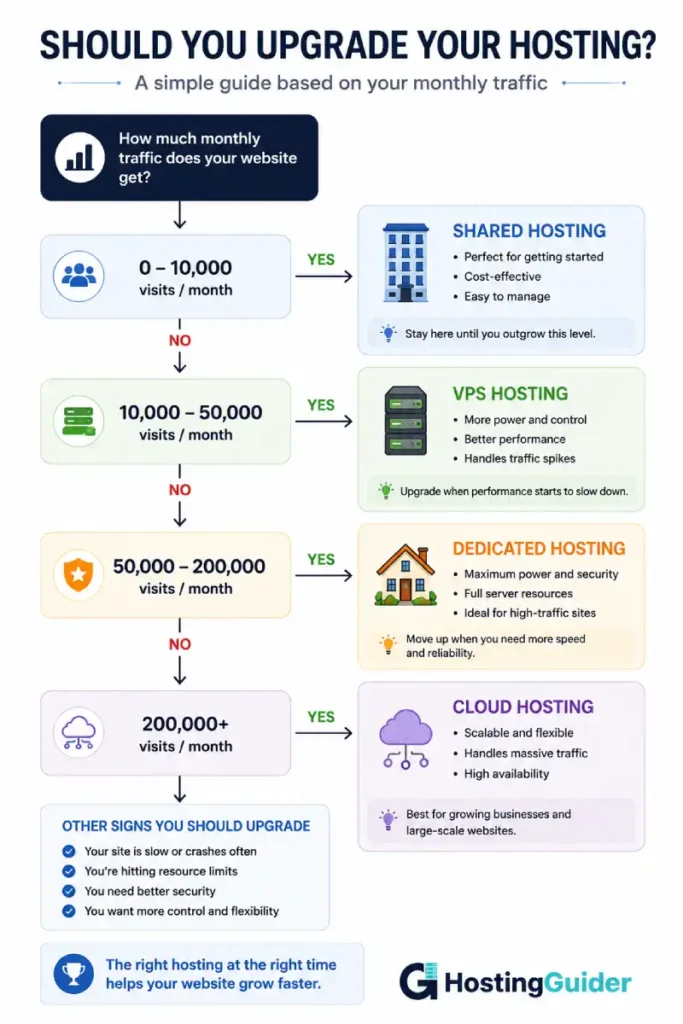
How Traffic Levels Map to Hosting Types
One of the clearest ways to think about hosting is by traffic volume.
Under 10,000 monthly visitors: Quality shared hosting or entry-level managed WordPress hosting works well. Focus on finding a fast, reliable provider rather than a premium plan.
10,000 to 50,000 monthly visitors: You’re in the transition zone. A solid VPS or a mid-tier managed WordPress plan is the better fit. Shared hosting will start showing strain.
50,000 to 200,000 monthly visitors: VPS or managed WordPress hosting is the right choice. Make sure your plan includes caching, a CDN, and scalable resources.
Over 200,000 monthly visitors: You need dedicated resources. Managed WordPress hosting with dedicated infrastructure, or cloud hosting, is appropriate at this level.
For a broad overview of hosting options at each stage, see the guide to choosing a web hosting plan.
The Role of Speed in Hosting Decisions
Speed is not just a nice-to-have. It directly affects your search rankings and user experience.
Google uses Core Web Vitals as a ranking signal. LCP (Largest Contentful Paint) is heavily influenced by server response time. A slow host means a slow LCP score.
When evaluating hosting plans, look for:
- Time to First Byte (TTFB): Should be under 200ms for good performance.
- CDN support: A built-in CDN reduces latency for visitors far from your server.
- Caching: Server-level caching (Redis, Memcached, or built-in WordPress caching) dramatically reduces load time.
- SSD/NVMe storage: Faster disk I/O speeds up database queries.
Hosting alone doesn’t determine your site’s speed. But a slow host creates a ceiling you can’t break through, no matter how well you optimize WordPress.
Pair good hosting with image optimization. The guide to optimizing images for website speed explains how to reduce file size without losing quality.
Migration: What to Know Before You Switch Hosts
Switching hosts can be stressful. But staying on the wrong host is worse.
Plan your migration carefully:
- Back up everything first. Full site backup before you do anything else.
- Test on the new host before switching DNS. Most hosts give you a temporary URL.
- Choose a low-traffic period. Weekday nights or weekends typically have the lowest traffic.
- Update your DNS TTL beforehand. Set it to 300 seconds (5 minutes) a few days before the switch so changes propagate faster.
- Monitor after the switch. Check your site’s speed and functionality for 48 hours post-migration.
The guide to migrating to managed WordPress hosting walks through the full process with step-by-step instructions.
Hosting for WordPress Stores: WooCommerce Considerations
If your growing WordPress site includes a WooCommerce store, your hosting requirements are higher than a standard blog or portfolio.
WooCommerce creates more database queries. Cart and checkout pages can’t be cached the same way as static content. Payment processing adds another layer of performance requirements.
For a WooCommerce site, prioritize:
- High memory limits (256MB or more)
- Strong database performance (MariaDB or MySQL optimized)
- A host that excludes cart and checkout pages from caching automatically
- PCI compliance (relevant if you handle payments server-side)
See the best WooCommerce hosting options for providers that handle these requirements well.
Choosing a WordPress Hosting Plan: Step-by-Step
Here’s a practical process for making your decision.
Step 1: Know your current traffic. Check Google Analytics or your hosting dashboard. Get a realistic monthly visitor count.
Step 2: Forecast 12 months ahead. Where do you expect your site to be? Choose hosting that fits your projected growth, not just your current state.
Step 3: Decide on your technical involvement. Do you want to manage a server yourself, or do you prefer hands-off hosting? This determines whether VPS or managed hosting makes more sense.
Step 4: Set a budget. Good managed WordPress hosting starts around $20 to $30 per month. Quality VPS plans start at $10 to $20 per month. Budget accordingly.
Step 5: Compare shortlisted providers. Use uptime data, speed test results, and user reviews. Don’t rely on marketing copy alone.
Step 6: Test support before buying. Ask a technical question. See how they respond.
Step 7: Check renewal pricing. Many hosts offer low introductory rates. Check what year two and three will actually cost.
Red Flags to Avoid When Choosing a Host
Not every hosting provider is worth your trust. Watch out for:
- Unlimited everything claims with no asterisks. All servers have real resource limits.
- No published uptime data or independent test results.
- No refund policy. Good hosts offer at least a 30-day money-back guarantee.
- Shared IP addresses without clear explanation. A blacklisted IP affects your email deliverability.
- No staging environment. This is a basic feature on any serious WordPress host.
- Support only through tickets. No live chat means slow response times when things break.
Recommended Hosting Resources
Depending on your site’s direction, these resources will help you compare options:
- Best WordPress Hosting — Broad comparison for WordPress sites at different stages.
- Best Managed WordPress Hosting — For sites ready for premium, fully managed hosting.
- Best VPS Hosting — For growing sites that need dedicated resources.
- Best Cloud Hosting — For high-traffic or unpredictable-traffic sites.
- How to Set Up VPS Hosting — Step-by-step guide if you’re moving to VPS for the first time.
FAQ’s
At what traffic level should I upgrade from shared hosting?
Most shared hosting plans start showing strain between 10,000 and 20,000 monthly visitors. If your site regularly hits that range or you notice slowdowns during traffic spikes, it’s time to move to VPS or managed WordPress hosting.
Is managed WordPress hosting worth the extra cost?
For most site owners with consistent traffic or a site tied to revenue, yes. Managed WordPress hosting handles updates, security, and backups automatically. You also get WordPress-specific performance optimization and expert support. The cost is higher, but the time and stress savings add up quickly.
What’s the difference between VPS and managed WordPress hosting?
VPS gives you a virtual server with dedicated resources, but it’s not specifically optimized for WordPress. Managed WordPress hosting is built around WordPress, with automatic updates, built-in caching, and WordPress-expert support. Both are better than shared hosting for a growing site.
How do I migrate my WordPress site without losing data?
Always back up your site before migrating. Use a migration plugin or your new host’s migration service. Test on the new host before switching your domain’s DNS. Keep your old host active for a few days as a fallback.
Does my hosting affect my Google rankings?
Yes, indirectly. Hosting affects your site’s speed and uptime, both of which influence user experience. Google uses Core Web Vitals, which include server response time metrics. A slow or unreliable host can lower your rankings over time.
What hosting type should I use for a WooCommerce store?
WooCommerce sites need more resources than a standard WordPress blog. Look for managed WordPress hosting with WooCommerce optimization, high memory limits, and database performance tuning. Cloud hosting also works well for stores with unpredictable traffic.
Wrapping Up
Choosing hosting for a growing WordPress site comes down to matching your current needs with a plan that can also handle where you’re headed.
Start by knowing your traffic. Pick a hosting type that fits your growth stage. Compare plans on the things that actually matter: uptime, speed, scalability, security, and support.
Moving from shared hosting to VPS or managed WordPress hosting is one of the most impactful changes you can make for your site’s long-term performance. The sooner you make the right call, the fewer headaches you’ll face as your audience grows.


