
Every managed WordPress host claims to be the best. They all promise speed, security, and expert support.
The real question is which one is best for your specific situation.
A developer managing agency sites has different needs from a solo blogger. A WooCommerce store owner has different priorities from a content creator. Price matters differently when your site generates revenue versus when it does not.
This guide skips the noise. It gives you a clear decision framework so you can choose confidently.
If you want to understand what managed hosting actually includes before comparing providers, read our managed WordPress hosting guide first.
The Five Factors That Actually Matter
Most managed hosts cover the basics. These five factors separate them at the details level.
| Factor | Why It Matters | What to Compare |
|---|---|---|
| Infrastructure | Determines base server performance | Google Cloud and AWS outperform generic hardware |
| PHP workers | How many simultaneous visitors your site handles | More workers means more capacity without queuing |
| Staging environment | Safe testing before changes go live | Must be a full copy including database |
| Backup retention | How far back you can restore | 30 days beats 14 days if a problem is discovered late |
| Support expertise | WordPress-specific knowledge when things break | Managed hosts should resolve WordPress errors directly |
Price matters too. But cheap managed hosting that cuts corners on infrastructure or support ends up costing more in lost performance. Read the full breakdown of managed WordPress hosting costs before making a price-based decision.
The Right Host Depends on Your Situation
There is no single best managed WordPress host. There is only the best one for your specific needs.
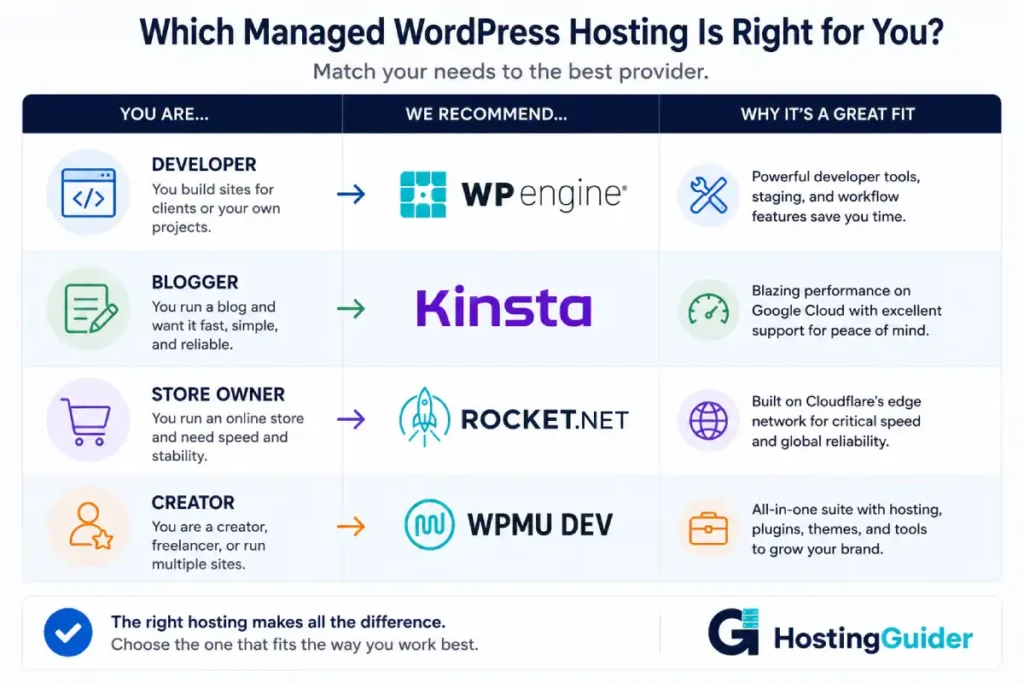
Work through this table. Find the row that matches you.
| Your Situation | Best Choice | Why |
|---|---|---|
| High-traffic site, performance is critical | Kinsta | Google Cloud infrastructure with Redis and Cloudflare CDN |
| Agency managing multiple client sites | WP Engine | Git integration, Smart Updates, multi-site dashboard |
| Want cloud flexibility without visitor limits | Cloudways | Choose your cloud provider, pay for resources not traffic |
| Content creator wanting Jetpack included | Pressable | Automattic-owned, Jetpack Security built into every plan |
| Budget-conscious, entry managed hosting | SiteGround | Managed features at lower entry price |
| WooCommerce store with growing orders | Kinsta or Cloudways | Both configure caching correctly for dynamic cart pages |
| Fastest possible page load times | Rocket.net | Cloudflare enterprise edge serving from nearest location |
| All-in-one hosting plus plugin suite | WPMU DEV | Hosting bundled with premium plugins for professionals |
A Closer Look at the Top Picks
Kinsta
Kinsta runs on Google Cloud C2 machines. Every plan includes dedicated PHP workers, Redis object caching, a Cloudflare CDN, and daily backups.
The MyKinsta dashboard is clean. It shows real-time performance data per site. The support team responds in under two minutes and handles WordPress-specific problems directly.
The entry plan costs $35 per month for one site and 25,000 monthly visits. Visitor limits mean costs increase as your site grows.
Best for performance-focused sites and established WooCommerce stores.
Read the full Kinsta review | Visit Kinsta
WP Engine
WP Engine stands apart on developer tooling. It offers Git integration, Smart Updates that test changes on staging before applying them to live, and a multi-site management dashboard.
Every plan includes access to the Genesis framework and StudioPress theme library. Agencies get a Transferable Sites feature to hand off client sites cleanly.
Entry plans start at $23 per month. Object Cache Pro is available on Business plans and above.
Best for agencies and developers who need a professional deployment workflow.
Read the full WP Engine review | Visit WP Engine
Cloudways
Cloudways lets you choose your cloud provider. Options include DigitalOcean, Linode, Vultr, AWS, and Google Cloud. You get managed hosting on top of whichever infrastructure you pick.
There are no visitor limits. You pay for server resources. This makes cost predictable for sites with variable traffic.
Entry plans start from $14 per month on DigitalOcean. Scaling up means resizing your server, not changing hosts.
Best for technically comfortable users who want flexibility and no visitor-based pricing.
Read the full Cloudways review | Visit Cloudways
Pressable
Pressable is owned by Automattic, the company behind WordPress itself. Every plan includes Jetpack Security covering real-time backups, malware scanning, and brute force protection.
Plans start at $25 per month. Support comes from a team with direct knowledge of the WordPress codebase.
Best for content creators and bloggers who want Jetpack built in and Automattic’s expertise behind their host.
Read the full Pressable review | Visit Pressable
SiteGround
SiteGround is the most accessible entry point into managed WordPress hosting. Their SuperCacher includes WordPress-aware rules that handle WooCommerce correctly. Phone support is available. The 99.99% uptime guarantee is backed by cloud infrastructure.
Cloud plans start from $100 per month. Shared plans with managed features start lower.
Best for site owners who want a known brand, phone support, and a clear upgrade path.
Read the full SiteGround review | Visit SiteGround
What to Ask Before You Commit
Run through these questions for any provider you are considering.
Is staging included on my specific plan? Some hosts restrict staging to higher tiers. Check the plan you are actually buying, not a premium one.
What are the visitor limits? Know what threshold triggers an automatic upgrade. Calculate whether your current traffic fits the entry plan.
How long are backups retained? 14 days is common. 30 days is better. Problems are sometimes discovered weeks after they start.
What exactly does automatic WordPress updating cover? Core only? Plugins too? Ask specifically.
How fast does support respond? Ask a WordPress-specific question before you buy. See how well they answer it. Generic responses suggest a generalist team.
Our guide on the top features to look for in managed WordPress hosting covers each of these in detail.
Frequently Asked Questions
How do I know if I need managed WordPress hosting?
The main signals are: your site generates revenue and downtime has a direct cost, you spend too much time on technical maintenance, you have experienced a security issue, or your traffic has grown beyond what shared hosting handles reliably. If any of these apply, managed hosting is worth the upgrade. The pros and cons of managed WordPress hosting guide helps you make the final call.
Is managed WordPress hosting worth the price?
For most established WordPress sites, yes. The extra cost compared to shared hosting is typically $15 to $30 per month at entry level. In return, you get automatic updates, daily backups with self-serve restore, active security monitoring, built-in caching, a staging environment, and expert support. If your site earns revenue, the investment in reliability and performance pays for itself quickly.
Which managed WordPress host is best for WooCommerce?
Kinsta and Cloudways both handle WooCommerce well. Both configure server-level caching to exclude cart, checkout, and account pages while still caching product pages. Both include Redis for object caching. Kinsta runs on Google Cloud with a polished dashboard. Cloudways gives you more infrastructure choice and no visitor limits. For very high-volume stores, Liquid Web and Nexcess offer WooCommerce-specific optimisations at an enterprise level.
Can I switch managed WordPress hosts later?
Yes. Most managed hosts offer free migrations when you join them. Moving between managed hosts is simpler than moving from shared hosting because WordPress installations are already clean and optimised. The main things to check are that your URLs stay the same and that 301 redirects are in place if anything changes.


