
When you build a website on Wix, Squarespace, Webflow, or Shopify, it feels like yours. You designed it. You wrote the content. You set it up.
But there is a meaningful difference between a website that you own and a website that lives on someone else’s platform.
This guide gives you the honest breakdown of what you actually own when you build on a website builder, what you do not own, and what happens if you ever decide to leave.
The Illusion of Ownership
Website builders are built on a subscription model. You pay monthly or annually to use the platform. Your website lives on their servers, is rendered by their software, and depends on their infrastructure to exist.
If you stop paying, your website disappears. Not the content necessarily. But the live website that visitors see stops existing the moment your subscription lapses.
That is fundamentally different from owning a website. It is closer to renting it.
This is not a secret and it is not inherently a problem. Renting infrastructure from a platform that manages everything is a reasonable trade-off for many businesses. But the implications of that arrangement are rarely explained clearly before you sign up.
Read our comparison of website builders pros and cons and our overview of what website builders are for the broader context before diving into the ownership question below.
What You Actually Own
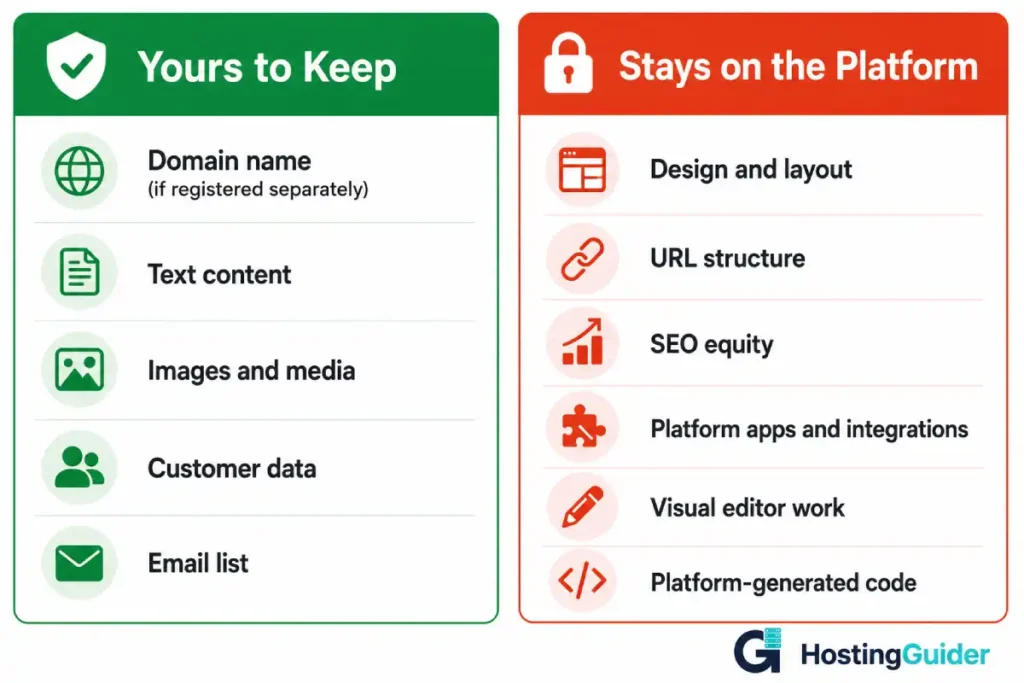
Let us be specific. Here is what you genuinely own regardless of which builder you use.
Your domain name If you registered your domain separately through a registrar like Namecheap or Porkbun, you own it. You can point it anywhere. You can move it to any host or platform at any time.
If you registered your domain through the builder platform itself, you still usually own it but accessing and transferring it can be more complicated. Always confirm that you have full access to transfer your domain before committing to a platform.
Read our guide on how to transfer a domain name for what that process involves.
Your text content The words you wrote belong to you. Every platform allows you to copy and export the text content of your pages. The format and ease of export varies, but the content itself is always yours.
Your images and media Files you uploaded belong to you. You can download them from any platform and use them elsewhere. The original files you created or licensed are yours to keep.
Your customer data On e-commerce platforms like Shopify, you can export your customer list, order history, and product catalog. This data is yours and exportable. The format may require reformatting for use on a different platform.
Your email list Any email subscribers collected through your site belong to you and can be exported. The email marketing integrations you use exist independently of the platform.
What You Do Not Own
This is the more important list. These are the things that feel like yours but are not.
The design and layout Your design was built using the platform’s editor, templates, and components. That design lives inside the platform. It cannot be exported and dropped into WordPress, another builder, or any other system. If you leave, your visual design does not come with you.
The URL structure Every page on your site has a URL. Your blog posts, product pages, and category pages all live at specific addresses. When you move to a different platform, those URLs either change entirely or require careful redirection work. The URL structure was built inside the platform’s system.
Your SEO equity This is the most damaging lock-in that nobody talks about clearly. Over months and years, your pages accumulate backlinks, Google index trust, and ranking position. That equity is tied to your specific URLs. When URLs change during a migration, that equity is at risk unless every old URL is properly redirected to the new equivalent.
Platform-specific URL patterns often cannot be replicated exactly on a new system, which means some loss is inevitable.
Platform-specific functionality Wix apps, Squarespace blocks, Shopify apps, and Webflow components are all platform-specific. The functionality they provide may exist on other platforms but the implementation does not transfer. Every integration, every custom form, every popup, every product upsell setup needs to be rebuilt from scratch.
Your page builder work The hours you spent arranging sections, setting up animations, configuring layouts in the visual editor are not exportable as work. They exist as data inside the platform. On a new platform, you start that visual work again.
Platform-generated code Builders generate the HTML, CSS, and JavaScript that make your site work. You do not have access to clean, portable code in most cases. What you see in the editor is not what is running underneath.
How Each Major Builder Handles Your Data
| Platform | Content Export | Design Portability | Domain Transfer | Customer Data Export |
|---|---|---|---|---|
| Wix | Partial, no full CMS export | Not portable | Yes, with process | Limited |
| Squarespace | XML export for blog content | Not portable | Yes | Yes, CSV |
| Webflow | CMS content export via CSV | Code export available | Yes | Yes |
| Shopify | Full product and order export | Not portable | Yes | Yes, CSV |
| WordPress.com | Full export available | Limited portability | Yes | Yes |
Webflow stands apart from this group because it offers code export. You can export the HTML, CSS, and JavaScript that Webflow generates and host it yourself. This is a significant advantage for portability. The exported code still requires a developer to work with and does not include CMS functionality, but it is genuinely more portable than Wix or Squarespace.
Shopify has the most complete data export of any e-commerce builder. Products, customers, orders, and inventory all export cleanly. The design and app configurations do not.
The SEO Lock-In Problem in Detail
SEO lock-in deserves its own section because it is the hidden cost that only becomes visible after significant investment in a platform.
Here is how it works.
You publish content on your Squarespace site. The URL is yoursite.squarespace.com/blog/your-post-title or yourdomain.com/blog/your-post-title. Google indexes that URL. Other sites link to it. Over time, that specific URL accumulates ranking authority.
When you migrate to WordPress or any other platform, the new URL structure is typically different. WordPress might generate yourdomain.com/your-post-title or yourdomain.com/2024/your-post-title. Even on the same domain, the path changes.
Every changed URL loses its direct ranking authority unless it is permanently redirected.
Setting up redirects is possible and standard practice. But it requires:
- Mapping every old URL to its new equivalent
- Implementing 301 redirects before or immediately after migration
- Verifying that search engines follow the redirects correctly
- Accepting that some ranking drop is likely during the transition even with perfect redirects
The more content you have and the more links you have built, the more SEO equity is at risk. A site with two years of content and backlinks faces a much more complex migration than a brand-new site.
This is why starting on the right platform matters. Every month of content built on a builder is a month of SEO equity that will be disrupted if you later need to migrate.
Read our guide on how to migrate from a website builder for the full migration process and what to expect.
The Migration Reality: What It Actually Takes
When people decide to leave a website builder, they often underestimate what migration involves.
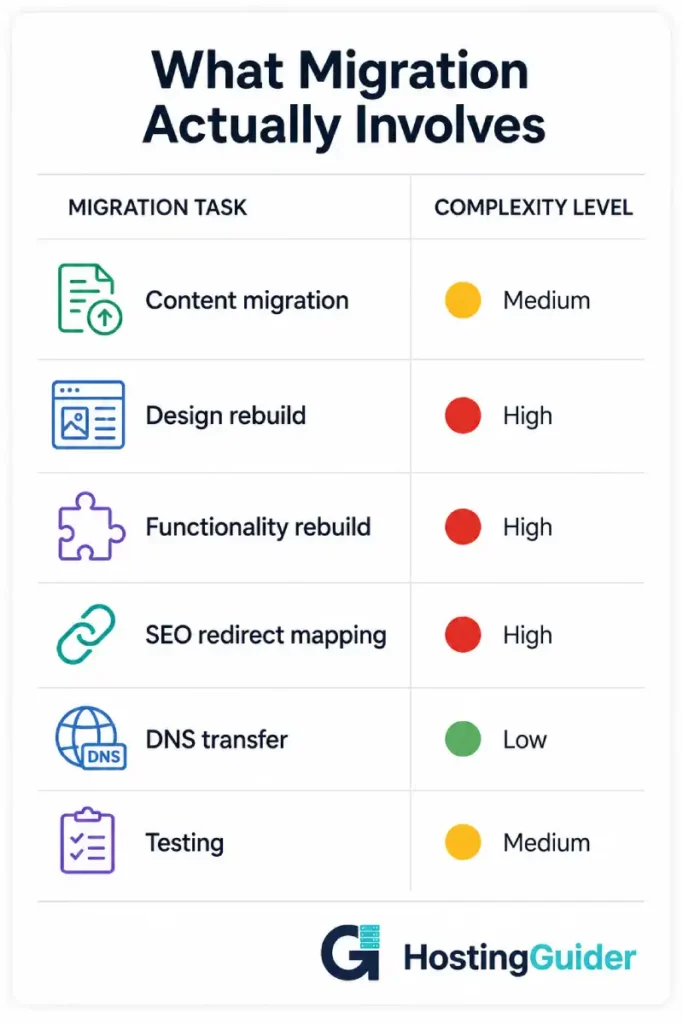
Here is what typically needs to happen.
Content migration Blog posts: export from the builder, import into the new platform, verify formatting, fix images that did not transfer cleanly.
Pages: recreate each page manually on the new platform. Most page content does not transfer in a usable format.
Products: export as CSV, import into the new platform, verify images, check variants, rebuild product options.
Design rebuild Your entire visual design needs to be recreated from scratch on the new platform. This is the largest time investment in any migration.
Functionality rebuild Every form, popup, integration, and custom feature needs to be set up again on the new platform.
SEO work Map old URLs to new URLs. Implement redirects. Update internal links. Submit the updated sitemap. Monitor rankings during and after the transition.
DNS and domain Update nameservers or DNS records to point to the new hosting. Wait for propagation.
Testing Verify every page, every form, every checkout flow, every email notification on the new platform before removing the old one.
A simple five-page business site might take a weekend to migrate properly. A content-heavy blog or e-commerce store with hundreds of pages and products can take weeks.
How to Minimise Lock-In From the Start
If you are already on a builder or planning to use one, these steps reduce how trapped you become.
Register your domain separately Never let the platform own your domain. Register it through a dedicated registrar like Namecheap, Cloudflare Registrar, or Porkbun. Point it to the builder. That way your domain is fully yours to move at any time.
Keep a backup of all your content Export your text content regularly. Download copies of all your images. Keep a local copy of everything you would need to rebuild the site elsewhere.
Avoid deep platform-specific integrations if you can Every native platform app or block you use makes migration harder. Where an integration works the same way across platforms (a standard email signup form rather than a Squarespace-specific block), prefer the more portable option.
Document your URL structure Keep a spreadsheet of every URL on your site. If you ever migrate, this becomes the source for your redirect mapping.
Use platform-agnostic tools for email marketing and CRM Your email list and customer data should live in tools that work independently of your website platform. Mailchimp, ConvertKit, and similar tools work with any website. Squarespace Email Campaigns ties you further to Squarespace.
When Lock-In Matters and When It Does Not
Lock-in is not automatically a problem. It depends on where your site is going.
Lock-in matters less when:
- Your site is informational and you have no plans to scale
- You are a local business with a simple presence and no content strategy
- You are testing an idea and may not keep the site regardless
- Technical complexity of self-hosted WordPress is a genuine barrier for you
Lock-in matters more when:
- You are building long-term SEO through regular content
- You expect significant growth that may require platform change
- You need custom functionality that builders do not support
- You are building an e-commerce operation that will grow substantially
- You want full ownership and portability as a principle
Read our comparison of Wix vs Squarespace vs WordPress for a direct platform comparison that covers the ownership implications alongside the feature set.
What Genuine Ownership Looks Like
For comparison, here is what you own when you run a self-hosted WordPress site.
- Your domain (registered separately)
- Your WordPress installation and all its files
- Your database containing all content, settings, and user data
- Your theme and child theme files
- Your plugins (most are portable, some require licenses)
- Your complete URL structure
- Your hosting relationship (switch providers whenever you want)
If your hosting provider closes tomorrow, you take your files, your database export, and your domain, and you are live on a new host within hours. Nothing is owned by the platform.
That portability has a cost: you manage the infrastructure, updates, security, and backups yourself or pay a managed host to do it. But the ownership is real.
Final Thoughts
Website builders are useful tools that work well for the right use cases. The lock-in that comes with them is a reasonable trade-off for simplicity, especially at small scale.
But it is a trade-off. And it is one that is rarely explained before you invest months of content, design work, and SEO equity into a platform.
Know what you own before you build. Know what migrating will cost before it becomes urgent. And if long-term portability matters to your business, factor that into the platform decision at the beginning rather than discovering the problem after the fact.
Your website is one of your most valuable business assets. Make sure you actually own it.


