
Most WordPress site owners install Wordfence or a similar security plugin and assume their site is protected from attacks.
It is partially protected. Against some attacks. Under some conditions.
The case for proper WAF protection is backed by hard data. Our website security statistics show how frequently sites are targeted, what the financial impact of an unprotected vulnerability looks like, and how DDoS volumes have grown.
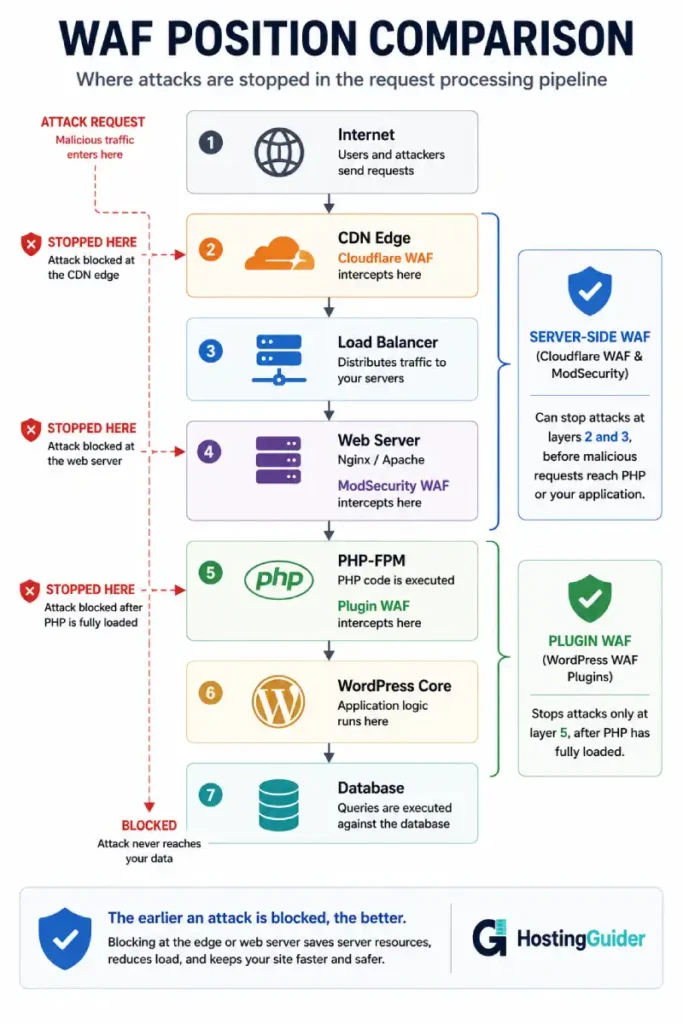
The part nobody explains clearly: a plugin WAF runs inside PHP, which runs inside WordPress, which runs on your server. By the time the plugin decides to block a request, your server has already loaded WordPress, initialised every active plugin, and consumed CPU and RAM to process the incoming request. The block happens at the end of that process, not the beginning.
A server-side WAF operates before any of that. The request is evaluated at the network or web server layer. If it is malicious, it never reaches PHP at all. WordPress never boots. The server expends no resources.
This distinction explains why plugin WAFs fail under high-volume attacks and why server-side WAFs miss certain application-level threats. Both statements are true. Both types have genuine roles. The question is which combination matches your hosting environment.
Key Takeaways
- Plugin WAFs load WordPress before blocking requests, consuming server resources for every attack attempt
- Server-side WAFs block at the network or web server layer, before PHP runs
- Under DDoS or volumetric attacks, plugin WAFs are overwhelmed. Server-side WAFs are not
- Plugin WAFs understand WordPress application logic. Server-side WAFs do not
- Brute force login protection is better at the plugin level because it needs database context
- The right answer for most sites is a server-side WAF for volumetric and known-pattern attacks combined with a plugin WAF for WordPress-specific application threats
- NinjaFirewall occupies a middle position by running PHP before WordPress initialises
What a WAF Does
A WAF (Web Application Firewall) inspects HTTP requests and decides whether to allow or block them based on a set of rules. Rules cover patterns like SQL injection attempts, cross-site scripting payloads, malformed HTTP headers, known malicious user agents, and file inclusion attacks.
The difference between WAF types is not what they inspect. It is where in the request lifecycle the inspection happens.
The overall picture of how web hosting firewalls work at multiple layers helps establish why the position in the stack matters so much a firewall close to the network drops requests cheaply, while one deep in the application stack drops them expensively.
How a Plugin WAF Works
A plugin WAF is a WordPress plugin. It hooks into WordPress’s request processing at the PHP level.
When a visitor requests a page, this is what happens before the plugin WAF can act:
- The server receives the HTTP request
- Nginx or Apache processes the request headers
- PHP-FPM initialises a worker process
- PHP loads WordPress core (wp-load.php, wp-settings.php)
- WordPress loads all active plugins in sequence
- The WAF plugin’s init hook fires
- The plugin inspects the request
- If malicious, the plugin blocks it and returns a 403
Steps 1 through 6 happen for every request, including malicious ones. A site under attack from 500 simultaneous requests runs steps 1 through 6 five hundred times concurrently. PHP-FPM worker pool fills. Server RAM depletes. MySQL connection pool exhausts. The site goes offline from resource exhaustion before the WAF plugin blocks anything meaningful.
This is the fundamental limitation of plugin-level WAFs. They are useful tools. Under attack at scale, they are overwhelmed by the load they are supposed to protect against.
How a Server-Side WAF Works
A server-side WAF operates before PHP runs. This applies to two distinct implementations.
Web server-level WAF (ModSecurity):
ModSecurity is an open-source module that runs inside Nginx or Apache. It inspects each HTTP request before the web server forwards it to PHP-FPM. If the request matches a rule, the web server rejects it immediately with a 403 response. PHP never starts.
This is fast. Nginx and ModSecurity reject a malicious request in under 1ms. PHP never runs. No database queries. No WordPress loading. No session handling. Zero application resources consumed.
The OWASP Core Rule Set provides a comprehensive library of rules for ModSecurity covering SQL injection, cross-site scripting, remote code execution, local and remote file inclusion, HTTP protocol violations, and hundreds of other attack patterns. It is maintained by a security community and updated regularly.
Install ModSecurity with the CRS on Nginx:
sudo apt install libmodsecurity3 libmodsecurity-dev -y
Clone the OWASP Core Rule Set:
git clone https://github.com/coreruleset/coreruleset.git /etc/nginx/modsec/crs
cp /etc/nginx/modsec/crs/csp-setup.conf.example /etc/nginx/modsec/crs/csp-setup.conf
Basic ModSecurity configuration at /etc/nginx/modsec/main.conf:
Include /etc/modsecurity/modsecurity.conf
Include /etc/nginx/modsec/crs/csp-setup.conf
Include /etc/nginx/modsec/crs/rules/*.conf
In the Nginx server block:
modsecurity on;
modsecurity_rules_file /etc/nginx/modsec/main.conf;
Start in detection mode first (SecRuleEngine DetectionOnly) to find false positives before switching to blocking mode. Common WordPress false positives come from the WordPress admin area, page builders, and certain plugin API calls.
Network-level WAF (Cloudflare):
Cloudflare WAF operates at the CDN edge, before traffic reaches the server at all. A malicious request is evaluated at the nearest Cloudflare data centre and dropped if it matches rules. The origin server never sees the request. No bandwidth, no CPU, no RAM consumed at the server.
Cloudflare WAF is available on paid plans. The Pro plan at $20 per month enables the Cloudflare Managed Ruleset. The Business plan at $200 per month adds the OWASP Core Rule Set and more advanced bot management.
For WordPress specifically, the Cloudflare Managed Ruleset includes WordPress-specific rules that block common WordPress attack patterns including xmlrpc.php abuse, wp-login.php brute force, and plugin-specific vulnerability exploits.
Enable the Cloudflare Managed Ruleset:
- Go to the Cloudflare dashboard
- Select your domain
- Go to Security, then WAF
- Click Managed Rules
- Enable Cloudflare Managed Ruleset
- Enable Cloudflare OWASP Core Ruleset
Set the sensitivity level to Medium initially. High sensitivity can produce false positives on legitimate admin traffic and some plugin API requests.
The Resource Exhaustion Problem
Under attack, the stack position of the WAF determines whether the server survives.
Consider a botnet sending 5,000 HTTP requests per second targeting wp-login.php. This is a common credential stuffing attack pattern.
With a plugin WAF only:
5,000 requests per second arrive at the server. Each request triggers a PHP-FPM worker. Each worker loads WordPress, loads all plugins, and eventually the plugin WAF blocks the request. The server has a pool of 30 PHP-FPM workers. 30 simultaneous requests can be processed. The remaining 4,970 requests queue. The queue fills. New requests fail. The site serves errors to legitimate visitors.
Even if the plugin WAF successfully blocks every malicious request, the server is effectively offline because of resource exhaustion.
With a server-side WAF:
5,000 requests per second arrive at Cloudflare or at ModSecurity. The WAF evaluates each request against its rules. Most are blocked in under 1ms at the network or web server layer. Fewer than 10 requests per second pass through as legitimate traffic. PHP-FPM handles 10 requests per second easily. The site stays online.
The deeper impact of large-scale attacks on hosting infrastructure and how different protection layers respond is covered in the DDoS protection guide.
What Each Type Stops
Understanding where each WAF type genuinely excels avoids the mistake of relying on one for what the other handles better.
| Attack Type | Server-Side WAF | Plugin WAF |
|---|---|---|
| SQL injection | Excellent | Good |
| Cross-site scripting (XSS) | Excellent | Good |
| Remote file inclusion | Excellent | Good |
| HTTP protocol violations | Excellent | Cannot catch |
| Volumetric DDoS (layer 7) | Excellent | Overwhelmed |
| IP reputation blocking | Excellent | Limited |
| Known malicious bots | Excellent | Limited |
| Brute force login attacks | Good (rate limits) | Excellent (with context) |
| WordPress-specific malware | Poor | Excellent |
| File integrity monitoring | Cannot | Excellent |
| Backdoor detection | Cannot | Excellent |
| Plugin-specific exploits | Rules-dependent | Better awareness |
| Authenticated user attacks | Limited context | Full context |
| Admin area protection | Possible (deny rules) | Full awareness |
The table shows why neither type alone is complete. Server-side WAFs do not understand whether a request is from an authenticated admin or an attacker. Plugin WAFs understand this context but collapse under volume.
The NinjaFirewall Middle Ground
NinjaFirewall deserves a specific mention because it occupies a position between the two types.
Unlike most WordPress security plugins, NinjaFirewall hooks into PHP using a standalone php.ini configuration that loads it before WordPress boots. It uses PHP’s auto_prepend_file directive to execute before wp-load.php:
auto_prepend_file = /path/to/ninjafirewall/ninjafirewall.php
This means NinjaFirewall runs before WordPress core, before any other plugins, and before the database is touched. A request blocked by NinjaFirewall consumes PHP startup time but not WordPress loading time or MySQL queries.
It is not equivalent to a server-side WAF because it still runs PHP and still consumes PHP worker resources. But it is significantly more efficient than typical plugin WAFs and can handle moderate attack volumes that would overwhelm standard plugins.
For sites that cannot use a server-side WAF (shared hosting without ModSecurity access and without Cloudflare) or for sites that want an additional layer, NinjaFirewall provides meaningful protection with a lower performance cost than plugins like Wordfence.
Setting Up the Combined Approach
The effective approach uses both types in complementary roles.
Layer 1: Cloudflare WAF (network level)
Enable both Cloudflare Managed Ruleset and OWASP CRS. This handles volumetric attacks, known-pattern exploits, and bad bot traffic before it touches the server.
Create custom WAF rules for WordPress-specific protection:
# Block xmlrpc.php entirely (unless you use it)
URI Path equals /xmlrpc.php → Block

# Rate limit wp-login.php
URI Path equals /wp-login.php AND Request rate > 5/minute per IP → Challenge

# Block direct PHP file access in uploads
URI Path starts with /wp-content/uploads AND URI Path ends with .php → Block
Layer 2: ModSecurity on the web server (optional but valuable)
ModSecurity on the server provides protection even if Cloudflare is bypassed (someone probing your origin IP directly). Origin lockdown in Cloudflare prevents most direct access, but ModSecurity is a defence-in-depth measure.
Run in detection mode for two weeks to identify and whitelist false positives before enabling blocking mode.
Layer 3: Plugin WAF for application-level protection
Wordfence free tier handles brute force login protection, file integrity monitoring, malware scanning, and WordPress-specific threat detection. Configure it with:
- Login rate limiting enabled (5 failures in 5 minutes locks out the IP)
- Real-time IP blocklist enabled (blocks known malicious IPs)
- File change notifications enabled
- Scan schedule set to weekly
The WordPress security plugin from Wordfence is free and covers application-level detection well when volumetric threats are handled upstream.
Install NinjaFirewall as an additional layer if resource efficiency under attack is a concern.
What Managed Hosting Changes
On managed WordPress hosting, the security stack is pre-built and maintained by the provider.
Kinsta includes Cloudflare Enterprise WAF on every site by default. Their integration provides the network-level WAF layer without additional configuration. The Kinsta team manages rule updates and false positive remediation.
Cloudways includes Cloudflare integration with WAF options and server-level security through their platform. Their underlying infrastructure includes Imunify360 on some configurations, which is a comprehensive server-side security suite covering WAF, malware scanning, and intrusion detection.
ScalaHosting managed VPS includes SShield, their proprietary security monitoring and blocking system, which operates at the server level rather than the application level.
On managed hosting, the relevant question shifts from how to implement WAF layers to what the provider’s WAF stack covers and what gap remains at the application level. The security requirements your hosting must meet differ depending on whether you are running an informational site or a site that handles payment card data or personal information at scale.
Frequently Asked Questions
Is Wordfence enough on its own?
For low-traffic sites not under active attack, Wordfence’s free tier provides meaningful protection against WordPress-specific threats, malware, and brute force login attempts. It is not enough when the traffic volume during an attack exceeds what PHP-FPM can process. For any site that might attract targeted attacks or that runs WooCommerce with real transaction volume, Wordfence should be paired with Cloudflare in front. The combination costs nothing extra on Cloudflare’s free tier.
Does Cloudflare’s free tier include WAF?
Cloudflare’s free tier includes DDoS mitigation, bot management, and custom firewall rules (up to 5 rules on the free tier). The full managed WAF rulesets, including the OWASP Core Rule Set require the Pro plan ($20/month) or higher. The free tier custom rules are sufficient to block xmlrpc.php abuse, rate-limit login pages, and create targeted blocks for known attack patterns. For most small WordPress sites, free Cloudflare plus Wordfence free provides adequate coverage.
Can a WAF break WordPress functionality?
Both server-side and plugin WAFs can produce false positives. ModSecurity with OWASP CRS commonly blocks legitimate WordPress admin actions because the payloads in page builder save requests and widget configurations look like attack patterns to generic rules. Cloudflare WAF can block REST API requests from plugins that use unusual request formats. Plugin WAFs are generally less likely to produce false positives because they understand WordPress context. Always test WAF changes in a staging environment and start with detection mode before blocking mode on server-side WAFs.
What is the difference between a WAF and a firewall?
A traditional network firewall operates at the IP and port level. It blocks traffic from specific IP addresses or to specific ports. A WAF operates at the HTTP application level. It inspects request content, headers, URLs, and payloads for attack patterns. A server running WordPress needs both a network firewall (UFW) to block all ports except 80, 443, and SSH, and a WAF to inspect the HTTP traffic that the network firewall allows through.
How do I know if my WAF is actually blocking attacks?
Check the logs on each layer. For Cloudflare WAF, go to Security, then Events in the dashboard. This shows every request that was blocked or challenged and the rule that triggered. For ModSecurity, check the Apache or Nginx error log filtered for ModSecurity. For Wordfence, the blocked attacks appear in the Firewall section of the plugin dashboard. Cross-referencing across layers shows what each type caught. Requests that appear in Wordfence logs but not in Cloudflare logs reached the origin directly, which often means Cloudflare was bypassed or the request came from an IP not going through Cloudflare.


