
SiteGround vs Cloudways: Simple Managed Hosting vs Cloud Flexibility for WordPress
SiteGround and Cloudways both run WordPress on managed cloud infrastructure. The similarity stops there.
SiteGround manages everything from the server through WordPress itself. Buy a plan, install WordPress, add content. It runs on Google Cloud, supports HTTP/3, earns GTmetrix Grade A, and holds Grade A+ SSL by default. A non-developer can be live in under ten minutes.
Cloudways manages the server infrastructure and hands you a pre-configured Varnish and Redis environment. You install WordPress, configure it, manage updates, and tune performance. The server is managed. The application is yours to run.

In eight direct tests, SiteGround passes more mobile Core Web Vitals, earns Grade A GTmetrix against Cloudways Grade D, holds Grade A+ SSL, and supports HTTP/3 natively. Cloudways handles concurrent load faster, offers five cloud provider choices, never raises renewal prices, and supports any application beyond WordPress.
The right choice depends on how much of the stack you want to manage yourself.
SiteGround launched in 2004 and built its reputation on shared hosting. It now runs all plans on Google Cloud infrastructure with daily backups, staging environments, WP CLI, Git access on higher tiers, and a managed WordPress experience that handles core updates and security at the platform level. Their SPanel control panel replaced cPanel and is built around WordPress workflows.
Cloudways launched in 2011 as a managed cloud layer on top of third-party infrastructure. It has no servers of its own. It wraps DigitalOcean, AWS, Google Cloud, Vultr, or Linode with a management interface, pre-configures Varnish and Redis, and lets developers deploy any application they need. Pay as you go, no long-term contracts, and no renewal price hike.
Quick Verdict
SiteGround wins on mobile Core Web Vitals, desktop GTmetrix grade, SSL grade, HTTP/3, global TTFB from a fixed origin, and ease of use for non-developers.
Cloudways wins on concurrent load handling, multi-cloud deployment flexibility, non-WordPress application support, long-term pricing stability, and control over server configuration.
Both hold 100% uptime. Both are verified green.
Category Winners
| Category | Winner | Why |
|---|---|---|
| Mobile INP | SiteGround | 189ms (Pass) vs Cloudways 225ms (Fail) |
| Mobile LCP | SiteGround | 2.7s (fail, closer) vs Cloudways 5.0s (fail, further) |
| Mobile CLS | SiteGround | Not recorded vs Cloudways 0.99 (severe fail) |
| Mobile CWV Overall | SiteGround | Fails 2 of 3; Cloudways fails all 3 |
| Desktop GTmetrix | SiteGround | Grade A (FCP 927ms, TBT 221ms) vs Cloudways Grade D |
| Desktop TBT | SiteGround | 221ms vs Cloudways 2,200ms |
| Global TTFB (fixed origin) | SiteGround | Frankfurt 107ms vs Cloudways origin 244ms |
| Global TTFB (flexible) | Cloudways | Deploy server in any region to match audience |
| Concurrent Load | Cloudways | 451ms avg vs SiteGround 624ms |
| Uptime | Tie | Both 100%, 0 incidents |
| SSL Grade | SiteGround | Grade A+ vs Cloudways Grade A |
| HTTP/3 | SiteGround | Supported; Cloudways requires Cloudflare add-on |
| Environmental | Tie | Both verified green; different sources |
| Setup for Beginners | SiteGround | Fully managed stack; Cloudways requires app setup |
| Multi-cloud | Cloudways | 5 IaaS options; SiteGround Google Cloud only |
| Non-WP Applications | Cloudways | Any app; SiteGround is general/WP hosting |
| Long-term Pricing | Cloudways | No renewal hike; SiteGround intro rate expires |
| Year-one Pricing | SiteGround | Intro discounts available |
Who Should Choose Which
| Choose SiteGround if… | Choose Cloudways if… |
|---|---|
| You want everything managed with no server configuration required | You want full control over server settings and the ability to tune Varnish and Redis |
| You are a business owner or blogger who wants WordPress running in minutes | You run applications beyond WordPress on the same infrastructure |
| You need HTTP/3 natively with no extra setup | You want to choose between DigitalOcean, AWS, Google Cloud, Vultr, or Linode |
| You want Grade A+ SSL enforced by default | You need predictable flat pricing with no renewal price hike |
| You want Git and WP CLI on higher plans without managing a server | You want pay-as-you-go monthly billing and a 3-day free trial |
| You need verified Google Cloud green credentials | You need faster concurrent load handling for high-traffic events |
SiteGround vs Cloudways: Full Feature Comparison
| Feature | SiteGround | Cloudways |
|---|---|---|
| Founded | 2004, Bulgaria | 2011, Malta |
| Infrastructure | Google Cloud | Multi-cloud (DO, AWS, GCP, Vultr, Linode) |
| WordPress Only | No (general hosting) | No (any application) |
| Best For | Beginners, blogs, SMBs, managed WP | Developers, agencies, multi-application teams |
| Mobile INP | 189ms (Pass) | 225ms (Fail) |
| Mobile LCP | 2.7s (Fail) | 5.0s (Fail) |
| Mobile TTFB | 1.6s (Fail) | Not recorded |
| Mobile CLS | Not recorded | 0.99 (Fail) |
| Desktop GTmetrix | Grade A (FCP 927ms, TBT 221ms) | Grade D (LCP 2.0s, TBT 2,200ms, TTFB 244ms) |
| Frankfurt TTFB | 107ms | 244ms (origin) |
| New York TTFB | 197ms | CDN edge only |
| Singapore TTFB | 420ms | CDN edge only |
| Bangalore TTFB | 1,520ms | CDN edge only |
| Load Test Avg | 624ms | 451ms |
| Load Test Reachability | 100% | 100% |
| 30-Day Uptime | 100%, 0 incidents | 100%, 0 incidents |
| SSL Grade | A+ | A |
| HTTP/3 | Yes | No (Cloudflare add-on) |
| QUIC | Yes | No natively |
| Green Hosting | Verified (Google Cloud) | Verified (Cloudflare) |
| Free Domain | Not on standard plans | No |
| Free SSL | Yes (A+) | Yes |
| Email Hosting | Yes | No |
| Control Panel | SPanel (custom) | Application Manager (custom) |
| cPanel | No (SPanel) | No |
| Staging | Yes | Yes |
| WP CLI | Yes (GoGeek+) | Available |
| Git Access | Yes (GoGeek+) | Yes |
| Varnish + Redis | Not pre-configured | Yes, pre-configured |
| Managed WP Updates | Yes | No (self-managed) |
| Plugin Restrictions | No | No |
| Billing | Monthly/Annual, intro pricing | Pay-as-you-go monthly |
| Renewal Pricing | Higher at renewal | Same rate forever |
| Free Trial | 30-day money-back | 3-day free trial |
| Support | 24/7 chat, phone, tickets | 24/7 chat (under 2 minutes) |
| Support Scope | All hosting issues | All app types |
How We Tested
We ran direct technical audits against each provider’s official corporate domain: siteground.com for SiteGround and cloudways.com for Cloudways.
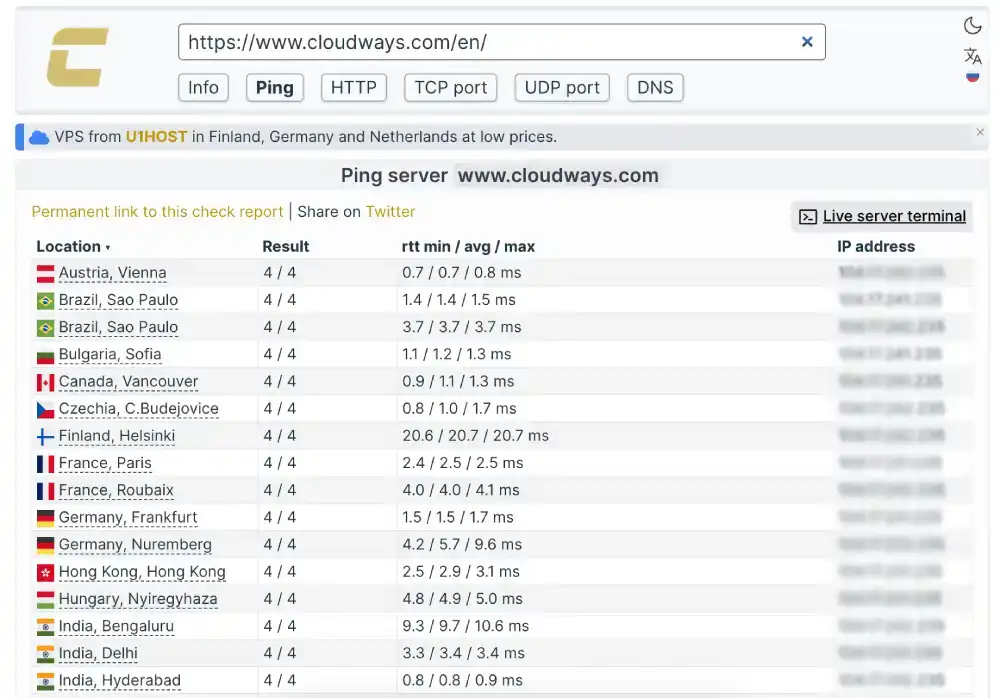
Important note on Cloudways global latency: the Check-Host test returns CDN edge acknowledgment times (under 2ms globally) rather than full content TTFB. The GTmetrix lab confirms Cloudways’ origin TTFB at 244ms. SiteGround’s global latency was tested with KeyCDN, which measures full content TTFB. These are different measurement types. SiteGround’s 107ms in Frankfurt represents actual content delivery. Cloudways’ sub-2ms represents a CDN edge ping.
Tools: Google PageSpeed Insights for mobile Core Web Vitals, GTmetrix for desktop rendering, K6 Load Cloud for concurrent traffic simulation, KeyCDN (SiteGround) and Check-Host (Cloudways) for global latency, Uptime Robot for availability, Qualys SSL Labs for SSL grade, HTTP/3 Check for protocol support, The Green Web Foundation for sustainability.
For complete individual test data, see our SiteGround review and Cloudways review.
Performance: Eight Tests, Head to Head
Test 1: Mobile Core Web Vitals (Google PageSpeed Insights)
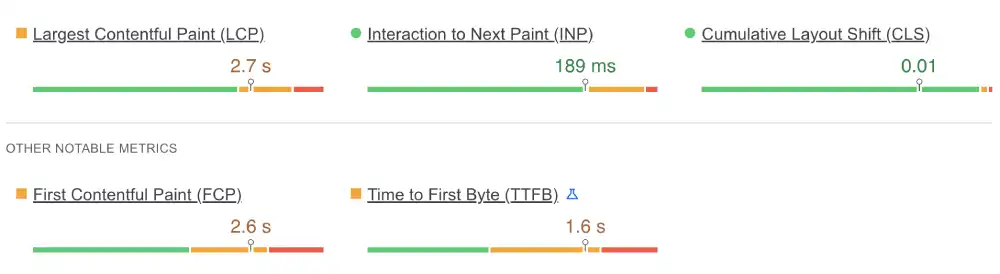
SiteGround Mobile
| Metric | Result | Google Threshold | Status |
|---|---|---|---|
| LCP (Loading) | 2.7s | Under 2.5s | Fail |
| INP (Interaction) | 189ms | Under 200ms | Pass |
| TTFB (Server) | 1.6s | Under 0.8s | Fail |
Cloudways Mobile
| Metric | Result | Google Threshold | Status |
|---|---|---|---|
| INP (Interaction) | 225ms | Under 200ms | Fail |
| LCP (Loading) | 5.0s | Under 2.5s | Fail |
| CLS (Stability) | 0.99 | Under 0.1 | Fail |
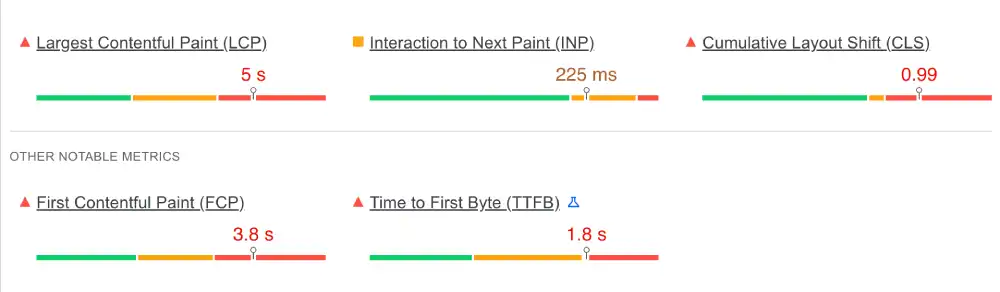
SiteGround’s INP of 189ms passes Google’s 200ms threshold. Cloudways’ INP of 225ms fails. SiteGround’s LCP of 2.7s fails but is significantly closer to the threshold than Cloudways’ 5.0s. Cloudways’ CLS of 0.99 is a severe layout stability failure that SiteGround avoids.
Both providers’ failures are driven by marketing site JavaScript and layout choices rather than server capacity. A clean WordPress installation on either platform would score differently. The corporate site results reflect the infrastructure and frontend decisions each provider made for their own brand.
For mobile SEO, a slow TTFB compounds into LCP and INP failures across the board. SiteGround’s 1.6s TTFB is the root cause of its LCP failure. Adding a full-page caching layer on SiteGround customer sites dramatically reduces effective TTFB for repeat visitors.
Winner: SiteGround (fails 2 of 3 vs Cloudways fails all 3; SiteGround INP passes).
Test 2: Global Server Latency
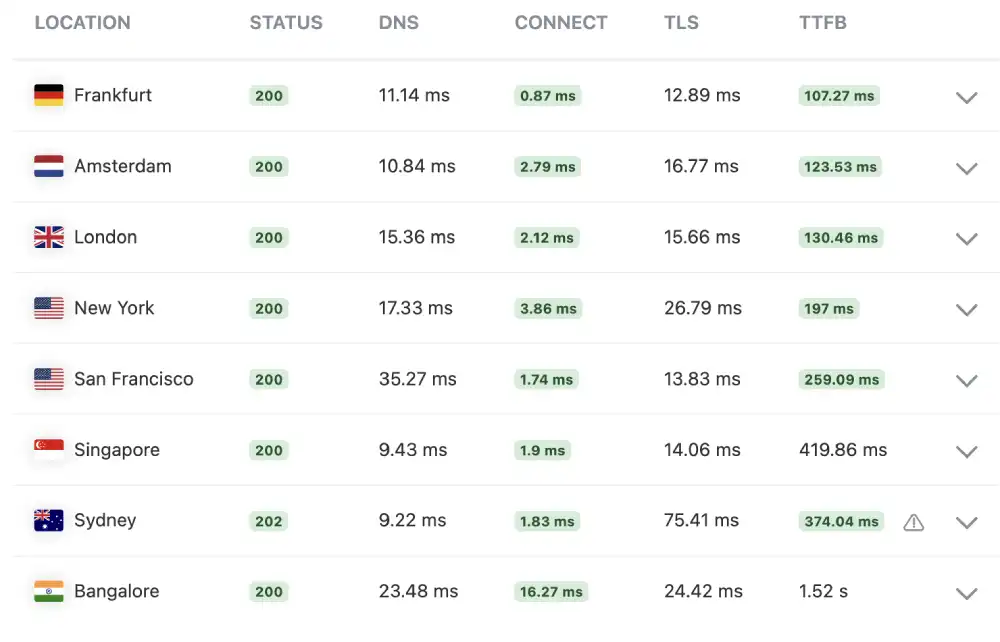
SiteGround (KeyCDN TTFB)
| Location | TTFB | Rating |
|---|---|---|
| Frankfurt, Germany | 107ms | Acceptable |
| New York, USA | 197ms | Slow |
| Singapore | 420ms | Very Slow |
| Bangalore, India | 1,520ms | Critical |
Cloudways (Check-Host CDN edge acknowledgment + GTmetrix origin)
| Measurement | Result | Type |
|---|---|---|
| Vienna, Austria | 0.7ms | CDN edge ping |
| Hyderabad, India | 0.8ms | CDN edge ping |
| Frankfurt, Germany | 1.5ms | CDN edge ping |
| Origin TTFB (lab) | 244ms | Full content (GTmetrix) |
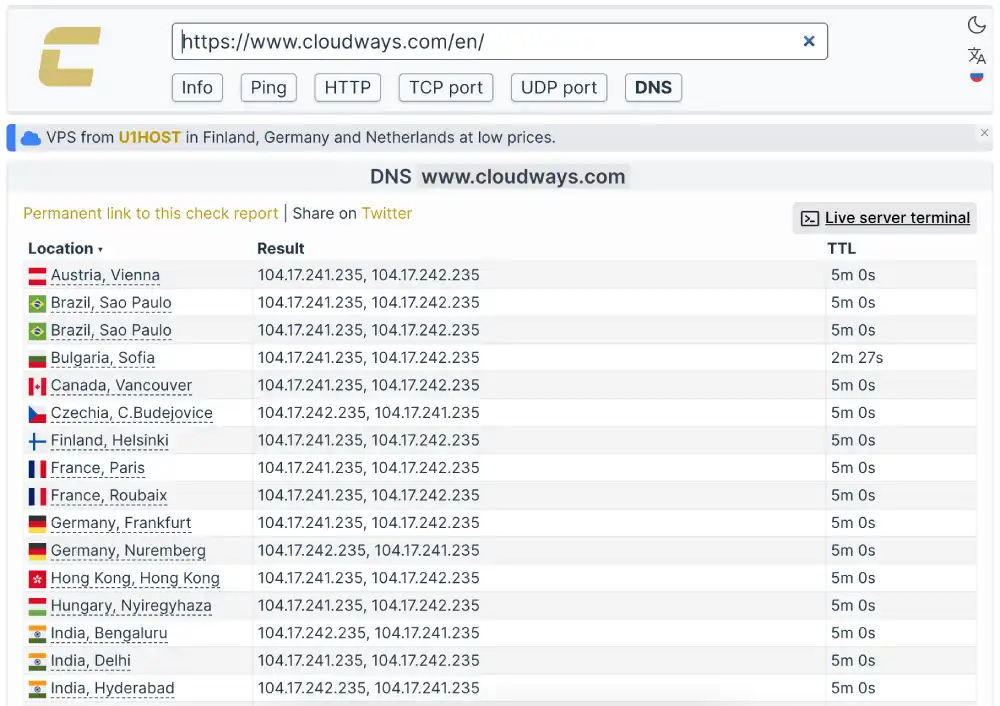
From a fixed server position, SiteGround wins in Europe. Frankfurt 107ms versus Cloudways origin 244ms. But SiteGround’s latency degrades to 420ms in Singapore and 1,520ms in Bangalore because the server sits in a Google Cloud EU region.
Cloudways’ structural advantage here is geographic flexibility. Deploying a Cloudways server on DigitalOcean Singapore instead of the default European region reduces Singapore latency to approximately the same level as SiteGround’s Frankfurt result. That flexibility is not available on SiteGround’s standard plans.
Winner: SiteGround from fixed EU position. Cloudways with correct server region selection.
Test 3: Desktop Rendering (GTmetrix)
| Metric | SiteGround | Cloudways |
|---|---|---|
| GTmetrix Grade | A | D |
| First Contentful Paint | 927ms | Not recorded directly |
| Total Blocking Time | 221ms | 2,200ms |
| Desktop LCP | Not recorded | 2.0s |
| Desktop TTFB | Not recorded | 244ms |
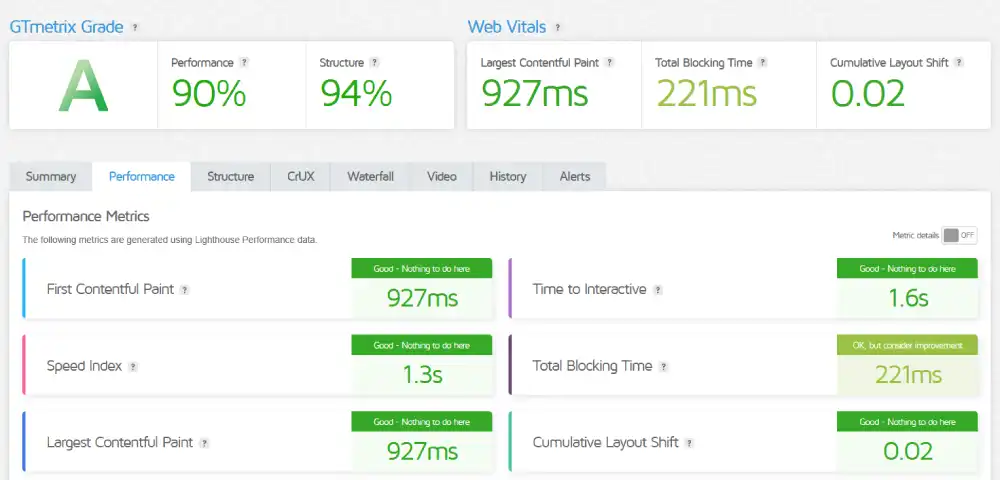
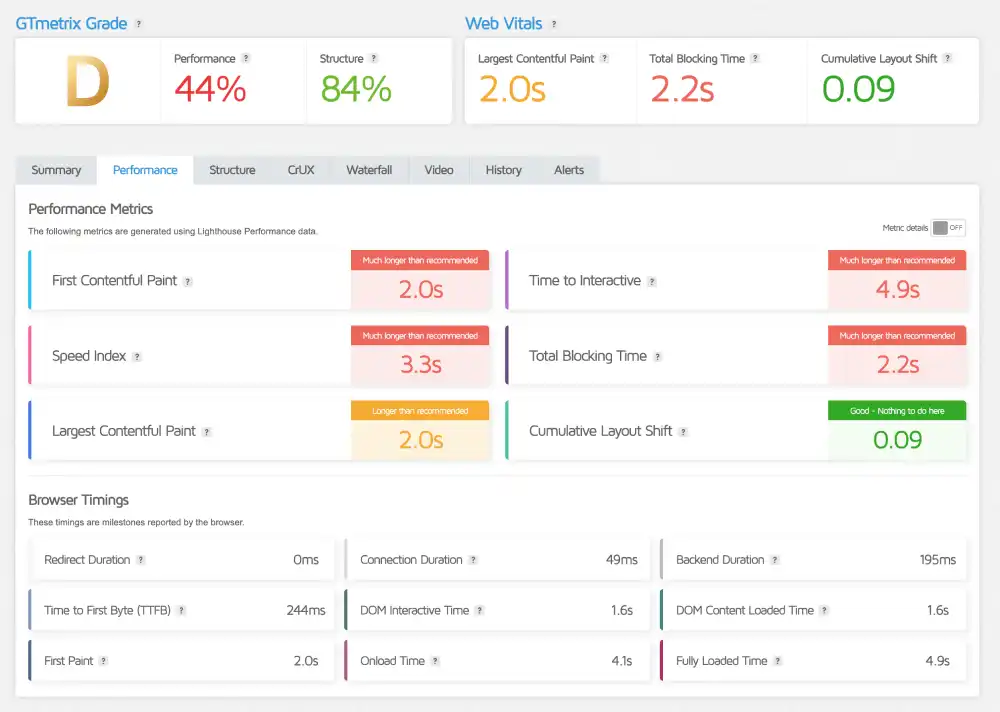
SiteGround’s Grade A with 221ms TBT is a strong desktop result. Content loads and the page becomes interactive with minimal blocking delay. The GTmetrix grade reflects a clean site structure with well-managed scripts.
Cloudways earns Grade D due to 2,200ms TBT on its marketing site. The 244ms TTFB confirms the Varnish infrastructure processes requests quickly at the server level. The Grade D comes from frontend JavaScript choices on the corporate site, not from the hosting stack’s processing speed.
Winner: SiteGround
Test 4: Concurrent Load (K6 Load Cloud, 50 Virtual Users)
| Parameter | SiteGround | Cloudways |
|---|---|---|
| Uptime Under Load | 100% | 100% |
| Reachability | 100% | 100% |
| Avg Response Latency | 624ms | 451ms |

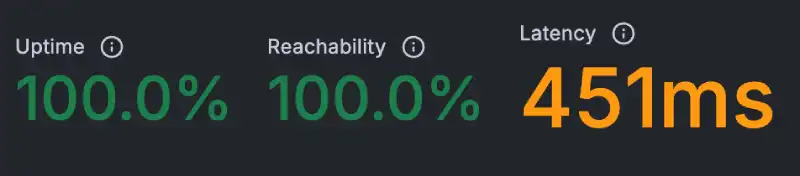
Both providers hold 100% reachability. Neither drops a request. Cloudways returns 451ms against SiteGround’s 624ms under the same concurrent load conditions. The 173ms difference reflects how caching layers affect response time when multiple users arrive simultaneously. Varnish serves cached page responses faster under concurrent pressure than a standard managed WordPress origin.
Winner: Cloudways
Test 5: Uptime (Uptime Robot, 30-Day Monitor)
| Window | SiteGround | Cloudways |
|---|---|---|
| Last 7 Days | 100%, 0 incidents | 100%, 0 incidents |
| Last 30 Days | 100%, 0 incidents | 100%, 0 incidents |

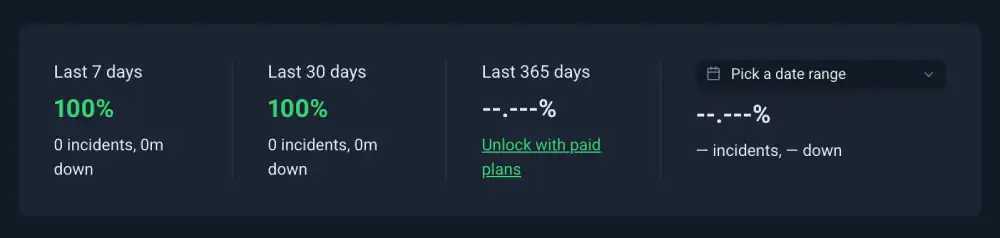
Both providers record perfect availability. Neither recorded a single incident across the full 30-day window.
Winner: Tie
Test 6: SSL Security (Qualys SSL Labs)
| Feature | SiteGround | Cloudways |
|---|---|---|
| Overall Grade | A+ | A |
| HSTS | Enforced by default | Optional |
| TLS | TLS 1.3 | TLS 1.2 and 1.3 |
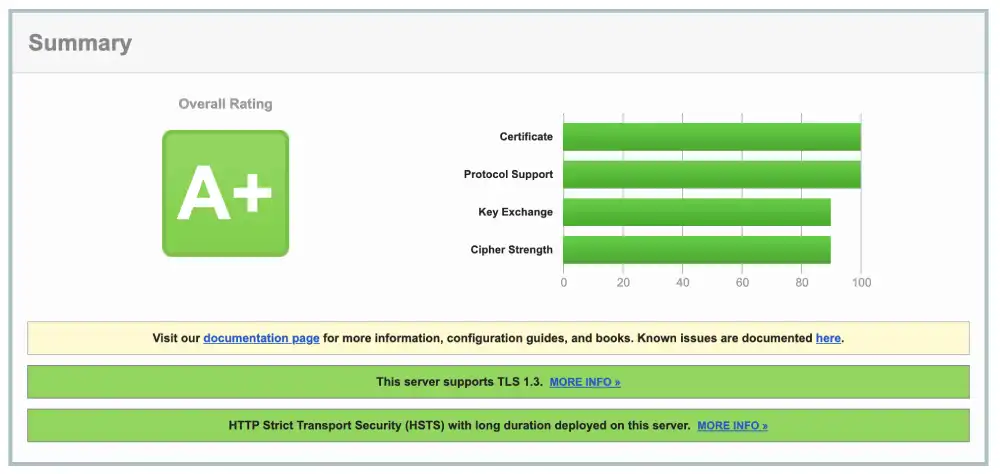
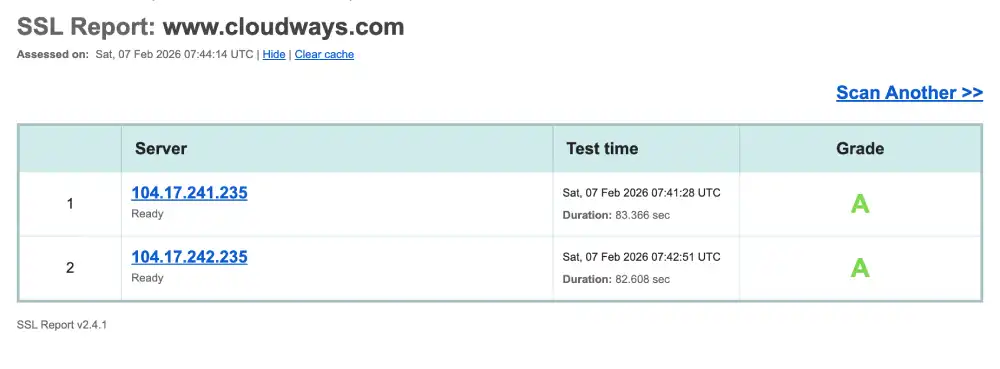
SiteGround enforces HSTS by default. Browsers that have visited a SiteGround-hosted site before will refuse to connect via HTTP even before the certificate is loaded. This is the behaviour that separates A+ from A in Qualys testing. Cloudways can reach A+ by enabling HSTS in the Application Manager. SiteGround delivers it without any action from the user.
Winner: SiteGround
Test 7: Protocol Support (HTTP/3 Check)
| Protocol | SiteGround | Cloudways |
|---|---|---|
| HTTP/3 | Supported | Not supported |
| QUIC | Supported | Not supported |
SiteGround runs on Google Cloud and supports HTTP/3 and QUIC natively. Cloudways does not support HTTP/3. Enabling it requires the Cloudflare Enterprise add-on, which adds cost.
HTTP/3’s benefit on mobile connections is most visible on 4G networks where packet loss is common. HTTP/3 handles each data stream independently, so a dropped packet stalls only that stream rather than the entire connection. SiteGround delivers this by default. Cloudways requires an additional step and additional cost.
Winner: SiteGround
Test 8: Environmental Impact (Green Web Foundation)
| Provider | Status | Source |
|---|---|---|
| SiteGround | Verified Green | Google Cloud renewable energy |
| Cloudways | Verified Green | Cloudflare CDN renewable |

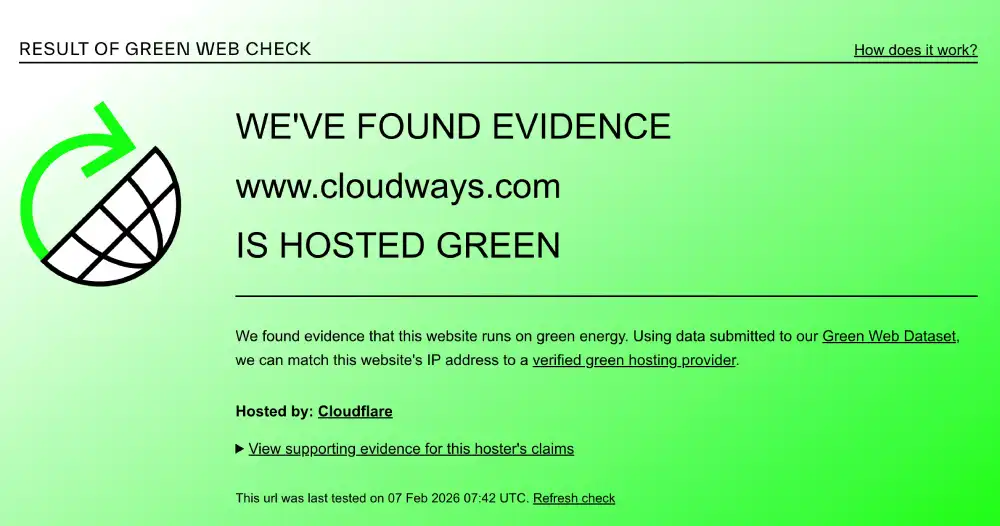
Both providers are verified green. SiteGround’s certification comes from Google Cloud’s 100% renewable energy matching programme. Cloudways’ comes from Cloudflare’s CDN renewable matching. Both are valid third-party certifications.
Winner: Tie
Performance Summary
| Test | Winner |
|---|---|
| Mobile CWV | SiteGround |
| Global TTFB | SiteGround (EU origin); Cloudways (regional flexibility) |
| Desktop GTmetrix | SiteGround |
| Concurrent Load | Cloudways |
| Uptime | Tie |
| SSL Grade | SiteGround |
| HTTP/3 | SiteGround |
| Environmental | Tie |
SiteGround wins five tests. Cloudways wins one (with the geographic flexibility note). Two are tied.
Desktop and Mobile Speed Summary
| Metric | SiteGround | Cloudways | Winner |
|---|---|---|---|
| Mobile INP | 189ms (Pass) | 225ms (Fail) | SiteGround |
| Mobile LCP | 2.7s (Fail) | 5.0s (Fail) | SiteGround |
| Mobile CLS | Not recorded | 0.99 (Fail) | SiteGround |
| Desktop GTmetrix | A | D | SiteGround |
| Desktop TBT | 221ms | 2,200ms | SiteGround |
| Desktop TTFB | Not recorded | 244ms | Context |
| SSL Grade | A+ | A | SiteGround |
| HTTP/3 | Yes | No | SiteGround |
Global Network and Load Test Summary
| Metric | SiteGround | Cloudways | Winner |
|---|---|---|---|
| Frankfurt TTFB | 107ms | 244ms (origin) | SiteGround |
| New York TTFB | 197ms | CDN edge only | SiteGround (known TTFB) |
| Singapore TTFB | 420ms | CDN edge only | Context |
| Bangalore TTFB | 1,520ms | CDN edge only | Context |
| Load Test Avg | 624ms | 451ms | Cloudways |
| Load Reachability | 100% | 100% | Tie |
| 30-Day Uptime | 100% | 100% | Tie |
The Management Depth Difference
The title of this comparison names the real distinction. SiteGround is simple managed hosting. Cloudways is managed cloud with flexibility.
What SiteGround manages for you: server provisioning, core WordPress updates, daily backups, security patching at the platform level, SSL configuration with HSTS by default, HTTP/3, CDN, staging environments, and malware scanning. You buy a plan and focus on your site.
What Cloudways manages for you: server provisioning, operating system updates, Varnish and Redis configuration, server-level security, and backup infrastructure. WordPress installation is one click. WordPress updates, plugin management, security plugins, and performance tuning are your responsibility.
For a business owner, blogger, or small team running one or two WordPress sites, SiteGround’s fully managed approach removes the configuration burden that Cloudways leaves with the user. For a developer managing multiple applications on different cloud providers, Cloudways’ control and flexibility are the product.
Neither approach is wrong. They serve different use cases.
Pricing and Value
SiteGround Pricing
SiteGround uses aggressive introductory pricing. The first term is discounted significantly. Renewal pricing is higher. Budget for the actual renewal rate before committing to an annual plan. Higher GoGeek tiers include Git access and WP CLI. Lower plans restrict some developer features.
Email hosting is included on all plans. Daily backups are included. Staging and WP CLI are available on higher plans.
StartUp |
GrowBig |
GoGeek |
StartUp |
GrowBig |
GoGeek |
StartUp |
GrowBig |
GoGeek |
Jump Start |
Business |
Business Plus |
Super Power |
|---|---|---|---|---|---|---|---|---|---|---|---|---|
$3.99
/mo |
$6.69
/mo |
$10.69
/mo |
$3.99
/mo |
$6.69
/mo |
$10.69
/mo |
$3.99
/mo |
$6.69
/mo |
$10.69
/mo |
$100
/mo |
$200
/mo |
$300
/mo |
$400
/mo |
|
|
|
|
|
|
|
|
|
|
|
|
|
Cloudways Pricing
Cloudways is pay-as-you-go monthly. No annual commitment required. No renewal price increase. The rate on day one is the rate forever. DigitalOcean-backed servers start at approximately $11 per month. Google Cloud-backed servers cost more. Bandwidth is metered so media-heavy sites should calculate transfer costs.
No email hosting. No free domain.
DigitalOcean Micro |
DigitalOcean Small |
DigitalOcean Medium |
DigitalOcean Large |
Vultr Micro |
Vultr Small |
Vultr Medium |
Vultr Large |
Linode Micro |
Linode Small |
Linode Medium |
Linode Large |
AWS Micro |
AWS Small |
AWS Medium |
AWS Large |
Google Cloud Small |
Google Cloud Medium |
Google Cloud Large |
Google Cloud XL |
|---|---|---|---|---|---|---|---|---|---|---|---|---|---|---|---|---|---|---|---|
$11
/mo |
$24
/mo |
$46
/mo |
$88
/mo |
$14
/mo |
$28
/mo |
$54
/mo |
$99
/mo |
$14
/mo |
$28
/mo |
$59
/mo |
$105
/mo |
$20.56
/mo |
$38.56
/mo |
$91.84
/mo |
$183.22
/mo |
$37.33
/mo |
$84
/mo |
$152.02
/mo |
$241.50
/mo |
|
|
|
|
|
|
|
|
|
|
|
|
|
|
|
|
|
|
|
|
Pricing Comparison
| Factor | SiteGround | Cloudways | Winner |
|---|---|---|---|
| Entry Pricing | Low intro rate | ~$11/month (DO) | Context |
| Renewal Pricing | Higher at renewal | Same rate forever | Cloudways |
| Email Hosting | Yes | No | SiteGround |
| Bandwidth | Not metered | Metered | SiteGround |
| SSL Default | A+ | A | SiteGround |
| HTTP/3 | Included | Add-on cost | SiteGround |
| Free Trial | 30-day money-back | 3-day free trial | SiteGround (longer) |
| Long-term Value | Lower (renewal hike) | Higher (flat rate) | Cloudways |
| Google Cloud option | Yes (only option) | Yes (one of 5) | Tie |
Features and Platform Types
SiteGround
WordPress Hosting: Managed WordPress on Google Cloud with automatic core updates, daily backups, and a staging environment. The WordPress Starter wizard walks beginners through initial setup.
WooCommerce Hosting: Managed ecommerce environments with security, backups, and performance tools pre-configured.
Developer Tools: Git integration, WP CLI, SSH access, and staging on GoGeek and higher plans. All on shared hosting without needing a VPS.
Email Hosting: Professional email included on all plans. No third-party service needed.
Cloudways
WordPress on Cloud: Varnish and Redis pre-configured. Any cloud provider. Deploy, configure, and manage your own WordPress stack with full control over PHP settings and server tuning.
Multi-Application: Node.js, Magento, Laravel, Drupal, and any LAMP or LEMP stack application. Not limited to WordPress.
Multi-cloud: Deploy on DigitalOcean, AWS, Google Cloud, Vultr, or Linode. Switch providers without migrating applications.
Ease of Use
SiteGround: Managed from Day One
SiteGround’s SPanel is built around WordPress. A beginner can install WordPress, configure email, add SSL, and push a staging site to production without touching a server. Managed core updates and daily backups mean the platform handles routine maintenance automatically.
Higher plan users get Git access and WP CLI without needing to manage a server directly. Knowing the limits of what self-managed hosting requires makes SiteGround’s managed layer valuable for any team without a dedicated sysadmin.
Support covers all hosting tasks including WordPress troubleshooting, plugin conflicts, and performance questions. Phone support is available.
Cloudways: Configured by You
Cloudways’ Application Manager separates server management from application management. Server provisioning, scaling, and infrastructure management are handled. WordPress setup, plugin configuration, PHP version selection, and performance tuning are user-managed.
For developers who want direct control over their stack, this is the product. For business owners who want WordPress running without configuration, this is not the right starting point.
Support is 24/7 live chat averaging under two minutes to connect. Agents cover all application types and infrastructure issues.
Ease of Use Comparison
| Feature | SiteGround | Cloudways | Winner |
|---|---|---|---|
| WordPress setup | Wizard-guided | One click, then configure | SiteGround |
| Server management | Fully managed | Infrastructure managed | SiteGround |
| WP updates | Automatic | Self-managed | SiteGround |
| Email hosting | Included | Not available | SiteGround |
| PHP control | Limited | Direct control | Cloudways |
| Varnish + Redis | Not configurable | Pre-configured, tunable | Cloudways |
| Multi-cloud | No | Yes | Cloudways |
| Non-WP apps | No | Yes | Cloudways |
Who Should Use Which
Choose SiteGround if you:
- Want fully managed WordPress with automatic updates, backups, and security handled at the platform level
- Are a business owner, blogger, or small team without a server administrator
- Need email hosting included without a third-party service
- Want Grade A+ SSL, HTTP/3, and a GTmetrix Grade A desktop result out of the box
- Use Git and WP CLI but do not want to manage a server to access those tools
- Need a clean year-one entry price for a single or small number of WordPress sites
Choose Cloudways if you:
- Want direct control over PHP settings, caching configuration, and server-level WordPress tuning
- Run applications beyond WordPress that need a managed cloud environment
- Need to deploy servers in multiple global regions to match your audience geography
- Want flat pricing that never changes at renewal
- Need to switch cloud providers without migrating applications
- Need the faster concurrent load handling for high-traffic WordPress or WooCommerce sites
Situation and Use Case Recommendations
| Situation | Recommended | Why |
|---|---|---|
| Non-technical business owner | SiteGround | Fully managed; Cloudways requires app management |
| Developer with multiple app types | Cloudways | Only option supporting non-WordPress workloads |
| WordPress SEO site, mobile rankings | SiteGround | Passes mobile INP; Cloudways fails; HTTP/3 native |
| WooCommerce under traffic spikes | Cloudways | 451ms concurrent vs SiteGround 624ms |
| European audience, fixed deployment | SiteGround | 107ms Frankfurt vs Cloudways 244ms origin |
| Asian audience | Cloudways | Deploy server in Singapore region; SiteGround 420ms |
| Email needed without extra cost | SiteGround | Included; Cloudways has no email |
| Configuring server-side caching yourself | Cloudways | Varnish tunable; SiteGround is pre-set |
| Budget certainty at renewal | Cloudways | Flat forever; SiteGround intro rate expires |
| Grade A+ SSL by default | SiteGround | Enforced; Cloudways requires HSTS setup |
Final Verdict
SiteGround wins more performance tests. Six tests go to SiteGround across mobile metrics, desktop rendering, SSL, and HTTP/3. Cloudways wins on concurrent load handling and earns its category on deployment flexibility that no test measures directly.
The verdict comes down to what each provider is designed to do.
SiteGround is best for: WordPress users who want a fully managed environment where performance, security, and maintenance are handled by the platform. It passes more performance tests at no extra configuration cost. Grade A+ SSL and HTTP/3 work out of the box. Email is included. Updates happen automatically.
Cloudways is best for: Developers and technical teams who want control over their WordPress stack, flexibility to choose their cloud provider, or need to run non-WordPress applications alongside WordPress. Flat pricing, faster concurrent load handling, and multi-cloud deployment are capabilities SiteGround cannot match.
| Category | Winner |
|---|---|
| Mobile CWV | SiteGround |
| Global TTFB | SiteGround |
| Desktop GTmetrix | SiteGround |
| Concurrent Load | Cloudways |
| SSL Grade | SiteGround |
| HTTP/3 | SiteGround |
| Uptime | Tie |
| Green | Tie |
| Setup Simplicity | SiteGround |
| Multi-cloud | Cloudways |
Tactical Recommendations
For SiteGround: enable SuperCacher on all plans. SiteGround’s SuperCacher caching layer stores static versions of WordPress pages and serves them without hitting the PHP origin on every request. Enabling all three caching levels (Browser Cache, PHP Cache, and Memcached on higher plans) reduces the effective TTFB for repeat visitors significantly. The 1.6s mobile TTFB reflects the uncached corporate origin. A SiteGround customer site with SuperCacher active returns much lower TTFB.
For SiteGround: upgrade to GoGeek for developer tools. Git integration and WP CLI are only available on the GoGeek plan and above. For developers used to deployment pipelines and server command access, this tier provides the tools without requiring a separate VPS or server management overhead.
For Cloudways: enable Cloudflare add-on for HTTP/3. Cloudways does not support HTTP/3 natively. Adding the Cloudflare integration in the Application Manager and enabling HTTP/3 in the Cloudflare dashboard closes the protocol gap with SiteGround. This also enables Cloudflare’s WAF and DDoS protection layer on top of the Cloudways infrastructure.
For Cloudways: select the correct server region at deployment. Cloudways’ geographic flexibility only reduces latency if the server is deployed close to the audience. A European audience needs a Frankfurt or Amsterdam server. An Asian audience needs a Singapore or Tokyo server. Deploying on a US server and serving a European audience produces the same 400ms to 600ms latency pattern that SiteGround records from its EU origin for Asian traffic.
Frequently Asked Questions
Is SiteGround better than Cloudways for WordPress?
For fully managed WordPress where setup simplicity and out-of-the-box performance matter, SiteGround wins on more test categories. It passes more mobile Core Web Vitals, earns GTmetrix Grade A against Cloudways Grade D, holds Grade A+ SSL, supports HTTP/3, and requires no server configuration. For WordPress deployments requiring direct server control, multi-cloud flexibility, or non-WordPress application support, Cloudways is the better platform.
Does SiteGround support HTTP/3?
Yes. SiteGround supports HTTP/3 and QUIC natively on its Google Cloud infrastructure. No add-on or extra configuration is needed. Cloudways does not support HTTP/3 by default and requires the Cloudflare Enterprise add-on to enable it.
Why does SiteGround fail mobile Core Web Vitals if it runs on Google Cloud?
SiteGround’s corporate site has a 1.6s mobile TTFB and 2.7s LCP, both of which fail Google’s thresholds. Google Cloud infrastructure is fast at the server level but TTFB also depends on caching, CDN configuration, and the application generating the response. SiteGround’s corporate marketing site is heavy and does not have aggressive edge caching active. A clean WordPress installation on SiteGround with SuperCacher enabled would score differently. The corporate site test reflects what SiteGround chose to put in front of its own brand.
Is Cloudways cheaper than SiteGround?
Year one, SiteGround’s introductory pricing is lower. From year two onwards, Cloudways is cheaper because its pricing does not increase at renewal. SiteGround’s intro rate expires and renewals cost significantly more. Cloudways charges the same rate on the first invoice as the tenth. For a two-year or longer commitment, Cloudways is typically the lower-cost option.
Does SiteGround include email hosting?
Yes. SiteGround includes professional email hosting on all plans. You can create email addresses at your domain directly through SPanel. Cloudways has no email hosting at any tier. Cloudways users must purchase a separate email service such as Google Workspace, Zoho, or Titan Email.
Can I use cPanel with SiteGround?
No. SiteGround moved from cPanel to its own SPanel control panel. SPanel covers hosting management, file access, backups, email, and staging. Users migrating from cPanel will find the interface different but the core tasks are the same. Cloudways also uses a custom Application Manager and does not offer cPanel.
Which is better for WooCommerce?
Cloudways for high-traffic WooCommerce stores where concurrent load handling matters. Its 451ms concurrent load average is faster than SiteGround’s 624ms. Varnish handles product page caching under simultaneous shoppers efficiently. SiteGround for beginner or low-traffic WooCommerce stores where setup simplicity, managed updates, and included email are more important than raw load handling speed.


