
Building a website has two parts most beginners do not realise are separate things. The first part is creating the website, the design, the pages, the content. The second part is storing that website somewhere so that anyone in the world can open it in their browser at any time.
That second part is hosting.
Think of it this way. If your website were a book, hosting is the library shelf where your book sits. The shelf keeps it available so anyone can come in and read it. Without a shelf, your book has no place to live and nobody can find it.
Web hosting works the same way. You put your website files on a server, which is a powerful computer connected to the internet all the time, and that server makes your site available to visitors 24 hours a day.
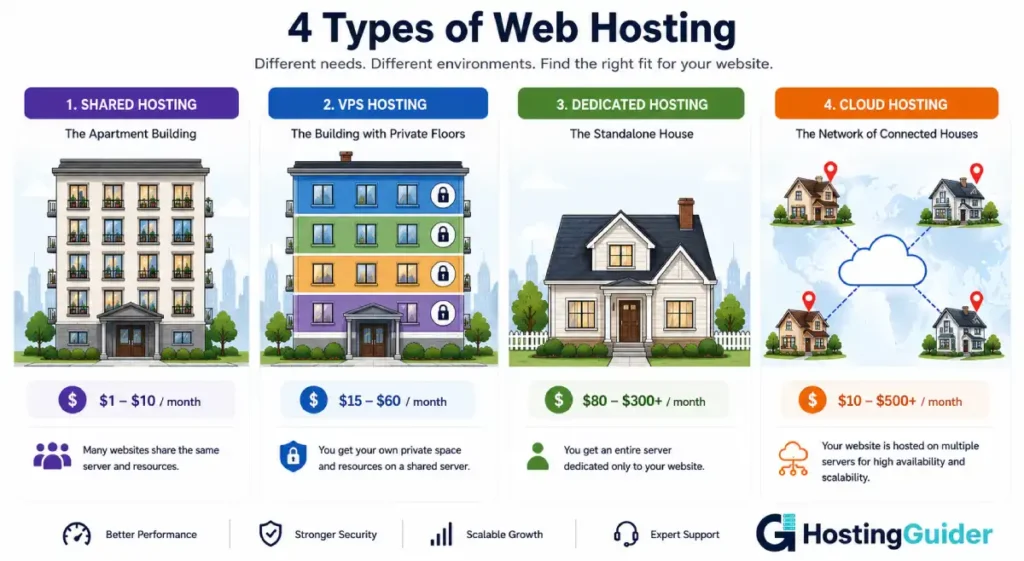
Now here is where it gets interesting. Not all shelves are the same. Some libraries have shared shelves where your book sits alongside hundreds of other books. Some give you your own private shelf. Some give you an entire room. Some use a network of libraries across different cities so your book is always available from the one nearest to each reader.
That is exactly what the four main types of web hosting are. This guide explains each one from the beginning, helps you understand which type fits your situation right now, and shows you how to think about upgrading as your site grows.
Key Takeaways
- Every website needs hosting to be accessible on the internet
- The four main types are shared, VPS, dedicated, and cloud hosting
- Shared hosting is cheapest but you share resources with other websites
- VPS gives you dedicated resources on a shared server
- Dedicated hosting gives you an entire physical server to yourself
- Cloud hosting spreads your site across many servers for reliability and scalability
- Most beginners should start with shared hosting and upgrade as they grow
Quick Answer
Shared hosting is cheap and easy, perfect for new sites. VPS gives you more power and control when your site starts growing. Dedicated hosting is for large sites that need maximum performance and a whole server to themselves. Cloud hosting spreads your site across multiple servers for reliability and automatic scaling. Most people start at shared hosting and move to VPS or cloud hosting as their traffic increases.
Part 1: What Is a Web Server?
Before comparing hosting types, you need to understand what a server actually is.
A server is just a very powerful computer. It is not magical. It is not floating in the sky. It is a physical machine sitting in a building called a data centre. Data centres have thousands of these machines in racks, kept cool by air conditioning, connected to fast internet cables, and running around the clock.
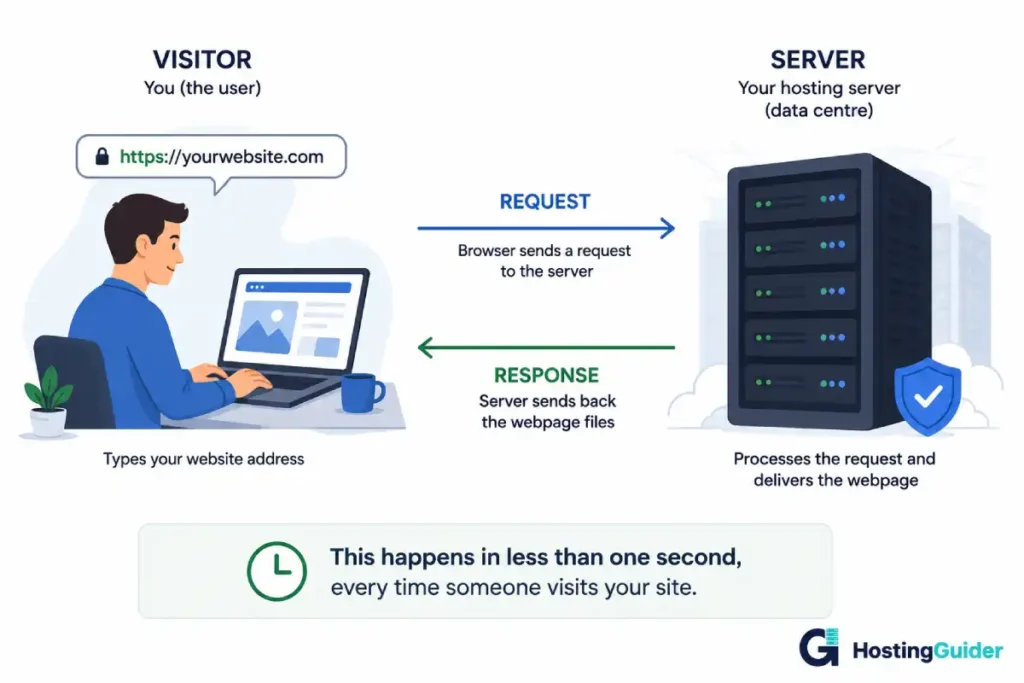
When someone types your website address into their browser, their computer sends a request to your server. The server finds your website files, sends them back through the internet, and the browser turns those files into the page the visitor sees. This happens in under a second.
The server needs to be running and connected to the internet at all times for your site to be available. That is why you pay a monthly or yearly fee to a hosting company. They own and maintain the servers. You rent space on them.
According to W3Techs, WordPress alone powers over 43% of all websites on the internet. Every single one of those sites depends on a hosting server to stay online. The hosting type they run on determines how fast pages load, how reliably the site stays up, and how well it handles traffic growth.
Now, different hosting types are different arrangements for how you rent that server space.
Part 2: Shared Hosting
What is shared hosting?
Shared hosting is exactly what it sounds like. Your website lives on a server that it shares with hundreds or even thousands of other websites.
Imagine a large apartment building. Everyone in the building shares the same electricity supply, the same water supply, and the same internet connection. Each family has their own apartment with their own rooms. But the building’s overall resources are shared between everyone.
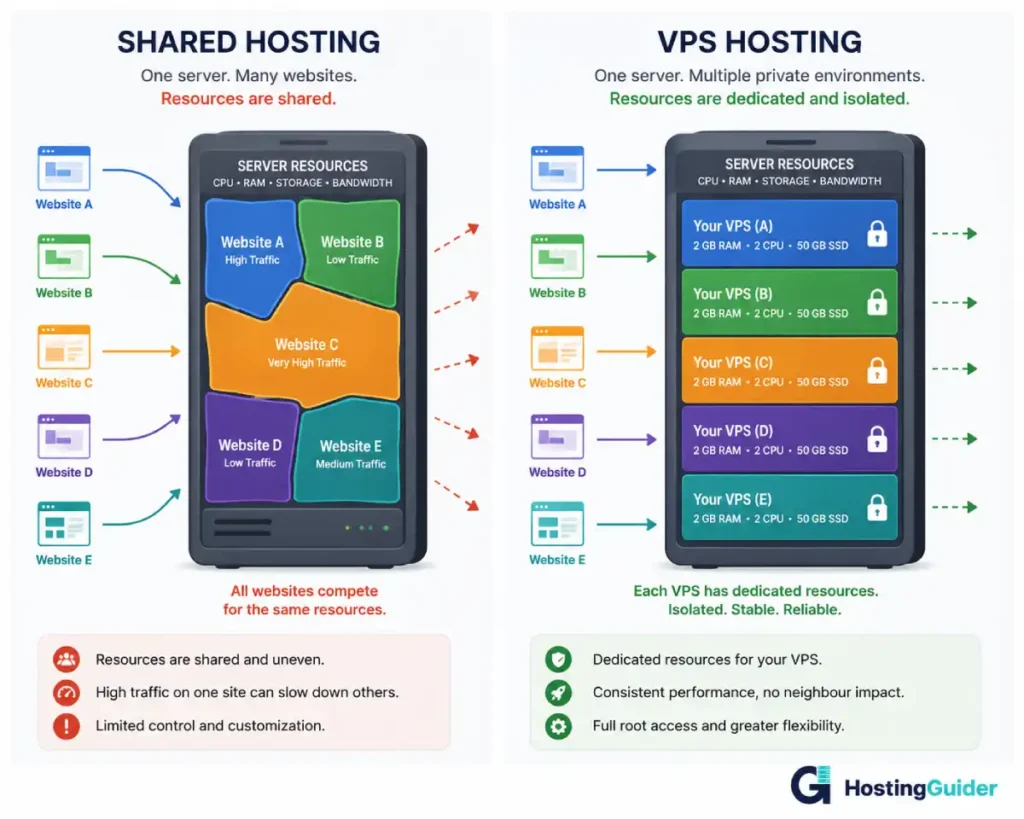
That is shared hosting. Your website has its own space on the server. Your files are separate from everyone else’s. But the server’s overall processing power, memory, and bandwidth are shared among all the websites on that machine.
How it actually works
When your visitor loads your page, the server gives them a small portion of its processing capacity. It is also doing the same thing for visitors on the other hundreds of sites simultaneously.
When those other sites are quiet, you get more of the available resources. When other sites get busy, your resources reduce. This is why shared hosting sites sometimes load slowly during peak hours, not because anything is wrong with your site, but because the shared pool of resources is being consumed by neighbours.
Most shared hosting providers put limits on how many server resources any one site can use at once. These limits prevent one busy site from slowing everyone else down too much. If your site exceeds those limits during a busy period, the host may throttle it or show a temporary error to visitors.
What it costs
Shared hosting is the most affordable type of hosting available. Entry prices typically run from $2 to $10 per month. That low price is possible because the cost of running the server is divided among everyone sharing it.
Providers like Hostinger offer shared WordPress hosting from under $3 per month. SiteGround starts from around $5 per month with better performance optimisation. GreenGeeks offers eco-friendly shared hosting from around $3.95 per month.
For full reviews and current pricing see:
- Hostinger Review
- SiteGround Review
- GreenGeeks Review
- Bluehost Review
- DreamHost Review
- HostGator Review
- HostArmada Review
- FastComet Review
- HostPapa Review
Pros and cons of shared hosting
| Pros | Cons |
|---|---|
| Cheapest type of hosting available | Resources shared with other sites |
| Very easy to set up, no technical skills needed | Performance affected by busy neighbours |
| Control panel like cPanel makes management simple | Limited control over server configuration |
| Technical maintenance handled by the host | Resource limits can throttle high-traffic sites |
| Good enough for most new websites | Not suitable for large or fast-growing sites |
| Most providers include free SSL and one-click WordPress | Risk if a neighbouring site gets hacked |
Who should use shared hosting
You should start with shared hosting if:
- You are building your first website and have never done this before
- Your site is new and does not yet have a significant audience
- Your budget is under $10 per month
- You run a personal blog, a portfolio, a small business site, or a hobby site
- You expect fewer than 10,000 to 20,000 monthly visitors for the foreseeable future
Real example: Sofia is a yoga instructor who wants a website with her class schedule, a contact form, and some photos of her studio. She gets maybe 300 visitors a month, all local. Shared hosting at $4 per month is exactly right for her. She does not need anything more powerful and there is no reason to spend more.
Best shared hosting providers
- Hostinger offers shared hosting from under $3 per month with excellent performance for the price.
- SiteGround provides better-than-average shared performance and strong WordPress support.
- GreenGeeks adds an eco-friendly green energy angle at competitive pricing.
- Bluehost is officially recommended by WordPress.org and suits first-time WordPress users.
- HostArmada runs even its shared plans on cloud infrastructure for better reliability.
- DreamHost offers shared hosting with no long-term contract required, and
- HostGator provides budget-friendly shared plans with unlimited storage.
When to upgrade from shared hosting?
Watch for these signs that your site has outgrown shared hosting:
Pages loading slowly even though nothing has changed on your site. Your host contacting you about exceeding resource limits. Your site occasionally showing errors during busy periods. Your monthly traffic growing above 20,000 to 30,000 visitors consistently.
When these signs appear, VPS hosting is usually the next step.
- Your pages load slowly even though your content has not changed
- Your host sends a warning that you are using too many server resources
- Your site goes down or slows during busy periods
- You receive consistent traffic above 30,000 monthly visitors
- You need to install software or PHP extensions the shared server does not support
Part 3: VPS Hosting
What is VPS hosting?
VPS stands for Virtual Private Server. A VPS takes the same physical server that shared hosting uses and divides it into separate virtual machines, each with its own fixed allocation of resources.
Using the apartment building analogy again: VPS is like converting that apartment building into private floors. Each tenant gets an entire floor to themselves. They still share the same building. But nobody else can access their floor. Nobody else’s activity affects what happens on their floor. The resources on their floor are exclusively theirs.
The virtual part means the division happens through software rather than by physically cutting up the hardware. Each virtual server behaves exactly like a dedicated server in terms of resource isolation, even though multiple virtual servers exist on the same physical machine.
How it actually works
When you sign up for a VPS, the hosting company allocates a specific amount of RAM, a specific number of CPU cores, and a specific amount of storage to your virtual machine. These resources are yours alone regardless of what other virtual servers on the same physical hardware are doing.
If another site on the same physical machine receives a million visitors at once, your VPS is completely unaffected. Your allocated resources cannot be consumed by anyone else.
Most VPS plans come in two versions: managed and unmanaged.
Unmanaged VPS means you get a bare virtual server. The hosting company keeps the physical hardware running. Everything inside your virtual server is your responsibility. You install the operating system, configure the web server software, set up your database, and manage security updates. This requires real technical knowledge of Linux server administration.
Managed VPS means the hosting company handles all the server administration for you. They install and configure the software, apply security patches, monitor server health, and provide support when problems occur. You manage your websites through a control panel like cPanel. No command-line knowledge required.
For beginners and most business owners, managed VPS is the right choice. The extra cost compared to unmanaged VPS is worth the time saved.
What it costs
VPS hosting typically runs from $5 to $100 per month depending on the resource allocation and whether it is managed or unmanaged.
Budget unmanaged options like Contabo start from around $7.50 per month with impressive specifications. Managed VPS from ScalaHosting starts from around $29.95 per month. Cloudways, which provides managed cloud VPS on premium infrastructure, starts from $14 per month.
For full reviews see:
- Contabo Review
- ScalaHosting Review
- Cloudways Review
- InMotion Hosting Review
- HostArmada Review
- InterServer Review
- OVHcloud Review
Pros and cons of VPS hosting
| Pros | Cons |
|---|---|
| Dedicated resources that other sites cannot consume | More expensive than shared hosting |
| Consistent performance regardless of server neighbours | Unmanaged VPS requires technical skills |
| More control over server configuration | More complex setup than shared hosting |
| Can host multiple websites on one VPS | Managed VPS costs significantly more than unmanaged |
| Better security isolation than shared hosting | Overkill for low-traffic sites |
| Scales by upgrading your plan as needs grow | Still tied to one physical machine (unless cloud VPS) |
Who should use VPS hosting
VPS hosting is the right choice when:
- Your site regularly receives more than 20,000 to 50,000 monthly visitors
- Pages are loading slowly on shared hosting even though you have optimised them
- Your shared host has throttled or suspended your account for using too many resources
- You need to install specific software or configure your server environment in ways shared hosting does not allow
- You run a WooCommerce or other e-commerce store that needs consistent resource availability
- You are a developer who needs to run multiple applications or test environments
Real example: Marcus runs a cooking blog that grew from 1,000 to 45,000 monthly visitors over two years. His shared hosting started throwing errors during traffic spikes when his posts got shared on Reddit. He moved to a managed VPS from ScalaHosting. His site now handles traffic spikes without any problems and loads faster than it ever did on shared hosting.
Best VPS hosting providers
- ScalaHosting offers excellent managed VPS with its own SPanel control panel at competitive prices.
- Cloudways provides managed cloud VPS with your choice of underlying cloud provider.
- Liquid Web serves the enterprise VPS market with guaranteed support response times.
- Contabo delivers the best raw VPS specifications per dollar for self-managed users.
- Hostinger makes VPS accessible with affordable plans starting under $6 per month.
- InMotion Hosting provides managed VPS with phone support.
- OVHcloud is the leading European VPS option for data residency requirements.
The difference between managed and unmanaged VPS
This is the most important decision you make when choosing a VPS.
Unmanaged VPS: you get a blank server. You install everything yourself. You apply security updates. You configure the web server and database. You troubleshoot problems. This requires real Linux server administration skills.
Managed VPS: the hosting provider installs and configures everything. They apply security patches, monitor the server health, and help you troubleshoot. You manage your website. They manage the server. This is what most business owners and website builders should choose.
Managed VPS providers like ScalaHosting and Cloudways provide a fully managed VPS experience that requires no server administration knowledge.
Our best VPS hosting guide covers the top VPS providers in detail with performance data and honest comparisons.
Part 4: Dedicated Hosting
What is dedicated hosting?
Dedicated hosting means you rent an entire physical server that is used by nobody else. The whole machine, all of its processing power, all of its memory, all of its storage, is exclusively yours.
Going back to the building analogy: dedicated hosting is like owning your own detached house. No shared building. No neighbours. No shared resources. Everything in and about the house belongs entirely to you.
How it actually works
The hosting company owns the physical server hardware and takes care of the data centre, the power, the cooling, and the network connectivity. You pay to have the entire machine dedicated to your use.
You get full administrative control over the server. You can install any operating system you choose, configure it exactly as you need, run any software, and customise every aspect of the server environment. This level of control makes dedicated hosting particularly useful for applications with specific technical requirements.
Like VPS, dedicated hosting comes in managed and unmanaged versions. Managed dedicated hosting means the provider handles server administration. Unmanaged means you do everything yourself.
The resources available on a dedicated server are genuinely substantial. A typical mid-range dedicated server might have 32GB or more of RAM, multiple CPU cores running at high clock speeds, and several terabytes of storage. A shared hosting site runs on a tiny fraction of these resources.
What it costs
Dedicated hosting is the most expensive of the four main types. Prices typically start from $80 to $150 per month for basic configurations and scale to $500 or more per month for high-specification setups.
Providers like Liquid Web offer managed dedicated servers from around $199 per month with enterprise-level support. OVHcloud offers dedicated servers from lower price points with European data centre locations.
For full reviews see:
Pros and cons of dedicated hosting
| Pros | Cons |
|---|---|
| Maximum performance with no resource sharing | Most expensive type of hosting |
| Complete control over server configuration | Requires significant technical knowledge to manage |
| Highest level of security isolation | Still one physical machine, single point of failure |
| Ideal for high-traffic and resource-intensive applications | Overkill for all but the largest websites |
| Customisable hardware specifications | Long setup time compared to shared or VPS |
| Consistent performance at high traffic volumes | Costs the same whether your server is busy or idle |
Who should use dedicated hosting
Dedicated hosting makes sense for a small percentage of websites. Consider it when:
- Your site receives hundreds of thousands of monthly visitors consistently
- You run a large e-commerce operation with complex product catalogues and high transaction volumes
- Your application has specific security or compliance requirements that require complete isolation
- You run software that requires specific server configurations unavailable on shared or VPS hosting
- Performance is business-critical and you need guaranteed resources that cannot be affected by any external factor
Real example: A large online newspaper receives 2 million monthly visitors. They run complex editorial software, a custom video delivery system, and a subscription management platform all on the same infrastructure. A dedicated server gives them the guaranteed processing power, memory, and storage their application requires without competing for resources with any other site.
For most small and medium businesses, dedicated hosting is more than they will ever need. VPS or cloud hosting handles the vast majority of high-traffic business website requirements at a fraction of the cost.
Best dedicated hosting providers
- Liquid Web is the leading managed dedicated server provider with guaranteed 59-second support response times.
- Contabo offers dedicated servers at unusually competitive prices for technically capable users.
- OVHcloud provides dedicated infrastructure across European and global data centres at various price points.
- InMotion Hosting offers managed dedicated servers for US-based businesses with phone support.
- Bluehost and HostGator provide dedicated options for users already on their shared infrastructure looking to upgrade.
Part 5: Cloud Hosting
What is cloud hosting?
Cloud hosting is the newest of the four main types and is different from the others in a fundamental way. Instead of your website running on one server, cloud hosting runs your site across a network of many servers simultaneously.
Imagine instead of one library keeping your book, a national library network keeps copies of it in cities across the country. If the local branch floods, every other branch still has your book available. If there is suddenly huge demand in one city, other cities can supply copies quickly. Your book is always available, always close to the reader, and can handle any level of demand.
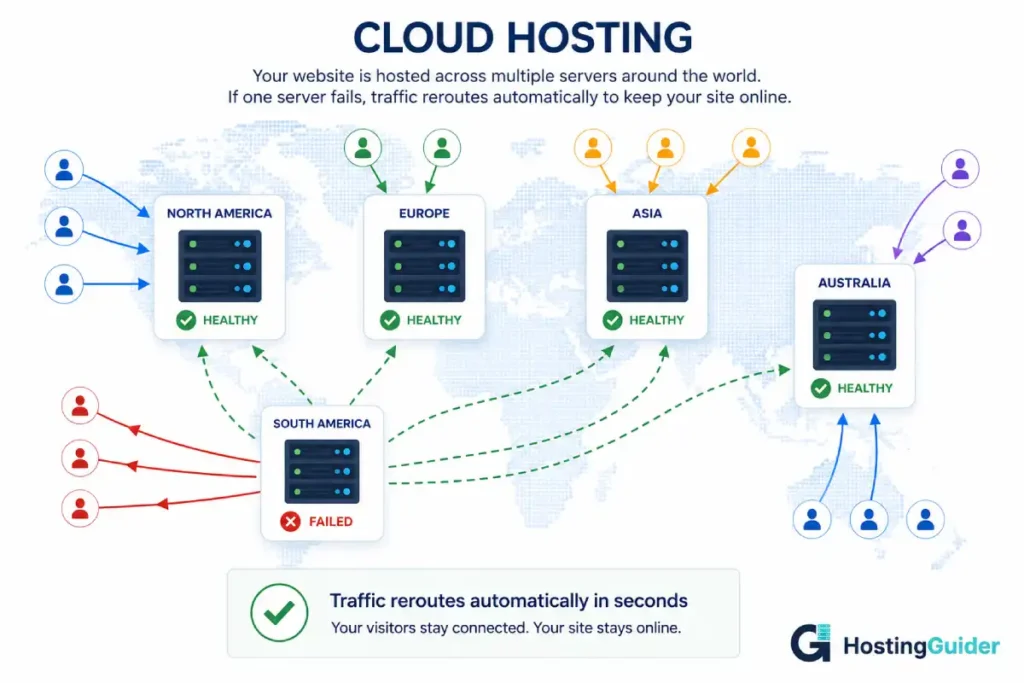
That is cloud hosting. Your site exists across multiple servers. Those servers back each other up. When one has a problem, others continue serving your visitors automatically.
How it actually works
In cloud hosting, your website files and database are stored across a distributed infrastructure. Multiple servers hold copies of your data. A system called a load balancer sits in front of the servers and decides which server handles each incoming visitor request. It picks the least busy server and routes the request there.
When traffic increases, the cloud network allocates more server resources automatically. This is called auto-scaling. You do not need to upgrade your plan, contact your host, or wait for changes to take effect. The infrastructure responds to demand in real time.
When traffic drops back down, the extra resources are released. On usage-based cloud pricing, your cost reduces too. On fixed-price cloud hosting plans, you simply have extra capacity available for whenever the next spike arrives.
This is what makes cloud hosting fundamentally different from shared, VPS, and dedicated hosting. Those three types all involve a fixed amount of resources on a fixed number of servers. Cloud hosting has no fixed ceiling because additional servers from the network can always join to handle demand.
Our guide on How Cloud Hosting Enhances Scalability explains this process in full technical detail with real-world examples.
What it costs
Cloud hosting costs vary more than any other hosting type because it depends on how much infrastructure you need and how it is packaged.
Cloud shared hosting from providers like HostArmada runs on cloud infrastructure and starts from under $3 per month, making it comparable to traditional shared hosting in price while delivering better reliability.
Managed cloud WordPress hosting from Kinsta starts from $35 per month for a single site. Cloudways starts from $14 per month for a managed cloud server. Rocket.net starts from $30 per month for its Cloudflare-based cloud infrastructure.
For full reviews see:
- Kinsta Review
- Cloudways Review
- WP Engine Review
- Rocket.net Review
- Pressable Review
- SiteGround Review
- HostArmada Review
Pros and cons of cloud hosting
| Pros | Cons |
|---|---|
| No single point of failure, much higher uptime | Generally more expensive than traditional shared hosting |
| Scales automatically with traffic demand | Variable pricing can be unpredictable on usage-based plans |
| Serves visitors from the nearest server location | Some cloud platforms require technical knowledge to configure |
| Handles traffic spikes without manual intervention | Not all cloud hosting is genuinely cloud (check the marketing) |
| CDN is usually included for global performance | Entry-level managed cloud costs more than basic shared hosting |
| Providers manage infrastructure and security | Overkill for very small sites with predictable low traffic |
Who should use cloud hosting
Cloud hosting suits:
- Growing WordPress sites that have outgrown shared hosting but want managed simplicity
- E-commerce stores where downtime during a sale would mean lost revenue
- Sites with unpredictable or spiky traffic patterns
- Businesses that serve a global audience and need fast load times across different countries
- Any site where being offline has real business or financial consequences
- Developers who want cloud infrastructure flexibility with a managed interface
Real example: Aisha runs an online handmade candle shop. Most months she gets 3,000 visitors. She runs a Christmas sale every December and promotes it heavily on Instagram. One year her site crashed on the first day of the sale because her shared hosting could not handle the traffic. She moved to managed cloud hosting. The following December, 40,000 visitors hit her store in three days. Her site stayed online the entire time and she had her best sales week ever.
Best cloud hosting providers
- Kinsta runs on Google Cloud infrastructure and is the strongest managed cloud WordPress host available.
- Cloudways lets you choose between AWS, Google Cloud, and other providers with a managed interface on top.
- WP Engine provides cloud WordPress hosting with excellent developer tools.
- Rocket.net builds on Cloudflare’s global edge network for the fastest page delivery available.
- Pressable and WPMU DEV offer managed cloud WordPress with bundled tools.
- SiteGround provides a managed cloud upgrade path for existing WordPress users.
- HostArmada and GreenGeeks run cloud-based shared infrastructure at entry-level prices.
Our best cloud hosting guide and best WordPress hosting guide cover the top cloud providers in detail.
The benefits of cloud hosting for business covers every practical advantage in depth.
How auto-scaling actually works (for curious readers)
This part is for readers who want to understand the mechanism more deeply.
Cloud infrastructure uses software called an auto-scaler that monitors your site’s resource usage in real time. It watches CPU usage, memory usage, and incoming request volume continuously. When any of these metrics crosses a defined threshold, the auto-scaler instructs the cloud network to spin up additional server instances, which are new virtual machines from the available resource pool.
These additional instances are ready to serve traffic within seconds. A load balancer, which is software that sits in front of all your server instances and decides which one handles each incoming request, immediately begins routing traffic to the new instances. The load balances evenly across all available instances so no single server gets overwhelmed.
When the traffic spike subsides, the auto-scaler detects falling resource usage and terminates the extra instances that are no longer needed. The whole process happens automatically without any human involvement.
Our full guide on how cloud hosting enhances scalability explains this process in even more detail with diagrams.
Part 6: The Full Comparison
Now that you understand each type individually, here is how they compare directly across every factor that matters.
| Factor | Shared Hosting | VPS Hosting | Dedicated Hosting | Cloud Hosting |
|---|---|---|---|---|
| Starting price | $2 to $10/month | $5 to $100/month | $80 to $400+/month | $3 to $150+/month |
| Resources | Shared with hundreds of sites | Fixed and dedicated to you | Entire server to yourself | Dynamic, scales with demand |
| Performance consistency | Variable, affected by neighbours | Consistent | Maximum, guaranteed | Consistent, scales automatically |
| Handles traffic spikes | Poorly, may crash | Handles moderate spikes | Handles significant spikes | Handles any size spike automatically |
| Technical skill needed | Very low | Low (managed) to high (unmanaged) | Low (managed) to very high (unmanaged) | Low (managed) to high (raw) |
| Setup complexity | Very simple | Moderate | Complex | Simple (managed) to complex (raw) |
| Server control | Minimal | Full root access (unmanaged) | Full root access | Varies by plan type |
| Single point of failure | Yes | Yes (traditional VPS) | Yes | No |
| Ideal site size | Small to medium | Medium to large | Very large | Any, but best for growing sites |
| Monthly visitors (typical) | Under 30,000 | 10,000 to 500,000 | 500,000+ | Any range |
| Best for | Beginners, small sites | Growing sites, developers | Enterprise, high-traffic sites | Sites needing reliability and scale |
Part 7: How to Choose the Right Hosting Type
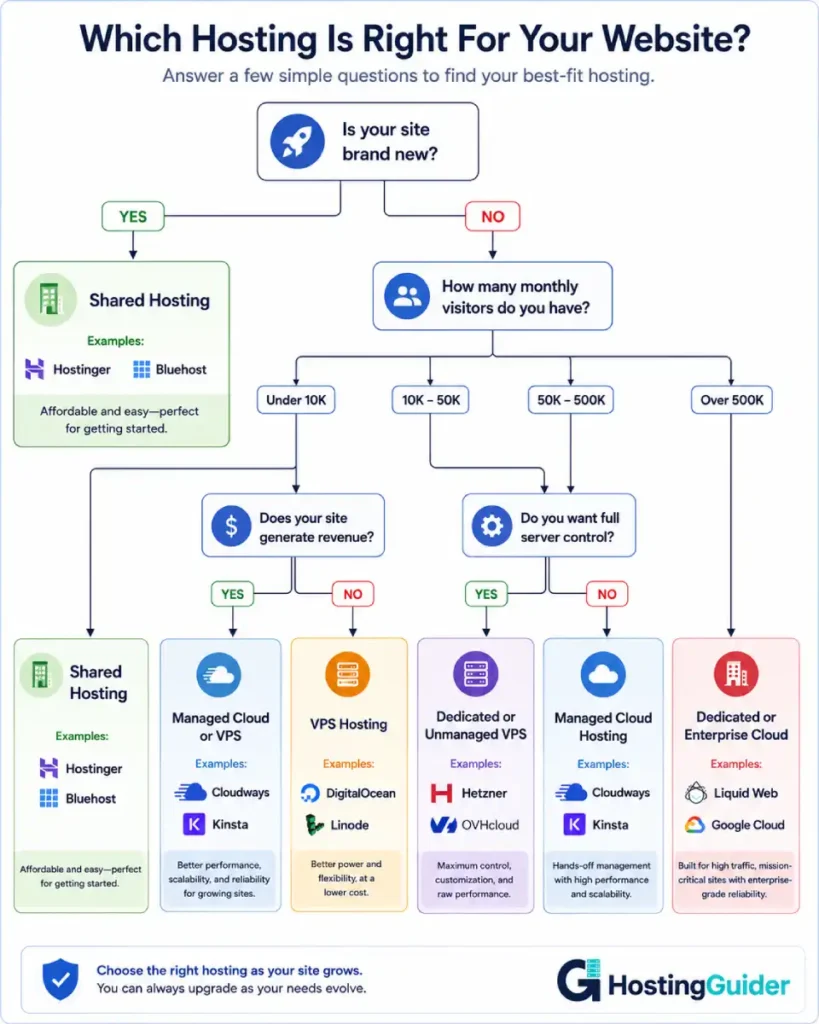
Here is a hands-on decision process you can follow right now.
Step 1: How new is your site?
If you are building your first website and it does not exist yet, start with shared hosting. You do not have visitors yet. You do not have traffic data. Spending $35 per month on cloud hosting for a site with 50 visitors per month makes no sense.
Start with shared hosting from a reputable provider. SiteGround and Hostinger are the strongest options for most new sites. Run your site on shared hosting until you have real traffic data that tells you what your site actually needs.
Step 2: What is your current monthly visitor count?
Check your analytics if your site already exists. Google Analytics shows you monthly users.
Under 10,000 monthly visitors: shared hosting is fine. Stay there until traffic grows.
10,000 to 50,000 monthly visitors: you are in the middle ground. Shared hosting may be struggling. A managed VPS or entry cloud hosting is the right next step.
50,000 to 500,000 monthly visitors: VPS or managed cloud hosting. Your site needs dedicated resources and cannot rely on shared infrastructure.
Above 500,000 monthly visitors: dedicated hosting or enterprise cloud infrastructure. You need the full power of a server or a large-scale cloud setup.
Step 3: Does your site generate revenue?
If your website generates direct revenue through e-commerce, advertising, lead generation, or subscriptions, the calculation changes.
A site that earns $2,000 per month can justify spending $35 to $70 per month on managed cloud hosting. An hour of downtime might cost you $100 or more in lost sales. The reliability improvement of cloud hosting over shared hosting pays for itself quickly in this context.
A hobby blog that generates nothing does not need that investment. Shared hosting serves it perfectly.
Step 4: Do you have technical skills?
If you are comfortable with Linux servers, command lines, and server administration, unmanaged VPS or dedicated hosting gives you maximum control at lower cost.
If you have no server administration experience and do not want to learn, managed hosting of any type is essential. Pay the extra amount for management and spend your time on your actual business instead.
Step 5: Is your traffic predictable or spiky?
Predictable steady traffic is handled well by any hosting type appropriately sized to that traffic level.
Unpredictable spiky traffic, perhaps you run occasional promotions, your content sometimes goes viral, or you have seasonal peaks, is where cloud hosting’s automatic scaling delivers unique value. No other hosting type responds to unexpected demand automatically.
Part 8: What to Look for When Choosing a Provider
Once you know which type of hosting you need, evaluate specific providers on these factors.
For shared hosting
Look for a provider that uses SSD storage rather than older HDD drives. SSD is significantly faster. Look for one that includes a free SSL certificate, which is required for your site to show the padlock in browsers. Look for one that includes daily automatic backups. Look for one that has genuinely accessible customer support, either live chat or phone, not just email tickets that take 48 hours.
For VPS hosting
Confirm whether the plan is managed or unmanaged before signing up. Check the specific RAM and CPU allocation on the plan you are considering. Look for providers that offer instant scalability so you can add resources without migrating to a new server. Check the storage type, NVMe SSD is fastest, then SSD, then older HDD. Ask what control panel is included since cPanel and SPanel are the most commonly used and easiest to learn.
For dedicated hosting
Check whether the server specifications meet your application’s actual requirements before purchasing. Understand whether managed or unmanaged service is included and what specifically the managed service covers. Confirm the network uplink speed, which affects how fast data travels from the server to your visitors. Check the data centre location relative to where most of your visitors are located.
For cloud hosting
Ask whether the infrastructure is genuinely multi-server cloud or a single server marketed as cloud. Check what CDN solution is included and how many global locations it covers. Understand the auto-scaling model and whether it is automatic or manual. Ask whether backups are included and whether restoration is self-serve. For managed cloud, check support specialisation, WordPress-specific issues need WordPress-specific expertise.
Part 9: Common Beginner Mistakes
Buying more hosting than you need at the start is the most common mistake. A brand new site with no audience does not need managed cloud hosting at $70 per month. Start with shared hosting and upgrade when your traffic justifies it.
Buying the cheapest possible shared hosting from an unreliable provider is the opposite mistake. The difference between $2 per month shared hosting and $5 per month shared hosting from a reputable provider is often the difference between slow unreliable hosting with poor support and fast reliable hosting with responsive help when things go wrong.
Choosing unmanaged VPS or dedicated without the technical skills to run it is a significant mistake. Many beginners sign up for an unmanaged VPS because the price is lower, then discover they have no idea how to install WordPress or configure the server. Always be honest about your technical skills before choosing an unmanaged plan.
Not checking renewal prices before signing up causes unpleasant surprises. Promotional pricing on shared hosting often doubles or triples at renewal. Check the renewal price on any plan before signing up. Providers like InterServer offer price-lock guarantees that keep your rate stable, which is rare but worth knowing about.
Ignoring the location of the data centre is a mistake that directly affects page speed. If most of your visitors are in Europe, hosting your site on a US-only server adds latency to every page load. Choose a provider with a data centre in or near the region where most of your audience is located.
Not taking backups seriously is a mistake that often only matters once, but that once can be devastating. Any hosting plan you choose should include automatic daily backups stored separately from your main server. If something goes wrong and you have no backup, recovering your site means rebuilding it from scratch.
Part 10: Quick Reference by Use Case
| Use Case | Recommended Type | Provider Examples |
|---|---|---|
| First website, blog, or portfolio | Shared hosting | Hostinger, SiteGround, DreamHost |
| Small local business website | Shared hosting | SiteGround, GreenGeeks, HostArmada |
| Growing blog with 20,000+ visitors | Managed VPS or managed cloud | Cloudways, ScalaHosting |
| WooCommerce store | Managed cloud WordPress | Kinsta, WP Engine, Cloudways |
| Agency managing client sites | Managed cloud WordPress | WP Engine, WPMU DEV, Cloudways |
| Developer who wants server control | Unmanaged VPS | Contabo, OVHcloud, InterServer |
| Site with seasonal traffic spikes | Managed cloud | Cloudways, Kinsta, Rocket.net |
| Large news or media site | Cloud or dedicated | Liquid Web, Kinsta, OVHcloud |
| European audience, data residency | Cloud VPS in Europe | OVHcloud, IONOS, SiteGround |
| Eco-conscious business | Shared or cloud hosting | GreenGeeks |
Frequently Asked Questions
What is the best type of hosting for beginners?
Shared hosting is the best starting point for beginners. It is the cheapest option, requires no technical skills, and handles everything a new website needs. The hosting company manages the server for you. You simply focus on building your site. As your site grows and your needs become clearer, you can upgrade to VPS or cloud hosting. Starting on shared hosting from a reputable provider like SiteGround or Hostinger and upgrading when you outgrow it is the correct approach for almost every beginner.
What is the difference between VPS and cloud hosting?
VPS hosting gives you a dedicated virtual slice of one physical server. Your resources are fixed and exclusive to you. Cloud hosting distributes your site across a network of many servers simultaneously. The key practical differences are reliability and scalability. VPS has a single point of failure because it relies on one physical machine. Cloud hosting has no single point of failure because many servers back each other up. Cloud hosting also scales automatically when traffic increases while VPS requires manual plan upgrades. Cloud hosting is generally more reliable but costs more than basic VPS.
When should I upgrade from shared to VPS or cloud hosting?
Upgrade when you see these signs: your pages load slowly during peak hours despite a well-optimised site, your host throttles or suspends your account for exceeding resource limits, your site crashes or shows errors during traffic spikes, or your monthly visitors consistently exceed 20,000 to 30,000. Also consider upgrading when your site starts generating revenue and downtime has direct financial consequences. You do not need to wait until your site is broken to upgrade. Upgrading before problems become severe is better than scrambling after your site has already been unreliable for visitors.
Is dedicated hosting necessary for most websites?
No. Dedicated hosting is necessary for a small percentage of websites. Most sites, including those with significant traffic and revenue, are well served by managed cloud hosting or high-tier VPS hosting at a fraction of the cost of dedicated servers. Dedicated hosting becomes relevant when you receive hundreds of thousands or millions of monthly visitors, run complex applications with specific server requirements, or have compliance requirements that mandate complete infrastructure isolation. For the vast majority of businesses and bloggers, even popular ones, managed cloud VPS or managed WordPress cloud hosting provides all the performance they will ever need.
What is managed hosting and do I need it?
Managed hosting means the hosting provider handles server administration for you. This includes installing and configuring server software, applying security patches, monitoring server health, and providing support for server-level problems. Unmanaged hosting gives you a server and leaves all of that to you. Whether you need managed hosting depends on your technical skills and how you want to spend your time. If you are not a Linux system administrator and do not want to become one, managed hosting is worth the extra cost. The time saved from not managing server administration is almost always worth more than the price difference.
How does hosting type affect my website speed?
Hosting type significantly affects speed in several ways. Shared hosting means your processing power is shared with other sites, which can slow page loading when the server is busy. VPS and dedicated hosting give you fixed resources that do not fluctuate based on other sites, providing more consistent speed. Cloud hosting adds a CDN that serves your content from the nearest global location, which reduces the physical distance data travels and speeds up loading for international visitors. In general, the more dedicated your resources and the more globally distributed your infrastructure, the faster and more consistent your site loads for visitors everywhere.
Can I change my hosting type later?
Yes. Migrating from shared hosting to VPS or cloud hosting is a standard process that most providers either handle for you (free migration is offered by many managed cloud hosts) or provide tools to help you do yourself. The technical process involves moving your files, your database, and updating your domain’s DNS settings to point to the new server. It typically takes a few hours for a small to medium site. The key things to manage during any hosting migration are maintaining your SEO rankings by keeping your URLs consistent and monitoring for any issues after the switch. Our migration guide covers this in detail.


