
Most businesses spend time thinking about branding, reviews, and customer service. Very few think about hosting.
But your hosting plan shapes how fast your site loads, how often it goes down, and how secure it feels to visitors. All three of those things directly affect how people perceive your business online.
This guide explains exactly how hosting connects to reputation, and what to do about it.
The Connection Most Businesses Miss
Your website is often the first interaction a customer has with your brand. Before they read a single word of your copy, your site has already made an impression.
A slow site says your business is not serious. A site that is down says you cannot be relied on. A browser warning about an insecure connection says you cannot be trusted.
None of those impressions require a bad review or a news story. Your hosting creates them automatically, invisibly, every day.
Six Ways Hosting Directly Affects Your Reputation
1. Page Load Speed
Slow websites lose visitors before they even engage. Studies consistently show that most users abandon a page that takes longer than three seconds to load.
Speed affects more than bounce rates. Google uses page speed as a ranking factor. A slow site ranks lower, gets fewer visitors, and makes less revenue. That is a reputation and a business problem at the same time.
What affects speed at the hosting level:
- Storage type: NVMe and SSD are significantly faster than older HDD storage
- Server location: closer to your visitors means lower latency
- Built-in caching: reduces load time by serving pre-built pages instead of generating them fresh each time
- CDN support: delivers content from servers near each visitor globally
Read how caching directly improves website speed to understand what your host should be doing automatically.
2. Uptime and Downtime
Every minute your site is offline is a minute a potential customer saw nothing, or worse, saw an error message.
Regular downtime signals unreliability. If a customer visits twice and finds your site down once, you have lost their confidence. If they find it during a sale, a product launch, or a time-sensitive decision, you have lost far more than that.
| Uptime Guarantee | Max Downtime Per Year | What That Means in Practice |
|---|---|---|
| 99.0% | ~87 hours | Significant risk for any business |
| 99.9% | ~8.7 hours | Acceptable baseline for most |
| 99.95% | ~4.4 hours | Better for customer-facing businesses |
| 99.99% | ~52 minutes | Strong for high-traffic or e-commerce |
Look for a host that backs their uptime claim with a real SLA, not just marketing copy. Read about why uptime matters more than most businesses realise and how to improve your site’s uptime performance.
3. SSL and Browser Trust Signals
Every major browser shows a “Not Secure” warning for sites without an SSL certificate. That warning appears in the address bar before a visitor reads a single word on your page.
For a business, that warning is a reputation hit you cannot afford. It signals that you either do not care about security or do not know enough to fix it. Neither is a good look.
SSL does three things for your reputation:
- Removes the browser warning so visitors feel safe
- Encrypts data so customers trust submitting forms or payments
- Improves search rankings since Google treats HTTPS as a positive signal
Most reputable hosts include SSL free on all plans. If yours charges extra for it, that is a signal to look elsewhere. Read our full explanation of what an SSL certificate does.
4. Security Incidents
A hacked website damages reputation in ways that take months to undo. Visitors who land on a compromised site see malware warnings, spam content, or redirects to unrelated pages. Google may blacklist the site entirely.
Recovering from a security incident means downtime, technical work, customer communication, and in some cases legal obligations. All of that is public, visible, and damaging.
The hosting-level protections that reduce this risk:
- Web application firewall to block malicious traffic
- DDoS protection to prevent traffic flood attacks
- Automated malware scanning and removal
- Isolated resources so other accounts on the same server cannot affect yours
Read our hosting security tips guide overview and secure hosting features guide for the full picture.
5. SEO and Search Visibility
Your hosting affects your search rankings in ways that are easy to overlook.
| Hosting Factor | SEO Impact |
|---|---|
| Slow load times | Lower ranking, higher bounce rate |
| Frequent downtime | Google reduces crawl frequency |
| No SSL certificate | Slight ranking penalty, browser warnings |
| Server location far from audience | Higher latency, slower TTFB |
| Poor uptime during Googlebot crawl | Pages missed or de-indexed |
Poor search visibility means fewer people find your business. That is a reputation problem even if nothing has gone wrong technically. Our cloud vs. traditional hosting breakdown includes a section on how hosting infrastructure differences affect SEO outcomes.
6. Customer Experience at Critical Moments
Your hosting matters most at the moments that matter most to your customers.
- A checkout page that loads slowly during a sale
- A site that crashes during a product launch
- A contact form that times out when a prospect is ready to enquire
- A login page that is slow during peak usage hours
These are the moments customers remember. They do not think “the server was under load.” They think “this company’s website does not work.”
Cloud hosting handles traffic spikes automatically, which is why it is often the right choice for businesses where customer experience at peak moments matters. For a detailed look at how hosting type affects performance under load, read our VPS scalability guide.
How Different Hosting Types Compare on Reputation Risk
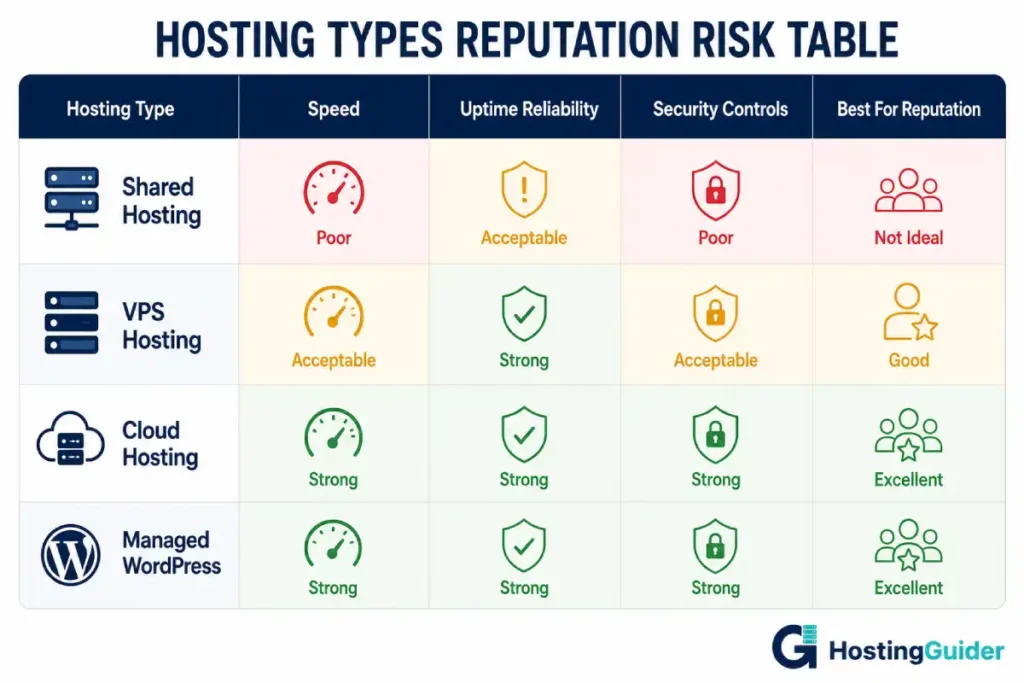
| Hosting Type | Speed | Uptime Reliability | Security Controls | Reputation Risk |
|---|---|---|---|---|
| Shared Hosting | Variable | Lower, affected by neighbors | Limited | High |
| VPS Hosting | Consistent | Good | Strong | Low to Medium |
| Cloud Hosting | Fast, scalable | Excellent | Strong | Low |
| Managed WordPress | Optimised for WP | Excellent | Provider-managed | Low |
Shared hosting carries the highest reputation risk because your performance is tied to everyone else on the same server. One busy neighbor can slow your site during a critical moment.
VPS and cloud hosting isolate your resources. What happens on other accounts does not affect you. For most businesses, moving off shared hosting is the single biggest reputation improvement available at the hosting level.
Our guide to web hosting types explains what each option includes and who it suits.
What to Look for in a Hosting Plan That Protects Your Reputation
Before signing up, check these specifics.
Performance
- SSD or NVMe storage included
- CDN available or built in
- Server caching enabled by default
- Data center location close to your audience
Reliability
- Uptime guarantee of 99.9% minimum, backed by an SLA
- Proactive monitoring and incident alerts
- Clear process for handling outages
Security
- Free SSL on all plans
- WAF and DDoS protection included, not add-ons
- Daily automated backups stored separately
- Malware scanning active by default
Support
- 24/7 live chat or phone access
- Real technical help, not just ticket routing
- Fast response times verified by independent reviews
Our guide to choosing a web hosting plan covers the full evaluation process if you want to go deeper.
Hosting Providers That Consistently Protect Business Reputation
A few providers stand out for the combination of speed, reliability, and security that reputation-sensitive businesses need.
SiteGround runs on Google Cloud and includes a CDN, daily backups, a proactive security system, and fast 24/7 support. Their uptime track record is consistently strong. For small to mid-sized businesses, it delivers the reliability you need without an enterprise price tag.
Cloudways puts your site on major cloud infrastructure from AWS, Google Cloud, or DigitalOcean with a managed interface. It is one of the best options for businesses that need cloud-level performance and uptime without managing the technical side themselves.
Kinsta runs on Google Cloud’s Premium Tier and is built specifically for WordPress performance. Every plan includes Cloudflare CDN, daily backups, and staging. For WordPress businesses where reputation depends on fast, reliable, secure delivery, it is hard to beat.
For detailed comparisons and performance data on any of these, the HostingGuider reviews section has full breakdowns.
Final Thoughts
Your hosting plan is invisible when it works and very visible when it does not.
Customers do not separate their experience of your website from their opinion of your business. A slow page, a security warning, or an error message at the wrong moment creates a lasting impression that good copy and a nice logo cannot fix.
Choose hosting that is fast, reliable, and secure. Everything else your brand does to build its reputation depends on that foundation being solid.


