
Running an online store is different from running any other kind of website. A blog can survive a slow load time. A portfolio can recover from a few minutes of downtime. An online store cannot.
Every second your checkout page takes to load, you lose customers. Every minute your site is down during a sale or product launch, you lose revenue. And if your hosting fails to protect payment data properly, you lose something much harder to recover: customer trust.
This guide covers the hosting requirements that actually matter for an online store, explained in plain language without the technical noise.
Why E-commerce Hosting Is a Different Conversation
Most websites can get away with average hosting. An online store cannot, because three things are always in play at once.
Customers hand over payment information. That creates a security responsibility that most regular websites never have to think about.
The checkout page is the most critical moment in the customer journey. If it loads slowly, looks broken, or times out, the sale is gone. Most shoppers do not come back after a bad checkout experience.
Traffic is unpredictable. A flash sale, a press mention, or a product going viral can send hundreds of visitors to your store at the same time. If your hosting cannot absorb that spike, your site crashes at the exact moment you need it most.
If you are new to hosting entirely, understanding how web hosting works before reading further will make everything in this guide much easier to apply.
The Six Things Your E-commerce Hosting Must Get Right
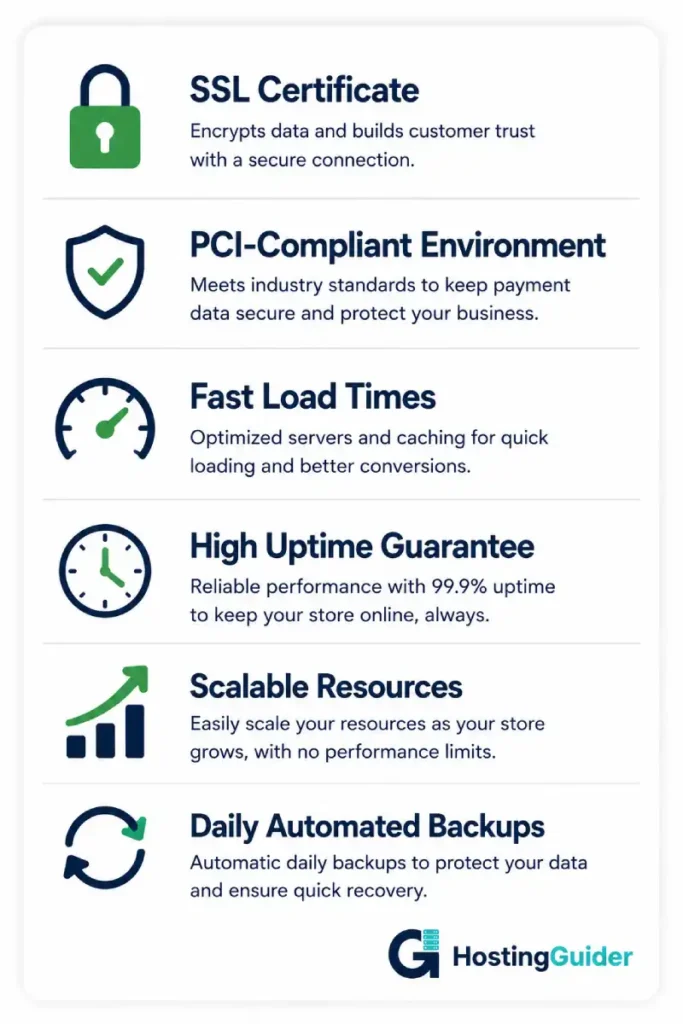
1. SSL Certificate
An SSL certificate encrypts everything that passes between your customer’s browser and your website. Without it, payment details and personal information are exposed to anyone who intercepts the connection.
Every major browser now flags sites without SSL as “Not Secure.” That warning appears before a visitor even sees your products. For an online store, it is an immediate conversion killer.
Most reputable hosting providers include a free SSL certificate on all plans. If a provider does not, that is a clear sign to look elsewhere. Read more about what SSL does and why every online store needs it.
2. PCI DSS Compliance
PCI DSS, the Payment Card Industry Data Security Standard, is the global framework that governs how payment data must be handled, stored, and transmitted. If your store accepts credit or debit card payments, your hosting environment needs to support PCI compliance.
You do not need to understand every technical detail. But you do need to know that using a payment processor like Stripe or PayPal handles compliance on their end for the actual card data. Your hosting still needs to meet the baseline environment requirements. Ask any hosting provider directly whether their infrastructure supports PCI-compliant setups. Any serious provider will have a straightforward answer.
3. Fast Load Times, Especially at Checkout
Page speed matters for every website, but checkout pages are the most speed-sensitive pages on the internet. Google’s research shows that moving from a one-second to a three-second load time increases the chance of a mobile visitor leaving by 32%. At the point of purchase, where the customer has already decided to buy, a slow page is the difference between a completed order and an abandoned cart.
Your hosting influences speed through its storage type, server location, and built-in caching systems. Read how caching directly affects website speed to understand what your host should be handling in the background. You can test your store’s current performance free using Google PageSpeed Insights.
4. High Uptime
A 99.9% uptime guarantee sounds impressive, but it still allows for up to 8.7 hours of downtime per year. For a general website, that is acceptable. For an online store running a time-sensitive promotion or a product launch, a few hours offline at the wrong moment is a serious business problem.
Look for providers offering 99.95% or above, backed by a real service level agreement. A promise without an SLA is just marketing. Our detailed guide on why uptime matters for your business breaks down exactly what those percentages mean in real terms.
5. Scalability
Black Friday. A product going viral. A mention in a high-traffic newsletter. These moments are impossible to predict precisely, but they are exactly when your hosting gets tested hardest.
Cloud hosting is the most scalable option because it spreads your site across multiple servers and adds resources automatically when traffic spikes. VPS hosting can also work well if your provider makes it easy to upgrade quickly. The key question to ask before signing up: can I scale up without taking my store offline? If the answer is unclear, keep looking.
6. Daily Backups
Your product catalog, customer records, and order history are assets. Hosting accounts get compromised, plugins corrupt databases, and human errors happen. A daily automated backup means you can restore your store to a fully working state within hours rather than starting from scratch.
Before committing to a plan, check how far back backups go, whether they are stored separately from the main server, and how straightforward the restore process is. These details matter a great deal when something actually goes wrong.
Which Hosting Type Does an Online Store Need?
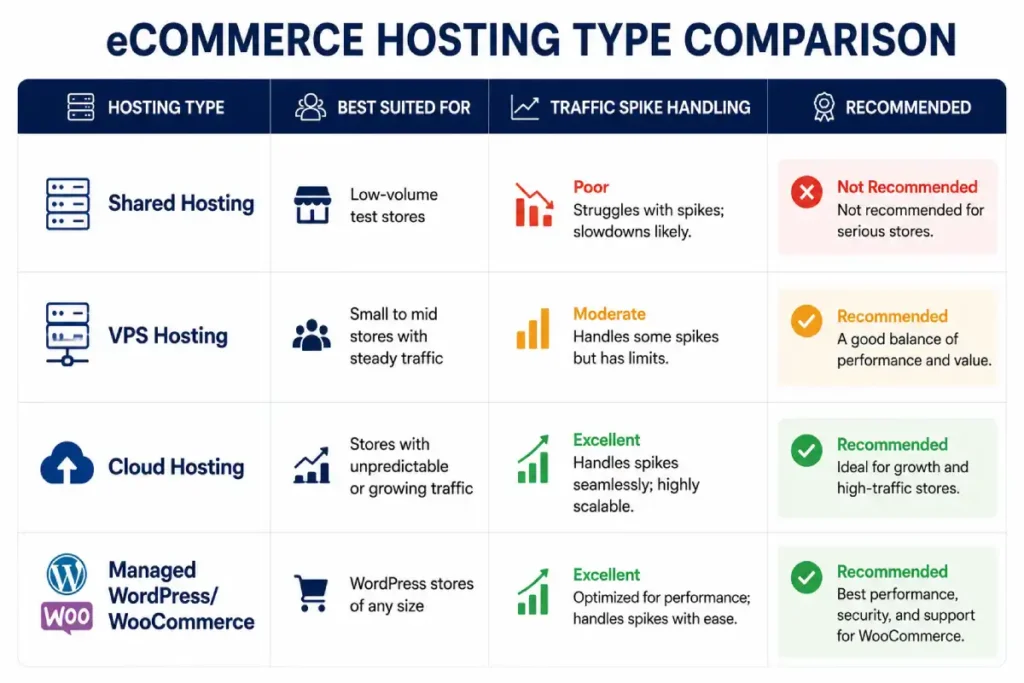
Shared Hosting: Acceptable Only for Testing an Idea
Shared hosting places your store on a server alongside hundreds of other websites, all sharing the same resources. It is the cheapest option available and works fine for a basic informational site with little traffic.
For a real online store, it is the wrong foundation. A neighboring site having a busy day can slow your checkout page without any fault of your own. Security options are limited. And if you need to scale, you are usually forced to switch providers entirely rather than simply upgrading.
If you are at the very earliest stage, just validating a product idea with minimal transactions, shared hosting might work temporarily. For anything more than that, start on VPS or cloud from the beginning.
VPS Hosting: The Right Foundation for Most Stores
VPS hosting gives your store its own dedicated resources within a server. Other websites cannot touch your performance. You get better security controls, more stability, and the room to grow without a full migration.
For small to mid-sized stores with consistent traffic and real transaction volumes, VPS hits the right balance of cost and capability. Our guide to choosing the right VPS plan helps you spec a plan that fits where your store is now without paying for resources you do not need yet. If you are currently on shared hosting and weighing the move, our shared vs. VPS comparison lays out exactly when the switch makes sense.
See our tested picks: Best VPS Hosting
Cloud Hosting: Best for Stores With Unpredictable Traffic
Cloud hosting does not rely on a single server. Your store runs across a distributed network, so if one server has an issue, another takes over immediately. When traffic spikes, resources increase automatically and scale back down when things normalise.
This makes cloud hosting the most resilient option for stores that run regular promotions, carry trending products, or cannot afford to guess when their next busy period is coming. It costs more than a basic VPS, but the protection against downtime during peak moments justifies it. Our cloud vs. traditional hosting breakdown covers where cloud makes the strongest case for e-commerce specifically.
See our tested picks: Best Cloud Hosting
Managed WordPress Hosting: Best for WooCommerce Stores
If your store runs on WooCommerce, the most widely used e-commerce platform for WordPress, managed WordPress hosting is the most practical choice. The server environment is tuned specifically for WordPress and WooCommerce performance. Updates, backups, security monitoring, and caching are all handled for you.
Managed WordPress hosting removes a significant maintenance burden from a small team. The trade-off is a higher monthly cost compared to standard hosting. Our comparison of managed vs. regular WordPress hosting helps you decide whether the convenience is worth the price for your situation. And for the security side specifically, read how managed WordPress hosting handles store security.
See our tested picks: Best WooCommerce Hosting
Security Features Your E-commerce Host Should Include
SSL is the starting point, not the finish line. Here is what else your hosting should be doing to protect your store.
Web Application Firewall. A WAF filters traffic coming into your site and blocks requests that look malicious before they ever reach your store. This includes common attacks like SQL injection and cross-site scripting, which attackers use to extract customer data. Our guide to web hosting firewalls explains what to look for in a provider’s firewall offering. The complete secure hosting features guide gives a full checklist worth bookmarking.
DDoS Protection. A distributed denial-of-service attack floods your server with fake traffic until it collapses under the load. For an online store, this means going completely offline. Good hosting includes always-on DDoS mitigation that absorbs these attacks automatically, without your store going down in the process.
Malware Scanning. Attackers sometimes inject code into website files to silently steal payment details entered at checkout. It is more common than most store owners realise, and it can happen without any visible sign that anything is wrong. Hosting that scans for and removes malware automatically is a meaningful safeguard. Our hosting security tips guide covers this and the broader threat landscape in plain terms.
Two-Factor Authentication on Your Hosting Account. If your hosting control panel is compromised, everything else falls apart. Two-factor authentication means that even if your password is stolen, an attacker still cannot log in. Our guide on setting up two-factor authentication for your hosting account walks through the setup step by step.
Which Providers Are Worth Considering for E-commerce
Rather than walking through every option, here is a focused view of providers that consistently perform well for online stores.
For WooCommerce stores at any scale, Cloudways and Kinsta are the two names that come up most consistently. Cloudways gives you managed cloud hosting on top of infrastructure from AWS, Google Cloud, and DigitalOcean, which means enterprise-level performance without needing a technical team to manage it. Kinsta runs on Google Cloud’s Premium Tier and includes Cloudflare-powered security and CDN on every plan. Both are strong choices; the difference comes down to how much control you want over your server environment. Cloudways gives you more flexibility. Kinsta is more hands-off. Our Cloudways review covers this in detail if you are deciding between them.
For stores that cannot afford any downtime, Liquid Web stands apart from the rest of the market. Their 100% uptime SLA is rare, their support is staffed entirely by senior engineers, and their infrastructure is built for mission-critical workloads. It is priced accordingly, but if a few hours offline would cost your business thousands of dollars, the premium makes straightforward sense.
For stores that are growing but watching costs, SiteGround runs on Google Cloud, includes a CDN, daily backups, and a proactive security system, and still sits at a price point most small businesses can justify. Their WooCommerce plans are specifically configured for store performance and their support is genuinely responsive. For the majority of growing stores, SiteGround is the most practical starting point before scaling to something more powerful.
For stores with international customers, FastComet operates data centers across North America, Europe, Asia, and Australia, which means shorter distances between your server and your customers. Load times improve noticeably for international visitors, which matters if a meaningful share of your orders comes from outside your home country.
For deeper comparisons on any of these, the HostingGuider reviews section has full breakdowns of each provider tested across performance, security, and support.
Before You Sign Up: Seven Questions to Ask Any Provider
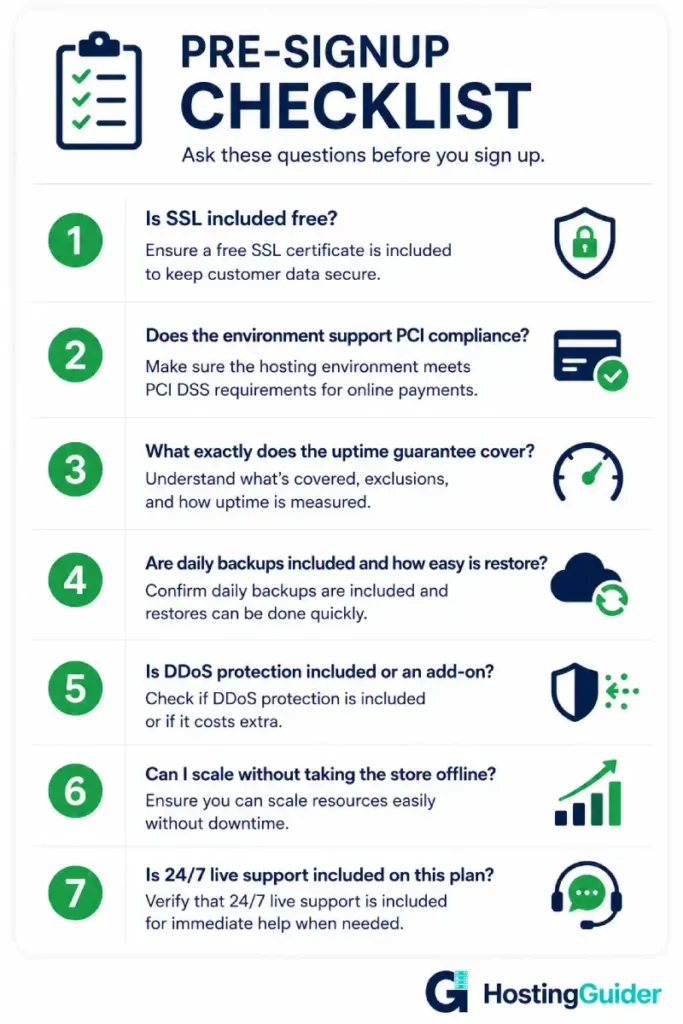
These seven questions will surface any weaknesses in a hosting plan before you commit.
Is SSL included free on this plan? If it is an add-on you pay for separately, look elsewhere. It should come standard.
Does the hosting environment support PCI-compliant setups? Any provider built for e-commerce will say yes clearly. Vague answers are a red flag.
What exactly does the uptime guarantee cover, and is it in the SLA? A stated percentage without a written service level agreement is not a guarantee, it is marketing.
Are daily backups included, and how do I restore them? Find out before you need to. Ask if backups are stored separately from the main server.
Is DDoS protection included or is it an add-on? For a store, this should be included as standard, not something you bolt on later.
Can I scale my plan without taking my store offline? Some providers require downtime to upgrade. That is not acceptable for a store that processes orders continuously.
Is live chat or phone support included on my specific plan? Many providers restrict their best support to higher-tier plans. Confirm before signing up.
Our broader guide to choosing a web hosting plan expands on the decision process if you want a full framework before committing.
Final Thoughts
Your hosting is the infrastructure your store runs on. Most of the time, customers never think about it. But when it goes wrong, they notice immediately and at the worst possible moment, during checkout.
Focus on security, uptime, and the ability to handle traffic spikes. Those three things protect your revenue and your reputation more than any other hosting feature.
Get those right and everything else is just fine-tuning.


