
Most advice on cloud hosting for SaaS startups falls into one of two unhelpful categories. Either it is written for engineers at companies with hundreds of employees, full of architecture diagrams that assume a platform team you do not have. Or it is so generic (“use the cloud, it scales”) that it gives you nothing to actually act on this week.
This is a founder’s checklist. It assumes you are pre-seed to Series A, you have a small team or you are the technical co-founder doing this yourself, and every decision has a real cost in time, money, or both. It tells you what to set up now, what to deliberately defer, and what mistakes cost the most when they surface later.
Cloud hosting for SaaS startups is not about choosing the “best” cloud provider. It is about choosing the configuration that lets you focus on the product while your infrastructure quietly does its job, and that does not require a rebuild every time you hit a growth milestone.
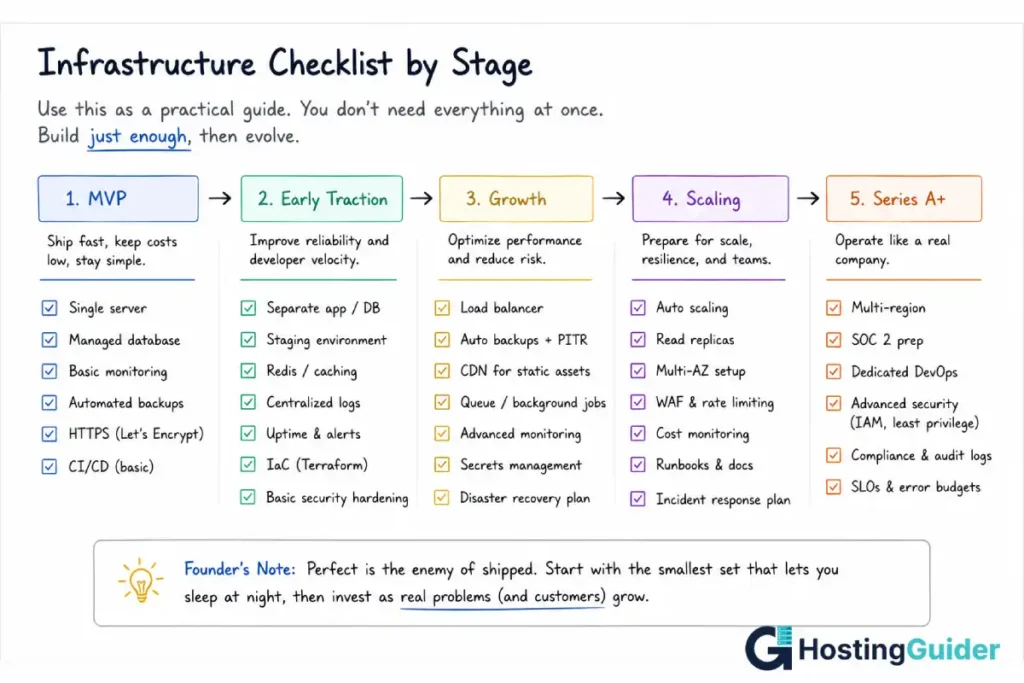
The Core Principle of Cloud Hosting for SaaS Startups: Match Infrastructure to Stage
The single most expensive infrastructure mistake founders make is building for the company they hope to become rather than the company they are.
A pre-seed startup with twelve customers does not need a multi-region, auto-scaling, Kubernetes-orchestrated architecture. Setting one up consumes weeks that should go into product and customer development, and it adds operational complexity that a two-person team cannot maintain. When something breaks at 2am, a complex architecture with many moving parts is much harder to debug than a simple one.
Equally, a company with 500 paying customers and growing 15% month over month cannot run on a single server with manual deploys forever. At some point, the infrastructure that felt appropriately simple becomes the bottleneck that limits growth and creates outages.
The skill is not picking the “right” architecture once. It is recognising which stage you are in and matching your infrastructure decisions to that stage, with a clear sense of what the next stage will require so you are not blindsided.
This cloud hosting for SaaS startups checklist is organised by stage. Each stage builds on the previous one. Skipping ahead wastes time. Falling behind creates risk.
Cloud Hosting for SaaS Startups, Stage 1: MVP and Pre-Seed Checklist
At this stage, your infrastructure goal is simple: get the product in front of real users with minimal time spent on anything that is not the product itself.
What to set up:
A single cloud server (a VPS or a small cloud instance) running your application. One server is enough for an MVP serving up to a few hundred concurrent users for most SaaS applications. Providers like DigitalOcean, Linode, and Vultr offer simple, predictable pricing for this stage, typically $20 to $80 per month for a server adequate for an early SaaS product.
A managed database from day one. This is the single highest-value infrastructure decision at this stage. Running your own database on the same server as your application, with no managed backups and no replication, is the most common cause of catastrophic data loss for early-stage startups. Managed database services (such as managed PostgreSQL or MySQL offered by every major cloud provider) cost more than self-hosting but include automated backups, point-in-time recovery, and patching. The cost difference, typically $15 to $50 per month at this stage, is the cheapest insurance your company will ever buy.
A single environment with a staging area. You do not need separate staging, QA, and production environments yet. You need exactly two: production, where customers are, and a staging environment where you test changes before they reach customers. Deploying directly to production without ever testing changes elsewhere is how startups lose customer trust early, when trust is hardest to rebuild.
Basic uptime monitoring. A free or low-cost uptime monitor (UptimeRobot, Better Uptime, or similar) that checks your application every few minutes and alerts you if it goes down. This costs nothing or close to nothing and means you find out about outages from a monitor, not from a customer’s angry email.
Automated daily backups, verified at least once. Set up automated backups (most managed database services include this) and actually restore from a backup at least once to confirm the process works. An untested backup is not a backup, it is a hope.
What to deliberately skip at this stage:
Multi-region deployment. Your handful of early customers are not noticing 50ms of extra latency from being served from a single region. Multi-region adds real operational complexity for a benefit your current users cannot perceive.
Auto-scaling infrastructure. Auto-scaling solves a problem (handling unpredictable traffic spikes across many servers) that an MVP with a known, small user base does not have. Setting it up now means maintaining configuration for a scenario that has not arrived. Our explainer on cloud hosting auto-scaling covers what auto-scaling actually does and when it becomes relevant, which is useful context for recognising when you have crossed into needing it.
A dedicated DevOps hire or consultant. At this stage, the technical founder or an existing engineer can manage the infrastructure described above in a few hours per month. A dedicated infrastructure hire is premature and expensive relative to the actual workload.
Compliance certifications (SOC 2, ISO 27001). These take months and significant cost, and most enterprise customers who require them are not customers you will have at this stage. Pursuing certification before you have customers who need it is effort spent on a problem you do not yet have.
Cloud Hosting for SaaS Startups, Stage 2: Early Traction Checklist
You have paying customers. Growth is real but not yet explosive. This is typically the stage where founders either build the habits that scale well, or accumulate the technical debt that becomes painful at the next stage.
What to add:
A proper CI/CD pipeline. Manual deployment (SSH into the server, pull code, restart the service) works for an MVP but becomes risky as the application grows and more people touch the code. Set up automated deployment through GitHub Actions, GitLab CI, or a similar tool, so that deploys are consistent, repeatable, and do not depend on one person remembering the exact steps.
Separate staging and production databases with realistic data. Your staging environment should now have its own database, ideally seeded with realistic (anonymised) data, so that testing changes actually reflects how the application behaves with real data volumes.
A second server for redundancy, even if simple. At this stage, a single server going down means your application is down, full stop. Adding a second server, even in a basic load-balanced configuration, means a single server failure does not take down the entire product. This does not require complex orchestration: two servers behind a basic load balancer is a meaningful improvement over one server with no redundancy.
Application performance monitoring (APM). Tools like New Relic, Datadog (entry tier), or open-source alternatives like Sentry give you visibility into slow requests, errors, and performance trends before they become outages. At this stage, you start to have enough traffic that performance issues are real but not yet enough that you have dedicated people watching dashboards constantly, which is exactly when automated alerting earns its cost.
Object storage for user-uploaded files. If your application handles file uploads (avatars, documents, exports), move them to object storage (S3-compatible storage from your cloud provider) rather than storing them on the application server’s disk. This decouples your files from your server, which matters enormously when you eventually need to replace or scale that server. Our guide on object, block, and file storage in cloud hosting explains the different storage types and when each is appropriate.
What to start planning, even if you do not implement it yet:
A data residency and compliance roadmap. If you are selling to enterprise customers, EU customers, or customers in regulated industries, start understanding what compliance requirements you will eventually face (GDPR, SOC 2, HIPAA if relevant). You do not need to implement these now, but architectural decisions made now (which regions you store data in, how you structure access controls) are much easier to get right from the start than to retrofit later.
Cloud Hosting for SaaS Startups, Stage 3: Growth Stage Checklist
Growth is consistent. You likely have a small team, possibly your first dedicated infrastructure or backend-focused hire. The cost of downtime is now meaningfully higher because more customers and more revenue are affected by any incident.
What to add:
Read replicas for your database. As read traffic (dashboard views, reports, analytics queries) grows, a single database instance handling both reads and writes becomes a bottleneck. Read replicas let you direct read-heavy queries to copies of your database, keeping your primary database focused on writes. Most managed PostgreSQL database services support read replicas as a configuration option rather than a major architectural change.
Real auto-scaling for your application servers. This is the point where auto-scaling starts to deliver real value: traffic patterns are now significant enough that fixed capacity either wastes money during quiet periods or risks performance during busy ones. Configure auto-scaling rules based on CPU, memory, or request queue depth so your infrastructure adjusts to actual demand.
A CDN for static assets and, if applicable, API responses. If your application serves any static content (marketing pages, documentation, exported reports, images) to a geographically distributed customer base, a CDN reduces load times and reduces load on your origin servers. For API-heavy SaaS products, some API responses can also be cached at the edge with careful invalidation strategies.
Formal incident response process. Define what counts as an incident, who gets paged, what the communication plan is (status page, customer notifications), and how post-incident reviews work. This does not need to be elaborate, but it needs to exist before the first major incident, not be improvised during one.
Multi-region consideration, if your customer base demands it. If you have meaningful customer concentrations in multiple regions (US and EU, for example), latency and data residency requirements may now justify a second region. This is a significant architectural decision and should be driven by actual customer needs, not speculative future-proofing.
Database query monitoring and optimisation as a routine practice, not a fire drill. At this stage, slow queries that were tolerable at lower data volumes start to cause real performance problems. Build the habit of reviewing slow query logs regularly. Our guide on database query optimisation versus hosting upgrades covers how to tell which problem you actually have, because the two are frequently confused and lead to the wrong fix.
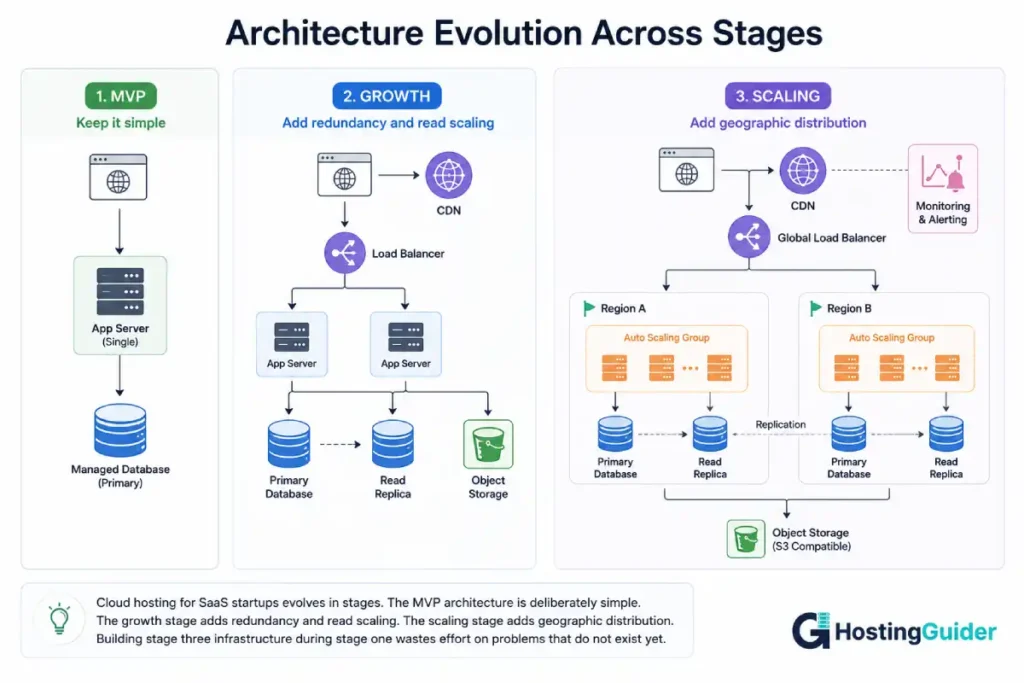
Cloud Hosting for SaaS Startups, Stage 4: Scaling and Series A Checklist
At this stage, infrastructure decisions affect fundraising, enterprise sales, and the company’s ability to operate reliably at meaningfully larger scale. The checklist shifts from “what do we need to function” to “what do we need to be trusted by larger customers and investors.”
What to add:
SOC 2 Type II preparation, if enterprise sales require it. Many enterprise buyers will not sign a contract without SOC 2 compliance. The preparation process takes months and touches infrastructure, access controls, logging, and policies. Starting this process when the first enterprise deal requires it is too late; the process should begin before it becomes a blocker.
Dedicated infrastructure or platform engineering function. Whether this is a hire, a fractional consultant, or a small team, infrastructure work at this stage is no longer something a generalist engineer handles alongside feature work. The complexity and the cost of getting it wrong both justify dedicated attention.
Disaster recovery planning with defined recovery time objectives (RTO) and recovery point objectives (RPO). At earlier stages, “we have backups” was sufficient. At this stage, you need to know specifically how long it would take to recover from a major incident (RTO) and how much data you could lose in the worst case (RPO), and whether those numbers are acceptable to your business and your customers.
Infrastructure as code for your entire environment. If your infrastructure is still configured through manual changes in cloud provider dashboards, this is the stage to change that. Tools like Terraform or Pulumi let you define your infrastructure in code, version it, review changes, and recreate environments reliably. This becomes essential when your infrastructure is too complex to hold in one person’s head.
Formal vendor and architecture review. At this stage, it is worth a structured review of whether your current cloud provider and architecture choices still fit. Decisions that were correct for an MVP on a $50/month budget may not be optimal at a scale where infrastructure costs are a meaningful line item and where enterprise customers ask detailed questions about your infrastructure during due diligence.
Choosing a Cloud Provider for SaaS Startups: What Actually Matters
Founders spend a surprising amount of time on cloud provider selection relative to how much it usually matters at early stages. Here is what genuinely matters and what does not.
What matters:
Predictable, transparent pricing. At early stages, you need to know roughly what your bill will be. Providers with simple, predictable pricing (DigitalOcean, Linode, Vultr, Hetzner) let you reason about costs easily. The major hyperscalers (AWS, Google Cloud, Azure) have more complex pricing that can produce surprising bills if you are not careful, though they offer startup credit programmes that can offset this significantly in the first year or two.
Managed service quality for your database and core dependencies. The quality of managed database offerings varies. A provider with a reliable, well-monitored managed PostgreSQL or MySQL service saves you operational burden regardless of which provider you choose for compute.
Startup credit programmes. AWS Startups, Google Cloud for Startups, and Microsoft for Startups all offer meaningful credits (often $1,000 to $100,000+ depending on your funding stage and programme tier) that can cover infrastructure costs for a year or more. These programmes are worth applying to regardless of which provider you ultimately choose long-term, because free infrastructure during the highest-uncertainty period of your company is genuinely valuable.
Ease of finding talent familiar with the platform. If you will eventually hire infrastructure engineers, a more common platform (AWS in particular has the largest talent pool) means easier hiring later. This matters more at growth stage than at MVP stage.
What does not matter as much as founders think:
Which provider has the “best” performance benchmarks. At the traffic levels of pre-Series A SaaS companies, the performance difference between major cloud providers’ compute offerings rarely determines product success or failure. Application-level performance issues (slow database queries, inefficient code) dwarf provider-level performance differences at this scale.
Having every advanced service available. Hyperscalers offer hundreds of specialised services. An early-stage SaaS company typically uses a small handful: compute, managed database, object storage, and basic networking. The other hundreds of services are not a reason to choose one provider over another at this stage.
Long-term lock-in concerns, prematurely. While vendor lock-in is a real consideration (covered later in this guide), optimising your MVP architecture to avoid theoretical future lock-in often means building unnecessary abstraction layers that cost time now for a problem that may never materialise if the company does not survive to the stage where lock-in matters.
For founders evaluating specific provider comparisons at the VPS and cloud server level, our comparisons of DigitalOcean vs Linode, Cloudways vs DigitalOcean, and Vultr vs DigitalOcean cover the practical differences between providers commonly used at MVP and early traction stages.
Database Decisions for SaaS Startups That Are Hard to Reverse
Most infrastructure decisions can be changed later with effort. A few database decisions are disproportionately expensive to reverse, and deserve more thought upfront than other choices.
Choosing between SQL and NoSQL. For the large majority of SaaS applications, a relational database (PostgreSQL is the most commonly recommended default in 2026) is the right choice. Relational databases handle the kind of structured, relational data that most SaaS applications have (users, accounts, subscriptions, relationships between entities) naturally, and they make it easy to ask new questions of your data as your product evolves, which matters enormously in an early-stage company where the product is still changing. NoSQL databases solve specific problems (extreme write scale, flexible schema for specific data types) that most SaaS startups do not have at the start. Choosing NoSQL by default because it sounds more “scalable” often creates problems when the product needs relational queries that the database was not designed for.
Multi-tenancy architecture. How you separate customer data (separate databases per customer, separate schemas, or shared tables with a tenant ID column) is a decision that becomes very expensive to change once you have real customer data in production. Shared tables with a tenant ID column (a single database, single schema, with a column identifying which customer each row belongs to) is the simplest approach and works well for most SaaS products through a significant scale. Separate databases per customer add operational overhead that is rarely justified until you have specific enterprise customers requiring data isolation that this provides.
Database hosting location. If you anticipate EU customers with data residency requirements, or specific compliance needs tied to geography, deciding where your primary database lives is much easier to get right from the start than to migrate later. Migrating a production database to a different region while maintaining uptime is a significant undertaking.
Security and Compliance Timing for Cloud Hosting for SaaS Startups
Security work at the wrong time is either wasted (too early) or a fire drill that disrupts the company (too late). Here is roughly how the timing works.
From day one, regardless of stage:
HTTPS everywhere, with no exceptions. This is free, standard, and there is no reason to ever serve a SaaS application without it. HTTPS alone is not a complete security strategy, but it is the non-negotiable baseline.
Strong access controls on your infrastructure. Use SSH keys, not passwords. Use two-factor authentication on your cloud provider account, your code repository, and any service that holds customer data. The cloud provider account itself is often the highest-value target, because compromising it can expose everything.
Secrets management. API keys, database credentials, and other secrets should never be committed to your code repository. Use environment variables or a dedicated secrets manager from day one. Retrofitting this after secrets have been in your git history for a year is a much bigger job than doing it correctly from the start.
By early traction stage:
A documented incident response plan, even a simple one. What happens if there is a data breach. Who needs to be notified, and within what timeframe (this varies by jurisdiction and by what data you hold). Having thought through this before an incident happens means you act faster and more correctly when it matters.
Regular dependency updates. Application dependencies (libraries, frameworks) accumulate security vulnerabilities over time. A routine practice of updating dependencies, even just monthly, prevents the accumulation of a large backlog of security patches that becomes risky and time-consuming to apply all at once. Zero-day vulnerabilities are a real risk even for small applications, and staying current on dependencies is the most effective mitigation available to a small team.
By growth stage:
A web application firewall (WAF) if your application is a meaningful target (handles payments, sensitive data, or has faced any attack attempts). Our comparison of server-side WAF versus plugin-based WAF covers the trade-offs between approaches, which is relevant once your traffic and risk profile justify the investment.
A formal backup and disaster recovery test, beyond the initial verification done at MVP stage. Test recovery from backups regularly, not just once. Backup failures are a leading cause of catastrophic data loss precisely because backups are assumed to work and never tested until the moment they are needed.
By scaling stage:
SOC 2 preparation, as covered in the Stage 4 checklist, if enterprise sales require it.
A formal security policy covering employee access, data handling, and incident response, suitable for sharing with enterprise customers and auditors during due diligence.
Cost Management: What Founders Get Wrong About Cloud Hosting for SaaS Startups
Cloud hosting for SaaS startups has a cost trajectory that founders frequently misjudge in both directions.
The mistake of over-provisioning early. Founders sometimes provision infrastructure sized for hoped-for scale rather than actual scale, reasoning that it is easier to set up the “right” size now than to resize later. In practice, resizing a cloud server is usually a few minutes of work and often does not require downtime with modern cloud providers. The cost of running an oversized server for months while waiting for traffic to catch up is real and ongoing. Start smaller than feels comfortable; resizing up is easy.
The mistake of ignoring data transfer costs. Compute and storage costs are usually well understood. Data transfer costs (bandwidth between regions, between services, and to the internet) are less visible and can become a meaningful cost as the product scales, particularly for SaaS products that move significant data (file storage, exports, API responses with large payloads). Review your cloud bill’s breakdown specifically for data transfer line items as you grow, not just compute and storage.
The mistake of not using startup credit programmes. As mentioned above, AWS Activate, Google Cloud for Startups, and similar programmes offer substantial credits. Many eligible startups never apply, either because they did not know the programmes existed or because they assumed the application process was not worth the effort. The credits can be substantial enough to materially extend runway.
The mistake of premature reserved capacity commitments. Cloud providers offer discounts for committing to capacity for one to three years. These discounts are real, but committing to capacity before your usage patterns are stable means you may be locked into paying for capacity that no longer matches your actual needs as the product evolves. Wait until your usage patterns are predictable before making multi-year commitments.
The mistake of not monitoring costs at all until the bill is a surprise. Set up billing alerts from day one, even at low thresholds. A misconfigured auto-scaling rule, an accidentally-public storage bucket serving large files to bots, or a runaway background job can turn a $100/month bill into a $5,000/month bill within days if nobody notices until the invoice arrives.
Monitoring and Incident Response for SaaS Startups
The monitoring setup that is right for a SaaS startup changes with stage, but a few principles apply throughout.
You should know about outages before your customers tell you. This is the single most important monitoring principle. An uptime monitor checking your application every few minutes, configured from day one, ensures this.
Many monitoring tools also track HTTP response codes such as 404, 429, 500, 502, 503, and 504 to help identify application, server, and network issues. Understanding what these codes mean can significantly reduce troubleshooting time during an incident. See our complete guide to HTTP Status Codes for a detailed breakdown.
Alerts should be actionable, not just informational. An alert that fires constantly for things that do not require action trains the team to ignore alerts, which means the alert that does matter gets ignored too. Tune alert thresholds so that an alert firing means something genuinely needs attention.
Logs should be centralised before you need them, not after. When an incident happens, you need to look at logs from your application, your database, and your infrastructure together to understand what happened. If these logs live in different places with different retention periods and different access methods, debugging an incident takes much longer than it should. Centralised logging (even a simple setup) pays for itself the first time you need it during an actual incident.
Post-incident reviews should happen even for small incidents, especially early. The habit of briefly reviewing what happened, why, and what (if anything) should change, builds institutional knowledge while the team is small enough that everyone can absorb the lessons directly. This habit is much harder to introduce later, after incidents have already happened without review and the lessons were lost.
The Vendor Lock-In Question in Cloud Hosting for SaaS Startups
Vendor lock-in is a real consideration, but it is frequently overweighted by early-stage founders relative to its actual impact at their current stage.
The realistic picture: most of what locks you into a cloud provider is not your compute infrastructure (which is broadly portable with moderate effort) but your managed services, particularly your database and any provider-specific services you adopt deeply (specialised queuing systems, provider-specific authentication services, provider-specific serverless functions with proprietary APIs).
For an early-stage SaaS company, a pragmatic approach: use standard, widely-supported technologies (PostgreSQL rather than a provider-proprietary database variant, standard container formats rather than provider-specific deployment formats, S3-compatible object storage rather than a fully proprietary storage API) where the choice is free or low-cost. This keeps a future migration realistic without paying a meaningful tax now.
Avoid spending significant engineering time building abstraction layers “to avoid lock-in” for services where the abstraction itself costs more than a future migration would. The right level of lock-in awareness at this stage is choosing standard technologies when the choice is easy, not building infrastructure to be theoretically provider-agnostic when it is hard.
Cloud Hosting for SaaS Startups: When to Hire for Infrastructure vs Buy Managed Services
A recurring question for SaaS founders: when does it make sense to hire someone (or build a team) focused on infrastructure, versus continuing to rely on managed services and existing engineers’ part-time attention?
Managed services remain the right choice when: the operational burden of the unmanaged alternative is well-understood and bounded (a managed database versus self-hosting one, for example), and the cost premium is small relative to the time it saves a team that has higher-value work to do. This is true for almost the entire MVP and early traction stages.
A first infrastructure-focused hire becomes justified when: infrastructure work is consuming a meaningful and growing share of engineering time that would otherwise go to product development, or when the complexity of the infrastructure has grown to the point where institutional knowledge concentrated in one generalist engineer represents a significant risk if that person is unavailable, or when specific requirements (compliance preparation, performance at scale, multi-region architecture) require sustained, focused attention that cannot be done well as a side project.
A dedicated platform or infrastructure team becomes justified when: the company has reached a scale where infrastructure decisions materially affect the product roadmap (what features are feasible depends on infrastructure capabilities), where compliance and security requirements are an ongoing function rather than a one-time project, and where the cost of infrastructure itself (not just the people managing it) has become a significant line item that benefits from dedicated optimisation attention.
For companies considering whether their workload has outgrown standard cloud VPS infrastructure fully, our overview of when a business needs a dedicated server covers the signals that indicate this transition, which for some SaaS companies with predictable, heavy compute workloads can be a meaningful cost optimisation at scale.
The Full Cloud Hosting for SaaS Startups Checklist in One Place
For quick reference, here is the complete checklist organised by stage.
MVP and Pre-Seed:
- Single cloud server (VPS or small cloud instance)
- Managed database with automated backups
- Separate staging environment
- Basic uptime monitoring
- Verified backup restoration tested at least once
- HTTPS everywhere
- SSH key authentication, 2FA on all critical accounts
- Secrets management (no credentials in code)
Early Traction:
- Automated CI/CD pipeline
- Realistic staging data
- Second server for basic redundancy
- Application performance monitoring (APM)
- Object storage for user-uploaded files
- Documented incident response plan
- Routine dependency updates
- Early compliance roadmap awareness
Growth Stage:
- Database read replicas
- Real auto-scaling for application servers
- CDN for static and cacheable content
- Formal incident response process
- Multi-region evaluation based on customer needs
- Routine slow query monitoring
- Web application firewall if risk profile justifies it
- Regular backup recovery testing
Scaling and Series A:
- SOC 2 Type II preparation (if required by sales)
- Dedicated infrastructure or platform function
- Disaster recovery plan with defined RTO and RPO
- Infrastructure as code for the full environment
- Formal architecture and vendor review
- Security policy documentation for enterprise due diligence
Frequently Asked Questions About Cloud Hosting for SaaS Startups
Cloud Hosting for SaaS Startups: What Is the Best Cloud Provider?
There is no single best provider for every SaaS startup, but for most pre-seed to early traction companies, providers with simple, predictable pricing such as DigitalOcean, Linode, Vultr, or Hetzner offer the best combination of cost and operational simplicity. Hyperscalers (AWS, Google Cloud, Azure) become more attractive once startup credit programmes are factored in, or once the company needs specific managed services that only hyperscalers offer at the required maturity level. The choice matters less than founders often expect at early stages; application-level decisions usually have more impact on product success than provider choice.
Cloud Hosting for SaaS Startups: How Much Should an MVP Spend?
Most SaaS MVPs run comfortably on $50 to $150 per month in infrastructure costs, covering a single application server, a managed database, basic monitoring, and a small amount of object storage. This figure assumes modest early traffic (hundreds, not tens of thousands, of users). Costs scale with usage, but a healthy MVP budget at this stage should not be a significant line item relative to other early costs like salaries or customer acquisition.
Cloud Hosting for SaaS Startups: When Should You Set Up Multi-Region Infrastructure?
Multi-region infrastructure becomes worth considering when you have a meaningful concentration of customers in a second geographic region where latency or data residency requirements are actually affecting customer experience or sales, not as a speculative future-proofing measure. For most startups, this happens at growth stage or later, once there is a specific, identifiable business reason (an enterprise customer requiring EU data residency, for example) rather than a general sense that “global companies have multi-region infrastructure.”
Cloud Hosting for SaaS Startups: Do Early-Stage Companies Need SOC 2 Compliance?
Generally not at the MVP or early traction stage. SOC 2 becomes relevant when enterprise customers require it as part of their vendor evaluation process, which typically happens at growth stage or later, once the company is pursuing larger contracts. Starting SOC 2 preparation before any customer requires it consumes significant time and cost for a requirement that has not yet materialised. However, many of the underlying practices SOC 2 requires (access controls, logging, incident response) are good practices to establish early regardless of formal certification timing, because retrofitting them later is harder than building them in from the start.
Cloud Hosting for SaaS Startups: What Is the Biggest Infrastructure Mistake?
Running production databases without managed backups, or with backups that have never been tested, is the most common and most catastrophic mistake. The second most common is building infrastructure complexity (multi-region, microservices, complex orchestration) for a scale the company has not reached, which consumes engineering time that should go to product development and creates an operational burden that a small team struggles to maintain. Both mistakes stem from the same root cause: not matching infrastructure decisions to the company’s actual current stage.
Cloud Hosting for SaaS Startups: Should You Use Kubernetes from the Start?
For almost all SaaS startups at MVP and early traction stage, no. Kubernetes solves orchestration problems at a scale and complexity that early-stage startups have not reached, and it adds significant operational overhead that a small team will struggle to manage well alongside everything else. A single server or a small number of servers behind a basic load balancer, using a managed database, handles the traffic levels of most pre-Series A SaaS companies without the operational complexity Kubernetes introduces. Kubernetes becomes more relevant at scaling stage, when the team has dedicated infrastructure expertise and the orchestration problems Kubernetes solves are problems the company actually has.
Cloud Hosting for SaaS Startups: How Do Startup Cloud Credits Work?
Programmes like AWS Activate, Google Cloud for Startups, and Microsoft for Startups offer credits ranging from around $1,000 for early-stage applicants to $100,000 or more for startups with venture funding from participating investors. The application process typically requires basic company information and sometimes proof of funding or accelerator participation. These credits are worth applying for regardless of which provider you plan to use long-term, because the credits can cover a meaningful portion of infrastructure costs during the highest-uncertainty period of a startup’s life, when extending runway has outsized value.


