
When you’re building a startup, your website is often the first thing people see. It’s how investors research you, how potential customers decide if you’re legit, and how early users sign up and come back.
So picking the wrong hosting — or just grabbing the cheapest thing you can find — is a bigger deal than it seems at first.
The good news is that choosing the right hosting for a startup isn’t complicated. You don’t need to understand servers or tech infrastructure. You just need to know a few things about where you are now, where you’re heading, and what to avoid along the way.
This guide breaks it all down in plain language.
The Real Question: What Does Your Startup Actually Need Right Now?
Most startup founders make one of two mistakes with hosting.
The first is going too cheap — picking the most basic shared plan available because the startup isn’t making money yet. The site is slow, goes down at the wrong moments, and gives a bad impression at exactly the time you can’t afford one.
The second is over-engineering — spending on dedicated servers or enterprise infrastructure before you have the traffic to justify it. That’s money and time that should go toward building the product.
The right approach is somewhere in the middle: a plan that’s reliable and fast enough to look professional, with room to grow when you need it.
Before anything else, understand what web hosting is and how it actually works. It takes ten minutes and will make every hosting decision you make much easier.
Start with Your Stage, Not Your Budget
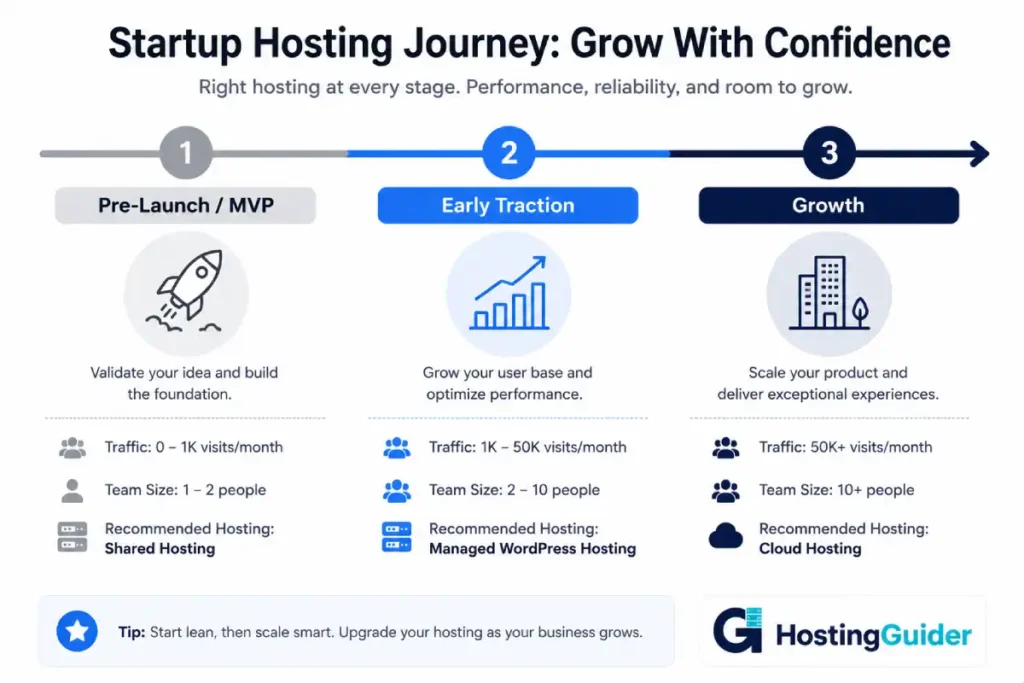
Your hosting needs aren’t just about how much money you have — they’re about where your startup is right now.
Pre-launch or MVP stage: You’re testing an idea. Traffic is low or nonexistent. You need something that looks professional, loads reasonably fast, and doesn’t cost a lot. A quality shared hosting plan or an entry-level managed WordPress plan is usually fine here.
Early traction: You have real users, maybe some press coverage, and traffic is starting to come in unpredictably. You need a plan that won’t fall over if a blog post goes viral or a newsletter drives a traffic spike. VPS or managed cloud hosting becomes relevant here.
Growth stage: You have consistent traffic, a product people are paying for, and uptime directly affects revenue. This is when reliability becomes the priority over price, and you should be looking at VPS hosting with room to scale, or cloud hosting that scales automatically.
The key thing to remember: it’s much easier to upgrade your hosting as you grow than to fix a bad impression after your site crashed during your product launch.
The Hosting Types Explained for Startup Founders
Here’s what you actually need to know about each type — no jargon, just the practical version. Our full guide to web hosting types goes deeper if you want it.
Shared Hosting — Good for Getting Started, Not Much More
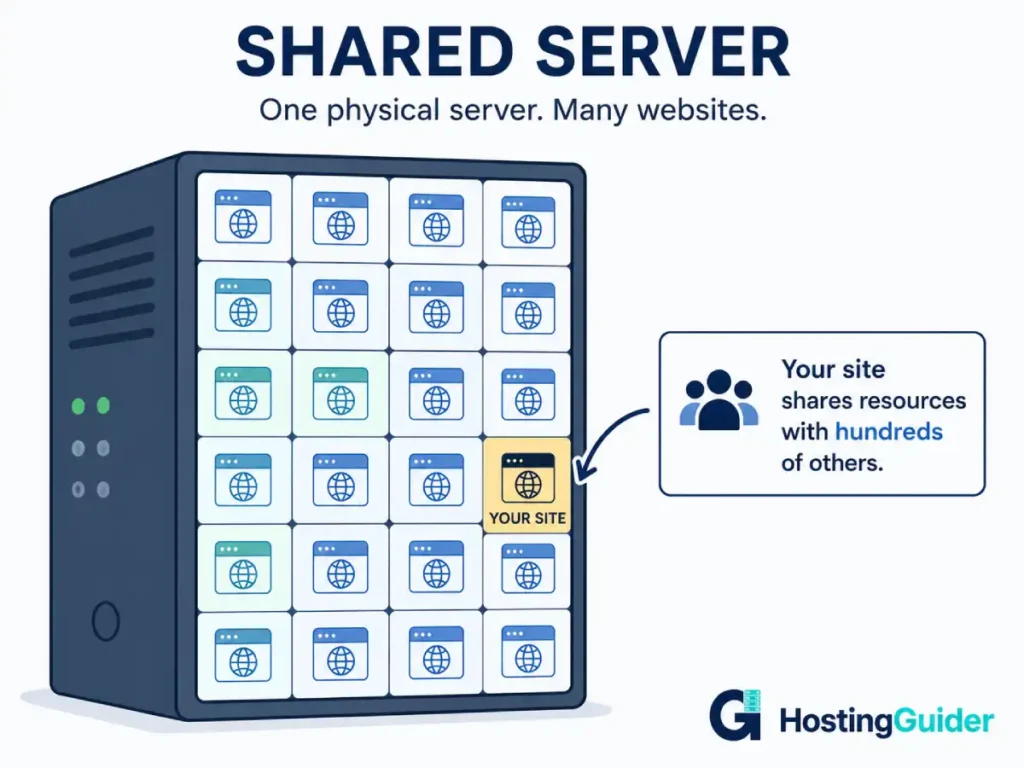
Shared hosting means your website lives on a server alongside hundreds of other websites. You share everything — storage, processing power, bandwidth. It’s the cheapest option available, and for a brand-new website with very little traffic, it often works fine.
The problem is that you have no control over your neighbors. If another site on the same server gets a traffic spike, your site slows down too. There’s also limited room to grow, and most shared plans don’t give you much control over your server environment.
For a pre-launch landing page or a very early-stage site, shared hosting is acceptable. But if people are already signing up, paying, or depending on your site, move past it quickly.
Browse our best shared hosting picks if this is where you’re starting. If you’re watching every dollar, our best cheap web hosting guide shows which budget options are actually worth using.
VPS Hosting — The Sweet Spot for Most Early-Stage Startups
VPS hosting gives your site its own dedicated portion of a server. Other websites are still on the same physical machine, but their activity doesn’t affect yours. You get more speed, more stability, and more control — at a price that’s still very manageable.
For most startups that are past the MVP stage and starting to get real users, VPS hosting hits the right balance. It’s fast enough to look professional, stable enough to handle traffic fluctuations, and scalable enough to grow with you without switching providers.
Not sure if it’s time to step up from shared to VPS? Read our shared vs. VPS comparison. And when you’re ready to pick a plan, our guide to choosing the right VPS plan helps you avoid overpaying.
→ See our top picks: Best VPS Hosting
Cloud Hosting — Best When You Can’t Predict Your Traffic
Cloud hosting spreads your website across multiple servers. If one server has an issue, another takes over automatically. If you get a sudden wave of visitors — say, from a Product Hunt launch or a press mention — the system adjusts in real time without your site slowing down or crashing.
This is why cloud hosting is increasingly popular with startups. You don’t know when your big moment is coming. Being on cloud hosting means you’re ready for it when it does.
The trade-off is that cloud hosting costs a little more than shared or entry VPS. But for a startup where one good day of traffic could make or break early momentum, it’s usually worth it. Read more about how cloud hosting handles sudden traffic spikes to understand how that protection actually works.
→ See our top picks: Best Cloud Hosting
Managed WordPress Hosting — The Easiest Option If Your Site Runs on WordPress
If your startup website is built on WordPress, managed WordPress hosting is worth serious consideration. Everything WordPress-related — updates, backups, security, caching — is handled by the hosting provider. You don’t need to think about it.
That matters a lot for a small team where everyone is already wearing multiple hats. Managed WordPress costs more than standard hosting, but the time it saves is real. Read how much managed WordPress hosting actually costs to see whether it fits your budget, and check the pros and cons before you commit.
→ See our top picks: Best Managed WordPress Hosting
What to Look for in Startup Hosting
Reliability First
If your site goes down when a journalist or investor visits, that’s a problem you can’t undo. Look for a host that guarantees at least 99.9% uptime — that’s industry standard, and most reputable providers meet or exceed it.
Read about why uptime matters more than most founders realize before you finalize any plan. A host with a cheaper price but no uptime guarantee is a risk you don’t need.
Room to Grow
The hosting plan you start with doesn’t have to be the one you use forever. But switching providers is disruptive — it takes time, can cause brief downtime, and is something you’ll want to do on your own schedule, not because your plan gave out.
Pick a provider with clear upgrade paths. A host that takes you from shared → VPS → cloud without needing to move your site is much more practical than constantly switching as you grow. Our guide to choosing a web hosting plan covers this decision step by step.
Basic Security Is Non-Negotiable
Even at the early stage, your startup website needs basic security. If you’re collecting emails, running a login, or processing payments, this matters immediately.
At minimum, look for:
- SSL certificate — this is the padlock in the browser bar. It encrypts data between your site and your visitors. Most good hosts include it free. Read more about what SSL does and why it matters.
- A firewall — blocks malicious traffic before it reaches your site. Our guide to web hosting firewalls explains what to look for.
- DDoS protection — defends against traffic flood attacks designed to crash your site. This is especially important if you’re building something that might attract attention. Read about DDoS protection in hosting.
For a complete security checklist, see our guide to secure hosting features and our hosting security tips guide.
Speed Matters for First Impressions
Studies consistently show that users leave websites that take longer than a few seconds to load. For a startup, where every early user’s experience counts, slow loading is a conversion killer.
Your hosting provider contributes significantly to how fast your site loads. Look for providers that use SSD storage and include a CDN (Content Delivery Network), which delivers your site from servers closer to each visitor. Our explainer on how caching improves website speed is worth reading to understand what your host should be doing under the hood. You can also run your site through Google PageSpeed Insights to see exactly where speed issues are coming from.
Best Hosting Providers for Startups
These providers offer the right mix of reliability, growth potential, and value for early-stage startups.
Hostinger — Best for Budget-Conscious Startups
Hostinger consistently delivers solid performance at the lowest prices in the market. Their interface is clean, setup is fast, and they’ve invested in server infrastructure that performs better than you’d expect at this price point. For a startup watching every dollar but still needing a professional, reliable home for their site, Hostinger is hard to beat.
→ Read our full Hostinger review
SiteGround — Best for Startups That Want Reliable Support
SiteGround runs on Google Cloud and earns consistently high marks for performance and support. Their team responds fast, actually helps, and is available around the clock. If you’re a solo founder or a small team without a developer, having support you can actually reach matters a lot. Their plans scale from shared hosting up through cloud, so you’re not forced to switch as you grow.
→ Read our full SiteGround review
→ See also: Best WordPress Hosting
Cloudways — Best for Startups Ready for Cloud Hosting
Cloudways gives you managed cloud hosting on top of infrastructure from providers like AWS, Google Cloud, and DigitalOcean — without requiring you to manage any of it yourself. You choose your cloud provider and server size. They handle the rest. It’s one of the most flexible options available for startups that are past the MVP stage and need real infrastructure without a DevOps hire.
→ Read our full Cloudways review
GreenGeeks — Best for Startups With Sustainability Values
GreenGeeks is a reliable, well-performing host that runs on 300% renewable energy. If your startup has sustainability as part of its identity or values, this is worth considering. The performance is solid, pricing is reasonable, and it’s a detail that matters to more customers than you might think.
→ Read our full GreenGeeks review
HostArmada — Best for Startups That Want Fast Setup and Strong Support
HostArmada is a newer provider that’s built a strong reputation quickly for fast servers, helpful support, and generous plans. They offer free site migrations, daily backups, and a staging environment even on lower-tier plans — things that usually cost extra elsewhere. A good option for startups that need a reliable, feature-rich setup without enterprise pricing.
→ Read our full HostArmada review
Bluehost — Best for WordPress Startups on a Tight Budget
Bluehost is one of the most widely used WordPress hosts and is officially recommended by WordPress.org. Plans are affordable, setup is fast, and the integration with WordPress is seamless. It’s not the highest-performance option available, but for a startup just getting off the ground on WordPress, it removes a lot of friction.
→ Read our full Bluehost review
Should You Use a Website Builder Instead?
Some startups don’t need traditional hosting at all — at least not to start. Platforms like Wix, Squarespace, and WordPress.com bundle hosting into the product, so you don’t manage it separately. You just log in and build your site.
Website builders are genuinely useful for getting a professional-looking site up fast without any technical setup. The pros and cons of website builders are worth reading before you decide. Our comparison of Wix vs. Squarespace vs. WordPress lays out exactly who each platform is for.
The main downside is that website builders limit what you can do as you grow. If your startup scales and you need more customization, better SEO control, or custom integrations, you may eventually need to migrate away from your website builder to a proper hosting plan. That migration takes work, so it’s worth thinking about now.
For startups building an online store early on, our website builders for e-commerce comparison covers the best options.
The Startup Hosting Decision in Plain Terms
Here’s a simple way to think through the decision:
You’re pre-launch or in MVP mode → Start with quality shared hosting or an affordable managed WordPress plan. Keep costs low, stay professional, and upgrade when you start getting real traffic.
You have early users and occasional traffic spikes → Move to VPS or managed cloud hosting. Stability and speed matter more now. One bad experience with a slow or down site costs you users you worked hard to get.
You’re growing consistently → Cloud hosting or managed WordPress from a premium provider. Reliability is now tied directly to revenue and reputation. Don’t cut corners here.
You’re running an e-commerce startup → Prioritize hosting that’s optimized for online stores. Look at our best WooCommerce hosting guide for options built with store performance in mind.
You want everything managed for you → Managed WordPress hosting or a managed cloud platform like Cloudways. Pay a little more, get your time back.
One More Thing: Your Domain Name
Your hosting plan and your domain name are separate — but they go together. Your domain is your web address (yourcompany.com). Your hosting is where the website actually lives.
Most hosting providers will sell you a domain when you sign up, but you don’t have to buy them from the same place. Read our guide to choosing the perfect domain name before you lock anything in — your domain is a long-term decision and worth taking a few extra minutes over. And understand why your domain name matters more than most founders expect — it affects trust, memory, and how easily people find you.
Final Thoughts
Choosing hosting for your startup doesn’t need to be a big, stressful decision. Pick something reliable, fast, and within budget — then focus the rest of your energy on building the product and talking to users.
Start where you are. Pick a provider with a clear upgrade path. And don’t let the hosting choice be the thing that slows you down from launching.
Browse all our in-depth hosting reviews at HostingGuider Reviews — every provider has been tested and evaluated so you don’t have to do it blind.


